req.get(‘content-type’)
正常的 batch 操作,response 的
content-type 不应该返回 html 类型:
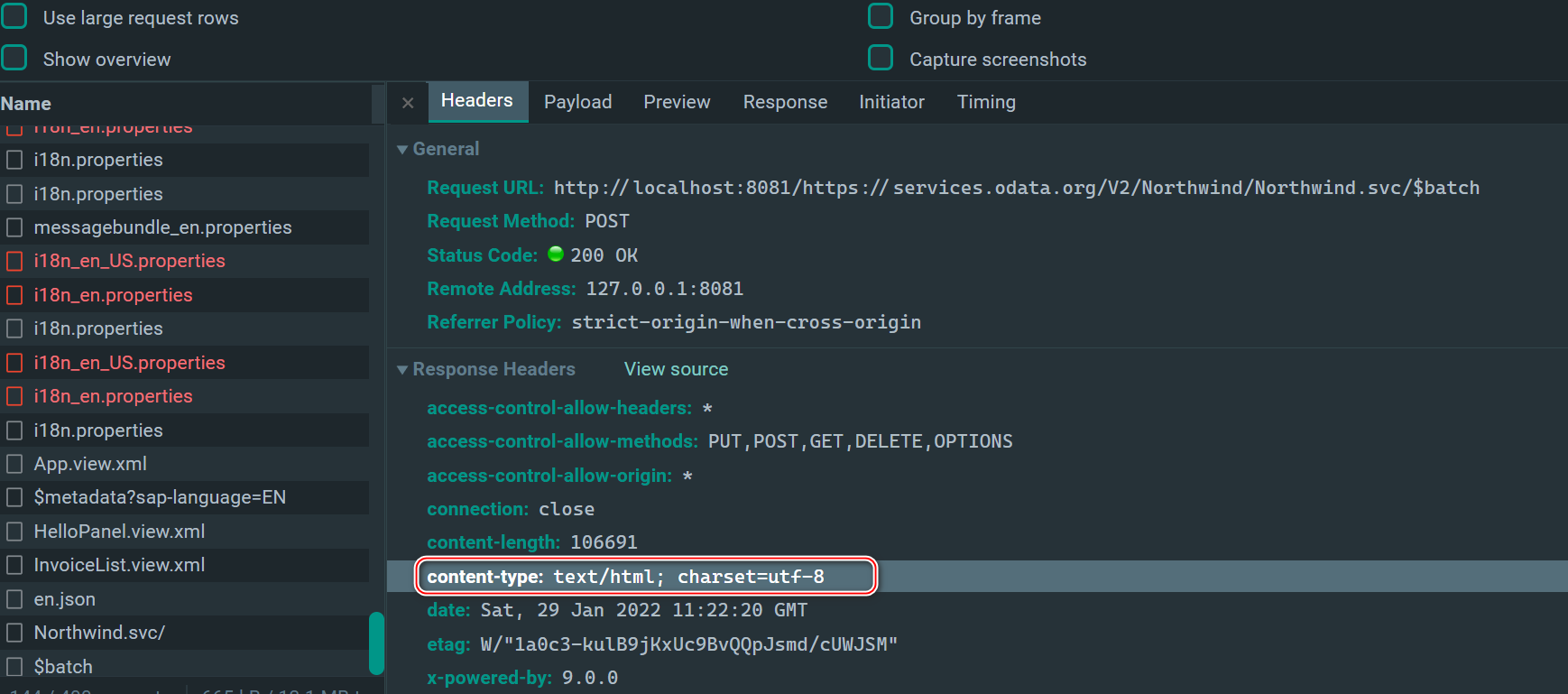
正确的 batch response,
Content-Type 值应该是
multipart/mixed; boundary=batchresponse_后面跟一个 guid


success handler 即下图的
fnSuccess, 被包裹在
wraHandler 里。
content-type 不同的 response,对应有不同的 handler 来处理。

httpClient.request 如果执行出错,会进入到
catch 分支,错误消息:
invalid MIME part type


使用分号将
multipart/mixed 和
boundary 的具体值分隔开。

每种类型都有对应的 handler,由对应的
handler 调用
read 方法执行 response 的解析操作。

解析 batch 操作的响应:


在出错情况下,从 Chrome 开发者工具 network 标签页里下载 batch 响应到本地,和不出错的场景比较,格式上没有任何差异:


问题出在 batch response 的 header 里的
Content-Type 字段。
chrome 里看到的 content-type 不是这个啊:


body 是 null,所以进不去
7884 行的
dispatchHandler 函数:

multipart/mixed MIME 消息由不同数据类型的混合组成。 每个
body part 都由一个
boundary 划定。
boundary 参数是一个文本字符串,用于将消息正文的一部分与另一部分区分开来。 所有边界都以两个连字符
hyphens (—) 开头。 最后的边界也以两个连字符 (—) 结束。 边界可以由除空格、控制字符或特殊字符之外的任何 ASCII 字符组成。
如果我们通过 batch 请求向服务器发送一个 word 文档,则 HTTP body payload 的例子如下:
Content-type: multipart/mixed;
boundary=”Boundary_any ascii character except some of the following special characters:
( )< > @ , ; : \ / [ ] ? = “
“
—Boundary_any ASCII character, except some special characters below:
content-Type: text/plain;——
charset=iso-8859-1
Content-transfer-encoding: 7BIT
—Boundary_ASCII characters
Content-type: application/msword;
name=”message.doc”
Content-Transfer-Encoding: base64
在
multipart 消息正文的情况下,一个或多个不同的数据集组合在一个正文中,值为
multipart 的
Content-Type 字段必须出现在 HTTP request entity 的头部字段中。正文部分在语法上类似于 RFC 822 消息,只是含义不同。