
Java 应用程序由开发人员编码完成,用于实现业务处理的逻辑和流程;
JDBC API 提供了统一的接口和驱动管理,实现了应用程序和 JDBC 驱动的隔离。同一套应用代码只需要切换驱动程序就可以支持不同的数据库;
JDBC 驱动实现了 JDBC API 中定义的接口,用于与不同的数据库进行交互;
数据库提供数据的存储管理和访问控制。
连接数据库
C:\Users\dongx>java -version
java version "13.0.1" 2019-10-15
Java(TM) SE Runtime Environment (build 13.0.1+9)
Java HotSpot(TM) 64-Bit Server VM (build 13.0.1+9, mixed mode, sharing)
右键单击“我的电脑”,然后选择“属性”。在“高级”选项卡上,选择“环境变量”,然后新建环境变量“JAVA_HOME”,变量值为 JDK 的安装目录,例如“C:\Program Files\Java\jdk-13.0.1”。
编辑环境变量“Path”,将以下内容追加到最后:%JAVA_HOME%\bin\。
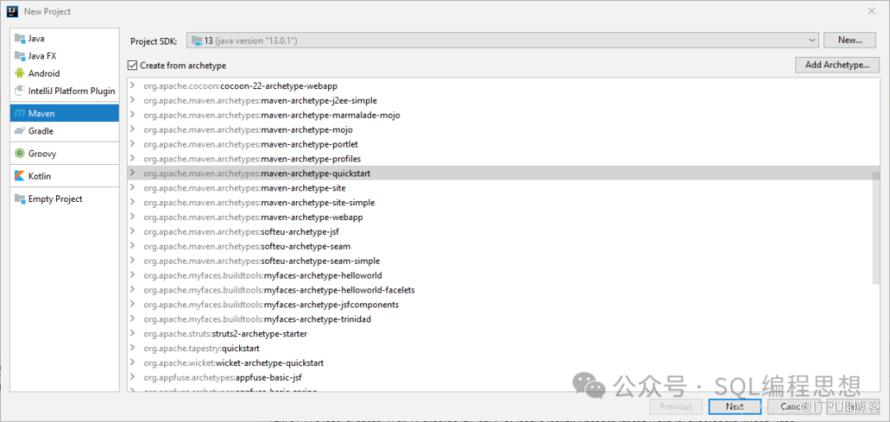
    <dependency>
<groupId>org.postgresql</groupId>
<artifactId>postgresql</artifactId>
<version>42.2.14</version>
</dependency>
url=jdbc:postgresql://192.168.56.104:3306/hrdb
user=tony
password=tony
package org.example;

// 导入 JDBC 和 IO 包
import java.io.FileInputStream;
import java.io.IOException;
import java.sql.*;
import java.util.Properties;

public class App
{
public static void main( String[] args )
{
String url = null;
String user = null;
String password = null;

// 读取数据库连接配置文件
try (FileInputStream file = new FileInputStream("db.properties")) {

Properties pros = new Properties();
            pros.load(file);
            url = pros.getProperty("url");
            user = pros.getProperty("user");
            password = pros.getProperty("password");
} catch (IOException e) {
System.out.println(e.getMessage());
}

// 建立数据库连接
try (Connection conn = DriverManager.getConnection(url, user, password)) {
System.out.println("连接 PostgreSQL 数据库成功!");
} catch (SQLException e) {
System.out.println(e.getMessage());
}
}
}
连接 PostgreSQL 数据库成功!
创建和删除表
利用 DriverManager 类的 getConnection() 方法获取一个 Connection 连接对象;
使用连接对象的 createStatement() 方法创建一个 Statement 语句对象;
利用语句对象的 execute() 方法执行 SQL 语句;
释放 Statement 以及 Connection 对象资源。
package org.example;

// 导入 JDBC 和 IO 包
import java.io.FileInputStream;
import java.io.IOException;
import java.sql.*;
import java.util.Properties;

public class PostgreSQLDDL {
public static void main(String[] args )
{
String url = null;
String user = null;
String password = null;
String sql_str = "create table users (" +
" id serial primary key," +
" name character varying(10) not null unique," +
" created_at timestamp not null" +
")";

// 读取数据库连接配置文件
try (FileInputStream file = new FileInputStream("db.properties")) {

Properties p = new Properties();
            p.load(file);
            url = p.getProperty("url");
            user = p.getProperty("user");
            password = p.getProperty("password");
} catch (IOException e) {
System.out.println(e.getMessage());
}

// 建立数据库连接,创建查询语句,并且执行语句
try (Connection conn = DriverManager.getConnection(url, user, password);
Statement ps = conn.createStatement()) {

// 执行 SQL 语句
            ps.execute(sql_str);
System.out.println("成功创建 users 表!");

} catch (SQLException e) {
System.out.println(e.getMessage());
}
}
}
成功创建 users 表!
ERROR: relation "users" already exists
插入数据
利用 DriverManager 类的 getConnection() 方法获取一个 Connection 连接对象;
使用连接对象的 createStatement() 方法创建一个 Statement 或者 PreparedStatement 语句对象;
利用语句对象的 execute() 或者 executeBatch() 方法执行 INSERT 语句;
释放 Statement 以及 Connection 对象资源。
package org.example;

// 导入 JDBC 和 IO 包
import java.io.FileInputStream;
import java.io.IOException;
import java.sql.*;
import java.util.Properties;
import java.sql.Timestamp;

public class PostgreSQLInsert {
public static void main(String[] args )
{
String url = null;
String user = null;
String password = null;
String sql_str = "insert into users(name, created_at) values(?, ?)";

// 读取数据库连接配置文件
try (FileInputStream file = new FileInputStream("db.properties")) {

Properties p = new Properties();
            p.load(file);
            url = p.getProperty("url");
            user = p.getProperty("user");
            password = p.getProperty("password");
} catch (IOException e) {
System.out.println(e.getMessage());
}

// 建立数据库连接,创建预编译语句,并且执行语句
try (Connection conn = DriverManager.getConnection(url, user, password);
PreparedStatement ps = conn.prepareStatement(sql_str)) {

// 设置输入参数
            ps.setString(1, "tony");
            ps.setTimestamp(2, new Timestamp(System.currentTimeMillis()));
            ps.addBatch();

            ps.setString(1, "david");
            ps.setTimestamp(2, new Timestamp(System.currentTimeMillis()));
            ps.addBatch();

// 执行批量插入操作
            ps.executeBatch();
System.out.println("插入数据成功!");

} catch (SQLException e) {
System.out.println(e.getMessage());
}
}
}
插入数据成功!
查询数据
利用 DriverManager 类的 getConnection() 方法获取一个 Connection 连接对象;
使用连接对象的 createStatement() 方法创建一个 Statement 或者 PreparedStatement 语句对象;
利用语句对象的 executeQuery() 方法执行 SQL 语句或者存储过程,返回一个 ResultSet 结果集对象;
遍历结果集,获取并处理查询结果;
释放 ResultSet、Statement 以及 Connection 对象资源。
package org.example;

// 导入 JDBC 和 IO 包
import java.io.FileInputStream;
import java.io.IOException;
import java.sql.*;
import java.util.Properties;

public class PostgreSQLQuery {
public static void main( String[] args )
{
String url = null;
String user = null;
String password = null;
String sql_str = "SELECT id, name, created_at FROM users";

// 读取数据库连接配置文件
try (FileInputStream file = new FileInputStream("db.properties")) {

Properties pros = new Properties();
            pros.load(file);
            url = pros.getProperty("url");
            user = pros.getProperty("user");
            password = pros.getProperty("password");
} catch (IOException e) {
System.out.println(e.getMessage());
}

// 建立数据库连接,创建查询语句,并且执行语句
try (Connection conn = DriverManager.getConnection(url, user, password);
Statement stmt = conn.createStatement();
ResultSet rs = stmt.executeQuery(sql_str)) {

// 处理查询结果集
while (rs.next()) {
System.out.println(rs.getInt("id") + "\t" +
                        rs.getString("name")  + "\t" +
                        rs.getTimestamp("created_at"));
}

} catch (SQLException e) {
System.out.println(e.getMessage());
}
}
}
1	tony	2020-06-15 15:36:13.562
2	david	2020-06-15 15:36:13.563
修改数据
package org.example;

// 导入 JDBC 和 IO 包
import java.io.FileInputStream;
import java.io.IOException;
import java.sql.*;
import java.util.Properties;

public class PostgreSQLUpdate {
public static void main(String[] args )
{
String url = null;
String user = null;
String password = null;
int affectedrows = 0;
String sql_str = "update users " +
"set name = ? " +
"where id = ?";

// 读取数据库连接配置文件
try (FileInputStream file = new FileInputStream("db.properties")) {

Properties p = new Properties();
            p.load(file);
            url = p.getProperty("url");
            user = p.getProperty("user");
            password = p.getProperty("password");
} catch (IOException e) {
System.out.println(e.getMessage());
}

// 建立数据库连接,创建更新语句,并且执行语句
try (Connection conn = DriverManager.getConnection(url, user, password);
PreparedStatement ps = conn.prepareStatement(sql_str)) {

// 设置输入参数
            ps.setString(1, "tom");
            ps.setInt(2, 1);

// 执行更新操作
            affectedrows = ps.executeUpdate();
System.out.println(String.format("更新行数: %d", affectedrows));

} catch (SQLException e) {
System.out.println(e.getMessage());
}
}
}
更新行数: 1
2	david	2020-06-15 15:36:13.563
1	tom		2020-06-15 15:36:13.562
删除数据
package org.example;

// 导入 JDBC 和 IO 包
import java.io.FileInputStream;
import java.io.IOException;
import java.sql.*;
import java.util.Properties;

public class PostgreSQLDelete {
public static void main(String[] args )
{
String url = null;
String user = null;
String password = null;
int affectedrows = 0;
String sql_str = "delete from users where id = ?";

// 读取数据库连接配置文件
try (FileInputStream file = new FileInputStream("db.properties")) {

Properties p = new Properties();
            p.load(file);
            url = p.getProperty("url");
            user = p.getProperty("user");
            password = p.getProperty("password");
} catch (IOException e) {
System.out.println(e.getMessage());
}

// 建立数据库连接,创建查询语句,并且执行语句
try (Connection conn = DriverManager.getConnection(url, user, password);
PreparedStatement ps = conn.prepareStatement(sql_str)) {

// 设置输入参数
            ps.setInt(1, 1);

// 执行更新操作
            affectedrows = ps.executeUpdate();
System.out.println(String.format("删除行数: %d", affectedrows));

} catch (SQLException e) {
System.out.println(e.getMessage());
}
}
}
删除行数: 1
处理事务
package org.example;

// 导入 JDBC 和 IO 包
import java.io.FileInputStream;
import java.io.IOException;
import java.sql.*;
import java.util.Properties;
import java.sql.Timestamp;

public class PostgreSQLTransaction {
public static void main(String[] args )
{
String url = null;
String user = null;
String password = null;
String sql_str = "insert into users(name, created_at) values(?, ?)";
String sql_str2 = "update users set name = ? where id = ?";

// 读取数据库连接配置文件
try (FileInputStream file = new FileInputStream("db.properties")) {

Properties p = new Properties();
            p.load(file);
            url = p.getProperty("url");
            user = p.getProperty("user");
            password = p.getProperty("password");
} catch (IOException e) {
System.out.println(e.getMessage());
}

// 建立数据库连接,创建查询语句,并且执行语句
try (Connection conn = DriverManager.getConnection(url, user, password)) {

//设置手动提交
            conn.setAutoCommit(false);

try (PreparedStatement ps = conn.prepareStatement(sql_str);
PreparedStatement ps2 = conn.prepareStatement(sql_str2)) {

// 设置输入参数并执行语句
                ps.setString(1, "anne");
                ps.setTimestamp(2, new Timestamp(System.currentTimeMillis()));
                ps.executeUpdate();

                ps2.setString(1, "anne");
                ps2.setInt(2, 2);
                ps2.executeUpdate();

// 提交事务
                conn.commit();
System.out.println("事务提交成功!");
} catch (SQLException e) {
// 回滚事务
                conn.rollback();
System.out.println(e.getMessage());
System.out.println("回滚事务!");
}
} catch (SQLException e) {
System.out.println(e.getMessage());
}
}
}
ERROR: duplicate key value violates unique constraint "users_name_key"
  Detail: Key (name)=(tony) already exists.
回滚事务!
调用存储过程
CREATE OR REPLACE PROCEDURE add_user(pv_name varchar, pd_created_at timestamp)
AS $$
BEGIN
insert into users(name, created_at)
values (pv_name, pd_created_at);
END; $$
LANGUAGE plpgsql;
url=jdbc:postgresql://192.168.56.104:5432/hrdb?escapeSyntaxCallMode=callIfNoReturn
user=tony
password=tony
package org.example;

// 导入 JDBC 和 IO 包
import java.io.FileInputStream;
import java.io.IOException;
import java.sql.*;
import java.util.Properties;

public class PostgreSQLSP {
public static void main( String[] args )
{
String url = null;
String user = null;
String password = null;

// 读取数据库连接配置文件
try (FileInputStream file = new FileInputStream("db.properties")) {

Properties pros = new Properties();
            pros.load(file);
            url = pros.getProperty("url");
            user = pros.getProperty("user");
            password = pros.getProperty("password");
} catch (IOException e) {
System.out.println(e.getMessage());
}

// 建立数据库连接,调用存储过程
try (Connection conn = DriverManager.getConnection(url, user, password);
CallableStatement stmt = conn.prepareCall("{call add_user( ?, ? )}");
) {
            stmt.setString(1, "anne");
            stmt.setTimestamp(2, new Timestamp(System.currentTimeMillis()));
            stmt.execute();
System.out.println("调用存储过程成功!");
} catch (SQLException e) {
System.out.println(e.getMessage());
}
}
}
调用存储过程成功!