Navigation:Navigate to Workflow Administrator> Oracle Application Manager > Workflow Manager > Service Components > Workflow Agent Listener Services
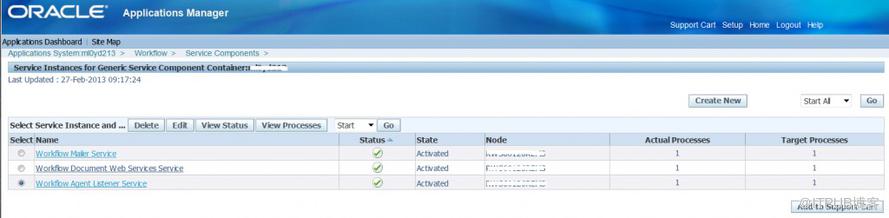
Start and Stop the Oracle Workflow Services
--------------------------------------------------------------------------------------------
There also is a script to check all workflow service status
SET PAGESIZE 400
SET LINESIZE 120
SET PAGESIZE 50
COLUMN COMPONENT_NAME FORMAT A45
COLUMN STARTUP_MODE FORMAT A15
COLUMN COMPONENT_STATUS FORMAT A15
SELECT FSC.COMPONENT_NAME,FSC.STARTUP_MODE,FSC.COMPONENT_STATUS
FROM APPS.FND_CONCURRENT_QUEUES_VL FCQ, FND_SVC_COMPONENTS FSC
WHERE FSC.CONCURRENT_QUEUE_ID = FCQ.CONCURRENT_QUEUE_ID(+)
ORDER BY COMPONENT_STATUS , STARTUP_MODE , COMPONENT_NAME;
Sample Output :
| COMPONENT_NAME | STARTUP_MODE | COMPONENT_STATUS |
|---|---|---|
| Workflow Notification Mailer | AUTOMATIC | DEACTIVATED_SYSTEM |
| ECX Inbound Agent Listener | AUTOMATIC | RUNNING |
| ECX Transaction Agent Listener | AUTOMATIC | RUNNING |
| WF_JMS_IN Listener(M4U) | AUTOMATIC | RUNNING |
| Web Services IN Agent | AUTOMATIC | RUNNING |
| Web Services OUT Agent | AUTOMATIC | RUNNING |
| Workflow Deferred Agent Listener | AUTOMATIC | RUNNING |
| Workflow Deferred Notification Agent Listener | AUTOMATIC | RUNNING |
| Workflow Error Agent Listener | AUTOMATIC | RUNNING |
| Workflow Inbound JMS Agent Listener | AUTOMATIC | RUNNING |
| Workflow Inbound Notifications Agent Listener | AUTOMATIC | RUNNING |
| Workflow Java Deferred Agent Listener | AUTOMATIC | RUNNING |
| Workflow Java Error Agent Listener | AUTOMATIC | RUNNING |