错误信息:
Date 2016/12/21 11:05:48
Log Job History (Job_FULLBACKUP)
Step ID 1
Server WINDOWS
Job Name Job_FULLBACKUP
Step Name mssqlserver_fullbackup
Duration 00:00:00
Sql Severity 16
Sql Message ID 15281
Operator Emailed
Operator Net sent
Operator Paged
Retries Attempted 0
Message
Executed as user: NT AUTHORITY\NETWORK SERVICE. SQL Server blocked access to procedure 'sys.xp_cmdshell' of component 'xp_cmdshell' because this component is turned off as part of the security configuration for this server. A system administrator can enable the use of 'xp_cmdshell' by using sp_configure. For more information about enabling 'xp_cmdshell', see "Surface Area Configuration" in SQL Server Books Online. [SQLSTATE 42000] (Error 15281). The step failed.
错误原因:
未启动xp_cmdshell,xp_cmdshell 扩展存储过程将命令字符串作为操作系统命令 shell 执行,并以文本行的形式返回所有输出。即通过系统命令调用系统存储过程
由于存在安全隐患, xp_cmdshell 默认是关闭的。
解决方法:
方法1:
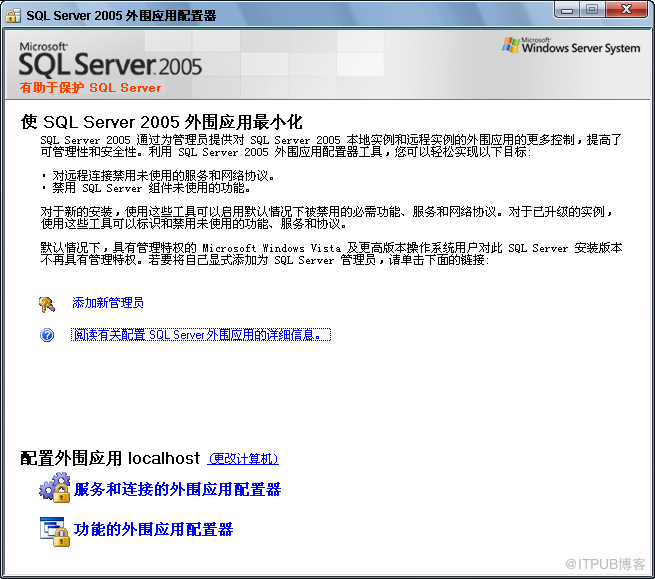
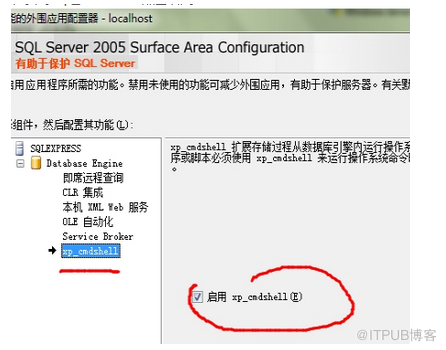
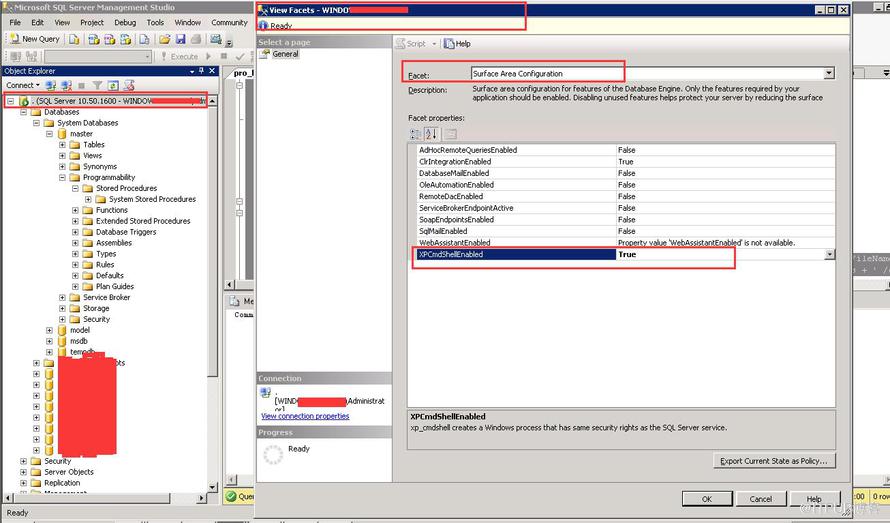
利用图形界面,外围应用配置器,启动xp_cmdshell即可
sqlserver2005和2008略有差别,具体参照如下:
SQLServer 2005外围应用配置器可以在程序界面找到
SQLServer2008的外围配置器集成到【方面】里,需要到数据库实例下去找和配置
方法2:
通过命令方式,启动xp_cmdshell
sp_configure 'show advanced options',1
reconfigure
go
sp_configure 'xp_cmdshell',1
reconfigure
go
知识扩展:
查看系统数据库参数配置: select * from sys.configurations where name='xp_cmdshell'
|
列名 |
数据类型 | 说明 |
|---|---|---|
|
configuration_id |
int |
配置值的唯一 ID。 |
|
name |
nvarchar(35) |
配置选项的名称。 |
|
value |
sql_variant |
该选项的配置值。 |
|
minimum |
sql_variant |
配置选项的最小值。 |
|
maximum |
sql_variant |
配置选项的最大值。 |
|
value_in_use |
sql_variant |
该选项当前使用的运行值。 |
|
description |
nvarchar(255) |
配置选项的说明。 |
|
is_dynamic |
bit |
1 = 执行 RECONFIGURE 语句时生效的变量。 |
|
is_advanced |
bit |
1 = 仅当设置了 show advanced 选项时才显示该变量。 |
修改系统数据库参数:
  语法格式:
     sp_configure [ @configname= ] 'hadoop connectivity',
             [ @configvalue = ] { 0 | 1 | 2 | 3 | 4 | 5 | 6 | 7 }  [;]
    RECONFIGURE  [;]
示例:sp_configure 'show advanced options',1
reconfigure
go
sp_configure 'xp_cmdshell',1
reconfigure
go
sp_configure具体使用参考:https://msdn.microsoft.com/zh-cn/library/ms188787.aspx