Docker从入门到精通_03 掌握Docker核心架构:镜像、仓库、容器及运行管理的深度解析一 概述1.1 镜像1.2 镜像仓库1.3 容器二、镜像及镜像仓库2.1 本地镜像仓库2.2 镜像仓库简介2.3 使用远端仓库2.3.1 从远端镜像仓库拉取apache镜像2.3.2 从远端镜像仓库拉取指定版本apache镜像 2.4 使用国内docker镜像仓库加速2.4.1 阿⾥云docker镜像加速配置2.4.2 查看docker运⾏状态汇总信息2.4.3 拉取apache 2.2版本镜像2.4.4 查看docker镜像三 docker 容器基础操作3.1 查看正在运行中的docker容器3.2 查看所有的docker容器3.3 删除⼀个容器ID=da9d839a96b13.4 删除镜像3.5 删除lastest3.6 删除指定版本 四 第一次正式运行 docker 容器4.1 运行apache2.4版本容器4.2 运行hello-world容器4.3 查看所有的docker容器4.4 查看docker镜像4.5 运行容器最后一个版本4.6 docker运行时对镜像加载流程五 docker 运行状态管理基础操作5.1 查看docker守护进程5.2 查看docker运行状态5.3 查看docker版本简要信息5.4 查看docker版本详细信息5.5 查看docker运行状态汇总信息
Docker从入门到精通_03 掌握Docker核心架构:镜像、仓库、容器及运行管理的深度解析
一 概述
Docker核心框架主要包括镜像、镜像仓库和容器三个关键组件。
1.1 镜像
Docker镜像是创建容器的只读模板,包含应用程序及其运行所需的基本操作系统环境。它类似于虚拟机的快照,但更加轻量级和高效。
1.2 镜像仓库
用于存储和共享Docker镜像的服务,类似于代码仓库。Docker Hub是Docker提供的公共镜像仓库服务,用户可以从中拉取或推送镜像。此外,还可以搭建私有镜像仓库,以满足企业内部需求。
1.3 容器
容器是基于Docker镜像创建的实例,可以看作是镜像的运行时状态。每个容器都拥有独立的文件系统、进程空间和网络栈,提供了应用程序运行的隔离环境;容器container是通过镜像复制创建的,可读可写。
二、镜像及镜像仓库
2.1 本地镜像仓库
[superman@docker ~]$ docker images
REPOSITORY    TAG       IMAGE ID       CREATED        SIZE
hello-world   latest    d2c94e258dcb   8 months ago   13.3kB
[superman@docker ~]$
2.2 镜像仓库简介
REPOSITORY : 镜像名称 TAG :镜像标签 - 通常⽤于表达镜像版本|latest 最新版本IMAGE ID :镜像IDCREATED :镜像创建时间SIZE :镜像大小
2.3 使用远端仓库
远端镜像仓库 私有 :本地个人自己搭建/本地公司自己搭建(docker) 公有 :官方 docker hub | https://hub.docker.com 非官方 - 通常官方镜像源 aliyun
2.3.1 从远端镜像仓库拉取apache镜像
默认docker hub拉取httpd镜像|默认latest
[superman@docker ~]$ docker pull httpd

[superman@docker ~]$ docker images
REPOSITORY    TAG       IMAGE ID       CREATED        SIZE
httpd         latest    6fd77d7e5eb7   2 months ago   167MB
hello-world   latest    d2c94e258dcb   8 months ago   13.3kB
[superman@docker ~]$
#Using default tag: latest
2.3.2 从远端镜像仓库拉取指定版本apache镜像
[superman@docker ~]$ docker pull httpd:2.4
[superman@docker ~]$ docker images
REPOSITORY    TAG       IMAGE ID       CREATED        SIZE
httpd         2.4       6fd77d7e5eb7   2 months ago   167MB
httpd         latest    6fd77d7e5eb7   2 months ago   167MB
hello-world   latest    d2c94e258dcb   8 months ago   13.3kB
[superman@docker ~]$
2.4 使用国内docker镜像仓库加速
阿⾥云docker镜像加速1.注册阿⾥云账号 - https://cn.aliyun.com/2.登录阿⾥云 - 控制台 - 搜素容器镜像服务 - 镜像工具 - 镜像加速器3.复制如下信息到Docker主机 (添加/etc/docker/daemon.json配置⽂件)
2.4.1 阿⾥云docker镜像加速配置
[superman@docker ~]$ sudo mkdir -p /etc/docker
[superman@docker ~]$ sudo tee /etc/docker/daemon.json <<-'EOF'
{
  "registry-mirrors": ["https://d0xlru8b.mirror.aliyuncs.com"]
}
EOF

[superman@docker ~]$ sudo systemctl daemon-reload
[superman@docker ~]$ sudo systemctl restart docker
2.4.2 查看docker运⾏状态汇总信息
[superman@docker ~]$ docker info
Client: Docker Engine - Community
 Version:    24.0.7
 Context:    default
 Debug Mode: false
 Plugins:
  buildx: Docker Buildx (Docker Inc.)
    Version:  v0.11.2
    Path:     /usr/libexec/docker/cli-plugins/docker-buildx
  compose: Docker Compose (Docker Inc.)
    Version:  v2.21.0
    Path:     /usr/libexec/docker/cli-plugins/docker-compose

Server:
 Containers: 1
  Running: 0
  Paused: 0
  Stopped: 1
 Images: 2
 Server Version: 24.0.7
 Storage Driver: overlay2
  Backing Filesystem: xfs
  Supports d_type: true
  Using metacopy: false
  Native Overlay Diff: true
  userxattr: false
 Logging Driver: json-file
 Cgroup Driver: cgroupfs
 Cgroup Version: 1
 Plugins:
  Volume: local
  Network: bridge host ipvlan macvlan null overlay
  Log: awslogs fluentd gcplogs gelf journald json-file local logentries splunk syslog
 Swarm: inactive
 Runtimes: io.containerd.runc.v2 runc
 Default Runtime: runc
 Init Binary: docker-init
 containerd version: 3dd1e886e55dd695541fdcd67420c2888645a495
 runc version: v1.1.10-0-g18a0cb0
 init version: de40ad0
 Security Options:
  seccomp
   Profile: builtin
 Kernel Version: 3.10.0-957.el7.x86_64
 Operating System: CentOS Linux 7 (Core)
 OSType: linux
 Architecture: x86_64
 CPUs: 1
 Total Memory: 3.683GiB
 Name: superman
 ID: 70cdde2c-be80-48b8-bfbb-f562145167a6
 Docker Root Dir: /var/lib/docker
 Debug Mode: false
 Experimental: false
 Insecure Registries:
  127.0.0.0/8
 Registry Mirrors:
  https://d0xlru8b.mirror.aliyuncs.com/
 Live Restore Enabled: false

[superman@docker ~]$
2.4.3 拉取apache 2.2版本镜像
[superman@docker ~]$ docker pull httpd:2.2
2.2: Pulling from library/httpd
f49cf87b52c1: Pull complete
24b1e09cbcb7: Pull complete
8a4e0d64e915: Pull complete
bcbe0eb4ca51: Pull complete
16e370c15d38: Pull complete
Digest: sha256:9784d70c8ea466fabd52b0bc8cde84980324f9612380d22fbad2151df9a430eb
Status: Downloaded newer image for httpd:2.2
docker.io/library/httpd:2.2
2.4.4 查看docker镜像
[superman@docker ~]$ docker images
REPOSITORY    TAG       IMAGE ID       CREATED        SIZE
httpd         2.4       6fd77d7e5eb7   2 months ago   167MB
httpd         latest    6fd77d7e5eb7   2 months ago   167MB
hello-world   latest    d2c94e258dcb   8 months ago   13.3kB
httpd         2.2       e06c3dbbfe23   5 years ago    171MB
[superman@docker ~]$
三 docker 容器基础操作
3.1 查看正在运行中的docker容器
[superman@docker ~]$ docker ps
CONTAINER ID IMAGE COMMAND CREATED STATUS PORTS NAMES
[superman@docker ~]$
3.2 查看所有的docker容器
[superman@docker ~]$ docker ps -a
CONTAINER ID   IMAGE         COMMAND    CREATED       STATUS                   PORTS     NAMES
da9d839a96b1   hello-world   "/hello"   7 hours ago   Exited (0) 7 hours ago             competent_burnell
 gracious_davinci
[superman@docker ~]$
3.3 删除⼀个容器ID=da9d839a96b1
[superman@docker ~]$ docker rm da9d839a96b1
da9d839a96b1
[superman@docker ~]$ docker ps -a
CONTAINER ID IMAGE COMMAND CREATED STATUS PORTS NAMES
[superman@docker ~]$
3.4 删除镜像
[superman@docker ~]$ docker rmi hello-world
Untagged: hello-world:latest
Untagged: hello-world@sha256:ac69084025c660510933cca701f615283cdbb3aa0963188770b54c31c8962493
Deleted: sha256:d2c94e258dcb3c5ac2798d32e1249e42ef01cba4841c2234249495f87264ac5a
Deleted: sha256:ac28800ec8bb38d5c35b49d45a6ac4777544941199075dff8c4eb63e093aa81e
[superman@docker ~]$ docker images
REPOSITORY   TAG       IMAGE ID       CREATED        SIZE
httpd        2.4       6fd77d7e5eb7   2 months ago   167MB
httpd        latest    6fd77d7e5eb7   2 months ago   167MB
httpd        2.2       e06c3dbbfe23   5 years ago    171MB
[superman@docker ~]$
3.5 删除lastest
[superman@docker ~]$ docker rmi httpd
Untagged: httpd:latest
[superman@docker ~]$ docker images
REPOSITORY   TAG       IMAGE ID       CREATED        SIZE
httpd        2.4       6fd77d7e5eb7   2 months ago   167MB
httpd        2.2       e06c3dbbfe23   5 years ago    171MB
[superman@docker ~]$
3.6 删除指定版本
建议使用该方法(添加tag)。
[superman@docker ~]$ docker rmi httpd:2.2
Untagged: httpd:2.2
Untagged: httpd@sha256:9784d70c8ea466fabd52b0bc8cde84980324f9612380d22fbad2151df9a430eb
Deleted: sha256:e06c3dbbfe239c6fca50b6ab6935b3122930fa2eea2136979e5b46ad77ecb685
Deleted: sha256:aefd81e57d336a46bb1eb4c4626a3f971759e0e9651e348d5e83b301614b4522
Deleted: sha256:b85fe9130aef01e870e6d0a108fd003cf803d5da7fe479513a21de0643d7ecae
Deleted: sha256:40154da5ddb3570d82395b9c632880baca5f12ad21ea8c699f3897cd5ed9b237
Deleted: sha256:f5863aa45770c31d7555287f821930e41bc466b97464733ccf980f16393d99d9
Deleted: sha256:4bcdffd70da292293d059d2435c7056711fab2655f8b74f48ad0abe042b63687
[superman@docker ~]$ docker images
REPOSITORY   TAG       IMAGE ID       CREATED        SIZE
httpd        2.4       6fd77d7e5eb7   2 months ago   167MB
[superman@docker ~]$
四 第一次正式运行 docker 容器
4.1 运行apache2.4版本容器
[superman@docker ~]$ docker run httpd:2.4
AH00558: httpd: Could not reliably determine the server's fully qualified domain name, using 172.17.0.2. Set the 'ServerName' directive globally to suppress this message
AH00558: httpd: Could not reliably determine the server's fully qualified domain name, using 172.17.0.2. Set the 'ServerName' directive globally to suppress this message
[Mon Jan 01 09:26:16.466594 2024] [mpm_event:notice] [pid 1:tid 140565572528000] AH00489: Apache/2.4.58 (Unix) configured -- resuming normal operations
[Mon Jan 01 09:26:16.468377 2024] [core:notice] [pid 1:tid 140565572528000] AH00094: Command line: 'httpd -D FOREGROUND'
^C[Mon Jan 01 09:29:12.537696 2024] [mpm_event:notice] [pid 1:tid 140565572528000] AH00491: caught SIGTERM, shutting down
[superman@docker ~]$
4.2 运行hello-world容器
[superman@docker ~]$ docker run hello-world
Unable to find image 'hello-world:latest' locally
latest: Pulling from library/hello-world
2db29710123e: Pull complete
Digest: sha256:cc15c5b292d8525effc0f89cb299f1804f3a725c8d05e158653a563f15e4f685
Status: Downloaded newer image for hello-world:latest

Hello from Docker!
This message shows that your installation appears to be working correctly.
To generate this message, Docker took the following steps:

1. The Docker client contacted the Docker daemon.
2. The Docker daemon pulled the "hello-world" image from the Docker Hub.
   (amd64)
3. The Docker daemon created a new container from that image which runs the
   executable that produces the output you are currently reading.
4. The Docker daemon streamed that output to the Docker client, which sent it
   to your terminal.
   To try something more ambitious, you can run an nginx container with:

$ docker run -it nginx bash
Share images, automate workflows, and more with a free Docker ID:
 https://hub.docker.com/
For more examples and ideas, visit:
 https://docs.docker.com/get-started/
[superman@docker ~]$
4.3 查看所有的docker容器
[superman@docker ~]$ docker ps -a
CONTAINER ID   IMAGE         COMMAND              CREATED          STATUS                      PORTS     NAMES
b762aaefa6c8   hello-world   "/hello"             22 seconds ago   Exited (0) 21 seconds ago             dazzling_mendeleev
3c59d7d7d6f5   httpd:2.4     "httpd-foreground"   3 minutes ago    Exited (0) 37 seconds ago             exciting_pare
[superman@docker ~]$
4.4 查看docker镜像
[superman@docker ~]$ docker images
REPOSITORY    TAG       IMAGE ID       CREATED        SIZE
httpd         2.4       6fd77d7e5eb7   2 months ago   167MB
hello-world   latest    feb5d9fea6a5   2 years ago    13.3kB
[superman@docker ~]$
4.5 运行容器最后一个版本
[superman@docker ~]$ docker run hello-world:latest

Hello from Docker!
This message shows that your installation appears to be working correctly.

To generate this message, Docker took the following steps:

  1. The Docker client contacted the Docker daemon.
  2. The Docker daemon pulled the "hello-world" image from the Docker Hub.
     (amd64)
  3. The Docker daemon created a new container from that image which runs the
     executable that produces the output you are currently reading.
  4. The Docker daemon streamed that output to the Docker client, which sent it
     to your terminal.

To try something more ambitious, you can run an nginx container with:
 $ docker run -it nginx bash

Share images, automate workflows, and more with a free Docker ID:
 https://hub.docker.com/

For more examples and ideas, visit:
 https://docs.docker.com/get-started/

[superman@docker ~]$
4.6 docker运行时对镜像加载流程
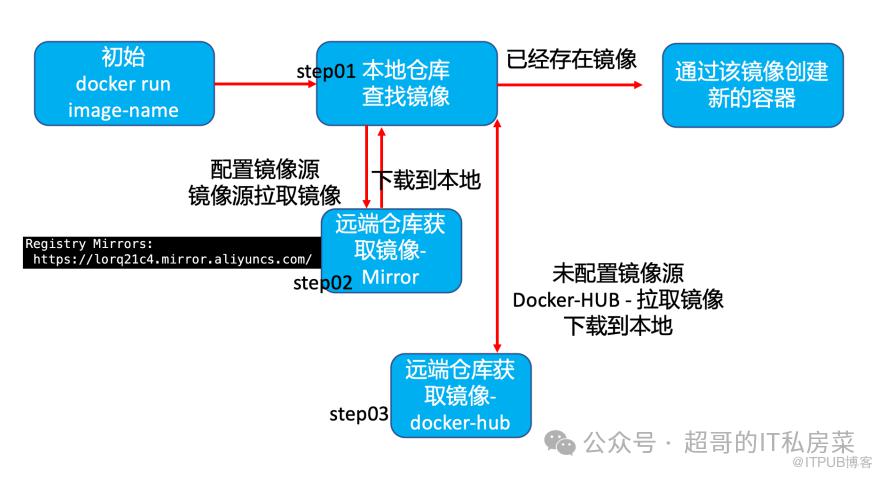
五 docker 运行状态管理基础操作
docker框架client/serverclient - 发送docker命令到docker server dockerdserver - 维护本地仓库镜像管理,容器管理(存储/网络/运行状态...)
5.1 查看docker守护进程
[superman@docker ~]$ ps -ef | grep -i dockerd
root      16821      1  0 11:32 ?        00:00:08 /usr/bin/dockerd -H fd:// --containerd=/run/containerd/containerd.sock
superman  20969  20221  0 17:40 pts/1    00:00:00 grep --color=auto -i dockerd
[superman@docker ~]$
5.2 查看docker运行状态
[superman@docker ~]$ systemctl status docker
● docker.service - Docker Application Container Engine
   Loaded: loaded (/usr/lib/systemd/system/docker.service; enabled; vendor preset: disabled)
   Active: active (running) since 一 2024-01-01 11:32:11 CST; 6h ago
     Docs: https://docs.docker.com
 Main PID: 16821 (dockerd)
    Tasks: 10
   Memory: 29.6M
   CGroup: /system.slice/docker.service
           └─16821 /usr/bin/dockerd -H fd:// --containerd=/run/containerd/containerd.sock
[superman@docker ~]$
5.3 查看docker版本简要信息
[superman@docker ~]$ docker --version
Docker version 24.0.7, build afdd53b
[superman@docker ~]$
5.4 查看docker版本详细信息
[superman@docker ~]$ docker version
Client: Docker Engine - Community
 Version:           24.0.7
 API version:       1.43
 Go version:        go1.20.10
 Git commit:        afdd53b
 Built:             Thu Oct 26 09:11:35 2023
 OS/Arch:           linux/amd64
 Context:           default

Server: Docker Engine - Community
 Engine:
  Version:          24.0.7
  API version:      1.43 (minimum version 1.12)
  Go version:       go1.20.10
  Git commit:       311b9ff
  Built:            Thu Oct 26 09:10:36 2023
  OS/Arch:          linux/amd64
  Experimental:     false
 containerd:
  Version:          1.6.26
  GitCommit:        3dd1e886e55dd695541fdcd67420c2888645a495
 runc:
  Version:          1.1.10
  GitCommit:        v1.1.10-0-g18a0cb0
 docker-init:
  Version:          0.19.0
  GitCommit:        de40ad0
[superman@docker ~]$
5.5 查看docker运行状态汇总信息
[superman@docker ~]$ docker info
Client: Docker Engine - Community
 Version:    24.0.7
 Context:    default
 Debug Mode: false
 Plugins:
  buildx: Docker Buildx (Docker Inc.)
    Version:  v0.11.2
    Path:     /usr/libexec/docker/cli-plugins/docker-buildx
  compose: Docker Compose (Docker Inc.)
    Version:  v2.21.0
    Path:     /usr/libexec/docker/cli-plugins/docker-compose

Server:
 Containers: 3
  Running: 0
  Paused: 0
  Stopped: 3
 Images: 2
 Server Version: 24.0.7
 Storage Driver: overlay2
  Backing Filesystem: xfs
  Supports d_type: true
  Using metacopy: false
  Native Overlay Diff: true
  userxattr: false
 Logging Driver: json-file
 Cgroup Driver: cgroupfs
 Cgroup Version: 1
 Plugins:
  Volume: local
  Network: bridge host ipvlan macvlan null overlay
  Log: awslogs fluentd gcplogs gelf journald json-file local logentries splunk syslog
 Swarm: inactive
 Runtimes: runc io.containerd.runc.v2
 Default Runtime: runc
 Init Binary: docker-init
 containerd version: 3dd1e886e55dd695541fdcd67420c2888645a495
 runc version: v1.1.10-0-g18a0cb0
 init version: de40ad0
 Security Options:
  seccomp
   Profile: builtin
 Kernel Version: 3.10.0-957.el7.x86_64
 Operating System: CentOS Linux 7 (Core)
 OSType: linux
 Architecture: x86_64
 CPUs: 1
 Total Memory: 3.683GiB
 Name: docker
 ID: 70cdde2c-be80-48b8-bfbb-f562145167a6
 Docker Root Dir: /var/lib/docker
 Debug Mode: false
 Experimental: false
 Insecure Registries:
  127.0.0.0/8
 Registry Mirrors:
  https://d0xlru8b.mirror.aliyuncs.com/
 Live Restore Enabled: false

[superman@docker ~]$
? 点赞,你的认可是我创作的动力!
⭐️ 收藏,你的青睐是我努力的方向!
✏️ 评论,你的意见是我进步的财富!
PS:因为公众号平台更改了推送规则,如果不想错过内容,记得读完点一下“在看”,加个“星标”,这样每次新文章推送才会第一时间出现在你的订阅列表里。点“在看”支持我吧!