本文介绍四种常用的openEuler桌面环境的安装和使用方法,它们提供美观易用、安全可靠的图形化操作界面,给用户带来更好的体验。
1 在 openEuler 上安装 UKUI
1.1 UKUI简介
UKUI是麒麟软件团队历经多年打造的一款 Linux 桌面,主要基于 GTK 和 QT 开发。与其它 UI 界面相比,UKUI 更加注重易用性和敏捷度,各元件相依性小,可以不依赖其它套件而独自运行,给用户带来亲切和高效的使用体验。
UKUI支持x86_64和aarch64两种架构。
前提:下载openEuler ISO镜像并已安装系统。
1.2 UKUI安装方法
更新软件源
# dnf update
示例命令如下:
[root@scfuture-21 ~]# dnf update
Last metadata expiration check: 0:45:19 ago on 2022年12月03日 星期六 10时39分32秒.
Dependencies resolved.
=============================================================================================================================
 Package                                             Architecture    Version                           Repository       Size
=============================================================================================================================
Upgrading:
 NetworkManager                                      x86_64          1:1.32.12-12.oe2203               update          2.2 M
 NetworkManager-config-server                        noarch          1:1.32.12-12.oe2203               update           12 k
 NetworkManager-libnm                                x86_64          1:1.32.12-12.oe2203               update          1.6 M
 acl                                                 x86_64          2.3.1-2.oe2203                    update           51 k
 atk                                                 x86_64          2.36.0-2.oe2203                   update          262 k
 atk-devel                                           x86_64          2.36.0-2.oe2203                   update          196 k
 augeas                                              x86_64          1.13.0-3.oe2203                   update          376 k
 authselect                                          x86_64          1.2.4-6.oe2203                    update          189 k
 bash                                                x86_64          5.1.8-6.oe2203                    update          1.2 M
 bc                                                  x86_64          1.07.1-11.oe2203                  update           89 k
 bind-libs                                           x86_64          32:9.16.23-11.oe2203              update          1.2 M
 bind-license                                        noarch          32:9.16.23-11.oe2203              update           18 k
 bind-utils                                          x86_64          32:9.16.23-11.oe2203              update          178 k
 bluez-libs                                          x86_64          5.54-15.oe2203
Downloading Packages:
(1/260): duktape-2.6.0-1.oe2203.x86_64.rpm                                                   680 kB/s | 143 kB     00:00
(2/260): elfutils-extra-0.185-13.oe2203.x86_64.rpm                                           389 kB/s | 227 kB     00:00
(3/260): grub2-tools-efi-2.06-15.oe2203.x86_64.rpm                                           755 kB/s | 463 kB     00:00
(4/260): NetworkManager-config-server-1.32.12-12.oe2203.noarch.rpm                           241 kB/s |  12 kB     00:00
(5/260): NetworkManager-1.32.12-12.oe2203.x86_64.rpm                                         8.9 MB/s | 2.2 MB     00:00
(6/260): acl-2.3.1-2.oe2203.x86_64.rpm                                                       1.0 MB/s |  51 kB     00:00
(7/260): atk-2.36.0-2.oe2203.x86_64.rpm                                                      3.7 MB/s | 262 kB     00:00
(8/260): atk-devel-2.36.0-2.oe2203.x86_64.rpm                                                3.1 MB/s | 196 kB     00:00
(9/260): augeas-1.13.0-3.oe2203.x86_64.rpm                                                   4.6 MB/s | 376 kB     00:00
(10/260): authselect-1.2.4-6.oe2203.x86_64.rpm                                               3.5 MB/s | 189 kB     00:00
(11/260): bash-5.1.8-6.oe2203.x86_64.rpm                                                      12 MB/s | 1.2 MB     00:00
(12/260): NetworkManager-libnm-1.32.12-12.oe2203.x86_64.rpm                                  2.5 MB/s | 1.6 MB     00:00
(13/260): bc-1.07.1-11.oe2203.x86_64.rpm                                                     1.2 MB/s |  89 kB     00:00
  .
  .
  .
  vim-minimal-2:9.0-1.oe2203.x86_64
  wayland-1.19.91-4.oe2203.x86_64                                                           wayland-devel-1.19.91-4.oe2203.x86_64                                                     words-3.0-33.oe2203.noarch
  xz-5.2.5-2.oe2203.x86_64
  xz-devel-5.2.5-2.oe2203.x86_64                                                           xz-libs-5.2.5-2.oe2203.x86_64
  yajl-2.1.0-18.oe2203.x86_64
  yum-4.10.0-7.oe2203.noarch
  zlib-1.2.11-22.oe2203.x86_64
  zlib-devel-1.2.11-22.oe2203.x86_64
Installed:
  duktape-2.6.0-1.oe2203.x86_64            elfutils-extra-0.185-13.oe2203.x86_64   grub2-tools-efi-1:2.06-15.oe2203.x86_64
  kernel-5.10.0-60.68.0.93.oe2203.x86_64

Complete!
[root@scfuture-21 ~]#
安装UKUI
# dnf install ukui -y
示例命令如下:
[root@scfuture-21 ~]# dnf install ukui
Last metadata expiration check: 0:59:17 ago on 2022年12月03日 星期六 10时39分32秒.
Dependencies resolved.
=============================================================================================================================
 Package                                  Arch       Version                                            Repository      Size
=============================================================================================================================
Installing:
 ukui                                     noarch     2.0.2-14.oe1                                       EPOL            12 k
Installing dependencies:
 GeoIP                                    x86_64     1.6.12-6.oe2203                                    OS             106 k
 GeoIP-GeoLite-data                       noarch     2018.06-4.oe2203                                   update          26 M
 LibRaw                                   x86_64     0.20.2-5.oe2203                                    everything     356 k
 PackageKit-devel                         x86_64     1.1.12-10.oe2203                                   OS             103 k
 SDL2                                     x86_64     2.0.12-4.oe2203                                    update         464 k
 SDL2-devel                               x86_64     2.0.12-4.oe2203                                    update         266 k
 accountsservice                          x86_64     0.6.55-1.oe2203                                    OS             113 k
 adobe-mappings-cmap                      noarch     20190730-3.oe2203                                  OS              15 k
 adobe-mappings-cmap-lang                 noarch     20190730-3.oe2203                                  OS             2.5 M
 adobe-mappings-pdf                       noarch     20190401-2.oe2203
  .
  .
  .
  xorg-x11-drv-qxl-0.1.5-14.oe2203.x86_64                                                   xorg-x11-drv-synaptics-legacy-1.9.1-3.oe2203.x86_64
  xorg-x11-drv-v4l-0.3.0-1.oe2203.x86_64
  xorg-x11-drv-vesa-2.5.0-1.oe2203.x86_64
  xorg-x11-drv-vmware-13.3.0-2.oe2203.x86_64
  xorg-x11-drv-wacom-0.40.0-1.oe2203.x86_64
  xorg-x11-font-utils-1:7.5-43.oe2203.x86_64
  xorg-x11-fonts-7.5-24.oe2203.noarch                                                       xorg-x11-server-1.20.11-4.oe2203.x86_64
  xorg-x11-server-utils-7.7-29.oe2203.x86_64
  xorg-x11-utils-7.5-31.oe2203.x86_64
  xorg-x11-xauth-1:1.1-1.oe2203.x86_64
  xorg-x11-xinit-1.4.1-1.oe2203.x86_64
  xorg-x11-xkb-utils-7.7-30.oe2203.x86_64
  xvidcore-1.3.7-1.oe2203.x86_64
  yelp-tools-3.38.0-1.oe2203.noarch                                                         yelp-xsl-3.38.3-1.oe2203.noarch
  zenity-3.41.0-1.oe2203.x86_64
  zimg-2.9.3-2.oe2203.x86_64
  zvbi-0.2.35-7.oe2203.x86_64

Complete!
[root@scfuture-21 ~]#
在确认正常安装后,如果希望以图形界面的方式启动,请在命令行运行以下代码
# systemctl set-default graphical.target
示例命令如下:
[root@scfuture-21 ~]# systemctl set-default graphical.target
Removed /etc/systemd/system/default.target.
Created symlink /etc/systemd/system/default.target → /usr/lib/systemd/system/graphical.target.
[root@scfuture-21 ~]#
重启
# reboot
示例命令如下:
[root@scfuture-21 ~]# reboot
[root@scfuture-21 ~]#
1.3 UKUI图形界面


2 在 openEuler 上安装 DDE
2.1 DDE简介
DDE是统信软件团队研发的一款功能强大的桌面环境。包含数十款功能强大的桌面应用,是真正意义上的自主自研桌面产品。
2.2 DDE安装方法
前提:下载openEuler ISO镜像并已安装系统。
更新软件源
# dnf update
示例命令如下:
[root@scfuture-21 ~]# dnf update
Last metadata expiration check: 0:45:19 ago on 2022年12月03日 星期六 10时55分22秒.
Dependencies resolved.
=============================================================================================================================
 Package                                             Architecture    Version                           Repository       Size
=============================================================================================================================
Upgrading:
 NetworkManager                                      x86_64          1:1.32.12-12.oe2203               update          2.2 M
 NetworkManager-config-server                        noarch          1:1.32.12-12.oe2203               update           12 k
 NetworkManager-libnm                                x86_64          1:1.32.12-12.oe2203               update          1.6 M
 acl                                                 x86_64          2.3.1-2.oe2203                    update           51 k
 atk                                                 x86_64          2.36.0-2.oe2203                   update          262 k
 atk-devel                                           x86_64          2.36.0-2.oe2203                   update          196 k
 augeas                                              x86_64          1.13.0-3.oe2203                   update          376 k
 authselect                                          x86_64          1.2.4-6.oe2203                    update          189 k
 bash                                                x86_64          5.1.8-6.oe2203                    update          1.2 M
 bc                                                  x86_64          1.07.1-11.oe2203                  update           89 k
 bind-libs                                           x86_64          32:9.16.23-11.oe2203              update          1.2 M
 bind-license                                        noarch          32:9.16.23-11.oe2203
  .
  .
  .
  vim-minimal-2:9.0-1.oe2203.x86_64
  wayland-1.19.91-4.oe2203.x86_64                                                           wayland-devel-1.19.91-4.oe2203.x86_64                                                     words-3.0-33.oe2203.noarch
  xz-5.2.5-2.oe2203.x86_64
  xz-devel-5.2.5-2.oe2203.x86_64                                                           xz-libs-5.2.5-2.oe2203.x86_64
  yajl-2.1.0-18.oe2203.x86_64
  yum-4.10.0-7.oe2203.noarch
  zlib-1.2.11-22.oe2203.x86_64
  zlib-devel-1.2.11-22.oe2203.x86_64
Installed:
  duktape-2.6.0-1.oe2203.x86_64            elfutils-extra-0.185-13.oe2203.x86_64   grub2-tools-efi-1:2.06-15.oe2203.x86_64
  kernel-5.10.0-60.68.0.93.oe2203.x86_64

Complete!
[root@scfuture-21 ~]#
安装DDE
# dnf install dde -y
示例命令如下:
[root@scfuture-21 ~]# dnf install dde -y
Last metadata expiration check: 1:23:58 ago on 2022年12月03日 星期六 10时39分32秒.
Dependencies resolved.
================================================================================
 Package                        Arch   Version                 Repository  Size
================================================================================
Installing:
 dde                            x86_64 2020.11.03-4.oe2203     EPOL        12 k
Installing dependencies:
 GConf2                         x86_64 3.2.6-27.oe2203         OS         996 k
 Imath                          x86_64 3.1.4-1.oe2203          everything  72 k
 OpenEXR-libs                   x86_64 3.1.5-1.oe2203          update     910 k
 byzanz                         x86_64 0.3-0.24.oe2203         EPOL       114 k
 cups                           x86_64 1:2.4.0-3.oe2203        update     1.1 M
 cups-client                    x86_64 1:2.4.0-3.oe2203        update      57 k
 cups-filesystem                noarch 1:2.4.0-3.oe2203        update     9.3 k
 cups-filters                   x86_64 1.28.9-2.oe2203         OS         812 k
 dde-account-faces              noarch 1.0.11-1.oe1            EPOL       1.1 M
 dde-api                        x86_64 5.2.0-2.oe2203          EPOL        26 M
 dde-clipboard                  x86_64 5.3.0.3-2.oe2203        EPOL       127 k
 dde-control-center             x86_64 5.3.0.54.4-2.oe2203     EPOL        11 M
 dde-daemon                     x86_64 5.12.0.18-5.oe2203      EPOL        24 M
 dde-desktop                    x86_64 5.2.0.56-1.oe2203       EPOL       425 k
 dde-device-formatter           x86_64 0.0.1.6-1.oe2203        EPOL        82 k
 .
 .
 .
  qpdf-8.4.2-3.oe2203.x86_64
  qt-at-spi-0.3.1-1.oe2203.x86_64
  sil-abyssinica-fonts-1.200-18.oe2203.noarch
  sil-nuosu-fonts-2.1.1-17.oe2203.noarch
  sil-padauk-fonts-3.003-4.oe2203.noarch
  startdde-5.6.0.25-2.oe2203.x86_64
  stix-fonts-1.1.0-15.oe2203.noarch
  sunpinyin-3.0.0-1.oe2203.x86_64
  tinyxml2-6.0.0-5.oe2203.x86_64
  udisks2-qt5-5.0.3-2.oe2203.x86_64
  zssh-1.5c-1.oe2203.x86_64

Complete!
[root@scfuture-21 ~]#
设置以图形界面的方式启动
# systemctl set-default graphical.target
示例命令如下:
[root@scfuture-21 ~]# systemctl set-default graphical.target
[root@scfuture-21 ~]#
重启
# reboot
示例命令如下:
[root@scfuture-21 ~]# reboot
现在您可以尽情的使用dde桌面了。
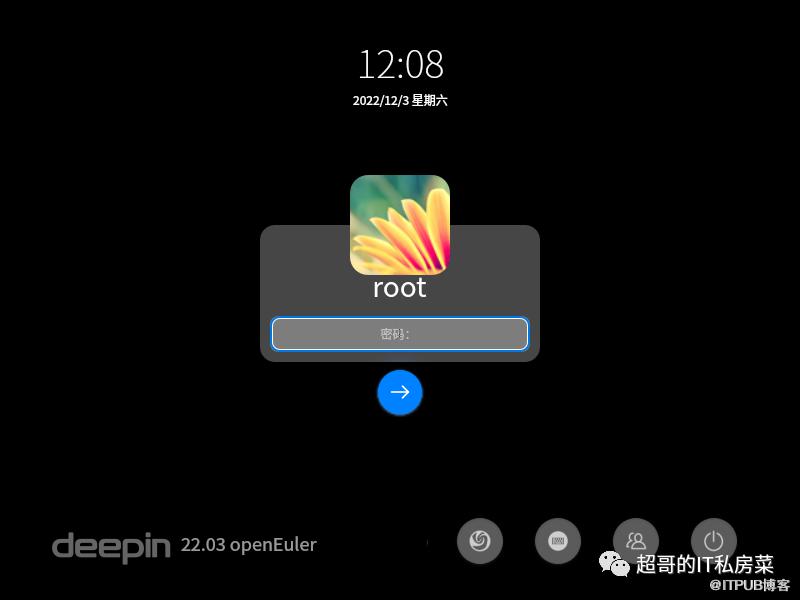
2.3 DDE图形界面

3 在 openEuler 上安装 XFCE
3.1 XFCE简介
XFCE是一款轻量级 Linux 桌面,当前版本已经将所有部件从 GTK2 更新到 GTK3,从D-Dbus Glib更新到GDBus,大部分组件支持Object Introspection(简称 GI,用于产生与解析 C 程序库 API 元信息,以便于动态语言(或托管语言)绑定基于 C + GObject 的程序库)。优化用户体验,加入新特性,并修补大量BUG。与其它UI界面(GNOME、KDE)相比,XFCE占用的内存和CPU使用量非常小,给用户带来亲切和高效的使用体验。
XFCE支持x86_64和aarch64两种架构。
3.2 XFCE安装方法
安装时,建议新建一个管理员用户。
前提:下载openEuler ISO镜像并已安装系统。
更新软件源
# dnf update -y
示例命令如下:
[root@scfuture-21 ~]# dnf update -y
Last metadata expiration check: 0:45:19 ago on 2022年12月03日 星期六 11时09分36秒.
Dependencies resolved.
=============================================================================================================================
 Package                                             Architecture    Version                           Repository       Size
=============================================================================================================================
Upgrading:
 NetworkManager                                      x86_64          1:1.32.12-12.oe2203               update          2.2 M
 NetworkManager-config-server                        noarch          1:1.32.12-12.oe2203               update           12 k
 NetworkManager-libnm                                x86_64          1:1.32.12-12.oe2203               update          1.6 M
 acl                                                 x86_64          2.3.1-2.oe2203                    update           51 k
 atk                                                 x86_64          2.36.0-2.oe2203                   update          262 k
 atk-devel                                           x86_64          2.36.0-2.oe2203                   update          196 k
 augeas                                              x86_64          1.13.0-3.oe2203                   update          376 k
 authselect                                          x86_64          1.2.4-6.oe2203                    update          189 k
 bash                                                x86_64          5.1.8-6.oe2203                    update          1.2 M
 bc                                                  x86_64          1.07.1-11.oe2203                  update           89 k
 bind-libs                                           x86_64          32:9.16.23-11.oe2203              update          1.2 M
 bind-license                                        noarch          32:9.16.23-11.oe2203
  .
  .
  .
  vim-minimal-2:9.0-1.oe2203.x86_64
  wayland-1.19.91-4.oe2203.x86_64                                                           wayland-devel-1.19.91-4.oe2203.x86_64                                                     words-3.0-33.oe2203.noarch
  xz-5.2.5-2.oe2203.x86_64
  xz-devel-5.2.5-2.oe2203.x86_64                                                           xz-libs-5.2.5-2.oe2203.x86_64
  yajl-2.1.0-18.oe2203.x86_64
  yum-4.10.0-7.oe2203.noarch
  zlib-1.2.11-22.oe2203.x86_64
  zlib-devel-1.2.11-22.oe2203.x86_64
Installed:
  duktape-2.6.0-1.oe2203.x86_64            elfutils-extra-0.185-13.oe2203.x86_64   grub2-tools-efi-1:2.06-15.oe2203.x86_64
  kernel-5.10.0-60.68.0.93.oe2203.x86_64

Complete!
[root@scfuture-21 ~]#
安装字库
# dnf install dejavu-fonts liberation-fonts gnu-*-fonts google-*-fonts -y
示例命令如下:
[root@scfuture-21 ~]# dnf install dejavu-fonts liberation-fonts gnu-*-fonts google-*-fonts -y
Last metadata expiration check: 2:44:53 ago on 2022年12月03日 星期六 10时39分32秒.
Package dejavu-fonts-2.37-1.oe2203.noarch is already installed.
Package liberation-fonts-1:2.00.5-4.oe2203.noarch is already installed.
Package gnu-free-mono-fonts-20120503-21.oe2203.noarch is already installed.
Package gnu-free-sans-fonts-20120503-21.oe2203.noarch is already installed.
Package gnu-free-serif-fonts-20120503-21.oe2203.noarch is already installed.
Package google-droid-sans-fonts-20200215-1.oe2203.noarch is already installed.
Package google-noto-cjk-fonts-20170602-9.oe2203.noarch is already installed.
Package google-noto-emoji-fonts-20200916-3.oe2203.noarch is already installed.
Package google-noto-sans-cjk-ttc-fonts-20170602-9.oe2203.noarch is already installed.
Package google-noto-sans-fonts-20181223-1.oe2203.noarch is already installed.
Package google-noto-serif-cjk-ttc-fonts-20170602-9.oe2203.noarch is already installed.
Dependencies resolved.
================================================================================
 Package                              Arch   Version           Repository  Size
================================================================================
Installing:
 google-crosextra-carlito-fonts       noarch 1.103-1.0.20130920.oe2203
                                                               everything 817 k
 google-droid-kufi-fonts              noarch 20200215-1.oe2203 OS          70 k
 .
 .
 .
  google-noto-serif-malayalam-fonts-20181223-1.oe2203.noarch
  google-noto-serif-myanmar-fonts-20181223-1.oe2203.noarch
  google-noto-serif-myanmar-vf-fonts-20181223-1.oe2203.noarch
  google-noto-serif-sc-fonts-20170602-9.oe2203.noarch
  google-noto-serif-sinhala-fonts-20181223-1.oe2203.noarch
  google-noto-serif-sinhala-vf-fonts-20181223-1.oe2203.noarch
  google-noto-serif-tamil-fonts-20181223-1.oe2203.noarch
  google-noto-serif-tamil-slanted-fonts-20181223-1.oe2203.noarch
  google-noto-serif-tamil-slanted-vf-fonts-20181223-1.oe2203.noarch
  google-noto-serif-tamil-vf-fonts-20181223-1.oe2203.noarch
  google-noto-serif-tc-fonts-20170602-9.oe2203.noarch
  google-noto-serif-telugu-fonts-20181223-1.oe2203.noarch
  google-noto-serif-thai-fonts-20181223-1.oe2203.noarch
  google-noto-serif-thai-vf-fonts-20181223-1.oe2203.noarch
  google-noto-serif-tibetan-fonts-20181223-1.oe2203.noarch
  google-noto-serif-tibetan-vf-fonts-20181223-1.oe2203.noarch
  google-noto-serif-vf-fonts-20181223-1.oe2203.noarch
  google-roboto-slab-fonts-1.100263-0.9.20150923git.oe2203.noarch

Complete!
[root@scfuture-21 ~]#
安装Xorg
# dnf install xorg-* -y
示例命令如下:
[root@scfuture-21 ~]# dnf install xorg-* -y
Last metadata expiration check: 0:17:53 ago on 2022年12月03日 星期六 13时37分26秒.
Package xorg-x11-proto-devel-2021.5-1.oe2203.noarch is already installed.
Dependencies resolved.
================================================================================
 Package                            Arch   Version             Repository  Size
================================================================================
Installing:
 xorg-x11-apps                      x86_64 7.7-23.oe2203       everything 238 k
 xorg-x11-apps-debuginfo            x86_64 7.7-23.oe2203       debuginfo  554 k
 xorg-x11-apps-debugsource          x86_64 7.7-23.oe2203       debuginfo  246 k
 xorg-x11-apps-help                 x86_64 7.7-23.oe2203       everything  65 k
 xorg-x11-drivers                   x86_64 7.7-28.oe2203       OS         7.8 k
 xorg-x11-drv-ati                   x86_64 19.1.0-3.oe2203     OS         156 k
 xorg-x11-drv-ati-debuginfo         x86_64 19.1.0-3.oe2203     debuginfo  749 k
 xorg-x11-drv-ati-debugsource       x86_64 19.1.0-3.oe2203     debuginfo  222 k
 xorg-x11-drv-ati-help              noarch 19.1.0-3.oe2203     everything 329 k
 xorg-x11-drv-dummy                 x86_64 0.3.8-1.oe2203      OS          15 k
 xorg-x11-drv-dummy-debuginfo       x86_64 0.3.8-1.oe2203      debuginfo   47 k
 xorg-x11-drv-dummy-debugsource     x86_64 0.3.8-1.oe2203      debuginfo   16 k
 xorg-x11-drv-dummy-help            noarch 0.3.8-1.oe2203      everything  17 k
 xorg-x11-drv-evdev                 x86_64 2.10.6-4.oe2203     OS         113 k
.
.
.
  xorg-x11-xauth-help-1:1.1-1.oe2203.noarch
  xorg-x11-xbitmaps-1.1.2-1.oe2203.noarch
  xorg-x11-xinit-1.4.1-1.oe2203.x86_64
  xorg-x11-xinit-debuginfo-1.4.1-1.oe2203.x86_64
  xorg-x11-xinit-debugsource-1.4.1-1.oe2203.x86_64
  xorg-x11-xinit-help-1.4.1-1.oe2203.noarch
  xorg-x11-xkb-utils-7.7-30.oe2203.x86_64
  xorg-x11-xkb-utils-debuginfo-7.7-30.oe2203.x86_64
  xorg-x11-xkb-utils-debugsource-7.7-30.oe2203.x86_64
  xorg-x11-xkb-utils-devel-7.7-30.oe2203.x86_64
  xorg-x11-xkb-utils-help-7.7-30.oe2203.noarch
  xorg-x11-xtrans-devel-1.4.0-1.oe2203.noarch

Complete!
[root@scfuture-21 ~]#
安装XFCE及组件
# dnf install xfwm4 xfdesktop xfce4-* xfce4-*-plugin network-manager-applet *fonts -y
示例命令如下:
[root@scfuture-21 ~]# dnf install xfwm4 xfdesktop xfce4-* xfce4-*-plugin network-manager-applet *fonts -y
Last metadata expiration check: 0:02:19 ago on 2022年12月03日 星期六 13时56分02秒.
Package abattis-cantarell-fonts-0.301-1.oe2203.noarch is already installed.
Package xorg-x11-fonts-7.5-24.oe2203.noarch is already installed.
Dependencies resolved.
================================================================================
 Package                           Arch   Version              Repository  Size
================================================================================
Installing:
 bpg-algeti-fonts                  noarch 2.005-12.oe2203      OS          36 k
 bpg-chveulebrivi-fonts            noarch 3.002-12.oe2203      OS          29 k
 bpg-classic-fonts                 noarch 8.500-12.oe2203      everything  25 k
 bpg-courier-fonts                 noarch 4.002-12.oe2203      OS          31 k
 bpg-courier-s-fonts               noarch 4.000-12.oe2203      OS          51 k
 bpg-dedaena-block-fonts           noarch 3.005-12.oe2203      everything  36 k
 bpg-dejavu-sans-fonts             noarch 2.28-12.oe2203       everything  34 k
 bpg-elite-fonts                   noarch 3.000-12.oe2203      OS          35 k
 bpg-excelsior-caps-fonts          noarch 2.003-12.oe2203      everything  87 k
 bpg-excelsior-fonts               noarch 2.03-12.oe2203       OS          24 k
 bpg-glaho-fonts                   noarch 9.000-12.oe2203      OS          29 k
 bpg-irubaqidze-fonts              noarch 1.000-12.oe2203      everything  29 k
 bpg-mikhail-stephan-fonts         noarch 2.500-12.oe2203      everything  35 k
 bpg-mrgvlovani-fonts              noarch 1.002-12.oe2203      everything  61 k
 bpg-nino-medium-fonts             noarch 4.005-12.oe2203      OS          33 k
 bpg-sans-fonts                    noarch 1.005-12.oe2203      OS         122 k
 bpg-sans-modern-fonts             noarch 2.025-12.oe2203      OS          34 k
 bpg-serif-modern-fonts            noarch 2.028-12.oe2203      OS          44 k
 bpg-ucnobi-fonts                  noarch 3.300-12.oe2203      everything  35 k
.
.
.
  xfce4-volumed-pulse-debugsource-0.2.3-2.oe2203.x86_64
  xfce4-wavelan-plugin-0.6.2-1.oe2203.x86_64
  xfce4-wavelan-plugin-debuginfo-0.6.2-1.oe2203.x86_64
  xfce4-wavelan-plugin-debugsource-0.6.2-1.oe2203.x86_64
  xfce4-weather-plugin-0.11.0-1.oe2203.x86_64
  xfce4-weather-plugin-debuginfo-0.11.0-1.oe2203.x86_64
  xfce4-weather-plugin-debugsource-0.11.0-1.oe2203.x86_64
  xfce4-whiskermenu-plugin-2.5.3-1.oe2203.x86_64
  xfce4-whiskermenu-plugin-debuginfo-2.5.3-1.oe2203.x86_64
  xfce4-whiskermenu-plugin-debugsource-2.5.3-1.oe2203.x86_64
  xfce4-xkb-plugin-0.8.2-1.oe2203.x86_64
  xfce4-xkb-plugin-debuginfo-0.8.2-1.oe2203.x86_64
  xfce4-xkb-plugin-debugsource-0.8.2-1.oe2203.x86_64
  xfconf-4.16.0-1.oe2203.x86_64
  xfconf-devel-4.16.0-1.oe2203.x86_64
  xfdesktop-4.16.0-1.oe2203.x86_64
  xfwm4-4.16.0-1.oe2203.x86_64
  zziplib-0.13.71-3.oe2203.x86_64

Complete!
[root@scfuture-21 ~]#
安装登录管理器
# dnf install lightdm lightdm-gtk -y
示例命令如下:
[root@scfuture-21 ~]# dnf install lightdm lightdm-gtk -y
Last metadata expiration check: 0:28:32 ago on 2022年12月03日 星期六 13时56分02秒.
Dependencies resolved.
================================================================================
 Package                    Arch        Version               Repository   Size
================================================================================
Installing:
 lightdm                    x86_64      1.30.0-13.oe2203      EPOL        193 k
 lightdm-gtk                x86_64      2.0.8-1.oe2203        EPOL        123 k
Installing dependencies:
 accountsservice            x86_64      0.6.55-1.oe2203       OS          113 k
 gnome-themes-standard      x86_64      3.27.90-4.oe2203      OS          2.9 M
 lightdm-gobject            x86_64      1.30.0-13.oe2203      EPOL         56 k
 systemd-pam                x86_64      249-42.oe2203         update      200 k

Transaction Summary
================================================================================
Install  6 Packages

Total download size: 3.5 M
Installed size: 6.3 M
Downloading Packages:
(1/6): accountsservice-0.6.55-1.oe2203.x86_64.r 553 kB/s | 113 kB     00:00
(2/6): lightdm-1.30.0-13.oe2203.x86_64.rpm      788 kB/s | 193 kB     00:00
(3/6): lightdm-gobject-1.30.0-13.oe2203.x86_64. 1.2 MB/s |  56 kB     00:00
(4/6): lightdm-gtk-2.0.8-1.oe2203.x86_64.rpm    2.5 MB/s | 123 kB     00:00
(5/6): systemd-pam-249-42.oe2203.x86_64.rpm     2.2 MB/s | 200 kB     00:00
(6/6): gnome-themes-standard-3.27.90-4.oe2203.x 3.1 MB/s | 2.9 MB     00:00
--------------------------------------------------------------------------------
Total                                           3.8 MB/s | 3.5 MB     00:00
Running transaction check
Transaction check succeeded.
Running transaction test
Transaction test succeeded.
Running transaction
  Preparing        :                                                        1/1
  Installing       : systemd-pam-249-42.oe2203.x86_64                       1/6
  Installing       : gnome-themes-standard-3.27.90-4.oe2203.x86_64          2/6
  Installing       : accountsservice-0.6.55-1.oe2203.x86_64                 3/6
  Running scriptlet: accountsservice-0.6.55-1.oe2203.x86_64                 3/6
Created symlink /etc/systemd/system/graphical.target.wants/accounts-daemon.service → /usr/lib/systemd/system/accounts-daemon.service.

  Installing       : lightdm-gobject-1.30.0-13.oe2203.x86_64                4/6
  Running scriptlet: lightdm-1.30.0-13.oe2203.x86_64                        5/6
  Installing       : lightdm-1.30.0-13.oe2203.x86_64                        5/6
  Running scriptlet: lightdm-1.30.0-13.oe2203.x86_64                        5/6
Created symlink /etc/systemd/system/display-manager.service → /usr/lib/systemd/system/lightdm.service.

  Running scriptlet: lightdm-gtk-2.0.8-1.oe2203.x86_64                      6/6
  Installing       : lightdm-gtk-2.0.8-1.oe2203.x86_64                      6/6
  Running scriptlet: lightdm-gtk-2.0.8-1.oe2203.x86_64                      6/6
  Verifying        : accountsservice-0.6.55-1.oe2203.x86_64                 1/6
  Verifying        : gnome-themes-standard-3.27.90-4.oe2203.x86_64          2/6
  Verifying        : lightdm-1.30.0-13.oe2203.x86_64                        3/6
  Verifying        : lightdm-gobject-1.30.0-13.oe2203.x86_64                4/6
  Verifying        : lightdm-gtk-2.0.8-1.oe2203.x86_64                      5/6
  Verifying        : systemd-pam-249-42.oe2203.x86_64                       6/6

Installed:
  accountsservice-0.6.55-1.oe2203.x86_64
  gnome-themes-standard-3.27.90-4.oe2203.x86_64
  lightdm-1.30.0-13.oe2203.x86_64
  lightdm-gobject-1.30.0-13.oe2203.x86_64
  lightdm-gtk-2.0.8-1.oe2203.x86_64
  systemd-pam-249-42.oe2203.x86_64

Complete!
[root@scfuture-21 ~]#
设置默认桌面为XFCE 通过root权限用户设置
# echo 'user-session=xfce' >> /etc/lightdm/lightdm.conf.d/60-lightdm-gtk-greeter.conf
示例命令如下:
[root@scfuture-21 ~]# echo 'user-session=xfce' >> /etc/lightdm/lightdm.conf.d/60-lightdm-gtk-greeter.conf
[root@scfuture-21 ~]#
使用登录管理器登录XFCE
# systemctl start lightdm
登录管理器启动后,在右上角左侧选择"xfce-session" 输入用户名、密码登录
示例命令如下:
[root@scfuture-21 ~]# systemctl start lightdm
[root@scfuture-21 ~]#
设置开机自启动图形界面
# systemctl enable lightdm
# systemctl set-default graphical.target
示例命令如下:
[root@scfuture-21 ~]# systemctl enable lightdm
[root@scfuture-21 ~]#
[root@scfuture-21 ~]# systemctl set-default graphical.target
Removed /etc/systemd/system/default.target.
Created symlink /etc/systemd/system/default.target → /usr/lib/systemd/system/graphical.target.
[root@scfuture-21 ~]#
重启验证
# reboot
示例命令如下:
[root@scfuture-21 ~]# reboot
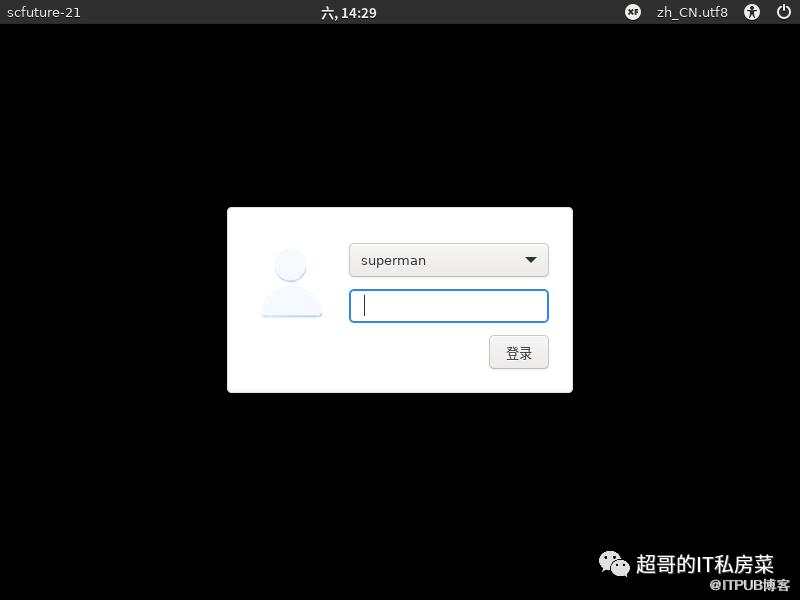
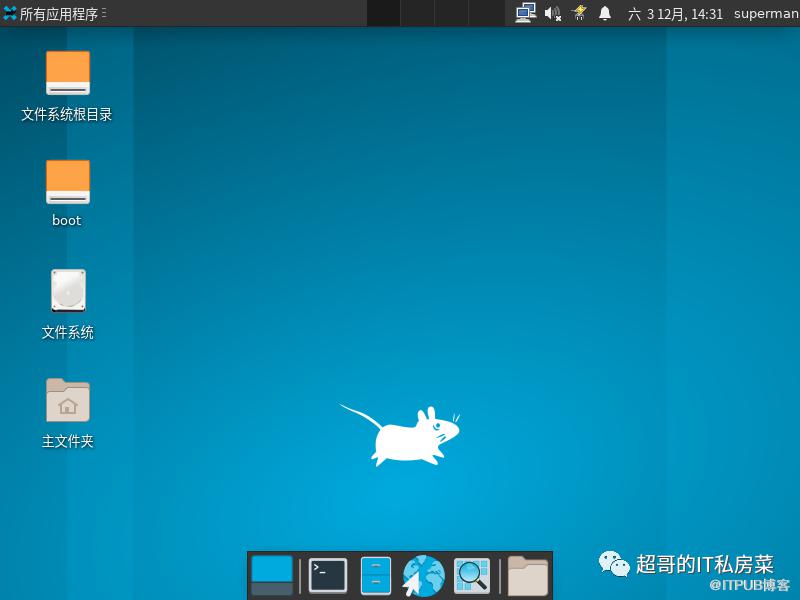
3.3 XFCE图形界面
3.4 问题处理
异常问题:
dm登录界面背景是黑色的?
问题原因:
登录界面是黑色的是因为lghtdm-gtk默认配置文件/etc/lightdm/lightdm-gtk-greeter.conf中没有设置background。
# grep background /etc/lightdm/lightdm-gtk-greeter.conf
示例命令如下:
[root@scfuture-21 ~]# grep background /etc/lightdm/lightdm-gtk-greeter.conf
#  background = Background file to use, either an image path or a color (e.g. #772953)
#  user-background = false|true ("true" by default)  Display user background (if available)
#  transition-duration = Length of time (in milliseconds) to transition betweenbackground images ("500" by default)
#  background = overrides default value
#  user-background = overrides default value
#background=
#user-background=
[root@scfuture-21 ~]#
问题解决:
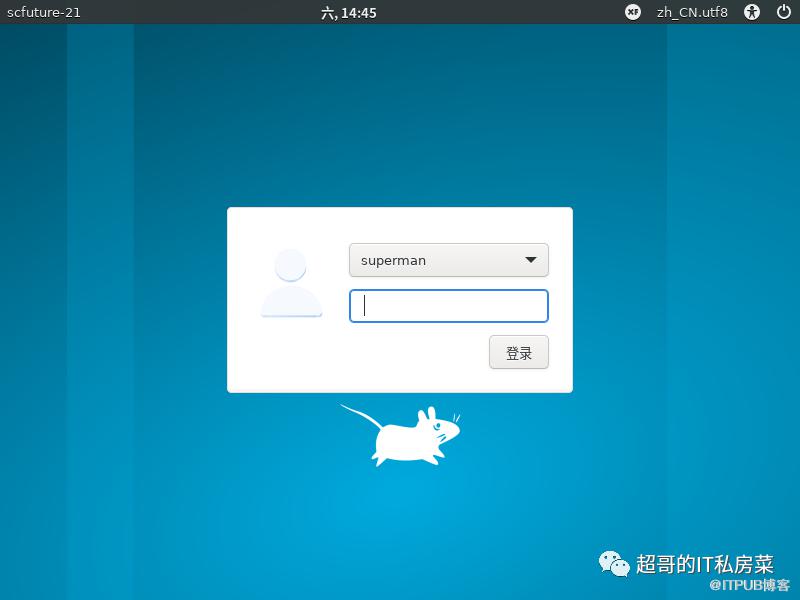
在该配置文件最后的[greeter]段中设置 background=/usr/share/backgrounds/xfce/xfce-blue.jpg;然后systemctl restart lightdm 就可以看到背景了。
# vi /etc/lightdm/lightdm-gtk-greeter.conf
# systemctl restart lightdm
示例命令如下:
[root@scfuture-21 ~]# cat /etc/lightdm/lightdm-gtk-greeter.conf
# LightDM GTK+ Configuration
# Available configuration options listed below.
#
# Appearance:
#  theme-name = GTK+ theme to use
#  icon-theme-name = Icon theme to use
#  cursor-theme-name = Cursor theme to use
#  cursor-theme-size = Cursor size to use
#  background = Background file to use, either an image path or a color (e.g. #772953)
#  user-background = false|true ("true" by default)  Display user background (if available)
#  transition-duration = Length of time (in milliseconds) to transition between background images ("500" by default)
#  transition-type = ease-in-out|linear|none  ("ease-in-out" by default)
#
# Fonts:
#  font-name = Font to use
#  xft-antialias = false|true  Whether to antialias Xft fonts
#  xft-dpi = Resolution for Xft in dots per inch (e.g. 96)
#  xft-hintstyle = none|slight|medium|hintfull  What degree of hinting to use
#  xft-rgba = none|rgb|bgr|vrgb|vbgr  Type of subpixel antialiasing
#
# Login window:
#  active-monitor = Monitor to display greeter window (name or number). Use #cursor value to display greeter at monitor with cursor. Can be a semicolon separated list
#  position = x y ("50% 50%" by default)  Login window position
#  default-user-image = Image used as default user icon, path or #icon-name
#  hide-user-image = false|true ("false" by default)
#
# Panel:
#  panel-position = top|bottom ("top" by default)
#  clock-format = strftime-format string, e.g. %H:%M
#  indicators = semi-colon ";" separated list of allowed indicator modules. Built-in indicators include "~a11y", "~language", "~session", "~power", "~clock", "~host", "~spacer". Unity indicators can be represented by short name (e.g. "sound", "power"), service file name, or absolute path
#
# Accessibility:
#  a11y-states = states of accessibility features: "name" - save state on exit, "-name" - disabled at start (default value for unlisted), "+name" - enabled at start. Allowed names: contrast, font, keyboard, reader.
#  keyboard = command to launch on-screen keyboard (e.g. "onboard")
#  keyboard-position = x y[;width height] ("50%,center -0;50% 25%" by default)  Works only for "onboard"
#  reader = command to launch screen reader (e.g. "orca")
#  at-spi-enabled = false|true ("true" by default) Enables accessibility at-spi-command if the greeter is built with it enabled
#
# Security:
#  allow-debugging = false|true ("false" by default)
#  screensaver-timeout = Timeout (in seconds) until the screen blanks when the greeter is called as lockscreen
#
# Template for per-monitor configuration:
#  [monitor: name]
#  background = overrides default value
#  user-background = overrides default value
#  laptop = false|true ("false" by default) Marks monitor as laptop display
#  transition-duration = overrides default value
#
[greeter]
background=/usr/share/backgrounds/xfce/xfce-blue.jpg
#user-background=
#theme-name=
#icon-theme-name=
#font-name=
#xft-antialias=
#xft-dpi=
#xft-hintstyle=
#xft-rgba=
#indicators=
#clock-format=
#keyboard=
#reader=
#position=
#screensaver-timeout=
[root@scfuture-21 ~]#
处理后结果:
4 在 openEuler 上安装 GNOME
4.1 GNOME简介
GNOME是运行在类Unix操作系统中最常用桌面环境。是一个功能完善、操作简单,界面友好,集使用和开发为一身的桌面环境,是GNU计划的正式桌面。
从用户的角度看,GNOME是一个集成桌面环境和应用程序的套件。从开发者的角度看,它是一个应用程序开发框架(由数目众多的实用函数库组成)。即使用户不运行GNOME桌面环境,用GNOME编写的应用程序也可以正常运行。
GNOME既包含文件管理器,应用商店,文本编辑器等基础软件,也包含系统采样分析,系统日志,软件工程IDE,web浏览器,简洁虚拟机监视器,开发者文档浏览器等高级应用和工具。
4.2 GNOME安装方法
安装时,建议新建一个管理员用户。
前提:下载openEuler ISO镜像并安装系统,更新软件源(需要配置Everything源,以及EPOL源,下面命令是在最小化安装系统的情况下安装GNOME)
更新软件源
# dnf update -y
示例命令如下:
[root@scfuture-21 ~]# dnf update -y
OS                                               43 kB/s | 3.8 kB     00:00
everything                                       44 kB/s | 3.8 kB     00:00
EPOL                                             34 kB/s | 3.0 kB     00:00
debuginfo                                        45 kB/s | 3.8 kB     00:00
source                                           42 kB/s | 3.8 kB     00:00
update                                           42 kB/s | 3.5 kB     00:00
update                                           16 MB/s |  28 MB     00:01
Dependencies resolved.
================================================================================
 Package                               Arch   Version              Repo    Size
================================================================================
Upgrading:
 NetworkManager                        x86_64 1:1.32.12-12.oe2203  update 2.2 M
 NetworkManager-config-server          noarch 1:1.32.12-12.oe2203  update  12 k
 NetworkManager-libnm                  x86_64 1:1.32.12-12.oe2203  update 1.6 M
 acl                                   x86_64 2.3.1-2.oe2203       update  51 k
 atk                                   x86_64 2.36.0-2.oe2203      update 262 k
 atk-devel                             x86_64 2.36.0-2.oe2203      update 196 k
 augeas                                x86_64 1.13.0-3.oe2203      update 376 k
 authselect                            x86_64 1.2.4-6.oe2203       update 189 k
 bash                                  x86_64 5.1.8-6.oe2203       update 1.2 M
 bc                                    x86_64 1.07.1-11.oe2203     update  89 k
 bind-libs                             x86_64 32:9.16.23-11.oe2203 update 1.2 M
 bind-license                          noarch 32:9.16.23-11.oe2203 update  18 k
 bind-utils                            x86_64 32:9.16.23-11.oe2203 update 178 k
 bluez-libs                            x86_64 5.54-15.oe2203       update  56 k
.
.
.
  selinux-policy-35.5-13.oe2203.noarch
  selinux-policy-targeted-35.5-13.oe2203.noarch
  sqlite-3.37.2-3.oe2203.x86_64
  sssd-2.6.1-4.oe2203.x86_64
  sudo-1.9.8p2-4.oe2203.x86_64
  systemd-249-42.oe2203.x86_64
  systemd-container-249-42.oe2203.x86_64
  systemd-help-249-42.oe2203.noarch
  systemd-libs-249-42.oe2203.x86_64
  systemd-udev-249-42.oe2203.x86_64
  tcl-1:8.6.10-4.oe2203.x86_64
  tcpdump-14:4.99.1-4.oe2203.x86_64
  time-1.9-8.oe2203.x86_64
  tzdata-2022a-7.oe2203.noarch
  unbound-libs-1.13.2-6.oe2203.x86_64
  unzip-6.0-50.oe2203.x86_64
  vim-common-2:9.0-1.oe2203.x86_64
  vim-enhanced-2:9.0-1.oe2203.x86_64
  vim-filesystem-2:9.0-1.oe2203.noarch
  vim-minimal-2:9.0-1.oe2203.x86_64
  wayland-1.19.91-4.oe2203.x86_64
  wayland-devel-1.19.91-4.oe2203.x86_64
  words-3.0-33.oe2203.noarch
  xz-5.2.5-2.oe2203.x86_64
  xz-devel-5.2.5-2.oe2203.x86_64
  xz-libs-5.2.5-2.oe2203.x86_64
  yajl-2.1.0-18.oe2203.x86_64
  yum-4.10.0-7.oe2203.noarch
  zlib-1.2.11-22.oe2203.x86_64
  zlib-devel-1.2.11-22.oe2203.x86_64
Installed:
  duktape-2.6.0-1.oe2203.x86_64
  elfutils-extra-0.185-13.oe2203.x86_64
  grub2-tools-efi-1:2.06-15.oe2203.x86_64
  kernel-5.10.0-60.68.0.93.oe2203.x86_64

Complete!
[root@scfuture-21 ~]#
安装字库
# dnf install dejavu-fonts liberation-fonts gnu-*-fonts google-*-fonts -y
示例命令如下:
[root@scfuture-21 ~]# dnf install dejavu-fonts liberation-fonts gnu-*-fonts google-*-fonts -y
Last metadata expiration check: 0:06:39 ago on 2022年12月03日 星期六 15时05分15秒.
Dependencies resolved.
================================================================================
 Package                              Arch   Version           Repository  Size
================================================================================
Installing:
 dejavu-fonts                         noarch 2.37-1.oe2203     OS         5.1 M
 gnu-free-mono-fonts                  noarch 20120503-21.oe2203
                                                               OS         428 k
 gnu-free-sans-fonts                  noarch 20120503-21.oe2203
                                                               OS         752 k
 gnu-free-serif-fonts                 noarch 20120503-21.oe2203
                                                               OS         1.5 M
 google-crosextra-carlito-fonts       noarch 1.103-1.0.20130920.oe2203
                                                               everything 817 k
 google-droid-kufi-fonts              noarch 20200215-1.oe2203 OS          70 k
 google-droid-sans-fonts              noarch 20200215-1.oe2203 OS         2.4 M
 google-droid-sans-mono-fonts         noarch 20200215-1.oe2203 OS          81 k
 google-droid-serif-fonts             noarch 20200215-1.oe2203 OS         517 k
 google-noto-cjk-fonts                noarch 20170602-9.oe2203 OS          10 k
 google-noto-emoji-fonts              noarch 20200916-3.oe2203 OS          10 M
 google-noto-kufi-arabic-fonts        noarch 20181223-1.oe2203 everything  70 k
 google-noto-music-fonts              noarch 20181223-1.oe2203 everything  51 k
 google-noto-naskh-arabic-fonts       noarch 20181223-1.oe2203 everything 198 k
 google-noto-naskh-arabic-ui-fonts    noarch 20181223-1.oe2203 everything 205 k
 google-noto-nastaliq-urdu-fonts      noarch 20181223-1.oe2203 everything 315 k
 google-noto-sans-adlam-fonts         noarch 20181223-1.oe2203 everything  41 k
.
.
.
  google-noto-serif-gurmukhi-vf-fonts-20181223-1.oe2203.noarch
  google-noto-serif-hebrew-fonts-20181223-1.oe2203.noarch
  google-noto-serif-hebrew-vf-fonts-20181223-1.oe2203.noarch
  google-noto-serif-jp-fonts-20170602-9.oe2203.noarch
  google-noto-serif-kannada-fonts-20181223-1.oe2203.noarch
  google-noto-serif-kannada-vf-fonts-20181223-1.oe2203.noarch
  google-noto-serif-khmer-fonts-20181223-1.oe2203.noarch
  google-noto-serif-khmer-vf-fonts-20181223-1.oe2203.noarch
  google-noto-serif-kr-fonts-20170602-9.oe2203.noarch
  google-noto-serif-lao-fonts-20181223-1.oe2203.noarch
  google-noto-serif-lao-vf-fonts-20181223-1.oe2203.noarch
  google-noto-serif-malayalam-fonts-20181223-1.oe2203.noarch
  google-noto-serif-myanmar-fonts-20181223-1.oe2203.noarch
  google-noto-serif-myanmar-vf-fonts-20181223-1.oe2203.noarch
  google-noto-serif-sc-fonts-20170602-9.oe2203.noarch
  google-noto-serif-sinhala-fonts-20181223-1.oe2203.noarch
  google-noto-serif-sinhala-vf-fonts-20181223-1.oe2203.noarch
  google-noto-serif-tamil-fonts-20181223-1.oe2203.noarch
  google-noto-serif-tamil-slanted-fonts-20181223-1.oe2203.noarch
  google-noto-serif-tamil-slanted-vf-fonts-20181223-1.oe2203.noarch
  google-noto-serif-tamil-vf-fonts-20181223-1.oe2203.noarch
  google-noto-serif-tc-fonts-20170602-9.oe2203.noarch
  google-noto-serif-telugu-fonts-20181223-1.oe2203.noarch
  google-noto-serif-thai-fonts-20181223-1.oe2203.noarch
  google-noto-serif-thai-vf-fonts-20181223-1.oe2203.noarch
  google-noto-serif-tibetan-fonts-20181223-1.oe2203.noarch
  google-noto-serif-tibetan-vf-fonts-20181223-1.oe2203.noarch
  google-noto-serif-vf-fonts-20181223-1.oe2203.noarch
  google-roboto-slab-fonts-1.100263-0.9.20150923git.oe2203.noarch
  liberation-fonts-1:2.00.5-4.oe2203.noarch

Complete!
[root@scfuture-21 ~]#
安装Xorg
# dnf install xorg-* -y
示例命令如下:
[root@scfuture-21 ~]# dnf install xorg-* -y
Last metadata expiration check: 0:38:02 ago on 2022年12月03日 星期六 15时05分15秒.
Package xorg-x11-proto-devel-2021.5-1.oe2203.noarch is already installed.
Dependencies resolved.
================================================================================
 Package                            Arch   Version             Repository  Size
================================================================================
Installing:
 xorg-x11-apps                      x86_64 7.7-23.oe2203       everything 238 k
 xorg-x11-apps-debuginfo            x86_64 7.7-23.oe2203       debuginfo  554 k
 xorg-x11-apps-debugsource          x86_64 7.7-23.oe2203       debuginfo  246 k
 xorg-x11-apps-help                 x86_64 7.7-23.oe2203       everything  65 k
 xorg-x11-drivers                   x86_64 7.7-28.oe2203       OS         7.8 k
 xorg-x11-drv-ati                   x86_64 19.1.0-3.oe2203     OS         156 k
 xorg-x11-drv-ati-debuginfo         x86_64 19.1.0-3.oe2203     debuginfo  749 k
 xorg-x11-drv-ati-debugsource       x86_64 19.1.0-3.oe2203     debuginfo  222 k
 xorg-x11-drv-ati-help              noarch 19.1.0-3.oe2203     everything 329 k
 xorg-x11-drv-dummy                 x86_64 0.3.8-1.oe2203      OS          15 k
 xorg-x11-drv-dummy-debuginfo       x86_64 0.3.8-1.oe2203      debuginfo   47 k
 xorg-x11-drv-dummy-debugsource     x86_64 0.3.8-1.oe2203      debuginfo   16 k
.
.
.
  xorg-x11-util-macros-1.19.3-1.oe2203.noarch
  xorg-x11-utils-7.5-31.oe2203.x86_64
  xorg-x11-utils-debuginfo-7.5-31.oe2203.x86_64
  xorg-x11-utils-debugsource-7.5-31.oe2203.x86_64
  xorg-x11-utils-help-7.5-31.oe2203.noarch
  xorg-x11-xauth-1:1.1-1.oe2203.x86_64
  xorg-x11-xauth-debuginfo-1:1.1-1.oe2203.x86_64
  xorg-x11-xauth-debugsource-1:1.1-1.oe2203.x86_64
  xorg-x11-xauth-help-1:1.1-1.oe2203.noarch
  xorg-x11-xbitmaps-1.1.2-1.oe2203.noarch
  xorg-x11-xinit-1.4.1-1.oe2203.x86_64
  xorg-x11-xinit-debuginfo-1.4.1-1.oe2203.x86_64
  xorg-x11-xinit-debugsource-1.4.1-1.oe2203.x86_64
  xorg-x11-xinit-help-1.4.1-1.oe2203.noarch
  xorg-x11-xkb-utils-7.7-30.oe2203.x86_64
  xorg-x11-xkb-utils-debuginfo-7.7-30.oe2203.x86_64
  xorg-x11-xkb-utils-debugsource-7.7-30.oe2203.x86_64
  xorg-x11-xkb-utils-devel-7.7-30.oe2203.x86_64
  xorg-x11-xkb-utils-help-7.7-30.oe2203.noarch
  xorg-x11-xtrans-devel-1.4.0-1.oe2203.noarch

Complete!
[root@scfuture-21 ~]#
这可能会安装很多没用的包,可以使用下面的命令安装必要的xorg相关包
# dnf install xorg-x11-apps xorg-x11-drivers xorg-x11-drv-ati \
	xorg-x11-drv-dummy xorg-x11-drv-evdev xorg-x11-drv-fbdev xorg-x11-drv-intel \
	xorg-x11-drv-libinput xorg-x11-drv-nouveau xorg-x11-drv-qxl \
	xorg-x11-drv-synaptics-legacy xorg-x11-drv-v4l xorg-x11-drv-vesa \
	xorg-x11-drv-vmware xorg-x11-drv-wacom xorg-x11-fonts xorg-x11-fonts-others \
	xorg-x11-font-utils xorg-x11-server xorg-x11-server-utils xorg-x11-server-Xephyr \
	xorg-x11-server-Xspice xorg-x11-util-macros xorg-x11-utils xorg-x11-xauth \
	xorg-x11-xbitmaps xorg-x11-xinit xorg-x11-xkb-utils -y
示例命令如下:
[root@scfuture-21 ~]# dnf install xorg-x11-apps xorg-x11-drivers xorg-x11-drv-ati \
> xorg-x11-drv-dummy xorg-x11-drv-evdev xorg-x11-drv-fbdev xorg-x11-drv-intel \
> xorg-x11-drv-libinput xorg-x11-drv-nouveau xorg-x11-drv-qxl \
> xorg-x11-drv-synaptics-legacy xorg-x11-drv-v4l xorg-x11-drv-vesa \
> xorg-x11-drv-vmware xorg-x11-drv-wacom xorg-x11-fonts xorg-x11-fonts-others \
> xorg-x11-font-utils xorg-x11-server xorg-x11-server-utils xorg-x11-server-Xephyr \
> xorg-x11-server-Xspice xorg-x11-util-macros xorg-x11-utils xorg-x11-xauth \
> xorg-x11-xbitmaps xorg-x11-xinit xorg-x11-xkb-utils -y
Last metadata expiration check: 0:02:04 ago on 2022年12月03日 星期六 15时45分35秒.
Dependencies resolved.
================================================================================
 Package                        Arch    Version               Repository   Size
================================================================================
Installing:
 xorg-x11-apps                  x86_64  7.7-23.oe2203         everything  238 k
 xorg-x11-drivers               x86_64  7.7-28.oe2203         OS          7.8 k
 xorg-x11-drv-ati               x86_64  19.1.0-3.oe2203       OS          156 k
 xorg-x11-drv-dummy             x86_64  0.3.8-1.oe2203        OS           15 k
 xorg-x11-drv-evdev             x86_64  2.10.6-4.oe2203       OS          113 k
 xorg-x11-drv-fbdev             x86_64  0.5.0-5.oe2203        OS           28 k
 xorg-x11-drv-intel             x86_64  2.99.917-45.oe2203    OS          662 k
 xorg-x11-drv-libinput          x86_64  1.2.0-1.oe2203        OS           70 k
 xorg-x11-drv-nouveau           x86_64  1:1.0.17-1.oe2203     OS          285 k
 xorg-x11-drv-qxl               x86_64  0.1.5-14.oe2203       OS           86 k
 xorg-x11-drv-synaptics-legacy  x86_64  1.9.1-3.oe2203        EPOL         67 k
 xorg-x11-drv-v4l               x86_64  0.3.0-1.oe2203        OS           17 k
 xorg-x11-drv-vesa              x86_64  2.5.0-1.oe2203        OS           20 k
 xorg-x11-drv-vmware            x86_64  13.3.0-2.oe2203       OS           77 k
 xorg-x11-drv-wacom             x86_64  0.40.0-1.oe2203       OS           91 k
 xorg-x11-font-utils            x86_64  1:7.5-43.oe2203       OS           85 k
 xorg-x11-fonts                 noarch  7.5-24.oe2203         OS           15 M
 xorg-x11-fonts-others          noarch  7.5-24.oe2203         OS          7.4 M
 xorg-x11-server                x86_64  1.20.11-12.oe2203     update      1.4 M
 xorg-x11-server-Xephyr         x86_64  1.20.11-12.oe2203     update      966 k
 xorg-x11-server-Xspice         x86_64  0.1.5-14.oe2203       everything  100 k
 xorg-x11-server-utils          x86_64  7.7-29.oe2203         OS          130 k
 xorg-x11-util-macros           noarch  1.19.3-1.oe2203       everything   53 k
 xorg-x11-utils                 x86_64  7.5-31.oe2203         OS          100 k
 xorg-x11-xauth                 x86_64  1:1.1-1.oe2203        OS           27 k
 xorg-x11-xbitmaps              noarch  1.1.2-1.oe2203        everything   43 k
 xorg-x11-xinit                 x86_64  1.4.1-1.oe2203        OS           50 k
 xorg-x11-xkb-utils             x86_64  7.7-30.oe2203         update      162 k
Installing dependencies:
 alsa-lib                       x86_64  1.2.5.1-1.oe2203      OS          454 k
 autoconf                       noarch  2.71-2.oe2203         OS          663 k
 automake                       noarch  1.16.5-3.oe2203       OS          460 k
 cdparanoia-libs                x86_64  10.2-31.oe2203        OS           49 k
 graphene                       x86_64  1.10.6-1.oe2203       OS           59 k
 gstreamer1                     x86_64  1.19.3-1.oe2203       OS          1.3 M
 gstreamer1-plugins-base        x86_64  1.18.4-3.oe2203       OS          2.0 M
 iso-codes                      noarch  4.7.0-1.oe2203        OS          3.7 M
 libICE                         x86_64  1.0.10-4.oe2203       update       53 k
 libSM                          x86_64  1.2.3-4.oe2203        update       23 k
 libXScrnSaver                  x86_64  1.2.3-4.oe2203        OS           14 k
 libXaw                         x86_64  1.0.14-1.oe2203       OS          160 k
 libXdmcp                       x86_64  1.1.3-4.oe2203        update       19 k
 libXfont2                      x86_64  2.0.5-1.oe2203        OS          144 k
 libXmu                         x86_64  1.1.3-1.oe2203        OS           54 k
 libXpm                         x86_64  3.5.13-1.oe2203       OS           41 k
 libXt                          x86_64  1.2.1-1.oe2203        OS          168 k
 libXv                          x86_64  1.0.11-11.oe2203      OS           17 k
 libXvMC                        x86_64  1.0.12-1.oe2203       OS           21 k
 libXxf86dga                    x86_64  1.1.5-1.oe2203        OS           18 k
 libXxf86vm                     x86_64  1.1.4-13.oe2203       OS           16 k
 libdmx                         x86_64  1.1.4-6.oe2203        OS           15 k
 libevdev                       x86_64  1.11.0-2.oe2203       OS           38 k
 libfontenc                     x86_64  1.1.4-2.oe2203        OS           19 k
 libglvnd                       x86_64  1:1.3.4-2.oe2203      OS           64 k
 libglvnd-egl                   x86_64  1:1.3.4-2.oe2203      OS           39 k
 libglvnd-glx                   x86_64  1:1.3.4-2.oe2203      OS          112 k
 libgudev                       x86_64  237-1.oe2203          OS           32 k
 libinput                       x86_64  1.19.2-2.oe2203       update      187 k
 libogg                         x86_64  2:1.3.5-1.oe2203      OS           31 k
 libtheora                      x86_64  1:1.1.1-25.oe2203     OS          157 k
 libtool                        x86_64  2.4.6-34.oe2203       OS          584 k
 libunwind                      x86_64  2:1.5.0-2.oe2203      update       54 k
 libvisual                      x86_64  1:0.4.0-27.oe2203     OS          149 k
 libvorbis                      x86_64  1:1.3.7-2.oe2203      OS          182 k
 libwacom                       x86_64  1.12-1.oe2203         OS           44 k
 libwacom-data                  noarch  1.12-1.oe2203         OS           99 k
 libxkbfile                     x86_64  1.1.0-4.oe2203        update       84 k
 libxshmfence                   x86_64  1.3-7.oe2203          update       12 k
 llvm-libs                      x86_64  12.0.1-2.oe2203       OS           23 M
 mcpp                           x86_64  2.7.2-28.oe2203       OS           77 k
 mesa-libEGL                    x86_64  21.3.1-1.oe2203       OS          104 k
 mesa-libGL                     x86_64  21.3.1-1.oe2203       OS          139 k
 mesa-libgbm                    x86_64  21.3.1-1.oe2203       OS           32 k
 mesa-libglapi                  x86_64  21.3.1-1.oe2203       OS           31 k
 mesa-libxatracker              x86_64  21.3.1-1.oe2203       OS          1.9 M
 mtdev                          x86_64  1.1.6-2.oe2203        OS           19 k
 opus                           x86_64  1.3.1-3.oe2203        update      205 k
 orc                            x86_64  0.4.32-1.oe2203       OS          161 k
 sgml-common                    noarch  0.6.3-51.oe2203       OS           53 k
 spice-server                   x86_64  0.14.3-3.oe2203       everything  364 k
 xcb-util                       x86_64  0.4.0-13.oe2203       OS           16 k
 xcb-util-image                 x86_64  0.4.0-12.oe2203       OS           17 k
 xcb-util-keysyms               x86_64  0.4.0-10.oe2203       OS           13 k
 xcb-util-renderutil            x86_64  0.3.9-13.oe2203       OS           16 k
 xcb-util-wm                    x86_64  0.4.1-15.oe2203       OS           28 k
 xorg-x11-server-common         x86_64  1.20.11-12.oe2203     update       26 k

Transaction Summary
================================================================================
Install  85 Packages

Total download size: 64 M
Installed size: 186 M
Downloading Packages:
(1/85): alsa-lib-1.2.5.1-1.oe2203.x86_64.rpm    1.4 MB/s | 454 kB     00:00
(2/85): automake-1.16.5-3.oe2203.noarch.rpm     1.4 MB/s | 460 kB     00:00
(3/85): cdparanoia-libs-10.2-31.oe2203.x86_64.r 854 kB/s |  49 kB     00:00
(4/85): graphene-1.10.6-1.oe2203.x86_64.rpm     1.0 MB/s |  59 kB     00:00
(5/85): autoconf-2.71-2.oe2203.noarch.rpm       1.3 MB/s | 663 kB     00:00
(6/85): gstreamer1-1.19.3-1.oe2203.x86_64.rpm   7.1 MB/s | 1.3 MB     00:00
(7/85): libXScrnSaver-1.2.3-4.oe2203.x86_64.rpm 299 kB/s |  14 kB     00:00
(8/85): libXaw-1.0.14-1.oe2203.x86_64.rpm       3.0 MB/s | 160 kB     00:00
(9/85): libXfont2-2.0.5-1.oe2203.x86_64.rpm     3.0 MB/s | 144 kB     00:00
(10/85): libXmu-1.1.3-1.oe2203.x86_64.rpm       1.2 MB/s |  54 kB     00:00
(11/85): gstreamer1-plugins-base-1.18.4-3.oe220 4.7 MB/s | 2.0 MB     00:00
(12/85): libXpm-3.5.13-1.oe2203.x86_64.rpm      848 kB/s |  41 kB     00:00
(13/85): libXt-1.2.1-1.oe2203.x86_64.rpm        3.5 MB/s | 168 kB     00:00
(14/85): libXv-1.0.11-11.oe2203.x86_64.rpm      351 kB/s |  17 kB     00:00
(15/85): libXvMC-1.0.12-1.oe2203.x86_64.rpm     427 kB/s |  21 kB     00:00
(16/85): libXxf86dga-1.1.5-1.oe2203.x86_64.rpm  390 kB/s |  18 kB     00:00
(17/85): libdmx-1.1.4-6.oe2203.x86_64.rpm       356 kB/s |  15 kB     00:00
(18/85): libXxf86vm-1.1.4-13.oe2203.x86_64.rpm  353 kB/s |  16 kB     00:00
.
.
.
  xorg-x11-drv-nouveau-1:1.0.17-1.oe2203.x86_64
  xorg-x11-drv-qxl-0.1.5-14.oe2203.x86_64
  xorg-x11-drv-synaptics-legacy-1.9.1-3.oe2203.x86_64
  xorg-x11-drv-v4l-0.3.0-1.oe2203.x86_64
  xorg-x11-drv-vesa-2.5.0-1.oe2203.x86_64
  xorg-x11-drv-vmware-13.3.0-2.oe2203.x86_64
  xorg-x11-drv-wacom-0.40.0-1.oe2203.x86_64
  xorg-x11-font-utils-1:7.5-43.oe2203.x86_64
  xorg-x11-fonts-7.5-24.oe2203.noarch
  xorg-x11-fonts-others-7.5-24.oe2203.noarch
  xorg-x11-server-1.20.11-12.oe2203.x86_64
  xorg-x11-server-Xephyr-1.20.11-12.oe2203.x86_64
  xorg-x11-server-Xspice-0.1.5-14.oe2203.x86_64
  xorg-x11-server-common-1.20.11-12.oe2203.x86_64
  xorg-x11-server-utils-7.7-29.oe2203.x86_64
  xorg-x11-util-macros-1.19.3-1.oe2203.noarch
  xorg-x11-utils-7.5-31.oe2203.x86_64
  xorg-x11-xauth-1:1.1-1.oe2203.x86_64
  xorg-x11-xbitmaps-1.1.2-1.oe2203.noarch
  xorg-x11-xinit-1.4.1-1.oe2203.x86_64
  xorg-x11-xkb-utils-7.7-30.oe2203.x86_64

Complete!
[root@scfuture-21 ~]#
安装GNOME及组件
# dnf install adwaita-icon-theme atk atkmm at-spi2-atk at-spi2-core baobab \
	abattis-cantarell-fonts cheese clutter clutter-gst3 clutter-gtk cogl dconf \
	dconf-editor devhelp eog epiphany evince evolution-data-server file-roller folks \
	gcab gcr gdk-pixbuf2 gdm gedit geocode-glib gfbgraph gjs glib2 glibmm24 \
	glib-networking gmime30 gnome-autoar gnome-backgrounds gnome-bluetooth \
	gnome-builder gnome-calculator gnome-calendar gnome-characters \
	gnome-clocks gnome-color-manager gnome-contacts gnome-control-center \
	gnome-desktop3 gnome-disk-utility gnome-font-viewer gnome-getting-started-docs \
	gnome-initial-setup gnome-keyring gnome-logs gnome-menus gnome-music \
	gnome-online-accounts gnome-online-miners gnome-photos gnome-remote-desktop \
	gnome-screenshot gnome-session gnome-settings-daemon gnome-shell \
	gnome-shell-extensions gnome-software gnome-system-monitor gnome-terminal \
	gnome-tour gnome-user-docs gnome-user-share gnome-video-effects \
	gnome-weather gobject-introspection gom grilo grilo-plugins \
	gsettings-desktop-schemas gsound gspell gssdp gtk3 gtk4 gtk-doc gtkmm30 \
	gtksourceview4 gtk-vnc2 gupnp gupnp-av gupnp-dlna gvfs json-glib libchamplain \
	libdazzle libgdata libgee libgnomekbd libgsf libgtop2 libgweather libgxps libhandy \
	libmediaart libnma libnotify libpeas librsvg2 libsecret libsigc++20 libsoup \
	mm-common mutter nautilus orca pango pangomm libphodav python3-pyatspi \
	python3-gobject rest rygel simple-scan sushi sysprof tepl totem totem-pl-parser \
	tracker3 tracker3-miners vala vte291 yelp yelp-tools \
	yelp-xsl zenity -y
示例命令如下:
[root@scfuture-21 ~]# dnf install adwaita-icon-theme atk atkmm at-spi2-atk at-spi2-core baobab \
> abattis-cantarell-fonts cheese clutter clutter-gst3 clutter-gtk cogl dconf \
> dconf-editor devhelp eog epiphany evince evolution-data-server file-roller folks \
> gcab gcr gdk-pixbuf2 gdm gedit geocode-glib gfbgraph gjs glib2 glibmm24 \
> glib-networking gmime30 gnome-autoar gnome-backgrounds gnome-bluetooth \
> gnome-builder gnome-calculator gnome-calendar gnome-characters \
> gnome-clocks gnome-color-manager gnome-contacts gnome-control-center \
> gnome-desktop3 gnome-disk-utility gnome-font-viewer gnome-getting-started-docs \
> gnome-initial-setup gnome-keyring gnome-logs gnome-menus gnome-music \
> gnome-online-accounts gnome-online-miners gnome-photos gnome-remote-desktop \
> gnome-screenshot gnome-session gnome-settings-daemon gnome-shell \
> gnome-shell-extensions gnome-software gnome-system-monitor gnome-terminal \
> gnome-tour gnome-user-docs gnome-user-share gnome-video-effects \
> gnome-weather gobject-introspection gom grilo grilo-plugins \
> gsettings-desktop-schemas gsound gspell gssdp gtk3 gtk4 gtk-doc gtkmm30 \
> gtksourceview4 gtk-vnc2 gupnp gupnp-av gupnp-dlna gvfs json-glib libchamplain \
> libdazzle libgdata libgee libgnomekbd libgsf libgtop2 libgweather libgxps libhandy \
> libmediaart libnma libnotify libpeas librsvg2 libsecret libsigc++20 libsoup \
> mm-common mutter nautilus orca pango pangomm libphodav python3-pyatspi \
> python3-gobject rest rygel simple-scan sushi sysprof tepl totem totem-pl-parser \
> tracker3 tracker3-miners vala vte291 yelp yelp-tools \
> yelp-xsl zenity -y
Last metadata expiration check: 0:03:07 ago on 2022年12月03日 星期六 15时45分35秒.
Package adwaita-icon-theme-41.0-1.oe2203.noarch is already installed.
Package atk-2.36.0-2.oe2203.x86_64 is already installed.
Package at-spi2-atk-2.38.0-1.oe2203.x86_64 is already installed.
Package at-spi2-core-2.42.0-1.oe2203.x86_64 is already installed.
Package abattis-cantarell-fonts-0.301-1.oe2203.noarch is already installed.
Package dconf-0.40.0-3.oe2203.x86_64 is already installed.
Package gcr-3.41.0-1.oe2203.x86_64 is already installed.
Package gdk-pixbuf2-2.42.6-4.oe2203.x86_64 is already installed.
Package glib2-2.68.1-11.oe2203.x86_64 is already installed.
Package gobject-introspection-1.70.0-1.oe2203.x86_64 is already installed.
Package gtk3-3.24.30-5.oe2203.x86_64 is already installed.
Package libsecret-0.20.4-1.oe2203.x86_64 is already installed.
Package pango-1.49.3-3.oe2203.x86_64 is already installed.
Package python3-gobject-3.42.0-2.oe2203.x86_64 is already installed.
Dependencies resolved.
================================================================================
 Package                     Arch   Version                    Repository  Size
================================================================================
Installing:
 atkmm                       x86_64 2.28.1-1.oe2203            everything  83 k
 baobab                      x86_64 3.38.0-1.oe2203            EPOL       372 k
 cheese                      x86_64 2:3.38.0-1.oe2203          everything  88 k
 clutter                     x86_64 1.26.4-1.oe2203            OS         1.0 M
 clutter-gst3                x86_64 3.0.27-1.oe2203            OS          79 k
 clutter-gtk                 x86_64 1.8.4-6.oe2203             OS          44 k
 cogl                        x86_64 1.22.8-1.oe2203            OS         450 k
 dconf-editor                x86_64 3.38.3-1.oe2203            OS         643 k
 devhelp                     x86_64 1:3.38.1-5.oe2203          everything 310 k
 eog                         x86_64 3.38.3-3.oe2203            OS         3.3 M
 epiphany                    x86_64 1:40.6-1.oe2203            update     2.2 M
 evince                      x86_64 3.38.2-1.oe2203            OS         2.5 M
 evolution-data-server       x86_64 3.38.4-2.oe2203            OS         2.1 M
 file-roller                 x86_64 3.38.1-1.oe2203            OS         864 k
 folks                       x86_64 1:0.15.2-2.oe2203          everything 548 k
 gcab                        x86_64 1.4-2.oe2203               everything  79 k
 gdm                         x86_64 1:3.38.2.1-5.oe2203        OS         816 k
 gedit                       x86_64 1:3.38.2-3.oe2203          EPOL       2.5 M
 geocode-glib                x86_64 3.26.2-3.oe2203            OS          63 k
 gfbgraph                    x86_64 0.2.4-2.oe2203             everything  38 k
 gjs                         x86_64 1.71.1-1.oe2203            OS         463 k
 glib-networking             x86_64 2.68.1-2.oe2203            OS         159 k
.
.
.
  urw-base35-standard-symbols-ps-fonts-20200910-1.oe2203.noarch
  urw-base35-z003-fonts-20200910-1.oe2203.noarch
  usbmuxd-1.1.1-1.oe2203.x86_64
  util-linux-devel-2.37.2-5.oe2203.x86_64
  vala-0.50.8-4.oe2203.x86_64
  vala-devel-0.50.8-4.oe2203.x86_64
  vdo-6.2.0.298-13.oe2203.x86_64
  vid.stab-1.1.0-1.oe2203.x86_64
  vino-3.22.0-12.oe2203.x86_64
  vo-amrwbenc-0.1.3-1.oe2203.x86_64
  volume_key-0.3.12-3.oe2203.x86_64
  vte291-0.62.3-1.oe2203.x86_64
  vulkan-loader-1.1.92.0-2.oe2203.x86_64
  wavpack-5.3.0-2.oe2203.x86_64
  wavpack-help-5.3.0-2.oe2203.noarch
  wayland-devel-1.19.91-4.oe2203.x86_64
  wayland-protocols-devel-1.24-2.oe2203.noarch
  webkit2gtk3-2.32.1-3.oe2203.x86_64
  webkit2gtk3-jsc-2.32.1-3.oe2203.x86_64
  woff2-1.0.2-6.oe2203.x86_64
  wpa_supplicant-1:2.6-30.oe2203.x86_64
  wpebackend-fdo-1.6.1-1.oe2203.x86_64
  x264-libs-0.157-13.20190717git34c06d1_bootstrap.oe2203.x86_64
  x265-3.4-2.oe2203.x86_64
  xdg-dbus-proxy-0.1.2-1.oe2203.x86_64
  xdg-desktop-portal-1.7.2-2.oe2203.x86_64
  xdg-desktop-portal-gtk-1.8.0-1.oe2203.x86_64
  xdg-user-dirs-0.17-3.oe2203.x86_64
  xorg-x11-proto-devel-2021.5-1.oe2203.noarch
  xvidcore-1.3.7-1.oe2203.x86_64
  xz-devel-5.2.5-2.oe2203.x86_64
  yelp-2:3.38.3-1.oe2203.x86_64
  yelp-tools-3.38.0-1.oe2203.noarch
  yelp-xsl-3.38.3-1.oe2203.noarch
  zenity-3.41.0-1.oe2203.x86_64
  zimg-2.9.3-2.oe2203.x86_64
  zvbi-0.2.35-7.oe2203.x86_64
  zziplib-0.13.71-3.oe2203.x86_64

Complete!
[root@scfuture-21 ~]#
启动gdm显示管理器
# systemctl enable gdm
示例命令如下:
[root@scfuture-21 ~]# systemctl enable gdm
[root@scfuture-21 ~]#
设置系统默认以图形界面登录
# systemctl set-default graphical.target
示例命令如下:
[root@scfuture-21 ~]# systemctl set-default graphical.target
Removed /etc/systemd/system/default.target.
Created symlink /etc/systemd/system/default.target → /usr/lib/systemd/system/graphical.target.
[root@scfuture-21 ~]#
重启验证
# reboot
示例命令如下:
[root@scfuture-21 ~]# reboot
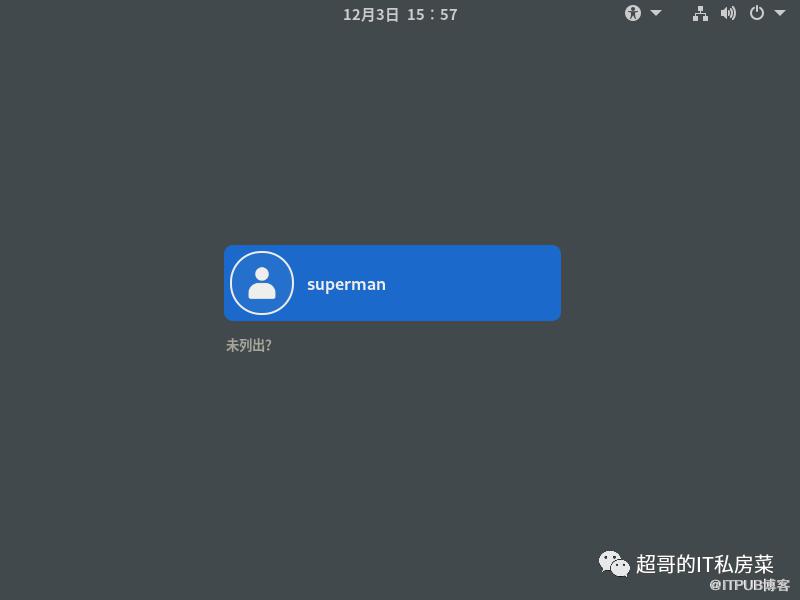
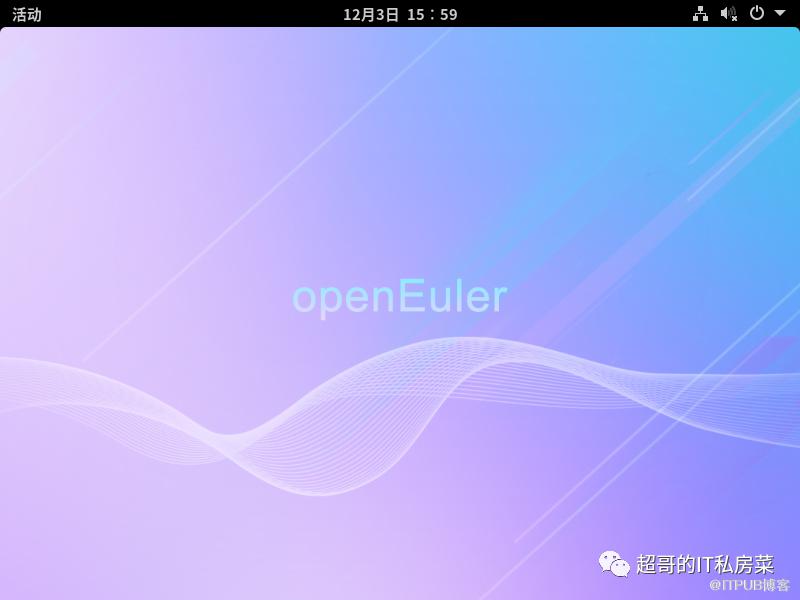
4.3 GNOME图形界面
4.4 问题处理
当gdm不能工作
如果默认安装了gdm,则停用gdm
# systemctl disable gdm
安装lightdm显示管理器替代
# dnf install lightdm lightdm-gtk -y
设置默认桌面为GNOME,通过root权限用户设置
# echo 'user-session=gnome' >> /etc/lightdm/lightdm.conf.d/60-lightdm-gtk-greeter.conf
启动lightdm显示管理器
# systemctl enable lightdm
设置系统默认以图形界面登录
# systemctl set-default graphical.target
重启验证
# reboot
有什么吐槽或反馈意见,直接告诉我!
温馨提示:如出现二维码失效也可直接添加微信号:ysc13803862469。