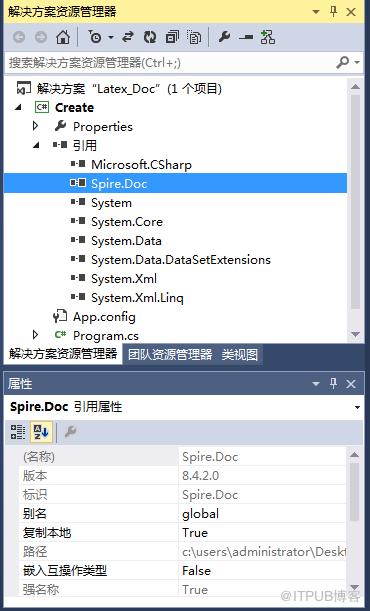
本篇内容介绍使用Spire.Doc for .NET在Word中添加Latex数学公式和符号的方法。编辑代码前,将Spire.Doc.dll文件添加引用至VS程序。dll文件包可通过 官网下载导入(如果下载的是pack包,需要将Spire.Doc for .NET包解压安装到指定路径,dll文件可在安装路径下的Bin中找到;如果下载的是hotfix包,则无需安装,可直接在文件夹Bin下找到dll);或者通过 Nuget搜索下载导入。
注意 :需要使用7.6.5 版本及以上的Spire.Doc for .NET ,本文中下载使用的是hotfix 8.4.2 版本
dll添加引用效果,如下图:
using Spire.Doc;
using Spire.Doc.Documents;
using Spire.Doc.Fields.OMath;

namespace Create
{
    class Program
    {
        static void Main(string[] args)
        {
            //新建word实例
            Document doc = new Document();

            //添加一个section
            Section section = doc.AddSection();

            //添加一个段落
            Paragraph paragraph = section.AddParagraph();

            //在第一段添加公式
            OfficeMath officeMath = new OfficeMath(doc);
            paragraph.Items.Add(officeMath);
            officeMath.FromLatexMathCode("x^{2}+\\sqrt{x^{2}+1}=2");

            //添加第二个公式到第二段
            Paragraph paragraph2 = section.AddParagraph();
            OfficeMath officeMath1 = new OfficeMath(doc);
            paragraph2.Items.Add(officeMath1);
            officeMath1.FromLatexMathCode("\\forall x \\in X, \\quad \\exists y \\leq \\epsilon");

            //添加符号到第三段
            Paragraph paragraph3 = section.AddParagraph();
            OfficeMath officeMath2 = new OfficeMath(doc);
            paragraph3.Items.Add(officeMath2);
            officeMath2.FromLatexMathCode(" \\alpha,\\beta, \\gamma, \\Gamma, \\pi, \\Pi, \\phi, \\varphi, \\mu, \\Phi");

            //保存文档
            doc.SaveToFile("result.docx", FileFormat.Docx);
            System.Diagnostics.Process.Start("result.docx");
        }
    }
}
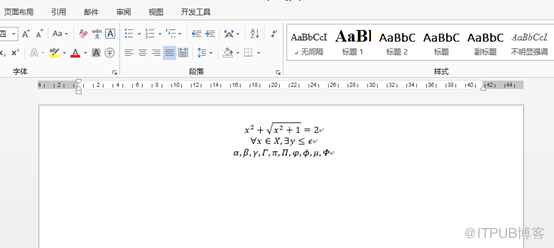
公式/符号添加效果:
(完)