本文介绍通过Java后端程序代码来读取Word文本和段落格式的方法。
本次测试环境如下:
-
Word版本:2013
-
编译环境:IntelliJ IDEA2018
-
Work库:free spire.doc.jar 3.9.0
-
JDK版本:1.8.0
通过 textrange.getCharacterFormat()方法读取文本字符串格式,通过 paragraph.getFormat()读取段落格式,读取具体文字及段落属性时,可支持读取字体、字号、文字颜色、文字背景、文字是否加粗或倾斜、文字下划线、大小写、边框、上标下标、行距、段落缩进、对齐方式、段落边框、背景等等,下表中罗列了所有可支持读取的样式属性,供参考:
读取文本格式 getCharacterFormat():
|
方法 |
类型 |
|
getFontName() |
String |
|
getFontNameAscii() |
String |
|
getFontNameBidi() |
String |
|
getFontNameFarEast() |
String |
|
getFontNameNonFarEast() |
String |
|
getBold() |
boolean |
|
getFontSize() |
float |
|
getHighlightColor() |
Color |
|
getItalic() |
boolean |
|
getTextBackgroundColor() |
Color |
|
getTextColor() |
Color |
|
getAllCaps() |
boolean |
|
getAllowContextualAlternates() |
boolean |
|
getBidi() |
boolean |
|
getBoldBidi() |
boolean |
|
getBorder() |
Border |
|
getCharacterSpacing() |
float |
|
getDoubleStrike() |
boolean |
|
getEmboss() |
boolean |
|
getEmphasisMark() |
Emphasis |
|
getEngrave() |
boolean |
|
getFontSizeBidi() |
float |
|
getFontTypeHint() |
FontTypeHint |
|
getHidden() |
boolean |
|
getItalicBidi() |
boolean |
|
getLigaturesType() |
LigatureType |
|
getLocaleIdASCII() |
short |
|
getLocaleIdFarEast() |
short |
|
getNumberFormType() |
NumberFormType |
|
getNumberSpaceType() |
NumberSpaceType |
|
getPosition() |
float |
|
getStylisticSetType() |
StylisticSetType |
|
getSubSuperScript() |
SubSuperScript |
|
getTextScale() |
short |
|
getUnderlineStyle() |
UnderlineStyle |
读取段落格式:getFormat()
|
方法 |
类型 |
|
getLineSpacing() |
float |
|
getFirstLineIndent() |
float |
|
getLeftIndent() |
float |
|
getAfterSpacing() |
float |
|
getBeforeSpacing() |
float |
|
getRightIndent() |
float |
|
getTextAlignment() |
TextAlignmnet |
|
getAfterAutoSpacing() |
boolean |
|
getAutoSpaceDE() |
boolean |
|
getAutoSpaceDN() |
boolean |
|
getBackColor() |
Color |
|
getBeforeAutoSpacing() |
boolean |
|
getBoders() |
Borders |
|
getHorizontalAlignment() |
HorizontalAlignmnet |
|
getKeepFollow() |
boolean |
|
getKeepLines() |
boolean |
|
getLineSpacingRule() |
LineSpacingRule |
|
getMirrorIndents() |
boolean |
|
getOutlineLevel() |
OutlineLevel |
|
getOverflowPunc() |
boolean |
|
getPageBreakAfter() |
boolean |
|
getPageBreakBefore() |
boolean |
|
getSuppressAutoHyphens() |
boolean |
|
getTabs() |
TabCollection |
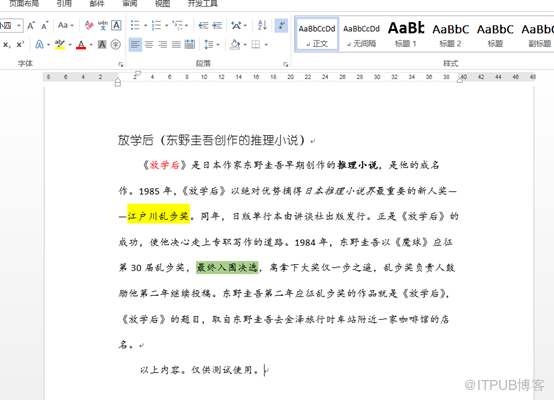
用于测试的Word文档:
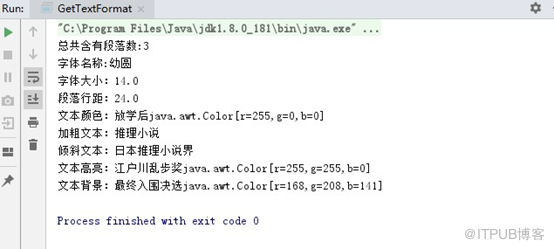
Java 示例代码
 import com.spire.doc.*;
 import com.spire.doc.documents.Paragraph;
 import com.spire.doc.documents.TextSelection;
 import com.spire.doc.fields.TextRange;

 import java.awt.*;

 public class GetTextFormat {
     public static void main(String[] args) {
         //加载Word源文档
         Document doc = new Document();
         doc.loadFromFile("test.docx");

         //获取段落数量
         int count = doc.getSections().get(0).getParagraphs().getCount();
         System.out.println("总共含有段落数:" + count);

         //查找指定文本
         TextSelection textSelections = doc.findString("东野圭吾", false, true);
         //获取字体名称
         String fontname = textSelections.getAsOneRange().getCharacterFormat().getFontName();
         //获取字体大小
         float fontsize = textSelections.getAsOneRange().getCharacterFormat().getFontSize();
         System.out.println("字体名称:" + fontname +"\n"
             +"字体大小:"+fontsize);


         //获取第二段
         Paragraph paragraph2 = doc.getSections().get(0).getParagraphs().get(1);
         //获取段落行距
         float linespage = paragraph2.getFormat().getLineSpacing();
         System.out.println("段落行距:" + linespage);

         //遍历段落中的子对象
         for (int z = 0; z < paragraph2.getChildObjects().getCount(); z++)
         {
             Object obj2 = paragraph2.getChildObjects().get(z);

             //判定是否为文本
             if (obj2 instanceof TextRange)
             {
                 TextRange textRange2 = (TextRange) obj2;

                 //获取文本颜色
                 Color textcolor = textRange2.getCharacterFormat().getTextColor();
                 if (!(textcolor.getRGB() == 0))
                 {
                     System.out.println("文本颜色:" + textRange2.getText() + textcolor.toString());
                 }

                 //获取字体加粗效果
                 boolean isbold = textRange2.getCharacterFormat().getBold();
                 if (isbold == true)
                 {
                     System.out.println("加粗文本:" + textRange2.getText());
                 }

                 //获取字体倾斜效果
                 boolean isitalic = textRange2.getCharacterFormat().getItalic();
                 if (isitalic == true)
                 {
                     System.out.println("倾斜文本:" + textRange2.getText());
                 }

                 //获取文本背景
                 String text = textRange2.getText();
                 Color highlightcolor = textRange2.getCharacterFormat().getHighlightColor();//获取文本的高亮颜色(即突出显示颜色)
                 if (!(highlightcolor.getRGB() == 0 ))
                 {
                     System.out.println("文本高亮:" + text + highlightcolor.toString());//输出高亮的文本和颜色
                 }

                 Color textbackgroundcolor = textRange2.getCharacterFormat().getTextBackgroundColor();//获取文字背景(底纹)
                 if (!(textbackgroundcolor.getRGB()==0))
                 {
                     System.out.println("文本背景:" + text + textbackgroundcolor.toString());//输出有背景的文本和颜色
                 }

             }
         }

     }
 }
转载请注明出处!