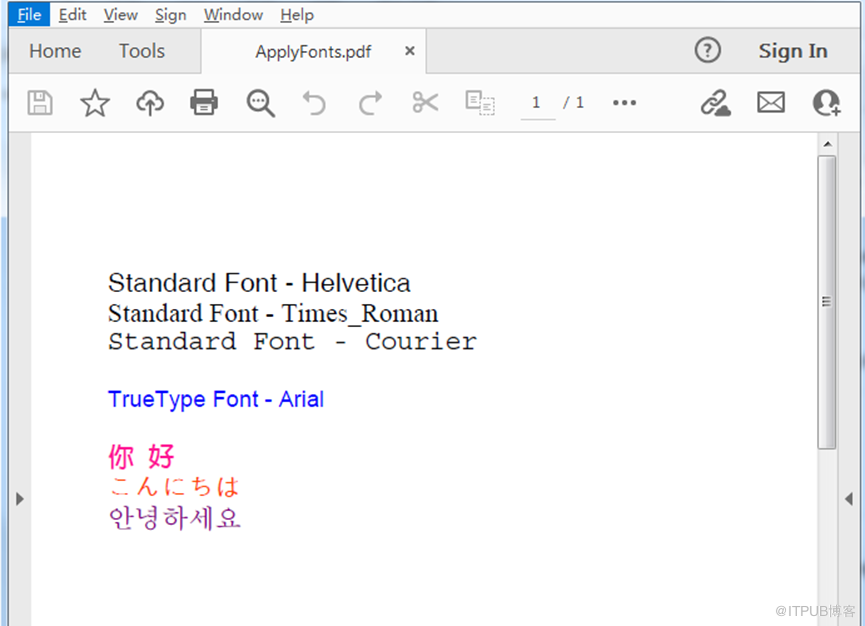
在PDF文档中,可绘制不同字体样式、不同语言的文字,可通过使用Standard字体、TrueType字体、CJK字体或者自定义(私有)等字体类型。下面通过C#程序代码来展示如何实现使用以上类型的字体来绘制文本。
引入dll
本次程序中引入的是Spire.Pdf.dll,引入方法如下:
【方法1 】通过NuGet 安装。
1. 可以在Visual Studio中打开“解决方案资源管理器”,鼠标右键点击“引用”,“管理NuGet包”,然后搜索“Free Spire.PDF”,点击“安装”。
2. 也可以将以下内容复制到PM控制台安装:
Install-Package FreeSpire.PDF -Version 7.8.9
【方法2 】手动安装。
可通过手动下载包,然后解压,找到BIN文件夹下的Spire.Pdf.dll。在Visual Studio中打开“解决方案资源管理器”,鼠标右键点击“引用”,“添加引用”,将本地路径BIN文件夹下的dll文件添加引用至程序。
应用字体
C#
using Spire.Pdf;
using Spire.Pdf.Graphics;
using System.Drawing;

namespace ApplyFonts
{
    class Program
    {
        static void Main(string[] args)
        {
            //创建PdfDocument对象
            PdfDocument pdf = new PdfDocument();

            //添加一页
            PdfPageBase page = pdf.Pages.Add();

            //初始化y坐标
            float y = 30;

            //使用standard字体绘制文字
            PdfFont standardFont = new PdfFont(PdfFontFamily.Helvetica, 14f);
            page.Canvas.DrawString("Standard Font - Helvetica", standardFont, PdfBrushes.Black, 0, y);
            standardFont = new PdfFont(PdfFontFamily.TimesRoman, 14f);
            page.Canvas.DrawString("Standard Font - Times_Roman", standardFont, PdfBrushes.Black, 0, (y = y + 16));
            standardFont = new PdfFont(PdfFontFamily.Courier, 14f);
            page.Canvas.DrawString("Standard Font - Courier", standardFont, PdfBrushes.Black, 0, (y = y + 16));

            //使用true type字体绘制文字
            PdfTrueTypeFont trueTypeFont = new PdfTrueTypeFont(new Font("Arial", 12f), true);
            page.Canvas.DrawString("TrueType Font - Arial", trueTypeFont, PdfBrushes.Blue, 0, (y = y + 30f));

            /*//使用私有字体绘制文字
            string fontFileName = "C:\\Users\\Administrator\\Desktop\\fontfile.ttf";
            trueTypeFont = new PdfTrueTypeFont(fontFileName, 14f);
            page.Canvas.DrawString("Private Font: 私有字体", trueTypeFont, PdfBrushes.DarkGreen, 0, (y = y + 30f));
            */

            //使用cjk字体绘制文字
            PdfCjkStandardFont cjkFont = new PdfCjkStandardFont(PdfCjkFontFamily.MonotypeHeiMedium, 14f);
            page.Canvas.DrawString("你 好", cjkFont, PdfBrushes.DeepPink, 0, (y = y + 30f));
            cjkFont = new PdfCjkStandardFont(PdfCjkFontFamily.HanyangSystemsGothicMedium, 14f);
            page.Canvas.DrawString("こんにちは", cjkFont, PdfBrushes.OrangeRed, 0, (y = y + 16f));
            cjkFont = new PdfCjkStandardFont(PdfCjkFontFamily.HanyangSystemsShinMyeongJoMedium, 14f);
            page.Canvas.DrawString("안녕하세요", cjkFont, PdfBrushes.Purple, 0, (y = y + 16f));

            //保存文档
            pdf.SaveToFile("ApplyFonts.pdf",FileFormat.PDF);
            System.Diagnostics.Process.Start("ApplyFonts.pdf");
        }
    }
}
VB.NET
Imports Spire.Pdf
Imports Spire.Pdf.Graphics
Imports System.Drawing

Namespace ApplyFonts
         Class Program
                   Private Shared Sub Main(args As String())
                            '创建PdfDocument对象
                            Dim pdf As New PdfDocument()

                            '添加一页
                            Dim page As PdfPageBase = pdf.Pages.Add()

                            '初始化y坐标
                            Dim y As Single = 30

                            '使用standard字体绘制文字
                            Dim standardFont As New PdfFont(PdfFontFamily.Helvetica, 14F)
                            page.Canvas.DrawString("Standard Font - Helvetica", standardFont, PdfBrushes.Black, 0, y)
                            standardFont = New PdfFont(PdfFontFamily.TimesRoman, 14F)
                            page.Canvas.DrawString("Standard Font - Times_Roman", standardFont, PdfBrushes.Black, 0, (InlineAssignHelper(y, y + 16)))
                            standardFont = New PdfFont(PdfFontFamily.Courier, 14F)
                            page.Canvas.DrawString("Standard Font - Courier", standardFont, PdfBrushes.Black, 0, (InlineAssignHelper(y, y + 16)))

                            '使用true type字体绘制文字
                            Dim trueTypeFont As New PdfTrueTypeFont(New Font("Arial", 12F), True)
                            page.Canvas.DrawString("TrueType Font - Arial", trueTypeFont, PdfBrushes.Blue, 0, (InlineAssignHelper(y, y + 30F)))

                            '//使用私有字体绘制文字
'            string fontFileName = "C:\\Users\\Administrator\\Desktop\\fontfile.ttf";
'            trueTypeFont = new PdfTrueTypeFont(fontFileName, 14f);
'            page.Canvas.DrawString("Private Font: 私有字体", trueTypeFont, PdfBrushes.DarkGreen, 0, (y = y + 30f));
'


                            '使用cjk字体绘制文字
                            Dim cjkFont As New PdfCjkStandardFont(PdfCjkFontFamily.MonotypeHeiMedium, 14F)
                            page.Canvas.DrawString("你 好", cjkFont, PdfBrushes.DeepPink, 0, (InlineAssignHelper(y, y + 30F)))
                            cjkFont = New PdfCjkStandardFont(PdfCjkFontFamily.HanyangSystemsGothicMedium, 14F)
                            page.Canvas.DrawString("こんにちは", cjkFont, PdfBrushes.OrangeRed, 0, (InlineAssignHelper(y, y + 16F)))
                            cjkFont = New PdfCjkStandardFont(PdfCjkFontFamily.HanyangSystemsShinMyeongJoMedium, 14F)
                            page.Canvas.DrawString("안녕하세요", cjkFont, PdfBrushes.Purple, 0, (InlineAssignHelper(y, y + 16F)))

                            '保存文档
                            pdf.SaveToFile("ApplyFonts.pdf", FileFormat.PDF)
                            System.Diagnostics.Process.Start("ApplyFonts.pdf")
                   End Sub
                   Private Shared Function InlineAssignHelper(Of T)(ByRef target As T, value As T) As T
                            target = value
                            Return value
                   End Function
         End Class
End Namespace
字体绘制效果:
—End—