Word中设置水印时,可预设的文字或自定义文字设置为水印效果,但通常添加水印效果时,会对所有页面都设置成统一效果,如果需要对每一页或者某个页面设置不同的水印效果,则可以参考本文中的方法。下面,将以Java代码为例,对Word每一页设置不同的文字水印效果作详细介绍。
方法思路
在给Word每一页添加水印前,首先需要在Word文档 每一页正文的最后一个字符后面 插入“连续”分节符,然后在 每一节的页眉段落里添加艺术字类型的形状对象,并设置艺术字的坐标位置、样式、对齐方式等。最后保存文档。
Jar引入
在程序中引入Free Spire.Doc for Java中的Spire.Doc.jar文件(该文件在lib文件夹下);如果需要通过Maven下载导入,可进行如下配置pom.xml:
            com.e-iceblue
            https://repo.e-iceblue.cn/repository/maven-public/


        e-iceblue
        spire.doc.free
        5.1.0
Java代码
给每页添加图片水印时,可参考如下步骤:
-
创建 Document类的对象,并通过 Document.loadFromFile(String fileName)方法加载Word文档。
-
通过 Document.getSections().get(int index)方法获取指定节。
-
通过 Section.getHeadersFooters().getHeader()方法获取页眉, HeaderFooter.addParagraph()方法添加段落到页眉。
-
创建ShapeObject类的对象,并传入参数设置形状类型为 Text_Plain_Text类型的艺术字。并调用方法设置艺术字样式,如艺术字高度、宽度、旋转、颜色、对齐方式等。
-
通过 Paragraph.getChildObjects().add(IdocumentObject entity)方法添加艺术字到段落。
-
最后,通过 Document.saveToFile(String fileName, FileFormat fileFormat)方法保存文档。
不同页面中设置不一样的文字水印效果,只需要获取该页面对应节的页眉段落,然后参考上述用到的方法步骤逐一添加即可。
下面是完整的Java代码示例:
 import com.spire.doc.*;
 import com.spire.doc.documents.*;
 import com.spire.doc.fields.ShapeObject;

 import java.awt.*;

 public class DifferentTextWatermark {
     public static void main(String[] args) {
         //加载Word测试文档
         Document doc = new Document();
         doc.loadFromFile("test.docx");

         //获取文档第一节
         Section section1 = doc.getSections().get(0);

         //定义水印文字的纵向坐标位置
         float y = (float) (section1.getPageSetup().getPageSize().getHeight()/3);

         //添加文字水印1
         HeaderFooter header1 = section1.getHeadersFooters().getHeader();//获取页眉
         header1.getParagraphs().clear();//删除原有页眉格式的段落
         Paragraph para1= header1.addParagraph();//重新添加段落
         //添加艺术字并设置大小
         ShapeObject shape1 = new ShapeObject(doc, ShapeType.Text_Plain_Text);
         shape1.setWidth(362);
         shape1.setHeight(118);
         //设置艺术字文本内容、位置及样式(即文本水印字样)
         shape1.setRotation(315);
         shape1.getWordArt().setText("内部使用");
         shape1.setFillColor(new Color(128,128,128));
         shape1.setLineStyle(ShapeLineStyle.Single);
         shape1.setStrokeColor(new Color(128,128,128));
         shape1.setStrokeWeight(0.5);
         shape1.setVerticalPosition(y);
         shape1.setHorizontalAlignment(ShapeHorizontalAlignment.Center);
         para1.getChildObjects().add(shape1);

         //同理设置第二节页眉中的文字水印2
         Section section2 = doc.getSections().get(1);
         HeaderFooter header2 = section2.getHeadersFooters().getHeader();
         header2.getParagraphs().clear();
         Paragraph para2= header2.addParagraph();
         ShapeObject shape2 = new ShapeObject(doc, ShapeType.Text_Plain_Text);
         shape2.setWidth(362);
         shape2.setHeight(118);
         shape2.setRotation(315);
         shape2.getWordArt().setText("绝密资料");
         shape2.setFillColor(new Color(221,160,221));
         shape2.setLineStyle(ShapeLineStyle.Single);
         shape2.setStrokeColor(new Color(221,160,221));
         shape2.setStrokeWeight(0.5);
         shape2.setVerticalPosition(y);
         shape2.setHorizontalAlignment(ShapeHorizontalAlignment.Center);
         para2.getChildObjects().add(shape2);

         //同理设置第三节中的页眉中的文字水印3
         Section section3 = doc.getSections().get(2);
         HeaderFooter header3 = section3.getHeadersFooters().getHeader();
         header3.getParagraphs().clear();
         Paragraph para3= header3.addParagraph();
         ShapeObject shape3 = new ShapeObject(doc, ShapeType.Text_Plain_Text);
         shape3.setWidth(362);
         shape3.setHeight(118);
         shape3.setRotation(315);
         shape3.getWordArt().setText("禁止传阅");
         shape3.setFillColor(new Color(70,130,180));
         shape3.setLineStyle(ShapeLineStyle.Single);
         shape3.setStrokeColor(new Color(70,130,180));
         shape3.setStrokeWeight(0.5);
         shape3.setVerticalPosition(y);
         shape3.setHorizontalAlignment(ShapeHorizontalAlignment.Center);
         para3.getChildObjects().add(shape3);

         //保存文档
         doc.saveToFile("DifferentTextWatermark.docx",FileFormat.Docx_2013);
         doc.dispose();
     }
 }
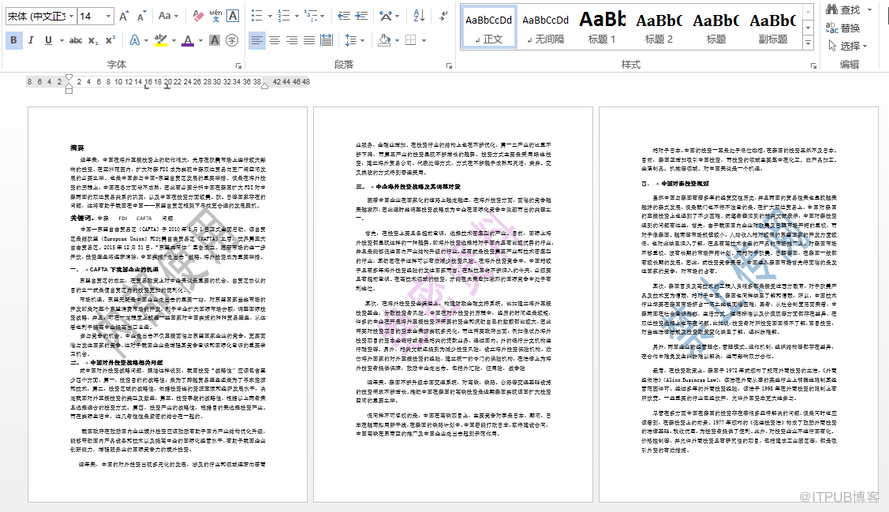
如图,每一页均可显示不同的文字水印效果:
—End—