对特定元素添加超链接后,用户可以通过点击被链接的元素来激活这些链接,通常在被链接的元素下带有下划线或者以不同的颜色显示来进行区分。按照使用对象的不同,链接又可以分为:文本超链接,图像超链接,E-mail链接,锚点链接,多媒体文件链接,空链接等多种链接,本篇文章中将介绍在PDF中添加几种不同类型超链接的方法,以及如何更新和删除PDF中已有的超链接。文章将从以下三个代码实力展示如何来实现超链接的相关操作
-
添加超链接( 普通链接、 超文本链接、 邮箱链接、 文档链接)
-
更新超链接
-
删除超链接
【导入jar】
本次代码中使用Free Spire.PDF for Java。
可按照如下方法来导入Spire.Pdf.jar 版本:5.1.0
方法1:将Free Spire.PDF for Java 包下载到本地,解压,找到lib文件夹下的Spire.Pdf.jar文件。然后在IDEA中打开“Project Structure”界面,然后执行如图步骤来手动导入本地路径下的jar文件:
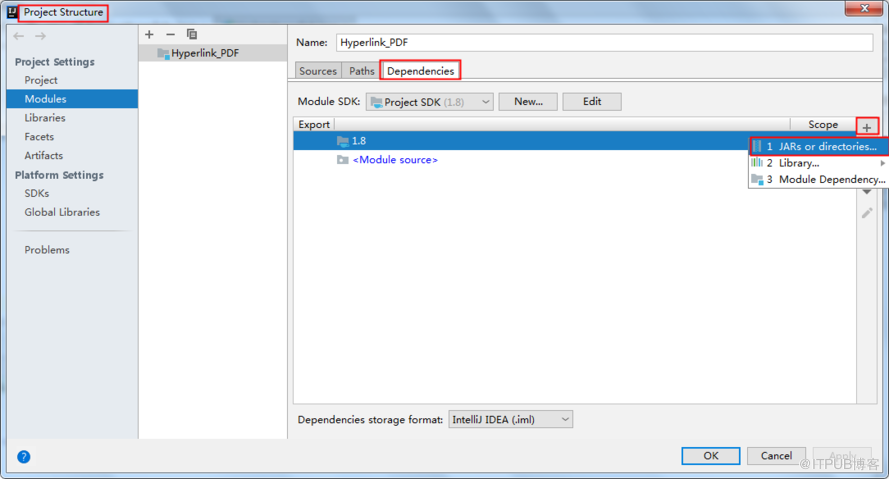
方法2:通过Maven仓库下载导入,如下配置pom.xml:
            com.e-iceblue
            e-iceblue
            https://repo.e-iceblue.cn/repository/maven-public/


        e-iceblue
        spire.pdf.free
        5.1.0
【代码示例】
1. 添加超链接
Java
import com.spire.pdf.annotations.*;
import com.spire.pdf.graphics.*;
import com.spire.pdf.*;

import java.awt.*;
import java.awt.font.TextAttribute;
import java.awt.geom.Point2D;
import java.awt.geom.Rectangle2D;
import java.util.HashMap;

public class AddLinksToPdf {

    public static void main(String[] args) throws Exception {

        //创建PDF文档
        PdfDocument doc = new PdfDocument();
        PdfPageBase page = doc.getPages().add();

        //初始化X,Y坐标
        float y = 30;
        float x = 0;

        // 创建一个普通字体
        PdfTrueTypeFont plainFont = new PdfTrueTypeFont(new Font("Arial Unicode MS",Font.PLAIN,13),true);

        //创建一个带下划线的字体
        HashMap hm = new HashMap();
        hm.put(TextAttribute.UNDERLINE, TextAttribute.UNDERLINE_ON);
        hm.put(TextAttribute.SIZE, 13);
        hm.put(TextAttribute.FAMILY, "Arial");
        Font font = new Font(hm);
        PdfTrueTypeFont underlineFont = new PdfTrueTypeFont(font,true);

        //添加简单链接到PDF
        String label = "简单链接: ";
        PdfStringFormat format = new PdfStringFormat();
        format.setMeasureTrailingSpaces(true);
        page.getCanvas().drawString(label, plainFont, PdfBrushes.getOrange(), 0, y,format);
        x = (float)plainFont.measureString(label,format).getWidth();
        page.getCanvas().drawString("https://www.baidu.com/", underlineFont, PdfBrushes.getBlue(), x, y+2);
        y = y + 26;

        //添加超文本链接到PDF
        label= "超文本链接: ";
        page.getCanvas().drawString(label, plainFont, PdfBrushes.getOrange(), 0, y, format);
        x = (float)plainFont.measureString(label,format).getWidth();
        PdfTextWebLink webLink = new PdfTextWebLink();
        webLink.setText("百度主页");
        webLink.setUrl("https://www.baidu.com/");
        webLink.setFont(plainFont);
        webLink.setBrush(PdfBrushes.getBlue());
        webLink.drawTextWebLink(page.getCanvas(), new Point2D.Float(x, y));
        y= y + 26;

        //添加邮箱链接到PDF
        label = "邮箱链接:  ";
        page.getCanvas().drawString(label, plainFont, PdfBrushes.getOrange(), 0, y, format);
        x = (float)plainFont.measureString(label, format).getWidth();
        webLink = new PdfTextWebLink();
        webLink.setText("联系我们");
        webLink.setUrl("ask@baidu.com");
        webLink.setFont(plainFont);
        webLink.setBrush(PdfBrushes.getBlue());
        webLink.drawTextWebLink(page.getCanvas(), new Point2D.Float(x, y));
        y = y + 26;

        //添加文档链接到PDF
        label = "文档链接: ";
        page.getCanvas().drawString(label, plainFont, PdfBrushes.getOrange(), 0, y, format);
        x = (float)plainFont.measureString(label, format).getWidth();
        page.getCanvas().drawString("详情参阅原文件", plainFont, PdfBrushes.getBlue(), x, y, format);
        Rectangle2D rect = new Rectangle2D.Float(x,y+2,60,15);
        PdfFileLinkAnnotation fileLinkAnnotation = new PdfFileLinkAnnotation(rect,"C:\\Users\\Administrator\\Desktop\\测试文件.docx");
        fileLinkAnnotation.setBorder(new PdfAnnotationBorder(0f));
        ((PdfNewPage) ((page instanceof PdfNewPage) ? page : null)).getAnnotations().add(fileLinkAnnotation);

        //保存文档
        doc.saveToFile("超链接.pdf");
        doc.close();
    }
}
2. 更新超链接
下面是实现更新超链接的代码步骤:
-
创建 PdfDocument类的对象。
-
调用 PdfDocument.loadFromFile(String fileName)方法加载PDF文档。
-
通过 PdfDocument.getPages().get(int index)方法获取指定页面。
-
通过 PdfPageBase.getAnnotationWidget()方法获取所有超链接集合。
-
使用 PdfUriAnnotationWidget.setUri(String value)方法设置新的超链接地址。
-
最后,通过 PdfDocument.saveToFile(String filename, FileFormat fileFormat)方法保存文档到指定路径。
Java
 import com.spire.pdf.*;
 import com.spire.pdf.annotations.PdfAnnotationCollection;
 import com.spire.pdf.annotations.PdfUriAnnotationWidget;

 public class UpdateHyperlink {
     public static void main(String[] args) throws Exception{
         //加载PDF文档
         PdfDocument pdf = new PdfDocument();
         pdf.loadFromFile("test.pdf");

         //获取PDF中的指定页面
         PdfPageBase page = pdf.getPages().get(0);

         //获取超链接,更改链接地址
         PdfAnnotationCollection widgetCollection = page.getAnnotationsWidget();
         PdfUriAnnotationWidget uri = (PdfUriAnnotationWidget) widgetCollection.get(0);
         uri.setUri("https://123456.com");

         //保存文档
         pdf.saveToFile("UpdateHyperlinks.pdf");
         pdf.dispose();
     }
 }
3. 删除超链接
删除超链接时,可通过 PdfAnnotationCollection.removeAt(int index)方法删除指定的超链接,或者通过 PdfAnnotationCollection.clear()方法删除文档中的所有超链接。下面是删除超链接的代码步骤:
-
创建 PdfDocument类的对象。
-
调用 PdfDocument.loadFromFile(String fileName)方法加载PDF文档。
-
通过 PdfDocument.getPages().get(int index)方法获取指定页面。
-
通过 PdfPageBase.getAnnotationWidget()方法获取所有超链接集合。
-
通过 PdfAnnotationCollection.removeAt(int index)方法删除指定超链接。
-
通过 PdfAnnotationCollection.clear()方法删除所有超链接。
-
最后,通过PdfDocument.saveToFile(String filename, FileFormat fileFormat)方法保存文档到指定路径。
Java
 import com.spire.pdf.*;
 import com.spire.pdf.annotations.*;

 public class RemoveHyperlinks {
     public static void main(String[] args) {
         //加载PDF
         PdfDocument pdf = new PdfDocument();
         pdf.loadFromFile("test.pdf");

         //获取PDF中的指定页面
         PdfPageBase page = pdf.getPages().get(0);

         //获取所有的PDF 超链接集合
         PdfAnnotationCollection widgetCollection = page.getAnnotationsWidget();
         widgetCollection.removeAt(1);//删除第2个超链接
         //widgetCollection.clear();//删除所有超链接

         //保存文档
         pdf.saveToFile("RemoveHyperlinks.pdf");
         pdf.dispose();
     }
 }
—END—