Word文档是时下非常常用的图文编辑工具,它的功能不止于编辑文字、图片。经过数年的版本更新,支持功能及文档元素也愈加丰富。在编辑某些专业性文档时,如试卷、论文、专业期刊等,其中会常要求使用公式功能。Word本身支持插入常见的数学公式,包括简单公式符号、复杂公式等,本文,将以C#及VB.NET代码为例介绍如何来实现在Word中插入公式,编辑公式时,包括使用LaTeX Math Code及MathML Code来展示如何编辑。下面是程序环境及完整的测试代码,供参考。
引入dll程序集文件
-
通过 NuGet 引入dll(2种方法)的方法
1.1 可以在Visual Studio中打开“解决方案资源管理器”,鼠标右键点击“引用”,“管理NuGet包”,然后搜索“Free Spire.Doc”,点击“安装”。等待程序安装完成。
1.2 将以下内容复制到PM控制台安装:
Install-Package FreeSpire.Doc -Version 10.2
-
手动添加dll引用的方法
可通过手动下载包到本地,然后解压,找到BIN文件夹下的Spire.Doc.dll。然后在Visual Studio中打开“解决方案资源管理器”,鼠标右键点击“引用”,“添加引用”,将本地路径BIN文件夹下的dll文件添加引用至程序。
插入公式
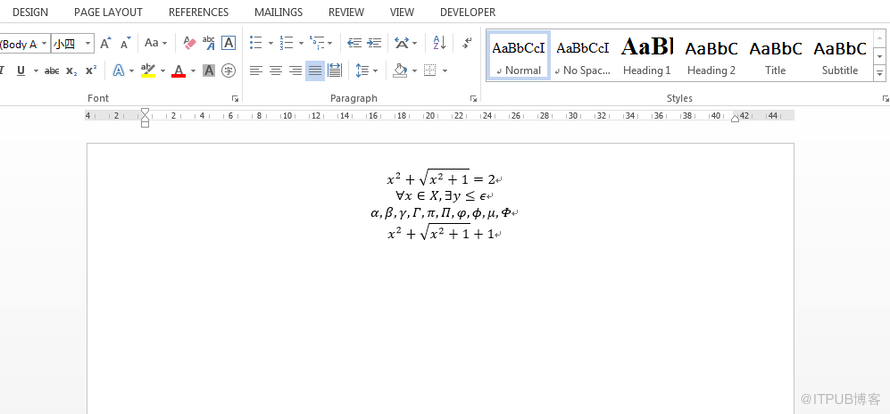
在编辑公式时,通过 OfficeMath.FromLatexMathCode()方法和 OfficeMath.FromMathMLCode()方法来添加LaTeX公式及MathML公式。开发者可根据程序设计需要选择其中对应的方法来编辑公式即可。
下面是本次程序代码实现公式添加的主要代码步骤:
-
创建 Document类的对象,并调用 Document.AddSection()方法添加节到Word文档。
-
通过 Section.AddParagraph()方法添加段落。
-
初始化 OfficeMath类的实例。通过 OfficeMath.FromLatexMathCode(string latexMathCode)方法编辑LeTeX公式;通过 OfficeMath.FromMathMLCode(string mathMLCode)方法编辑MathML公式。
-
通过 DocumentObjectCollection.Add(Spire.Doc.Interface.IDocumentObject entity)方法添加公式到段落。
-
最后,通过 Document.SaveToFile(string fileName, FileFormat fileFormat)方法保存文档。
C#
using Spire.Doc;
using Spire.Doc.Documents;
using Spire.Doc.Fields.OMath;
namespace InsertFormula
{
class Program
{
static void Main(string[] args)
{
//新建word实例
Document doc = new Document();
//添加一个section
Section section = doc.AddSection();
//添加一个段落
Paragraph paragraph = section.AddParagraph();
//在第一段添加Latex公式
OfficeMath officeMath = new OfficeMath(doc);
officeMath.FromLatexMathCode("x^{2}+\\sqrt{x^{2}+1}=2");
paragraph.Items.Add(officeMath);
//添加第二个Latex公式到第二段
Paragraph paragraph2 = section.AddParagraph();
OfficeMath officeMath1 = new OfficeMath(doc);
officeMath1.FromLatexMathCode("\\forall x \\in X, \\quad \\exists y \\leq \\epsilon");
paragraph2.Items.Add(officeMath1);
//添加Latex符号到第三段
Paragraph paragraph3 = section.AddParagraph();
OfficeMath officeMath2 = new OfficeMath(doc);
officeMath2.FromLatexMathCode("\\alpha,\\beta, \\gamma, \\Gamma, \\pi, \\Pi, \\phi, \\varphi, \\mu, \\Phi");
paragraph3.Items.Add(officeMath2);
//添加MathML公式到第四段
Paragraph paragraph4 = section.AddParagraph();
OfficeMath officeMath3 = new OfficeMath(doc);
officeMath3.FromMathMLCode("x 2 + x 2 + 1 + 1 ");
paragraph4.Items.Add(officeMath3);
//保存文档
doc.SaveToFile("InsertFormulas.docx", FileFormat.Docx2013);
System.Diagnostics.Process.Start("InsertFormulas.docx");
}
}
}
vb.net
Imports Spire.Doc
Imports Spire.Doc.Documents
Imports Spire.Doc.Fields.OMath
Namespace InsertFormula
Class Program
Private Shared Sub Main(args As String())
'新建word实例
Dim doc As New Document()
'添加一个section
Dim section As Section = doc.AddSection()
'添加一个段落
Dim paragraph As Paragraph = section.AddParagraph()
'在第一段添加Latex公式
Dim officeMath As New OfficeMath(doc)
officeMath.FromLatexMathCode("x^{2}+\sqrt{x^{2}+1}=2")
paragraph.Items.Add(officeMath)
'添加第二个Latex公式到第二段
Dim paragraph2 As Paragraph = section.AddParagraph()
Dim officeMath1 As New OfficeMath(doc)
officeMath1.FromLatexMathCode("\forall x \in X, \quad \exists y \leq \epsilon")
paragraph2.Items.Add(officeMath1)
'添加Latex符号到第三段
Dim paragraph3 As Paragraph = section.AddParagraph()
Dim officeMath2 As New OfficeMath(doc)
officeMath2.FromLatexMathCode("\alpha,\beta, \gamma, \Gamma, \pi, \Pi, \phi, \varphi, \mu, \Phi")
paragraph3.Items.Add(officeMath2)
'添加MathML公式到第四段
Dim paragraph4 As Paragraph = section.AddParagraph()
Dim officeMath3 As New OfficeMath(doc)
officeMath3.FromMathMLCode("x 2 + x 2 + 1 + 1 ")
paragraph4.Items.Add(officeMath3)
'保存文档
doc.SaveToFile("InsertFormulas.docx", FileFormat.Docx2013)
System.Diagnostics.Process.Start("InsertFormulas.docx")
End Sub
End Class
End Namespace
注:代码中的文件路径为程序的debug路径,文件路径可自定义为其他路径。
—END—