



来自Github的口红色号宇宙

https://github.com/Ovilia/lipstick

先用番茄做个实验?


提取这张纯色图片的RGB值在技术上是可行的,getcolor.py代码如下:
import colorsys
import PIL.Image as Image

def get_dominant_color(image):
    max_score = 0.0001
    dominant_color = None
    for count,(r,g,b) in image.getcolors(image.size[0]*image.size[1]):
        # 转为HSV标准
        saturation = colorsys.rgb_to_hsv(r/255.0, g/255.0, b/255.0)[1]
        y = min(abs(r*2104+g*4130+b*802+4096+131072)>>13,235)
        y = (y-16.0)/(235-16)

        #忽略高亮色
        if y > 0.9:
            continue
        score = (saturation+0.1)*count
        if score > max_score:
            max_score = score
            dominant_color = (r,g,b)
    return dominant_color
import os
import getcolor
from os.path import join as pjoin
from scipy import misc

def load_color(color_dir,list):
    count = 0
    for dir in os.listdir(color_dir):
        img_dir = pjoin(color_dir, dir)
        image = getcolor.Image.open(img_dir)
        image = image.convert('RGB')
        get=getcolor.get_dominant_color(image)
        list.append(get)
        count = count+1
        #print(person_dir)
    #print(count)
    return count

def Mean_color(count,list):
     Mean_R=Mean_G=Mean_B=0
     for i in range(count):
        tuple=list[i]
        Mean_R+=tuple[0]
        Mean_G+=tuple[1]
        Mean_B+=tuple[2]
     MeanC=((int)(Mean_R/count),(int)(Mean_G/count),(int)(Mean_B/count))
return Me当然是口红的数据,文摘菌这儿用到了5个品牌,分别是圣罗兰、香奈儿可可小姐、迪奥、美宝莲、纪梵希,共17个系列,271个口红色号,数据集是一个嵌套的字典数据结构,存为json串的形式,里面记录了每个口红品牌系列下不同口红色号的颜色id、名称、和16进制颜色值,lipstick.json部分数据集展示如下:
{"brands":[{"name":"圣罗兰","series":
[{"name":"莹亮纯魅唇膏","lipsticks":
[{"color":"#D62352","id":"49","name":"撩骚"},
{"color":"#DC4B41","id":"14","name":"一见倾心"},
{"color":"#B22146","id":"05","name":"浮生若梦"},
数据集中存储的RGB颜色是16进制的字符串形式,需要将其转换成RGB值,比较两个颜色相近与否,实际上是比较RGB三个分量维度上的误差,最小的口红输出对应的品牌、系列、色号和id,代码如下:
import json
import getcolor
import numpy as np
import lipcolor

#filename = 'temp.txt'
##write the temp data to file##
def WtoFile(filename,RGB_temp):
    num=len(RGB_temp)
    with open(filename,'w') as f:
       for i in range(num):
           s = str(RGB_temp[i]).replace('[','').replace(']','')
           f.write(s)
           f.write("\n")

#operate the data #
##save the brand&series&color id&color name to sum_list##
##covert the color #D62352 to RGB_array##
##caculate the RGB difference to RGB_temp and write the value to file##
def data_operate():
    with open('lipstick.json', 'r', encoding='utf-8') as f:
      ret_dic = json.load(f)
      #print(ret_dic['brands'])
      #print(type(ret_dic)) #
      #print(ret_dic['brands'][0]['name'])
      b_num=len(ret_dic['brands'])
      #print(b_num)#brands number

      s_list=[]
      #series brands#
      for i in range(len(ret_dic['brands'])):
          s_num=len(ret_dic['brands'][i]['series'])
          s_list.append(s_num)
          #print("{0} has {1} series".format((ret_dic['brands'][i]['name']),(s_list[i])))


      #the lipstick color of every brands every series#
      #the first loop calculate the total color numbers
      sum=0
      for b1 in range(b_num):
          for s1 in range(s_list[b1]):
              brand_name=ret_dic['brands'][b1]['name']
              lip_name=ret_dic['brands'][b1]['series'][s1]['name']
              color_num=len(ret_dic['brands'][b1]['series'][s1]['lipsticks'])
              sum+=color_num#calculate the total color numbers

      #the second loop save the message to a list#
      sum_list=np.zeros((sum,4), dtype=(str,8))
      value_array=np.zeros((sum,6), dtype=int)
      i=0
      for b2 in range(b_num):
          for s2 in range(s_list[b2]):
              brand_name=ret_dic['brands'][b2]['name']
              #print(type(brand_name))
              lip_name=ret_dic['brands'][b2]['series'][s2]['name']
              color_num=len(ret_dic['brands'][b2]['series'][s2]['lipsticks'])
              for c in range(color_num):
                    color_value=ret_dic['brands'][b2]['series'][s2]['lipsticks'][c]['color']
                    color_name=ret_dic['brands'][b2]['series'][s2]['lipsticks'][c]['name']
                    color_id=ret_dic['brands'][b2]['series'][s2]['lipsticks'][c]['id']
                    #print("{0} series {1} has {2} colors,color {3}:{4}".format(brand_name,lip_name,color_num,c+1,color_name))
                    sum_list[i][0]=brand_name
                    sum_list[i][1]=lip_name
                    sum_list[i][2]=color_id
                    sum_list[i][3]=color_name
                    #value_array[i]=value_array[i][1]
                    #convert "#D62352" to [13  6  2  3  5  2]#
                    for l in range(6):
                        temp=color_value[l+1]
                        if(temp>='A'and temp<='F'):
                           temp1=ord(temp)-ord('A')+10
                        else:
                           temp1=ord(temp)-ord('0')
                        value_array[i][l]=temp1
                    i+=1


    #the third loop covert value_array to RGB_array#
      RGB_array=np.zeros((sum,3), dtype=int)
      for i in range(sum):
          RGB_array[i][0]=value_array[i][0]*16+value_array[i][1]
          RGB_array[i][1]=value_array[i][2]*16+value_array[i][3]
          RGB_array[i][2]=value_array[i][4]*16+value_array[i][5]

      #calculate the similar and save to RGB_temp
      #RGB_temp=np.zeros((sum,1), dtype=int)
      RGB_temp=np.zeros((sum,1), dtype=float)
      for i in range(sum):
          R=RGB_array[i][0]
          G=RGB_array[i][1]
          B=RGB_array[i][2]
          RGB_temp[i]=abs(get[0]-R)+abs(get[1]*3/4-G)+abs(get[2]-B)
      RGB_temp.tolist();#covert array to list
      #print(RGB_temp)
      filename="temp.txt"
      WtoFile(filename,RGB_temp)
      #sort the RGB_temp#
      result=sorted(range(len(RGB_temp)), key=lambda k: RGB_temp[k])
      #print(result)
      #output the three max prob of the lipsticks#
      print("The first three possible lipstick brand and color id&name are as follows:")
      for i in range(3):
          idex=result[i]
          print(sum_list[idex])
      print("The first three possible lipstick brand RGB value are as follows:")
      for i in range(3):
          idex=result[i]
          R=RGB_array[idex][0]
          G=RGB_array[idex][1]
          B=RGB_array[idex][2]
          tuple=(R,G,B)
          print(tuple)


if __name__ == '__main__':
     #image = getcolor.Image.open(inputpath)
     #image = image.convert('RGB')
     #get=getcolor.get_dominant_color(image)#tuple #get=(231, 213, 211)
     list=[]
     color_dir="output"
     count=lipcolor.load_color(color_dir,list)
     get=lipcolor.Mean_color(count,list)
     print("the extracted RGB value of the color is {0}".format(get))
     #operate the data#
data_operat 
提取到的番茄颜色:

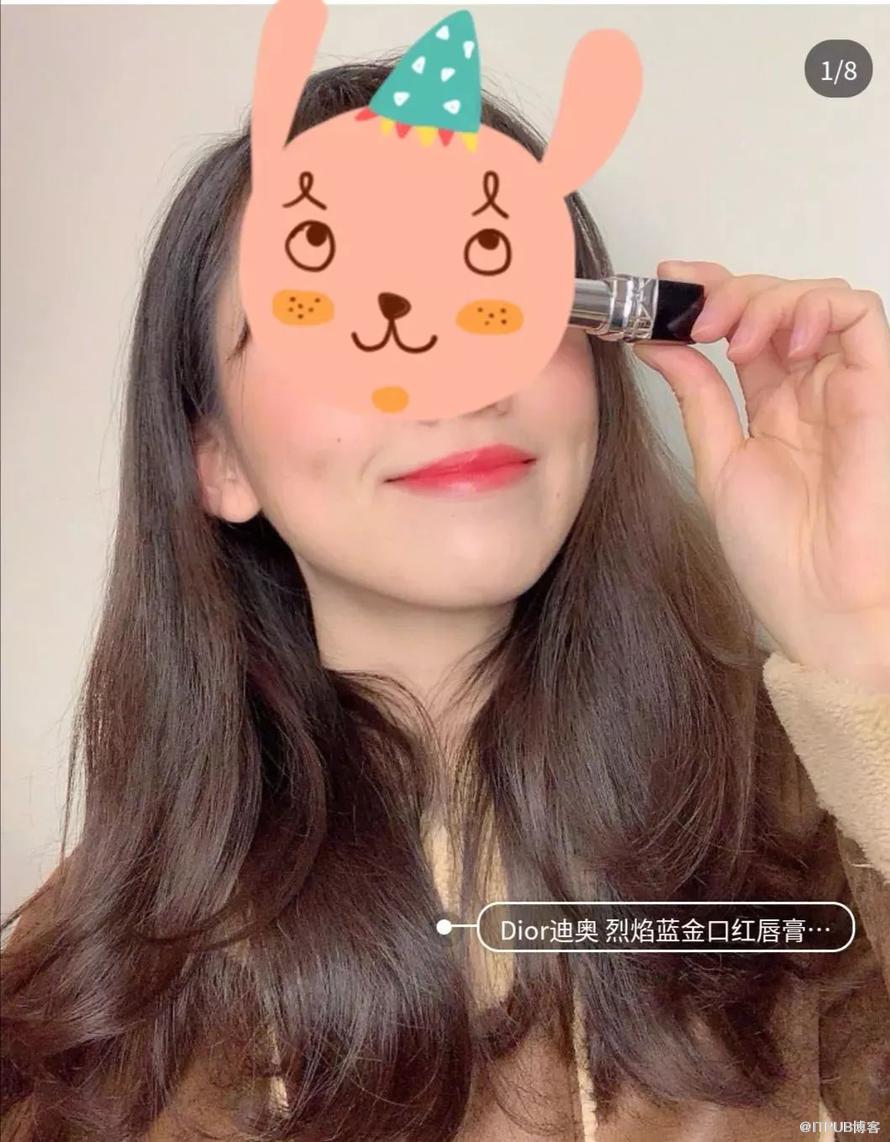
'迪奥' '烈艳蓝金唇膏' '080' '微笑正红’的颜色:

'圣罗兰' '纯口红' '56' '橙红织锦'的颜色:

'纪梵希' '高定香榭天鹅绒唇' '325' '圣水红'的颜色:

文摘菌已经眼花缭乱,三个颜色……有区别吗?!以后不如准备统一叫它们,番茄色!

不过,这也正说明了,刚刚的提取&对比方法可行!

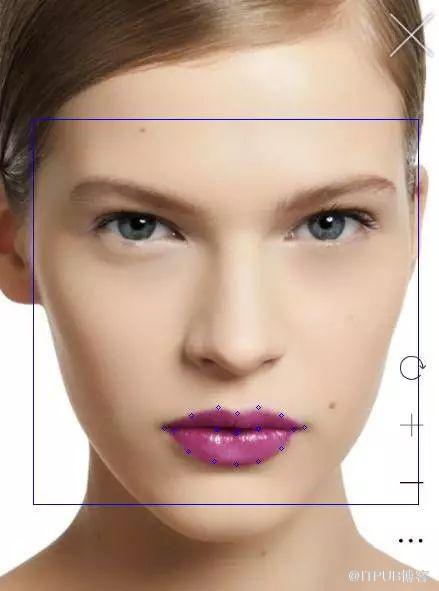
截取到的嘴唇区域如下:


圣罗兰官网#842C71口红


人脸识别和截取嘴唇区域的代码如下:
import numpy as np
import cv2
import dlib
from PIL import Image

def crop(source,pos):

      x1=pos[2][0]
      y1=pos[2][1]
      x2=pos[1][0]
      y2=pos[1][1]
      d=abs(x2-x1)
      region = source[(int)(y1-d*0.75):y2,x1:x2]
      # save the image
      cv2.imwrite("output/Mouth1.jpg", region)

      x1=pos[1][0]
      y1=pos[1][1]
      x2=pos[0][0]
      y2=pos[0][1]
      d=abs(x1-x2)
      region = source[y1-d:y2,x1:x2]
      # save the image
      cv2.imwrite("output/Mouth2.jpg", region)


def detect_mouth(img,pos):
        gray = cv2.cvtColor(img, cv2.COLOR_BGR2GRAY)
        gray = cv2.equalizeHist(gray)
        detector = dlib.get_frontal_face_detector()
        #use the predictor
        predictor = dlib.shape_predictor('shape_predictor_68_face_landmarks.dat')
        dets = detector(img, 1)
        print("Number of faces detected: {}".format(len(dets)))
        for a in dets:
           cv2.rectangle(img,(a.left(),a.top()),(a.right(),a.bottom()),(255,0,0))
        #point_list=[]#save the mouth point to point_list[]#
        #Extract 68 feature points of the face and crop the lip image#
        for index, face in enumerate(dets):
           print('face {}; left {}; top {}; right {}; bottom {}'.format(index, face.left(), face.top(), face.right(), face.bottom()))
           shape = predictor(gray, face)
           for i, pt in enumerate(shape.parts()):
            #print('Part {}: {}'.format(i, pt))
            #print(i)
             pt_pos = (pt.x, pt.y)
             if i>=48 and i<=67:
                cv2.circle(img, pt_pos, 2, (255, 0, 0), 1)
             if i>=56 and i<=58:
                #print(pt_pos)
                pos[i-56][0]=pt.x
                pos[i-56][1]=pt.y
             #cv2.circle(img, pt_pos, 2, (255, 0, 0), 1)
        return img

if __name__ == "__main__":
      img = cv2.imread("test3.png")
      #copy the input image for the later crop#
      img_clone = np.copy(img)
      cv2.imwrite("input/source.jpg",img_clone)
      #save the lip position to pos array#
      pos=np.zeros((3,2), dtype=int)
      result=detect_mouth(img,pos)
      cv2.imwrite("input/source2.jpg",result)
      #crop the lip areas#
      source = cv2.imread("input/source.jpg")
      crop(source,pos)
      # show the result
      cv2.imshow('FaceDetect',result)
      cv2.waitKey(0)
      cv2.destroyAllWindow
误差分析


嘴唇区域截取不可避免会截取到皮肤中的一部分颜色,虽然算法已经将那种可能降到最低; 颜色提取上,虽然截取多个嘴唇图片求平均值,但是本身的提取算法还是和实际值稍有偏差; RGB颜色相似度比对的算法也不够精确; 最最重要的是,照片必须是原图,而且光线要自然,加了滤镜的图是怎么也不可能识别出来的。
文末福利:实时人像口红色号预测

#coding=utf8
import cv2
import time
print('Press Esc to exit')
imgWindow = cv2.namedWindow('FaceDetect', cv2.WINDOW_NORMAL)
import sys
import os
import dlib
import glob
import numpy
from skimage import io
def detect_face():
    capInput = cv2.VideoCapture(0)
    #nextCaptureTime = time.time()
    faces = []
    feas = []
    if not capInput.isOpened(): print('Capture failed because of camera')
    while 1:
        ret, img = capInput.read()
        gray = cv2.cvtColor(img, cv2.COLOR_BGR2GRAY)
        gray = cv2.equalizeHist(gray)
        time=0
        eTime = time.time() + 0.1
        detector = dlib.get_frontal_face_detector()
        predictor = dlib.shape_predictor('shape_predictor_68_face_landmarks.dat')
        dets = detector(gray, 1)
        print("Number of faces detected: {}".format(len(dets)))
        for a in dets:
           cv2.rectangle(img,(a.left(),a.top()),(a.right(),a.bottom()),(255,0,0))
        for index, face in enumerate(dets):
           print('face {}; left {}; top {}; right {}; bottom {}'.format(index, face.left(), face.top(), face.right(), face.bottom()))
           shape = predictor(gray, face)
           for i, pt in enumerate(shape.parts()):
            #print('Part {}: {}'.format(i, pt))
             pt_pos = (pt.x, pt.y)
             cv2.circle(img, pt_pos, 2, (255, 0, 0), 1)
        cv2.imshow('FaceDetect',img)
        if cv2.waitKey(1) & 0xFF == 27: break
    capInput.release()
    cv2.destroyAllWindows()
if __name__ == "__main__":
    detect_face()
好啦,佳期如梦,双星良夜,在这个充满爱意的日子里,定位好女神常用的口红色号,和那个她来场华丽的邂逅吧!