1.前言
在日常的开发中经常会遇到对接第三方系统,如:各种支付(微信支付、支付宝支付。易宝支付,抖音支付、京东支付、美团支付、银联支付、云闪付等)、ocr识别(阿里、旷世等)、各种短信验证方接口、隐私号码打电话(华为、阿里)、开发票(百望等,税控盘发票或数电发票)等等,这些第三方都是通过sdk或者是https或者是http的方式提供一个json格式的接口,它们都有一个自己的开放平台,接入都需要使用应用appId和accessKey、secretKey等,有的使用RSA加解密及参数验签,有的使用SM4对参数和响应进行加解密,有的使用证书对参数和响应进行加解密及验签,有的使用其它加密和解密算法对参数进行加解密及验签啥的,大体上都是一个套路,都是通过http或者https协议加上一些加密算法实现,有的提供了好用的sdk,很方便使用,有的需要集成方自己写代码实现接口调用,这种方式就很low的。
假如你写了一个支付服务、开发票服务、ocr识别服务等此类通用的服务,提供给公司内部其他业务使用,
那此时你写的这些通用服务就相当于一个服务提供方,业务方来调用你的接口,你的接口又去调用第三方的接口,此时,如果调用中出现了一些问题,报错了导致接口不通,你该如何去排查分析定位到问题呢?如果服务应用重启或者重启了容器,没有使用elk,也没有配置日志输出到服务路径,此时重启之后就没有历史的日志了,如果集成了ELK等日志收集,项目中集成了ELK的相关依赖及配置,但是ELK存储日志也只是存储一段时间的,不是永久存储,否则磁盘不够用,所以定期要去清理ELK中存储了很久的日志,如果一个问题是很久的时候发生的,现在才反馈,去ELK中已经查不到日志了,此时,对于排查问题就很难排查,没有日志分析定位问题的难度是很大的,只能去看代码猜测问题,或者是根据前端返回异常信息看看是否能看出蛛丝马迹,还有一种是把生产的各个阶段的数据拿到测试环境从数据源头、数据扭转、在测试环境复现生产异常,这个方法有的时候还是管用的,但是就是实现起来很有难度,那这种难搞,那 有没有什么好的方法来解决这个问题呢?首先,日志可以永久存储,还可以记录到异常信息或者是业务处理抛出的业务异常信息,入参、出参,请求头,请求体,响应体,加密报文以及解密报文,业务方法层面的入参、出参及业务方法处理层面抛出的异常等信息,这种持久化到数据库的表中如果有问题,后续排查问题既方便又快捷的方法有没有有呢?答案是有的,我最近就实践出了一个好的思路,请看下文分解。
2.思路
2.1使用ELK收集日志
2.1.1ELK搭建
省略,这个不是本文的重点,可以去网上搜索相关教程。
2.1.2项目中集成ELK日志收集
2.1.2.1 引入依赖
<properties><skywalking.version>8.4.0skywalking.version>properties><dependencies><dependency><groupId>org.apache.skywalkinggroupId><artifactId>apm-toolkit-logback-1.xartifactId><version>${skywalking.version}version>dependency><dependency><groupId>net.logstash.logbackgroupId><artifactId>logstash-logback-encoderartifactId><version>6.6version>dependency><dependency><groupId>org.apache.skywalkinggroupId><artifactId>apm-toolkit-traceartifactId><version>${skywalking.version}version>dependency>dependencies>
2.1.2.2 logback-xxx.xml配置
logback-xxx.xml中的xxx是对应激活那个环境配置,有测试环境、生产环境等
<configuration scan="true" scanPeriod="30 seconds"><include resource="org/springframework/boot/logging/logback/defaults.xml"/><springProperty name="spring.application.name" scope="context" source="spring.application.name"/><springProperty scope="context" name="elkLoggerUrl" source="elk.logger.destination"/><property name="CONSOLE_LOG_PATTERN"value="%clr(%d{${LOG_DATEFORMAT_PATTERN:yyyy-MM-dd HH:mm:ss.SSS}}){faint} %clr(${LOG_LEVEL_PATTERN:-%5p}) %clr(${PID:- }){magenta} %clr(%tid){faint} %clr([%15.15t]){faint} %clr(%-40.40logger{39}){cyan} %clr(:){faint} %m%n%wEx"/><conversionRule conversionWord="tid"converterClass="org.apache.skywalking.apm.toolkit.log.logback.v1.x.LogbackPatternConverter"/><appender name="logstash" class="net.logstash.logback.appender.LogstashTcpSocketAppender"><destination>${elkLoggerUrl}destination><encoder charset="UTF-8" class="net.logstash.logback.encoder.LoggingEventCompositeJsonEncoder"><providers><timestamp><timeZone>UTCtimeZone>timestamp><pattern><pattern>{"level": "%level","serviceName": "${spring.application.name:-}","pid": "${PID:-}","tid": "%tid","thread": "%thread","class": "%logger{1.}","message": "%message","stackTrace": "%exception{10}"}pattern>pattern>providers>encoder>appender><appender name="console" class="ch.qos.logback.core.ConsoleAppender"><encoder class="ch.qos.logback.core.encoder.LayoutWrappingEncoder"><layout class="org.apache.skywalking.apm.toolkit.log.logback.v1.x.TraceIdPatternLogbackLayout"><Pattern>${CONSOLE_LOG_PATTERN}Pattern>layout>encoder>appender><appender name="ASYNC" class="ch.qos.logback.classic.AsyncAppender"><discardingThreshold>0discardingThreshold><queueSize>1024queueSize><appender-ref ref="logstash"/>appender><logger name="xxx.xxxx.xxxx" level="INFO"><appender-ref ref="ASYNC"/>logger><root level="INFO"><appender-ref ref="console"/>root>configuration>
2.1.2.3 yaml配置
application.yaml 或者 bootstrap.yml等,或者是nacos上的配置
spring:application:name: xxx #项目名称profiles:active: xxx #激活环境elk:logger:destination: ip:920 #es地址:端口logging:level:# root: info# 可以指定多个报名路径的日志级别xxxxx.xxx.xxx: info# 这里是指定logback日志配置文件位置,就是2.1.2.2 logback-xxx.xml文件(该文件在工程目录的resources下)config: classpath:logback-xxx.xml
2.2本文思路
2.2.1书接上文--自定义注解之AspectJ切面动态代理使用注意事项
可以去看上一篇文章。2.2.2 切面代码
package xxxx.xxxx.annotation;import com.alibaba.fastjson.JSON;import lombok.extern.slf4j.Slf4j;import org.apache.commons.lang3.StringUtils;import org.apache.commons.lang3.exception.ExceptionUtils;import org.aspectj.lang.ProceedingJoinPoint;import org.aspectj.lang.annotation.Around;import org.aspectj.lang.annotation.Aspect;import org.aspectj.lang.annotation.Pointcut;import org.aspectj.lang.reflect.MethodSignature;import org.springframework.beans.factory.annotation.Autowired;import org.springframework.context.ApplicationContext;import org.springframework.stereotype.Component;import java.lang.reflect.Method;import java.util.Objects;@Slf4j@Aspect@Componentpublic class xxxRequestLogAspect {@Autowiredprivate ApplicationContext applicationContext;//切面表达式的写法还有很多种写法,这个只是其中一种@Pointcut("@annotation(xxx.xxxx.xxx.xxxRequestLogAspect)")public void xxxRequestLogPoint() {}@Around("xxxRequestLogPoint()")public xxxx deal(ProceedingJoinPoint pjp) throws Throwable {//当前线程名String threadName = Thread.currentThread().getName();log.info("-------------RequestLogAspect开始执行-----线程:{}-----------", threadName);Exception exception = null;//获取参数列表Object[] objs = pjp.getArgs();String message = "";xxxReq xxxReq = null;xxxRequestLogAnno annotation = null;xxxLogDto xxxReqLogDto = new xxxxReqLogDto();try {MethodSignature ms = (MethodSignature) pjp.getSignature();Method method = ms.getMethod();String methodName = method.getName();String classSimpleName = method.getClass().getSimpleName();//获取第一个参数xxxReq = (xxxReq) objs[0];log.info("classSimpleName:{}.methodName:{},xxxReq:{}", classSimpleName, methodName, JSON.toJSONString(xxxReq));if (Objects.isNull(xxxReq)) {throw new RuntimeException("接口参数不为空");}String appId = xxxReq.getAppId();if (StringUtils.isEmpty(appId)) {throw new RuntimeException("接口参数中appId不为空");}xxxReqLogDto.setAppId(appId);//获取该注解的实例对象,暂时没有用到注解属性控制逻辑annotation = ((MethodSignature) pjp.getSignature()).getMethod().getAnnotation(xxxRequestLogAnno.class);// 记录开始时间long startTime = System.currentTimeMillis();// 记录结束时间xxxResp xxResp = (xxxesp) pjp.proceed();if (Objects.nonNull(xxxResp)) {xxxReqLogDto.setRequest(JSON.toJSONString(xxxReq.getRequestMaps()));if (xxResp.getIsSuccess()) {//接口调用成功xxxReqLogDto.setStatus("success");} else {Error error = xxResp.getError();if (Objects.nonNull(error)) {log.info("classSimpleName:{}.methodName:{},响应Error:{}", classSimpleName, methodName, JSON.toJSONString(error));}xxxReqLogDto.setStatus("fail");}xxxReqLogDto.setResponse(JSON.toJSONString(xxResp));}long endTime = System.currentTimeMillis();// 计算耗时long duration = endTime - startTime;xxxReqLogDto.setCostTime(duration);log.info("classSimpleName:{}.methodName:{},xxResp:{},duration:{}毫秒", classSimpleName, methodName, JSON.toJSONString(xxResp), duration);log.info("RequestLogAspect发送ReqLogEvent事件开始,ReqLogDto:{}", JSON.toJSONString(xxxReqLogDto));xxxReqLogEvent xxxReqLogEvent = new xxxReqLogEvent(this, xxxReqLogDto);applicationContext.publishEvent(xxxReqLogEvent);log.info("RequestLogAspect发送ReqLogEvent事件完成");return xxxResp;} catch (Exception e) {exception = e;message = e.getMessage();String stackTrace = ExceptionUtils.getStackTrace(e);log.error("-------------RequestLogAspect.message:{},stackTrace:{}-----线程{}-----------", message, stackTrace, threadName);xxxReqLogDto.setRequest(JSON.toJSONString(xxxReq));if (StringUtils.isNotBlank(message)) {if (message.length() > 255) {xxxReqLogDto.setExMsg(message.substring(0, 255));} else {xxxReqLogDto.setExMsg(message);}} else if (StringUtils.isEmpty(message)) {if (StringUtils.isNotBlank(stackTrace)) {if (stackTrace.length() > 255) {xxxReqLogDto.setExMsg(stackTrace.substring(0, 255));} else {xxxReqLogDto.setExMsg(stackTrace);}}}xxxReqLogDto.setStatus("fail-error");log.info("异常处理中===>RequestLogAspect发送ReqLogEvent事件开始,ReqLogDto:{}", JSON.toJSONString(xxxReqLogDto));xxxReqLogEvent xxxReqLogEvent = new xxxReqLogEvent(this, xxxReqLogDto);applicationContext.publishEvent(xxxReqLogEvent);log.info("异常处理中===>RequestLogAspect发送ReqLogEvent事件完成");}if (StringUtils.isNotBlank(message)) {throw new RuntimeException(message.replaceAll("RuntimeException", "").replaceAll("Exception", "").replaceAll(":", "").replaceAll(" ", ""));}throw new RuntimeException(exception);}}
2.2.3xxxReqLogEvent
package xxxx.xxxx.xx.event;import xxx.xxx.xxxReqLogDto;import lombok.Getter;import org.springframework.context.ApplicationEvent;public class xxxReqLogEvent extends ApplicationEvent {private xxxReqLogDto xxxReqLogDto;public xxxReqLogEvent(Object source, xxxReqLogDto xxxReqLogDto) {super(source);this.xxxReqLogDto = xxxReqLogDto;}}
2.2.4BizListener日志入库
package xxx.xxxx.listener;import lombok.extern.slf4j.Slf4j;import org.springframework.beans.factory.annotation.Autowired;import org.springframework.context.event.EventListener;import org.springframework.stereotype.Component;public class BizListener {private xxxxRequestLogService xxxxRequestLogService;public void xxxReqLogListener(xxxReqLogEvent xxxReqLogEvent) {//接口api调用日志入库Boolean result = xxxRequestLogService.saveRequestLog(xxxReqLogEvent.getXxxReqLogDto());log.info("ReqLogListener保存接口api调用日志入库完成result:{}", result);}}
2.2.5接口调用日志表设计
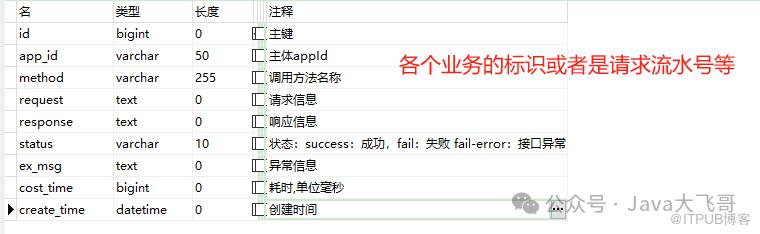
这个接口调用日志表可以根据自己对接的第三方接口或者是根据自己的业务系统来设计即可。
3.业务接口 + 第三方接口调用姿势
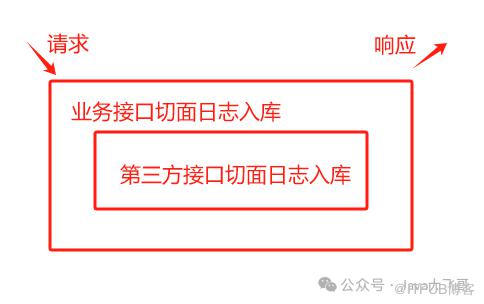
根据以上的原理(套路),可以在业务层接口在搞一层切面,标记业务接口的调用日志也入库,这种就可以知道业务接口本次调用是有啥异常或者是不满足什么条件抛出的业务异常等信息入库,查问题就非常方便了的。
4.总结
以上是最近写项目的一个思路,也是之前写项目,一个接口调用里面写一遍相同重复的接口日志记录代码,这种方式可以简化代码,提高排查问题的效率,可以精准记录问题日志,本次分享到此结束,希望我的分享对你有所启发和帮助,请一键三连,么么么哒!