前言
从v9.4开始,PostgreSQL正式支持了Logical Decoding,也就是逻辑解码,逻辑解码的实现为最终实现逻辑复制奠定了坚实的基础,终于在v10大版本发布之后,PostgreSQL正式支持了原生的逻辑复制,在此之前可以使用pglogical、BDR等插件实现,pglogical有着更强大的冲突处理能力。BDR特点是支持多主机、DDL复制、全局序列、全局DDL锁,最早开源过一阵子,后面就闭源了。
之前详细写过流复制,逻辑复制和流复制各自的应用领域不同:
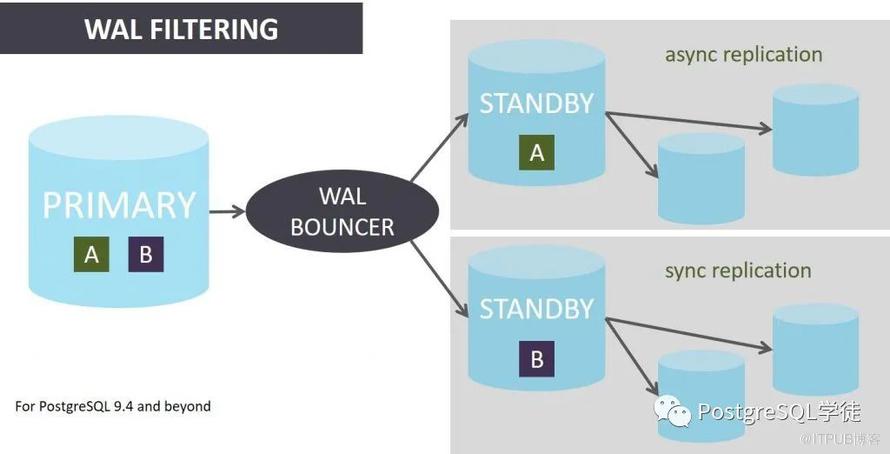
流复制只能做到整个cluster的复制,逻辑复制则更加灵活,可以做到表级同步,另外cybertc提供了一个patial replication的插件walbouncer,可以对WAL日志进行过滤,允许进行部分数据库的复制,而不是整个实例:https://www.cybertec-postgresql.com/en/products/walbouncer-partial-replication/
流复制的standby备库是只读的,不能写入,而逻辑复制读写都可以。
逻辑复制支持在不同版本数据库之间进行逻辑复制,所以可以利用来进行跨版本升级。
支持异构架构之前的同步,比如Linux -> Windows
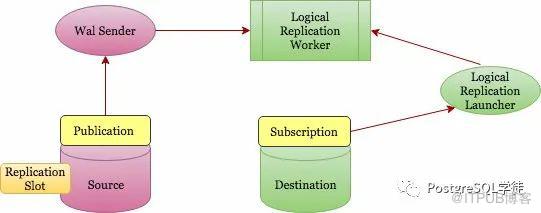
角色
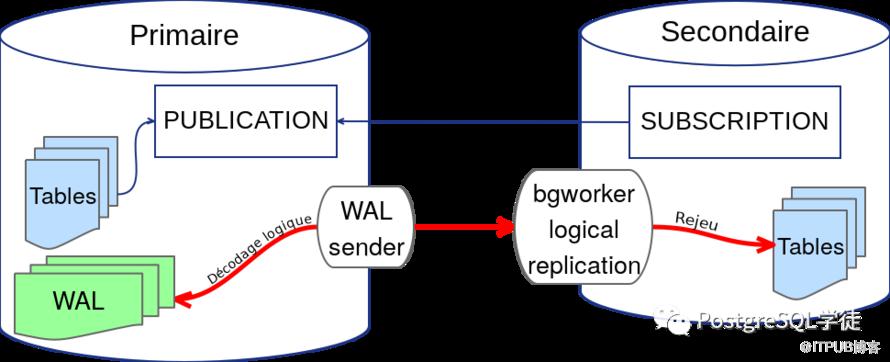
Walsender:使用OutputPlugins进行逻辑解码,然后将解码后的数据发送给订阅端
logical replication launcher:类似于autovacuum launcher,守护进程,进行fork logical replication worker,发布端和订阅端都有该进程
logical replication worker:工作进程,接收Walsender发送过来的数据
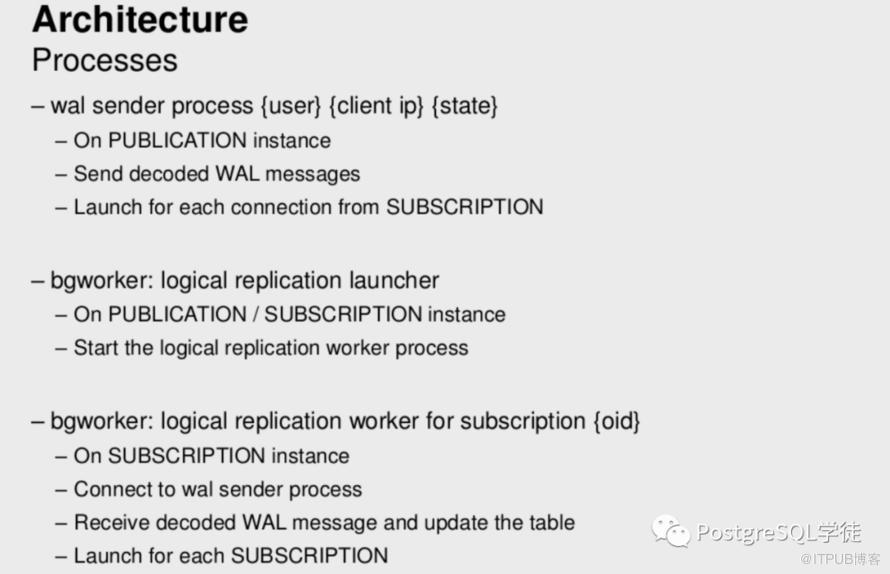
/usr/pgsql-13/bin/postgres -D mydir       ---订阅端,fork了 logical replication worker 进程
  \_ postgres: logger
  \_ postgres: checkpointer
  \_ postgres: background writer
  \_ postgres: walwriter
  \_ postgres: autovacuum launcher
  \_ postgres: archiver
  \_ postgres: stats collector
  \_ postgres: logical replication launcher
  \_ postgres: postgres postgres [local] idle
  \_ postgres: logical replication worker for subscription 82435
 /usr/pgsql-13/bin/postgres -D pgdata      ---发布端
  \_ postgres: logger
  \_ postgres: checkpointer
  \_ postgres: background writer
  \_ postgres: walwriter
  \_ postgres: autovacuum launcher
  \_ postgres: stats collector
  \_ postgres: logical replication launcher
  \_ postgres: walsender postgres 127.0.0.1(34718) idle
OutputPlugins
PostgreSQL的逻辑流复制协议开放一组可编程接口,用于自定义输数据到客户端的逻辑数据的格式。这部分实现使用插件的方式被内核集成和使用,称作 Output Plugins。目前常用的包括PostgreSQL自带的test_decoding,以及第三方的wal2json、decoder_raw等。此处可以参照wiki:https://wiki.postgresql.org/wiki/Logical_Decoding_Plugins,OutputPlugins本质是一系列的回调函数,也就是PostgreSQL里面俗称的钩子函数,Hook,此处是v13提供的钩子函数:
/*
 * Output plugin callbacks
 */
typedef struct OutputPluginCallbacks
{
    LogicalDecodeStartupCB startup_cb;
    LogicalDecodeBeginCB begin_cb;
    LogicalDecodeChangeCB change_cb;
    LogicalDecodeTruncateCB truncate_cb;
    LogicalDecodeCommitCB commit_cb;
    LogicalDecodeMessageCB message_cb;
    LogicalDecodeFilterByOriginCB filter_by_origin_cb;
    LogicalDecodeShutdownCB shutdown_cb;
} OutputPluginCallbacks;

typedef void (*LogicalOutputPluginInit) (struct OutputPluginCallbacks *cb);
可以看到,目前提供的钩子函数包括start事务开始、commit事务提交、change行级别的增删改和truncate,没有Sequence,Schema,所以截止v13,还暂时不支持序列、DDL的解析。所以想实现完整的undo log至少目前是比较困难的,不过相信后面社区会提供越来越多的钩子函数。
test_decoding
test_decoding是PostgreSQL系统自带的测试解码插件,它的主要作用是将筛选过后的wal日志,转化为人们可以理解的形式。
创建一个test_decoding的逻辑复制槽,需要指定一个输出插件(Output Plugin):
postgres=# create table test_decoding(id int,info text);
CREATE TABLE
postgres=# select pg_create_logical_replication_slot('myslot','test_decoding');
 pg_create_logical_replication_slot
------------------------------------
 (myslot,4/B5134340)
(1 row)

postgres=# \x
Expanded display is on.
postgres=# select * from pg_replication_slots ;
-[ RECORD 1 ]-------+--------------
slot_name           | myslot
plugin              | test_decoding
slot_type           | logical
datoid               | 13578
database            | postgres
temporary           | f
active              | f
active_pid          |
xmin                |
catalog_xmin        | 4370960
restart_lsn         | 4/B5134308
confirmed_flush_lsn | 4/B5134340
wal_status          | reserved
safe_wal_size       |
进行一些简单的写入操作,然后使用PostgreSQL提供的消费函数进行查看
pg_logical_slot_peek_binary_changes   ---只查看,不消费,返回二进制数据
pg_logical_slot_peek_changes          ---只查看,不消费,返回文本数据
pg_logical_slot_get_binary_changes    ---查看并且消费,意味着执行一次之后,数据没了,返回二进制数据
pg_logical_slot_get_changes           ---查看并且消费,意味着执行一次之后,数据没了,返回文本数据
可以看到,test_decoding的输出结果看起来没有那么容易被二次开发使用
postgres=# insert into test_decoding values(1,'test decoding');
INSERT 0 1
postgres=# select * from pg_logical_slot_get_changes('myslot', NULL, NULL);
    lsn     |   xid   |                                     data
------------+---------+------------------------------------------------------------------------------
 4/B513C1D0 | 4370964 | BEGIN 4370964
 4/B513C1D0 | 4370964 | table public.test_decoding: INSERT: id[integer]:1 info[text]:'test decoding'
 4/B513C250 | 4370964 | COMMIT 4370964
(3 rows)
进行一下删除和更新的操作,可以看到这里解析出来的delete很怪异,完全没有信息,并且解析出来的update是update之后的数据,对于原来的数据并没有解析出来
postgres=# update test_decoding set id = 99 where id = 1;
UPDATE 1
postgres=# select * from pg_logical_slot_get_changes('myslot', NULL, NULL);
    lsn     |   xid   |                                     data
------------+---------+-------------------------------------------------------------------------------
 4/B513C288 | 4370965 | BEGIN 4370965
 4/B513C288 | 4370965 | table public.test_decoding: UPDATE: id[integer]:99 info[text]:'test decoding'
 4/B513C310 | 4370965 | COMMIT 4370965
(3 rows)

postgres=# delete from test_decoding ;
DELETE 1
postgres=# select * from pg_logical_slot_get_changes('myslot', NULL, NULL);
    lsn     |   xid   |                        data
------------+---------+-----------------------------------------------------
 4/B513C348 | 4370966 | BEGIN 4370966
 4/B513C348 | 4370966 | table public.test_decoding: DELETE: (no-tuple-data)
 4/B513C3B0 | 4370966 | COMMIT 4370966
(3 rows)
这边,我们给表增加一个replica identity复制标识,复制标识稍后会详细介绍。
增加完复制标识之后,可以看到delete解析出了具体delete的Tuple,并且update也解析出了更新前的数据,也就是对应的Old value,这个和触发器有点类似,触发器中会有两个变量old与new,分别包含了变更记录的旧值与新值,在触发器中:
delete操作只有old变量,因为它只是删除已有记录。
update操作同时存在old变量与new变量
postgres=# alter table test_decoding replica identity full;
ALTER TABLE
postgres=# insert into test_decoding values(1,'test decoding');
INSERT 0 1
postgres=# update test_decoding set id = 99 where id = 1;
UPDATE 1
postgres=# select * from pg_logical_slot_get_changes('myslot', NULL, NULL);
    lsn     |   xid   |                                                                    data

------------+---------+-----------------------------------------------------------------------------------------------------------------------------
---------------
 4/B513C3E8 | 4370967 | BEGIN 4370967
 4/B513C550 | 4370967 | COMMIT 4370967
 4/B513C588 | 4370968 | BEGIN 4370968
 4/B513C588 | 4370968 | table public.test_decoding: INSERT: id[integer]:1 info[text]:'test decoding'
 4/B513C608 | 4370968 | COMMIT 4370968
 4/B513C608 | 4370969 | BEGIN 4370969
 4/B513C608 | 4370969 | table public.test_decoding: UPDATE: old-key: id[integer]:1 info[text]:'test decoding' new-tuple: id[integer]:99 info[text]:'
test decoding'
 4/B513C6A8 | 4370969 | COMMIT 4370969
(8 rows)

postgres=# delete from test_decoding ;
DELETE 1
postgres=# select * from pg_logical_slot_get_changes('myslot', NULL, NULL);
    lsn     |   xid   |                                     data
------------+---------+-------------------------------------------------------------------------------
 4/B513C6E0 | 4370970 | BEGIN 4370970
 4/B513C6E0 | 4370970 | table public.test_decoding: DELETE: id[integer]:99 info[text]:'test decoding'
 4/B513C760 | 4370970 | COMMIT 4370970
(3 rows)
wal2json
可以看到,官方自带的test_decoding只是一个Demo,不易二次利用, wal2json是test_decoding的一个升级版,它优化了输出结果的结构,使之更容易被应用。https://github.com/eulerto/wal2json
建一个wal2json的逻辑复制槽
postgres=# create table test_decoding(id int,info text);
CREATE TABLE
postgres=# select pg_create_logical_replication_slot('myslot','wal2json');
 pg_create_logical_replication_slot
------------------------------------
 (myslot,4/B516DEC8)
(1 row)
进行增删改查
postgres=# insert into test_decoding values(1,'test decoding');
INSERT 0 1
postgres=# select * from pg_logical_slot_get_changes('myslot', NULL, NULL);
    lsn     |   xid   |                                                                                   data

------------+---------+-----------------------------------------------------------------------------------------------------------------------------
---------------------------------------------
 4/B516DF80 | 4370974 | {"change":[{"kind":"insert","schema":"public","table":"test_decoding","columnnames":["id","info"],"columntypes":["integer","
text"],"columnvalues":[1,"test decoding"]}]}
(1 row)
同样的,因为没有指定复制标识,所以对于更新和删除,并不能解析出来
postgres=# update test_decoding set id = 99 where id = 1;
UPDATE 1
postgres=# delete from test_decoding;
DELETE 1
postgres=# select * from pg_logical_slot_get_changes('myslot', NULL, NULL);
WARNING:  table "test_decoding" without primary key or replica identity is nothing
WARNING:  table "test_decoding" without primary key or replica identity is nothing
    lsn     |   xid   |     data
------------+---------+---------------
 4/B516E108 | 4370975 | {"change":[]}
 4/B516E1F8 | 4370976 | {"change":[]}
(2 rows)
增加一个full模式的复制标识
postgres=# alter table test_decoding replica identity full;
ALTER TABLE
postgres=# insert into test_decoding values(1,'test decoding');
INSERT 0 1
postgres=# update test_decoding set id = 99 where id = 1;
UPDATE 1
postgres=# delete from test_decoding;
DELETE 1
postgres=# select * from pg_logical_slot_get_changes('myslot', NULL, NULL);
    lsn     |   xid   |
        data
------------+---------+-----------------------------------------------------------------------------------------------------------------------------
-------------------------------------------------------------------------------------------------------------------------------------------------
 4/B516F2E8 | 4370977 | {"change":[]}
 4/B516F3A0 | 4370978 | {"change":[{"kind":"insert","schema":"public","table":"test_decoding","columnnames":["id","info"],"columntypes":["integer","
text"],"columnvalues":[1,"test decoding"]}]}
 4/B516F440 | 4370979 | {"change":[{"kind":"update","schema":"public","table":"test_decoding","columnnames":["id","info"],"columntypes":["integer","
text"],"columnvalues":[99,"test decoding"],"oldkeys":{"keynames":["id","info"],"keytypes":["integer","text"],"keyvalues":[1,"test decoding"]}}]}
 4/B516F4C0 | 4370980 | {"change":[{"kind":"delete","schema":"public","table":"test_decoding","oldkeys":{"keynames":["id","info"],"keytypes":["integ
er","text"],"keyvalues":[99,"test decoding"]}}]}
(4 rows)
decoder_raw
decoder_raw是一款能够解析成具体SQL的Plugins,https://github.com/michaelpq/pg_plugins/tree/master/decoder_raw,看下具体效果
postgres=# drop table test_decoding ;
DROP TABLE
postgres=# create table test_decoding(id int,info text);
CREATE TABLE
postgres=# alter table test_decoding replica identity full;
ALTER TABLE
postgres=# select pg_create_logical_replication_slot('myslot','decoder_raw');
 pg_create_logical_replication_slot
------------------------------------
 (myslot,4/B519A1F0)
(1 row)
postgres=# insert into test_decoding values(1,'test decoding');
INSERT 0 1
postgres=# update test_decoding set id = 99 where id = 1;
UPDATE 1
postgres=# delete from test_decoding;
DELETE 1
postgres=# select * from pg_logical_slot_get_changes('myslot', NULL, NULL);
    lsn     |   xid   |                                                   data
------------+---------+----------------------------------------------------------------------------------------------------------
 4/B519A228 | 4370985 | INSERT INTO public.test_decoding (id, info) VALUES (1, 'test decoding');
 4/B519A2A8 | 4370986 | UPDATE public.test_decoding SET id = 99, info = 'test decoding' WHERE id = 1 AND info = 'test decoding';
 4/B519A348 | 4370987 | DELETE FROM public.test_decoding WHERE id = 99 AND info = 'test decoding';
(3 rows)
假如没有复制标识的话,就无法正确解析update和delete了
postgres=# drop table test_decoding ;
DROP TABLE
postgres=# create table test_decoding(id int,info text);
CREATE TABLE
postgres=# select pg_create_logical_replication_slot('myslot','decoder_raw');
 pg_create_logical_replication_slot
------------------------------------
 (myslot,4/B51CE3E8)
(1 row)

postgres=# insert into test_decoding values(1,'test decoding');
INSERT 0 1
postgres=# update test_decoding set id = 99 where id = 1;
UPDATE 1
postgres=# delete from test_decoding;
DELETE 1
postgres=# select * from pg_logical_slot_get_changes('myslot', NULL, NULL);
    lsn     |   xid   |                                   data
------------+---------+--------------------------------------------------------------------------
 4/B51CE420 | 4370992 | INSERT INTO public.test_decoding (id, info) VALUES (1, 'test decoding');
(1 row)
所以,这里就可以发挥我们天马行空的想象力了,比如在数据库模式不发生变化的情况下,如果只是单纯的表内容增删改出现了失误,完全可以利用类似decoder_raw的方式反向生成undo日志。当然更专业一点的就是pg_walminer了,可以生成完备的undo日志。
decoderbufs
A PostgreSQL logical decoder output plugin to deliver data as Protocol Buffers, adapted for Debezium,这里就不作演示了,可以对接Debezium。
Debezium是专注于 CDC的,是一个开源的分布式CDC系统,支持对接各种数据源,将上游已持久化的数据变更捕获后写入消息队列。它的亮点有:
支持 MySQL、MongoDB、PostgreSQL 三种数据源的变更抓取,并且社区正在开发 Oracle 与 Cassandra 支持;
Snapshot Mode 可以将表中的现有数据全部导入 Kafka,并且全量数据与增量数据形式一致,可以统一处理;
利用了 Kafka 的 Log Compaction 特性,变更数据可以实现”不过期”永久保存;
利用了 Kafka Connect,自动拥有高可用与开箱即用的调度接口;
社区活跃:Debezium 很年轻,面世不到1年,但它的 Gitter上每天都有百余条技术讨论,并且有两位 Redhat 全职工程师进行维护;
对于PostgreSQL的CDC工具,一般都会使用 Debezium,不过一定要注意,千万不要使用2.2和3.0的版本
NEVER, EVER use Debezium versions between 2.2 and 3.0. Those versions come with a bug which is hard to understand for anoyne who isn’t a Postgres expert, but its consequences are simple and dangerous : using such buggy Debezium version will take the master database down sooner or later. This is because Debezium will consume data changes, but won’t confirm the consumption to the database server. The server will retain all WAL segments since replication slot creation, and you will eventually run out of disk space (or money, if you use some pay-as-you-go storage like Amazon EFS or keep adding new disks).
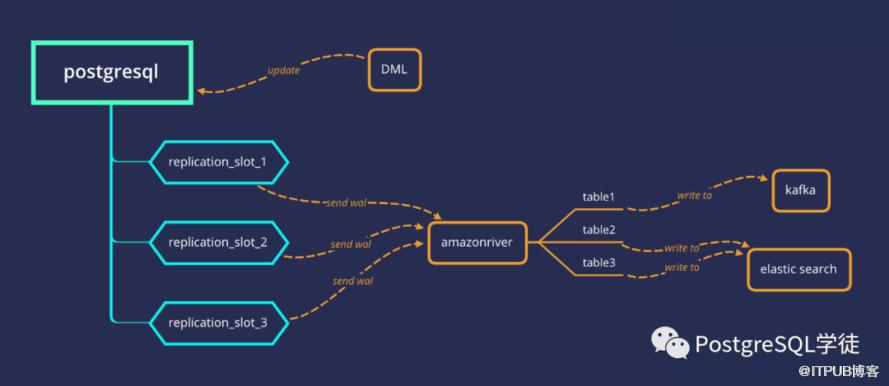
另外值得一提的是,哈罗单车开源了一款将PostgreSQL的实时数据同步到ES或Kafka的工具amazonriver,https://github.com/hellobike/amazonriver ,利用内部的逻辑复制功能,通过在PostgreSQL创建逻辑复制槽,接收数据库的逻辑变更,通过解析test_decoding特定格式的消息,得到逻辑数据
复制标识
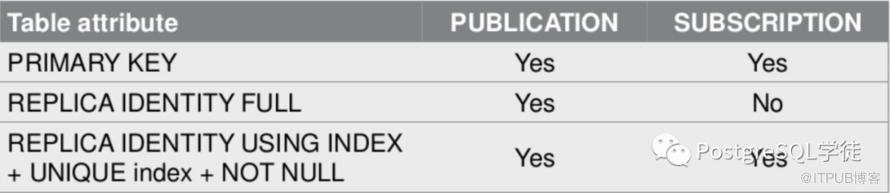
上面的例子简单给各位演示了一下复制标识的作用。复制标识,说白了,就是通过提供一种标识行的方式,复制标识是一组列的集合,这些列可以唯一标识一条记录。
A published table must have a “replica identity” configured in order to be able to replicate UPDATE and DELETE operations, so that appropriate rows to update or delete can be identified on the subscriber side. By default, this is the primary key, if there is one. Another unique index (with certain additional requirements) can also be set to be the replica identity. If the table does not have any suitable key, then it can be set to replica identity “full”, which means the entire row becomes the key. This, however, is very inefficient and should only be used as a fallback if no other solution is possible. If a replica identity other than “full” is set on the publisher side, a replica identity comprising the same or fewer columns must also be set on the subscriber side. See REPLICA IDENTITY for details on how to set the replica identity. If a table without a replica identity is added to a publication that replicates UPDATE or DELETE operations then subsequent UPDATE or DELETE operations will cause an error on the publisher. INSERT operations can proceed regardless of any replica identity.

This form changes the information which is written to the write-ahead log to identify rows which are updated or deleted. This option has no effect except when logical replication is in use. DEFAULT (the default for non-system tables) records the old values of the columns of the primary key, if any. USING INDEX records the old values of the columns covered by the named index, which must be unique, not partial, not deferrable, and include only columns marked NOT NULL. FULL records the old values of all columns in the row. NOTHING records no information about the old row. (This is the default for system tables.) In all cases, no old values are logged unless at least one of the columns that would be logged differs between the old and new versions of the row.
为了方便,直接google翻译一下
发布的表必须配置一个“副本身份”,以便能够复制 UPDATE 和 DELETE 操作,以便在订阅者端可以识别要更新或删除的适当行。默认情况下,这是主键(如果有)。另一个唯一索引(有某些附加要求)也可以设置为副本标识。如果该表没有任何合适的键,则可以将其设置为副本标识“完整”,这意味着整行成为键。然而,这非常低效,只有在没有其他解决方案时才应用作后备。如果在发布方设置了非“完整”的副本标识,则在订阅方也必须设置包含相同或更少列的副本标识。有关如何设置副本标识的详细信息,请参阅 REPLICA IDENTITY。如果将没有副本标识的表添加到复制 UPDATE 或 DELETE 操作的发布中,则后续的 UPDATE 或 DELETE 操作将导致发布者出错。无论任何副本身份如何,INSERT 操作都可以继续进行。

此表单更改写入预写日志的信息以标识更新或删除的行。除非正在使用逻辑复制,否则此选项无效。DEFAULT(非系统表的默认值)记录主键列的旧值(如果有)。USING INDEX 记录命名索引覆盖的列的旧值,该值必须是唯一的、不部分的、不可延迟的,并且仅包括标记为 NOT NULL 的列。FULL 记录行中所有列的旧值。NOTHING 不记录有关旧行的信息。(这是系统表的默认值。)在所有情况下,不会记录任何旧值,除非至少要记录的列之一在行的旧版本和新版本之间不同。
可以看到,有四种策略:
默认模式 (default):非系统表采用的默认模式,如果有主键,则用主键列作为身份标识
索引模式 (index):将某一个符合条件的索引中的列,用作身份标识
完整模式 (full):将整行记录中的所有列作为复制标识
无身份模式 (nothing):不记录任何复制标识,这意味着update和delete操作无法复制到订阅者上。
default模式
添加了主键之后,则使用主键作为身份标识
postgres=# create table test_decoding(id int,info text);
CREATE TABLE
postgres=# alter table test_decoding replica identity default ;
ALTER TABLE
postgres=# select pg_create_logical_replication_slot('myslot','decoder_raw');
 pg_create_logical_replication_slot
------------------------------------
 (myslot,4/B5235BA0)
(1 row)

postgres=# insert into test_decoding values(1,'test');
INSERT 0 1
postgres=# update test_decoding set id = 99 where id = 1;
UPDATE 1
postgres=# delete from test_decoding ;
DELETE 1
postgres=# select * from pg_logical_slot_get_changes('myslot', NULL, NULL);
    lsn     |   xid   |                              data
------------+---------+-----------------------------------------------------------------
 4/B5235BD8 | 4371008 | INSERT INTO public.test_decoding (id, info) VALUES (1, 'test');
(1 row)

postgres=# alter table test_decoding add primary key(id);
ALTER TABLE
postgres=# insert into test_decoding values(1,'test');
INSERT 0 1
postgres=# alter table test_decoding replica identity default ;
ALTER TABLE
postgres=# update test_decoding set id = 99 where id = 1;
UPDATE 1
postgres=# delete from test_decoding ;
DELETE 1
postgres=# select * from pg_logical_slot_get_changes('myslot', NULL, NULL);
    lsn     |   xid   |                                 data
------------+---------+----------------------------------------------------------------------
 4/B523EBD8 | 4371012 | INSERT INTO public.test_decoding (id, info) VALUES (1, 'test');
 4/B523ED50 | 4371014 | UPDATE public.test_decoding SET id = 99, info = 'test' WHERE id = 1;
 4/B523EE18 | 4371015 | DELETE FROM public.test_decoding WHERE id = 99;
(3 rows)
index模式
索引模式指定某个索引作为复制标识,必须是唯一的非空约束,同时不能是部分索引,且不可延迟的,之所以要求not null,是因为null无法进行等值判断,也就是null = null,这个是没有意义的。所以表中允许唯一的列上存在多条取值为NULL的记录,允许列为空说明这个列无法起到唯一标识记录的效果。这也是唯一索引的潜在问题,允许插入多条null
postgres=# create table t9(id int);
CREATE TABLE
postgres=# create unique index myidx on t9(id);
CREATE INDEX
postgres=# insert into t9 values(null);
INSERT 0 1
postgres=# insert into t9 values(null);
INSERT 0 1
postgres=# insert into t9 values(null);
INSERT 0 1
postgres=# create table test_decoding(id int,info text);
CREATE TABLE
postgres=# create unique index myidx on test_decoding(id);
CREATE INDEX
postgres=# alter table test_decoding replica identity using index myidx ;
---列不是not null的
ERROR: index "myidx" cannot be used as replica identity because column "id" is nullable
postgres=# drop index myidx ;
DROP INDEX
postgres=# create unique index myidx on test_decoding(id) where id < 5;
---部分索引
CREATE INDEX
postgres=# alter table test_decoding replica identity using index myidx ;
---部分索引不能作为复制标识
ERROR: cannot use partial index "myidx" as replica identity
postgres=# drop index myidx ;
DROP INDEX
postgres=# create unique index myidx on test_decoding(id);
CREATE INDEX
postgres=# alter table test_decoding alter column id set not null;
ALTER TABLE
postgres=# alter table test_decoding replica identity using index myidx ;
ALTER TABLE
postgres=# \d+ test_decoding
Table "public.test_decoding"
Column | Type | Collation | Nullable | Default | Storage | Stats target | Description
--------+---------+-----------+----------+---------+----------+--------------+-------------
id | integer | | not null | | plain | |
info | text | | | | extended | |
Indexes:
"myidx" UNIQUE, btree (id) REPLICA IDENTITY
Access method: heap
full模式
如果表上既没有主键,也没有非空唯一索引,则可以配置使用full的模式,不过要注意运行效率非常低,仅能作为兜底方案,对比一下full模式和默认模式
postgres=# create table test_decoding(id int,info text);
CREATE TABLE
postgres=# alter table test_decoding replica identity full;
---使用full模式
ALTER TABLE
postgres=# select pg_create_logical_replication_slot('myslot','wal2json');
pg_create_logical_replication_slot
------------------------------------
(myslot,4/B528CEA0)
(1 row)
postgres=# insert into test_decoding values(1,'test');
INSERT 0 1
postgres=# update test_decoding set id = 99 where id = 1;
UPDATE 1
postgres=# delete from test_decoding ;
DELETE 1
postgres=# select * from pg_logical_slot_get_changes('myslot', NULL, NULL);
lsn | xid | d
ata
------------+---------+-----------------------------------------------------------------------------------------------------------------------------
-------------------------------------------------------------------------------------------------------------------------------
4/B528CF10 | 4371030 | {"change":[{"kind":"insert","schema":"public","table":"test_decoding","columnnames":["id","info"],"columntypes":["integer","
text"],"columnvalues":[1,"test"]}]}
4/B528CFD8 | 4371031 | {"change":[{"kind":"update","schema":"public","table":"test_decoding","columnnames":["id","info"],"columntypes":["integer","
text"],"columnvalues":[99,"test"],"oldkeys":{"keynames":["id","info"],"keytypes":["integer","text"],"keyvalues":[1,"test"]}}]}
4/B528D050 | 4371032 | {"change":[{"kind":"delete","schema":"public","table":"test_decoding","oldkeys":{"keynames":["id","info"],"keytypes":["integ
er","text"],"keyvalues":[99,"test"]}}]}
4/B529FDE0 | 4371033 | {"change":[]}
(4 rows)
默认模式,也就是使用主键作为复制标识
postgres=# create table test_decoding(id int primary key,info text);
CREATE TABLE
postgres=# alter table test_decoding replica identity default ;
ALTER TABLE
postgres=# select pg_create_logical_replication_slot('myslot','wal2json');
 pg_create_logical_replication_slot
------------------------------------
 (myslot,4/B52E50D8)
(1 row)

postgres=# insert into test_decoding values(1,'test');
INSERT 0 1
postgres=# update test_decoding set id = 99 where id = 1;
UPDATE 1
postgres=# delete from test_decoding ;
DELETE 1
postgres=# select * from pg_logical_slot_get_changes('myslot', NULL, NULL);
    lsn     |   xid   |                                                                                                                 data

------------+---------+-----------------------------------------------------------------------------------------------------------------------------
----------------------------------------------------------------------------------------------------------
 4/B52E5228 | 4371045 | {"change":[{"kind":"insert","schema":"public","table":"test_decoding","columnnames":["id","info"],"columntypes":["integer","
text"],"columnvalues":[1,"test"]}]}
 4/B52E52F0 | 4371046 | {"change":[{"kind":"update","schema":"public","table":"test_decoding","columnnames":["id","info"],"columntypes":["integer","
text"],"columnvalues":[99,"test"],"oldkeys":{"keynames":["id"],"keytypes":["integer"],"keyvalues":[1]}}]}
 4/B52E5360 | 4371047 | {"change":[{"kind":"delete","schema":"public","table":"test_decoding","oldkeys":{"keynames":["id"],"keytypes":["integer"],"k
eyvalues":[99]}}]}
(3 rows)
通过对比,可以看到,默认模式,update只需解析出oldkeys id列即可,没有解析出info列,而full模式都解析了出来
4/B528CFD8 | 4371031 | {"change":[{"kind":"update","schema":"public","table":"test_decoding","columnnames":["id","info"],"columntypes":["integer","
text"],"columnvalues":[99,"test"],"oldkeys":{"keynames":["id","info"],"keytypes":["integer","text"],"keyvalues":[1,"test"]}}]}

 4/B52E52F0 | 4371046 | {"change":[{"kind":"update","schema":"public","table":"test_decoding","columnnames":["id","info"],"columntypes":["integer","
text"],"columnvalues":[99,"test"],"oldkeys":{"keynames":["id"],"keytypes":["integer"],"keyvalues":[1]}}]}
所以,不难想象,假如表是一个含有100列的宽表的话,那么解析是一件十分耗费资源的方式,每一行修改都要在订阅者上执行全表扫描,很容易把订阅者拖垮。
nothing模式
这种就表过不提了,无法完成update和delete的解析。
postgres=# create table test_decoding(id int,info text);
CREATE TABLE
postgres=# alter table test_decoding replica identity nothing ;
ALTER TABLE
postgres=# select pg_create_logical_replication_slot('myslot','wal2json');
 pg_create_logical_replication_slot
------------------------------------
 (myslot,4/B5313170)
(1 row)

postgres=# insert into test_decoding values(1,'test');
INSERT 0 1
postgres=# update test_decoding set id = 99 where id = 1;
UPDATE 1
postgres=# delete from test_decoding ;
DELETE 1
postgres=# select * from pg_logical_slot_get_changes('myslot', NULL, NULL);
WARNING:  table "test_decoding" without primary key or replica identity is nothing
WARNING:  table "test_decoding" without primary key or replica identity is nothing
    lsn     |   xid   |                                                                              data

------------+---------+-----------------------------------------------------------------------------------------------------------------------------
------------------------------------
 4/B53131E0 | 4371057 | {"change":[{"kind":"insert","schema":"public","table":"test_decoding","columnnames":["id","info"],"columntypes":["integer","
text"],"columnvalues":[1,"test"]}]}
 4/B5313260 | 4371058 | {"change":[]}
 4/B53132C8 | 4371059 | {"change":[]}
(3 rows)
postgres=# \d+ test_decoding
                               Table "public.test_decoding"
 Column |  Type   | Collation | Nullable | Default | Storage  | Stats target | Description
--------+---------+-----------+----------+---------+----------+--------------+-------------
 id     | integer |           |          |         | plain    |              |
 info   | text    |           |          |         | extended |              |
Replica Identity: NOTHING
Access method: heap
值得注意的是,wal2json完全没有解析出update和delete,而test_decoding至少解析出了update的新值
postgres=# drop table test_decoding ;
DROP TABLE
postgres=# select pg_drop_replication_slot('myslot');
 pg_drop_replication_slot
--------------------------

(1 row)
postgres=# create table test_decoding(id int,info text);
CREATE TABLE
postgres=# alter table test_decoding replica identity nothing ;
ALTER TABLE
postgres=# select pg_create_logical_replication_slot('myslot','test_decoding');
 pg_create_logical_replication_slot
------------------------------------
 (myslot,4/B532B258)
(1 row)

postgres=# insert into test_decoding values(1,'test');
INSERT 0 1
postgres=# update test_decoding set id = 99 where id = 1;
UPDATE 1
postgres=# delete from test_decoding ;
DELETE 1
postgres=# select * from pg_logical_slot_get_changes('myslot', NULL, NULL);
    lsn     |   xid   |                                 data
------------+---------+----------------------------------------------------------------------
 4/B532B258 | 4371064 | BEGIN 4371064
 4/B532B258 | 4371064 | table public.test_decoding: INSERT: id[integer]:1 info[text]:'test'
 4/B532B2C8 | 4371064 | COMMIT 4371064
 4/B532B2C8 | 4371065 | BEGIN 4371065
 4/B532B2C8 | 4371065 | table public.test_decoding: UPDATE: id[integer]:99 info[text]:'test'
 4/B532B348 | 4371065 | COMMIT 4371065
 4/B532B348 | 4371066 | BEGIN 4371066
 4/B532B348 | 4371066 | table public.test_decoding: DELETE: (no-tuple-data)
 4/B532B3B0 | 4371066 | COMMIT 4371066
(9 rows)
postgres=# \d+ test_decoding
                               Table "public.test_decoding"
 Column |  Type   | Collation | Nullable | Default | Storage  | Stats target | Description
--------+---------+-----------+----------+---------+----------+--------------+-------------
 id     | integer |           |          |         | plain    |              |
 info   | text    |           |          |         | extended |              |
Replica Identity: NOTHING
Access method: heap
复制标识的查阅
我们可以通过查阅pg_class的relreplident字段来判断复制标识,d = default ,f = full,i = index,n = nothing。
postgres=# select relreplident from pg_class where relname = 'test_decoding';
 relreplident
--------------
 n
(1 row)

postgres=# alter table test_decoding replica identity full;
ALTER TABLE
postgres=# select relreplident from pg_class where relname = 'test_decoding';
 relreplident
--------------
 f
(1 row)

postgres=# alter table test_decoding add primary key(id);
ALTER TABLE
postgres=# select relreplident from pg_class where relname = 'test_decoding';
 relreplident
--------------
 f
(1 row)

postgres=# alter table test_decoding replica identity default ;
ALTER TABLE
postgres=# select relreplident from pg_class where relname = 'test_decoding';
 relreplident
--------------
 d
(1 row)
自带的消费端
PostgreSQL自带了一个名为pg_recvlogical的客户端应用,是PostgreSQL提供的一个通过流复制协议,实时接收数据库逻辑变更的命令行客户端,可以将逻辑变更的事件流写至标准输出
postgres=# drop table test_decoding ;
DROP TABLE
postgres=# create table test_decoding(id int primary key,info text);
CREATE TABLE
postgres=# alter table test_decoding replica identity default ;
ALTER TABLE
postgres=# select pg_create_logical_replication_slot('myslot','wal2json');
 pg_create_logical_replication_slot
------------------------------------
 (myslot,4/B5371608)
(1 row)

postgres=# insert into test_decoding values(1,'test');
INSERT 0 1
postgres=# delete from test_decoding ;
DELETE 1
另外一个session,成功接收变更事件流
[postgres@xiongcc ~]$ pg_recvlogical -d postgres -S myslot -P wal2json --start -f -
{"change":[{"kind":"insert","schema":"public","table":"test_decoding","columnnames":["id","info"],"columntypes":["integer","text"],"columnvalues":[1,"test"]}]}
{"change":[{"kind":"delete","schema":"public","table":"test_decoding","oldkeys":{"keynames":["id"],"keytypes":["integer"],"keyvalues":[1]}}]}
超级复制槽
我为什么会称之为超级复制槽呢,因为我觉得这是一个强大的扩展,pg_tm_aux,可以创建指定LSN的复制槽,官方自带的创建复制槽的函数只能创建基于当前lsn的,如下
pg_catalog | pg_create_logical_replication_slot     | record           | slot_name name, plugin name, temporary boolean DEFAULT false, OUT slot_nam
e name, OUT lsn pg_lsn
 pg_catalog | pg_create_physical_replication_slot    | record           | slot_name name, immediately_reserve boolean DEFAULT false, temporary boole
an DEFAULT false, OUT slot_name name, OUT lsn pg_lsn
postgres=# begin;
BEGIN
postgres=*# select pg_create_physical_replication_slot('myslot2');
 pg_create_physical_replication_slot
-------------------------------------
 (myslot2,)
(1 row)

postgres=*# select pg_create_logical_replication_slot('myslot3','wal2json');
 pg_create_logical_replication_slot
------------------------------------
 (myslot3,4/B5371958)
(1 row)

postgres=*# select pg_current_wal_lsn();
 pg_current_wal_lsn
--------------------
 4/B5371958
(1 row)
而pg_tm_aux这个扩展可以提供给我们一个强大的功能,创建指定lsn的复制槽,可以看到,成功解析出了指定lsn后面的数据
postgres=# truncate table test_decoding ;
TRUNCATE TABLE
postgres=# begin;
BEGIN
postgres=*# insert into test_decoding values(1,'test decoding');
INSERT 0 1
postgres=*# select pg_current_wal_lsn();    ---这个点开始解析
 pg_current_wal_lsn
--------------------
 4/B5394148
(1 row)

postgres=*# commit;
COMMIT
postgres=# insert into test_decoding values(2,'test decoding');
INSERT 0 1
postgres=# insert into test_decoding values(3,'test decoding');
INSERT 0 1
postgres=# insert into test_decoding values(4,'test decoding');
INSERT 0 1
postgres=# select pg_current_wal_lsn();
 pg_current_wal_lsn
--------------------
 4/B5394380
(1 row)

postgres=# select pg_create_logical_replication_slot_lsn('myslot2','decoder_raw',false,pg_lsn('4/B5394148'));
 pg_create_logical_replication_slot_lsn
----------------------------------------
 (myslot2,4/B5394148)
(1 row)

postgres=# select * from pg_logical_slot_get_changes('myslot2', NULL, NULL);
    lsn     |   xid   |                                   data
------------+---------+--------------------------------------------------------------------------
 4/B5394200 | 4371082 | INSERT INTO public.test_decoding (id, info) VALUES (2, 'test decoding');
 4/B5394280 | 4371083 | INSERT INTO public.test_decoding (id, info) VALUES (3, 'test decoding');
 4/B5394300 | 4371084 | INSERT INTO public.test_decoding (id, info) VALUES (4, 'test decoding');
(3 rows)
wal2json
postgres=# truncate table test_decoding ;
TRUNCATE TABLE
postgres=# select pg_current_wal_lsn();
 pg_current_wal_lsn
--------------------
 4/B53B6E08
(1 row)

postgres=# insert into test_decoding values(1,'test decoding');
INSERT 0 1
postgres=# select pg_current_wal_lsn();
 pg_current_wal_lsn
--------------------
 4/B53B6EC0
(1 row)

postgres=# insert into test_decoding values(2,'test decoding');
INSERT 0 1
postgres=# select pg_current_wal_lsn();
 pg_current_wal_lsn
--------------------
 4/B53B6F40
(1 row)

postgres=# insert into test_decoding values(3,'test decoding');
INSERT 0 1
postgres=# select pg_current_wal_lsn();
 pg_current_wal_lsn
--------------------
 4/B53B6FF8
(1 row)

postgres=# select pg_create_logical_replication_slot_lsn('myslot','wal2json',false,pg_lsn('4/B53B6E08'));
 pg_create_logical_replication_slot_lsn
----------------------------------------
 (myslot,4/B53B6E08)
(1 row)

postgres=# select * from pg_logical_slot_peek_changes('myslot',null,null);
    lsn     |   xid   |                                                                                   data

------------+---------+-----------------------------------------------------------------------------------------------------------------------------
---------------------------------------------
 4/B53B6EC0 | 4371097 | {"change":[{"kind":"insert","schema":"public","table":"test_decoding","columnnames":["id","info"],"columntypes":["integer","
text"],"columnvalues":[1,"test decoding"]}]}
 4/B53B6F40 | 4371098 | {"change":[{"kind":"insert","schema":"public","table":"test_decoding","columnnames":["id","info"],"columntypes":["integer","
text"],"columnvalues":[2,"test decoding"]}]}
 4/B53B6FC0 | 4371099 | {"change":[{"kind":"insert","schema":"public","table":"test_decoding","columnnames":["id","info"],"columntypes":["integer","
text"],"columnvalues":[3,"test decoding"]}]}
(3 rows)
Failover slot
逻辑复制一直有一个疑难杂症未得到根除,逻辑复制依赖复制槽,因为复制槽持有着消费者的状态,记录着消费者的消费进度,因而数据库不会将消费者还没处理的消息清理掉。但是遗憾的是,目前复制槽不会被同步到备机上,因此主机一旦发生故障,备机提升为主后,原来的复制槽将不能继续使用。另外备库也不支持逻辑解码,因此客户端/订阅者也无法在备库创建逻辑复制插槽。
我们可以定时将主库的复制槽信息拷贝到备库,将主库的pg_replslot下的文件拷贝到备库,这样备库也就有了一份复制槽的信息,遗憾的是,备库并不会主动监测到复制槽,还需要重启,但是这样还会有一个很大的风险,备库复制槽的xmin和lsn是不会推进的,这就会导致备库的WAL会一直保留,所以对于DBA来说也是一个挑战,运维与DBA必须手工完成复制槽的复制工作。
使用pg_tm_aux扩展,对于目前主流的HA软件,稍微集成与适配一下,比如定时获取主库的restart_lsn,然后Failover之后,创建基于该lsn的复制槽,不过仍可能在写负载很高的情况下丢失一小部分数据,这时就只能提前开启同步提交并且禁止写入,完成复制槽的复制动作了。
所以Failover slot是限制逻辑复制发展的一大重要因素啊,毕竟生产环境大多数都是集群在跑着。

原生逻辑复制
原生逻辑复制的搭建就不再赘述了,原理类似,创建一个publication,然后创建订阅进行消费。
注意事项
我们需要的注意的是,对于创建订阅,有几个可选参数:? 所以关于默认创建复制槽,需要特别注意一下,假如发布端含有一个同名的复制槽了,这个时候创建订阅就会失败。
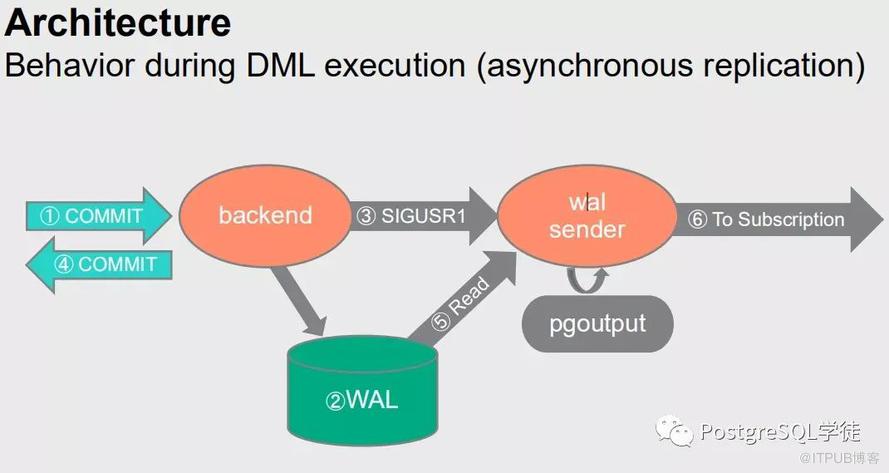
异步复制:
同步复制:
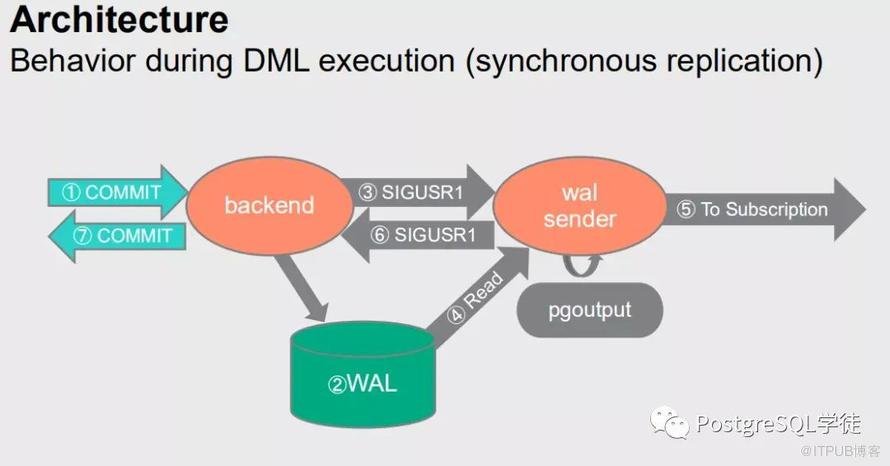
其实和synchronous_commit原理类似,
对于同步复制,每次事务的commit会等到订阅端接收到并且flush之后才会返回commit
对于异步复制,只通知walsender进程,就返回commit
A different setting might be appropriate when doing synchronous logical replication. The logical replication workers report the positions of writes and flushes to the publisher, and when using synchronous replication, the publisher will wait for the actual flush. This means that setting
synchronous_commitfor the subscriber tooffwhen the subscription is used for synchronous replication might increase the latency forCOMMITon the publisher. In this scenario, it can be advantageous to setsynchronous_committolocalor higher.
限制
schema和DDL不会被同步,truncate是可以同步的,所以需要在订阅端创建表,包含要同步的字段,不过可以使用插件pgl_ddl_deploy或者pglogical实现DDL的同步,值得注意的是,truncate的时候,订阅端是否有依赖关系,比如外键等
序列也不会被同步
大对象也不会被同步
只支持表,包括分区表,关于分区表的演进可以参照之前的文章,在 PostgreSQL 13之前,分区表必须单独复制。现在可以显式发布分区表,从而自动发布所有子分区。从分区表中添加 / 删除分区会自动从发布中添加/删除,所以包括物化视图、视图、外部表、索引、unlogged表等都会报错
还有触发器的限制
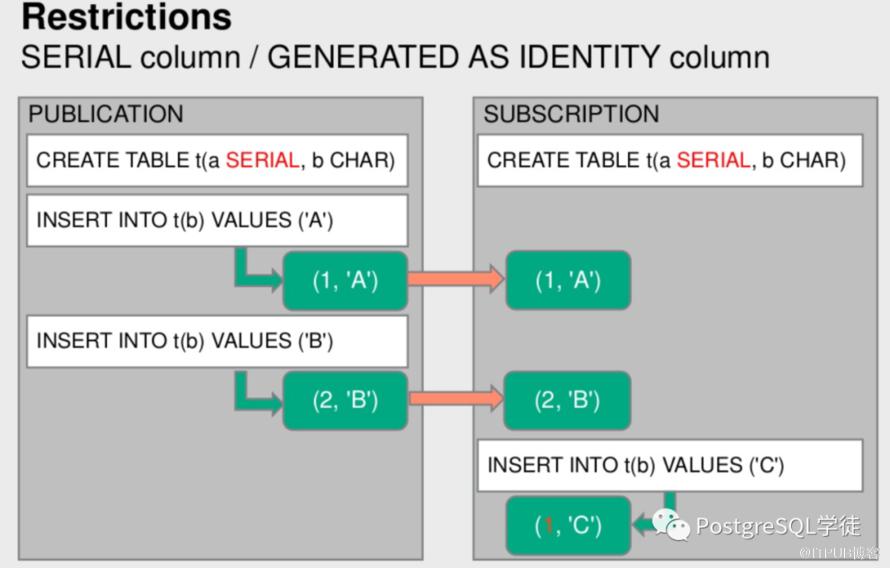
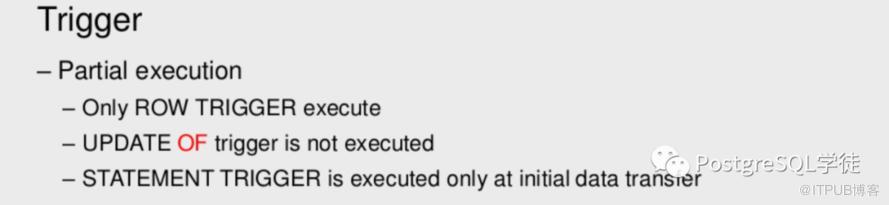
要让触发器能正常工作,我们还需要设置ALTER TABLE ENABLE ALWAYS 或者REPLICA TRIGGER语句。也就是ENABLE REPLICA TRIGGER trigger_name,另外逻辑复制不能在standby实例上创建,因为standby是只读的,不能创建逻辑复制插槽,因此逻辑解码插件也无法在standby实例上执行。
更多信息可以参照官方文档:https://www.postgresql.org/docs/13/logical-replication-restrictions.html
这里推荐阅读:《PostgreSQL 逻辑复制原理浅析3-使用限制和无限循环的双向复制》
冲突处理
因为我们知道,消费端是可写的,所以就无可避免各种各样的冲突,比如消费端有主键,发布端没有,就可能主键冲突,同样也可能锁冲突等等。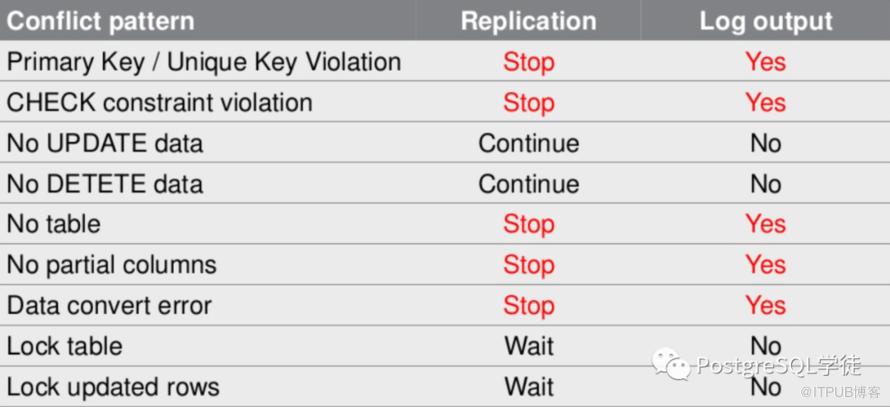
双向复制
虽然双向复制,理论上可以使用逻辑复制的方式实现,不过一定要注意,得是不同的表,不然就死循环了
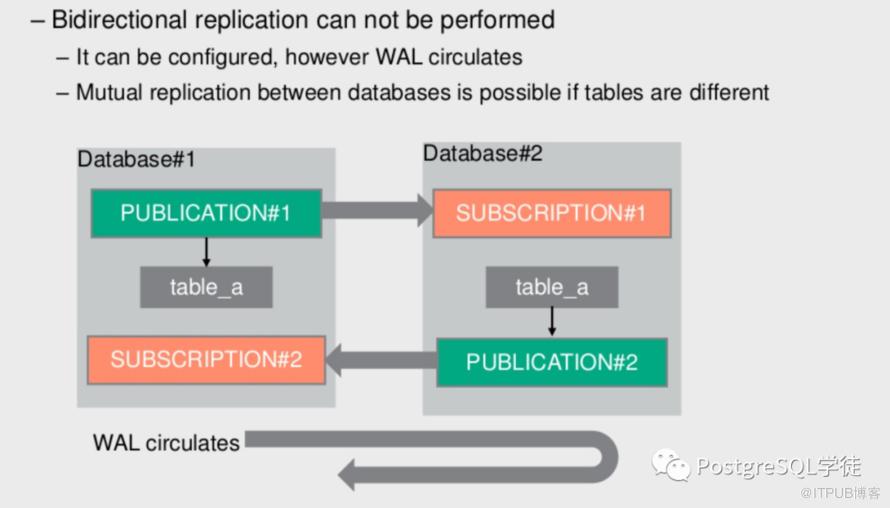 这里直接引用一下《PostgreSQL 逻辑复制原理浅析3-使用限制和无限循环的双向复制》的例子
CREATE TABLE t(a SERIAL, b CHAR);
create publication testpub1 FOR table t;

--正向 订阅
CREATE TABLE t(a SERIAL, b CHAR);
create subscription testsub1 connection 'host=192.168.56.119 port=5432 dbname=hr user=replication' publication testpub1;

--反向  发布
create publication testpub2 FOR table t;

--反向 订阅
create subscription testsub2 connection 'host=192.168.56.170 port=5432 dbname=hr user=replication' publication testpub2;
这样就构成了一个双向复制的案例,此时我在发布端插入一条数据就会出现环绕现像。此时就会出现死循环。不停的从A复制到B,再从B复制到A,直到把数据库搞死为止。
刚刚才配好不到1分钟,已经循环复制了2685条。
hr=# select count(1) from t;
 count
-------
  2685
(1 row)

hr=# select count(1) from t;
 count
-------
  3600
(1 row)

hr=# select count(1) from t;
 count
-------
  3784
(1 row)
所以,双向复制需要使用不同的表来实现。
小结
其实逻辑复制这么一通整理之后,可以发现逻辑复制强大之处,我们可以充分发挥我们天马行空的想象力,去做各种各样的骚操作,比如反向生成undo,专门拿一个库做订阅端做一些其他不可告人的目的等等。推荐阅读一下Noriyoshi Shinoda大师的Logical Replication Internals,很全面的,当然看看我这个总结也差不多了 (臭不要脸ing...)

参考
https://www.slideshare.net/noriyoshishinoda/pgconfasia-2017-logical-replication-internals-english?from_action=save
https://www.postgresql.org/docs/13/logical-replication-restrictions.html
https://blog.anayrat.info/en/2017/07/29/postgresql-10-and-logical-replication-overview/
https://severalnines.com/database-blog/overview-logical-replication-postgresql
PostgreSQL 逻辑复制原理浅析3-使用限制和无限循环的双向复制
进群唠嗑了,交流PostgreSQL技术?