引言
今天在整理参数的时候,又双叒叕发现了一个有点眼生的参数,effective_io_concurrency,光看名字像是个并行有关,本文将简单结合源码,窥探一下这个参数。

何为effective_io_concurrency
effective_io_concurrency (integer)
Sets the number of concurrent disk I/O operations that PostgreSQL expects can be executed simultaneously. Raising this value will increase the number of I/O operations that any individual PostgreSQL session attempts to initiate in parallel. The allowed range is 1 to 1000, or zero to disable issuance of asynchronous I/O requests. Currently, this setting only affects bitmap heap scans.

For magnetic drives, a good starting point for this setting is the number of separate drives comprising a RAID 0 stripe or RAID 1 mirror being used for the database. (For RAID 5 the parity drive should not be counted.) However, if the database is often busy with multiple queries issued in concurrent sessions, lower values may be sufficient to keep the disk array busy. A value higher than needed to keep the disks busy will only result in extra CPU overhead. SSDs and other memory-based storage can often process many concurrent requests, so the best value might be in the hundreds.

Asynchronous I/O depends on an effective posix_fadvise function, which some operating systems lack. If the function is not present then setting this parameter to anything but zero will result in an error. On some operating systems (e.g., Solaris), the function is present but does not actually do anything.

The default is 1 on supported systems, otherwise 0. This value can be overridden for tables in a particular tablespace by setting the tablespace parameter of the same name (see ALTER TABLESPACE).
根据官方文档,粗面理解一下这个参数:
指定PostgreSQL一次可以同时执行的IO操作数量,基于posix平台下的posix_fadvise()函数,所以对于不支持posix标准的,设置了这个参数也是不生效的。目前仅对bitmap heap scan生效。如果数据库并发连接(或者活跃会话)足够时,并且块设备处于繁忙状态的话,那么就没有必要开启异步IO,因为开了也没什么用,块设备已经足够的忙了,还会导致的额外的cpu开销。官方的建议是SSD和其他基于内存的存储可以调至几百,默认参数是1,设为0就禁止了异步IO。
emm,感觉不错,异步IO,预读,加速数据文件的读取。
五种IO模型
先回顾以下IO的几种模型,《UNIX网络编程》说得很清楚,5种IO模型分别是阻塞IO模型、非阻塞IO模型、IO复用模型、信号驱动的IO模型、异步IO模型;前4种为同步IO操作,只有异步IO模型是异步IO操作。
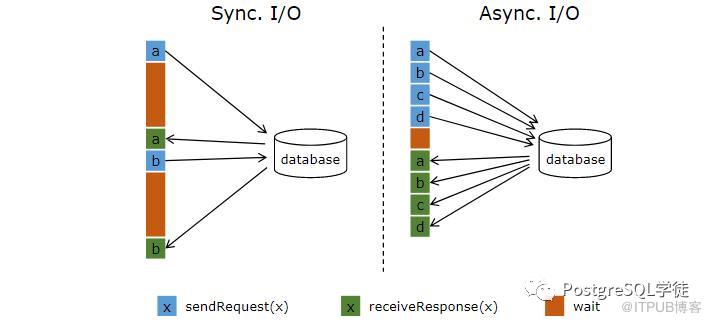
在一个CPU密集型的应用中,有一些需要处理的数据可能放在磁盘上。预先知道这些数据的位置,所以预先发起异步IO读请求,将他读到页缓存里面,I/O将在后台异步发生。等到真正需要用到这些数据的时候,再等待异步IO完成。使用了异步IO,在发起IO请求到实际使用数据这段时间内,程序还可以继续做其他事情。
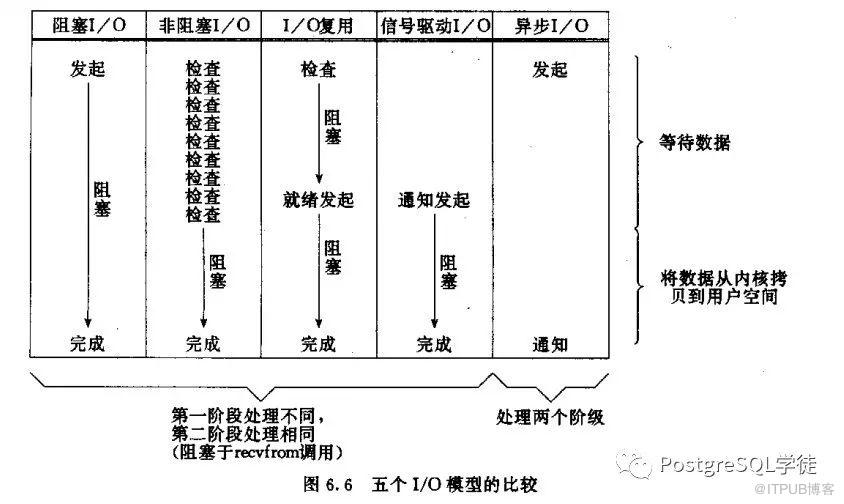
这里引用一个十分形象的例子:
1、阻塞I/O模型
老李去火车站买票,排队三天买到一张退票。
耗费:在车站吃喝拉撒睡 3天,其他事一件没干。
2、非阻塞I/O模型
老李去火车站买票,隔12小时去火车站问有没有退票,三天后买到一张票。
耗费:往返车站6次,路上6小时,其他时间做了好多事。
3、I/O复用模型
1) select/poll
老李去火车站买票,委托黄牛,然后每隔6小时电话黄牛询问,黄牛三天内买到票,然后老李去火车站交钱领票。
耗费:往返车站2次,路上2小时,黄牛手续费100元,打电话17次
2) epoll
老李去火车站买票,委托黄牛,黄牛买到后即通知老李去领,然后老李去火车站交钱领票。
耗费:往返车站2次,路上2小时,黄牛手续费100元,无需打电话
4、信号驱动I/O模型
老李去火车站买票,给售票员留下电话,有票后,售票员电话通知老李,然后老李去火车站交钱领票。
耗费:往返车站2次,路上2小时,免黄牛费100元,无需打电话
5、异步I/O模型
老李去火车站买票,给售票员留下电话,有票后,售票员电话通知老李并快递送票上门。
耗费:往返车站1次,路上1小时,免黄牛费100元,无需打电话
何为posix_fadvise()
那 posix_fadvise() 这个API是什么东西?看一下man,注解都很清晰,通过各个flag,告诉OS程序的期望,比如POSIX_FADV_WILLNEED,告诉OS我会在不久的未来访问数据,那么OS此时就会开启预读,异步地读入一些数据块,但是posix_fadvise()只是建议OS怎么做,最终决定权还是在OS手上。
另外值得注意的是,pgfincore这个预热插件也是基于posix_fadvise()实现的,pg_prewarm底层最终也是调用posix_fadvise()。
int posix_fadvise(int fd, off_t offset, off_t len, int advice);

Programs  can  use  posix_fadvise()  to announce an intention to access file data in a specific pattern in the future, thus allowing the kernel to perform appropriate optimizations. The  advice  applies to a (not necessarily existent) region starting at offset and extending for len bytes (or until the end of the file if lenis 0) within the file referred to by fd. The advice is not binding; it merely constitutes an expectation on behalf of the application.

    POSIX_FADV_NORMAL:Indicates that the application has no advice to give about its access pattern for the specified data. If no advice is given for an open file, this is the default assumption.

    POSIX_FADV_SEQUENTIAL:The application expects to access the specified data sequentially (with lower offsets read before higher ones).

    POSIX_FADV_RANDOM:The specified data will be accessed in random order.

    POSIX_FADV_NOREUSE:The specified data will be accessed only once.

    POSIX_FADV_WILLNEED:The specified data will be accessed in the near future.

    POSIX_FADV_DONTNEED:The specified data will not be accessed in the near future.
另外需要注意的,在Linux下面,这个API对于预读是有影响的
Under Linux, POSIX_FADV_NORMAL sets the readahead window to thedefault size for the backing device; POSIX_FADV_SEQUENTIAL this size, and POSIX_FADV_RANDOM disables file readahead entirely. These changes affect the entire file, not just the specified region (but other open file handles to the same file are unaffected).
posix_fadvise()为内核提供了文件描述符fd上的对于[offset, offset+len)这一段的建议。如果len为0,则建议将应用于范围[offset,length of file]。
1. POSIX_FADV_NORMAL:没有任何意见;
2. POSIX_FADV_RANDOM:程序打算随机读写,内核禁用预读功能,每次读取最少量的数据;
3. POSIX_FADV_SEQUENTIALP:打算顺序的方式访问,内核把预读的大小扩大一倍;
4. POSIX_FADV_WILLNEED:在不久的将来程序将访问该段内容,内核开启预读,把它们读入;
5. POSIX_FADV_NOREUSE:将来打算访问当只访问一次,但内核行为如同4;
6. POSIX_FADV_DONTNEED:在不久的将来应用程序不打算访问指定范围中的页面,内核从页缓冲中删除指定的范围。
所以可以看到,posix_fadvise() 依据具体的flag,会决定是否开启预读。
源码简单分析
这里分享一个有用的快速定位源码的方式:
现在这里查找对应参数:https://postgresqlco.nf/doc/en/param/maintenance_io_concurrency/
-
然后有具体的source code链接:
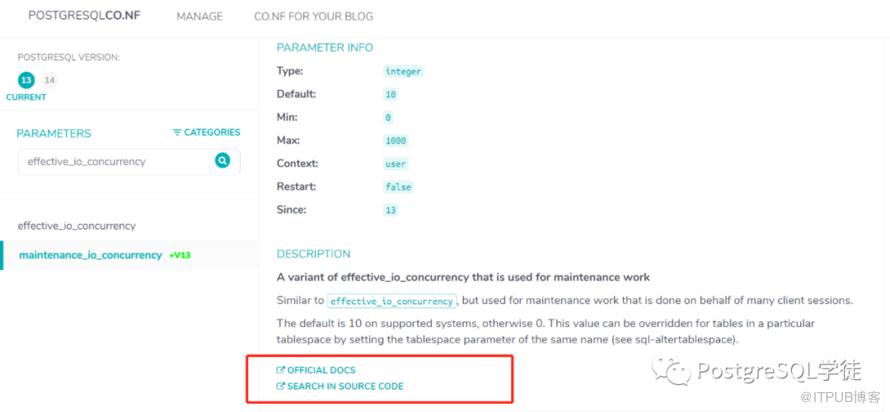
-
然后就会罗列出一个大概的定义
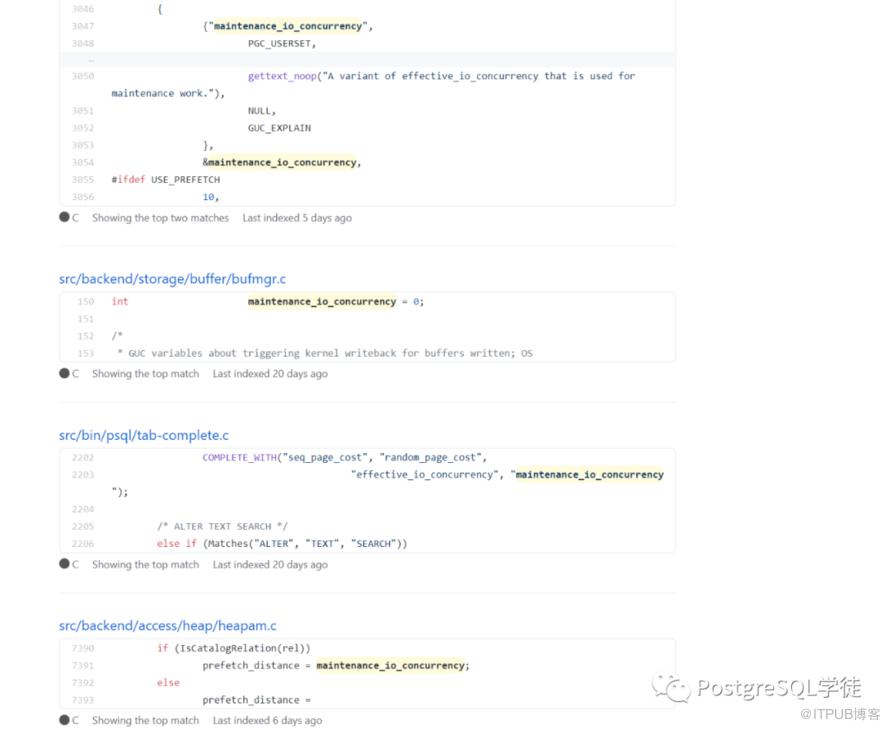
对应的源码位置在heapam.c里面,可以看到,tablespace级别的的值会覆盖全局的值
#ifdef USE_PREFETCH
    /* Initialize prefetch state. */
    prefetch_state.cur_hblkno = InvalidBlockNumber;
    prefetch_state.next_item = 0;
    prefetch_state.nitems = nitems;
    prefetch_state.tids = tids;

    /*
     * Compute the prefetch distance that we will attempt to maintain.
     *
     * Since the caller holds a buffer lock somewhere in rel, we'd better make
     * sure that isn't a catalog relation before we call code that does
     * syscache lookups, to avoid risk of deadlock.
     */
    if (IsCatalogRelation(rel))
        prefetch_distance = maintenance_io_concurrency;
    else
        prefetch_distance =
            get_tablespace_maintenance_io_concurrency(rel->rd_rel->reltablespace);

    /* Start prefetching. */
    xid_horizon_prefetch_buffer(rel, &prefetch_state, prefetch_distance);
#endif
核心函数是xid_horizon_prefetch_buffer,prefetch_count就是传入的prefetch_distance,也即maintenance_io_concurrency的值, prefetch_state是一个如下的结构体
typedef struct
{
    BlockNumber cur_hblkno;
    intnext_item;
    intnitems;
    ItemPointerData *tids;
} XidHorizonPrefetchState;
#ifdef USE_PREFETCH
    XidHorizonPrefetchState prefetch_state;
    intprefetch_distance;
#endif
...
...
/*
 * Helper function for heap_compute_xid_horizon_for_tuples.  Issue prefetch
 * requests for the number of buffers indicated by prefetch_count.  The
 * prefetch_state keeps track of all the buffers that we can prefetch and
 * which ones have already been prefetched; each call to this function picks
 * up where the previous call left off.
 */
static void
xid_horizon_prefetch_buffer(Relation rel,
                        XidHorizonPrefetchState *prefetch_state,
                        int prefetch_count)
{
    BlockNumber cur_hblkno = prefetch_state->cur_hblkno;
    intcount = 0;
    int i;
    intnitems = prefetch_state->nitems;
    ItemPointerData *tids = prefetch_state->tids;

    for (i = prefetch_state->next_item;
         i < nitems && count < prefetch_count;
         i++)
    {                ItemPointer htid = &tids[i];

        if (cur_hblkno == InvalidBlockNumber ||
            ItemPointerGetBlockNumber(htid) != cur_hblkno)
        {
            cur_hblkno = ItemPointerGetBlockNumber(htid);

        if (cur_hblkno == InvalidBlockNumber ||
            ItemPointerGetBlockNumber(htid) != cur_hblkno)
        {
            cur_hblkno = ItemPointerGetBlockNumber(htid);
            PrefetchBuffer(rel, MAIN_FORKNUM, cur_hblkno);
            count++;
        }
    }

    /*
     * Save the prefetch position so that next time we can continue from that
     * position.
     */
    prefetch_state->next_item = i;
    prefetch_state->cur_hblkno = cur_hblkno;
}
#endif
根据定义的 maintenance_io_concurrency的值的大小,决定预取多少个block
/*
 * PrefetchBuffer -- initiate asynchronous read of a block of a relation
 *
 * This is named by analogy to ReadBuffer but doesn't actually allocate a
 * buffer.  Instead it tries to ensure that a future ReadBuffer for the given
 * block will not be delayed by the I/O.  Prefetching is optional.
 *
 * There are three possible outcomes:
 *
 * 1.  If the block is already cached, the result includes a valid buffer that
 * could be used by the caller to avoid the need for a later buffer lookup, but
 * it's not pinned, so the caller must recheck it.
 *
 * 2.  If the kernel has been asked to initiate I/O, the initated_io member is
 * true.  Currently there is no way to know if the data was already cached by
 * the kernel and therefore didn't really initiate I/O, and no way to know when
 * the I/O completes other than using synchronous ReadBuffer().
 *
 * 3.  Otherwise, the buffer wasn't already cached by PostgreSQL, and either
 * USE_PREFETCH is not defined (this build doesn't support prefetching due to
 * lack of a kernel facility), or the underlying relation file wasn't found and
 * we are in recovery.  (If the relation file wasn't found and we are not in
 * recovery, an error is raised).
 */
PrefetchBufferResult
PrefetchBuffer(Relation reln, ForkNumber forkNum, BlockNumber blockNum)
{
    Assert(RelationIsValid(reln));
    Assert(BlockNumberIsValid(blockNum));

    /* Open it at the smgr level if not already done */
    RelationOpenSmgr(reln);

    if (RelationUsesLocalBuffers(reln))
    {
        /* see comments in ReadBufferExtended */
        if (RELATION_IS_OTHER_TEMP(reln))
            ereport(ERROR,
                (errcode(ERRCODE_FEATURE_NOT_SUPPORTED),
                 errmsg("cannot access temporary tables of other sessions")));

        /* pass it off to localbuf.c */
        return PrefetchLocalBuffer(reln->rd_smgr, forkNum, blockNum);
    }
    else
    {
        /* pass it to the shared buffer version */
        return PrefetchSharedBuffer(reln->rd_smgr, forkNum, blockNum);
    }
}
至此,简单分析清楚了,根据effective_io_concurrency的值,决定预取多少个block,假如是1的话,就预取一个数据块,最大1000的话,就预取1000个block。同时还会判断是否block已经被预取过了,会告知下次就不再继续去lookup了。可想而知,该值越大,对于磁盘的压力也越大,所以也证明了,调整这个值的前提是,磁盘不繁忙。
为何仅支持bitmap heap scan
如刚刚所述,posix_fadvise() 和预读相关联。先让我们简单回顾一下bitmap scan在PostgreSQL里面的工作原理,以下是Tom lane的原话:
A plain indexscan fetches one tuple-pointer at a time from the index,and immediately visits that tuple in the table. A bitmap scan fetches all the tuple-pointers from the index in one go, sorts them using an in-memory "bitmap" data structure, and then visits the table tuples in physical tuple-location order. The bitmap scan improves locality of reference to the table at the cost of more bookkeeping overhead to manage the "bitmap" data structure ,and at the cost that the data is no longer retrieved in index order, which doesn't matter for your query but would matter if you said ORDER BY.A bitmapped index scan works in two stages. First the index or indexes are scanned to create a bitmap representing matching tuple.
核心是传统的index scan每次从索引中去取一个tuple的指针,然后立马去表中取数据,每一次会造成一次随机io。如果数据量较多的情况下,会比较低效。而bitmap scan一次性将符合条件的tuple-pointers全部取出来,然后在内存中进行地址排序,然后去取出数据,这时的读取数据由于进行的地址排序,读取时就变成了顺序的读。其实就是一个随机读转化为顺序读取的过程,但是取出的数据由于进行了地址的排序,就没有顺序。同时,对于limit这种sql,bitmap index scan这种就不适合,因为它一次会取出所有数据。
感兴趣的童鞋可以去参考stackoverflow的这一段注解,看完就懂:https://dba.stackexchange.com/questions/119386/understanding-bitmap-heap-scan-and-bitmap-index-scan。
Heap, one square = one page:
+---------------------------------------------+
|c____u_____X___u___X_________u___cXcc______u_|
+---------------------------------------------+
Rows marked c match customers pkey condition.
Rows marked u match username condition.
Rows marked X match both conditions.


Bitmap scan from customers_pkey:
+---------------------------------------------+
|100000000001000000010000000000000111100000000| bitmap 1
+---------------------------------------------+
One bit per heap page, in the same order as the heap
Bits 1 when condition matches, 0 if not

Bitmap scan from ix_cust_username:
+---------------------------------------------+
|000001000001000100010000000001000010000000010| bitmap 2
+---------------------------------------------+
Once the bitmaps are created a bitwise AND is performed on them:
+---------------------------------------------+
|100000000001000000010000000000000111100000000| bitmap 1
|000001000001000100010000000001000010000000010| bitmap 2
 &&&&&&&&&&&&&&&&&&&&&&&&&&&&&&&&&&&&&&&&&&&&&
|000000000001000000010000000000000010000000000| Combined bitmap
+-----------+-------+--------------+----------+
            |       |              |
            v       v              v
Used to scan the heap only for matching pages:
+---------------------------------------------+
|___________X_______X______________X__________|
+---------------------------------------------+
The bitmap heap scan then seeks to the start of each page and reads the page:
+---------------------------------------------+
|___________X_______X______________X__________|
+---------------------------------------------+
seek------->^seek-->^seek--------->^
            |       |              |
            ------------------------
            only these pages read
回到正题,bitmap heap scan因为将地址在内存中进行了排序,所以bitmap heap scan是按顺序读取数据块的,所以顺序扫描理论上也是可以用上异步IO,但不知道为啥目前仅支持bitmap heap scan。
如何调优
EDB的建议是,普通的HDD设为2,SSD设置为200+,SAN存储可以设为300+
The number of real concurrent IO operations supported by the IO subsystem. As a starting point: with plain HDDs try setting at 2, with SSDs go for 200, and if you have a potent SAN you can start with 300.
看一下一个国外友人的实际case,环境信息:
PostgreSQL version:9.6
Magnetic drives:SSD + RAID 10
CPU :32 logical cores
CREATE TABLE test (major int PRIMARY KEY, minor int);
CREATE INDEX minor_idx ON test (major, minor);
INSERT INTO test VALUES ( generate_series(0,100000000), random()*1000 );
SELECT * FROM test WHERE major BETWEEN 10 AND 100 OR minor BETWEEN 800 AND 900;
执行计划:
Bitmap Heap Scan on test (cost=1279391.23..2027903.67 rows=10398562 width=12)
   Recheck Cond: (((major >= 10) AND (major <= 100)) OR ((minor >= 800) AND (min
or <= 900)))
   ->  BitmapOr  (cost=1279391.23..1279391.23 rows=10398572 width=0)
         ->  Bitmap Index Scan on minor_idx  (cost=0.00..2.50 rows=93 width=0)
               Index Cond: ((major >= 10) AND (major <= 100))
         ->  Bitmap Index Scan on minor_idx  (cost=0.00..1274189.45 rows=103984
79 width=0)
               Index Cond: ((minor >= 800) AND (minor <= 900))
每次操作之前,都会释放cache
for i in {1..10} ; do echo 3 > /proc/sys/vm/drop_caches ; /etc/init.d/postgresql restart ; sleep 5 ; psql -c 'EXPLAIN ANALYZE SELECT * FROM test WHERE major BETWEEN 10 AND 100 OR minor BETWEEN 800 AND 900;' ; done
最终的测试结果是,查询速度最大提升了4倍:
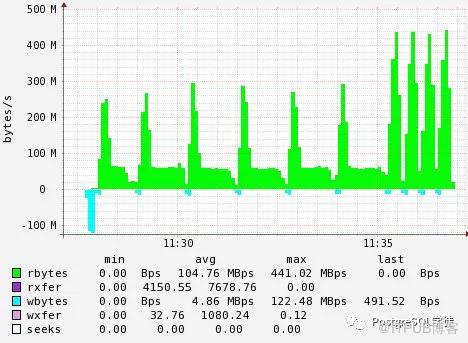
前6个峰值,对应的 effective_io_concurrency = 1
后面4个峰值,对应的 effective_io_concurrency = 100
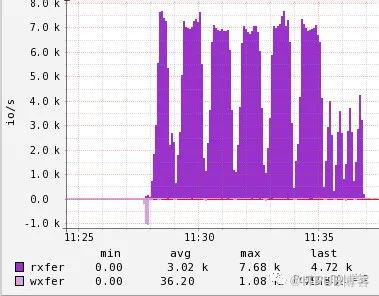
IOPS如下图, effective_io_concurrency越大,IOPS的值越小,对应峰值,其他的20和1000的值是类似的。
再看另一个友人的例子,环境信息:
PostgreSQL version:9.6
Magnetic drives:300gb intel s3500 ssd
CPU :8 logical cores
可以看到随着effective_io_concurrency的调大,对应的带宽和查询耗时都有显著的不同:
bench=# explain (analyze, buffers)  select * from pgbench_accounts
where aid between 1000 and 50000000 and abalance != 0;

QUERY PLAN
────────────────────────────────────────────────────────────────────────────────────────────────────────────────────────────────────────────────────────
 Bitmap Heap Scan on pgbench_accounts  (cost=1059541.66..6929604.57
rows=1 width=97) (actual time=5040.128..23089.651 rows=1420738
loops=1)
   Recheck Cond: ((aid >= 1000) AND (aid <= 50000000))
   Rows Removed by Index Recheck: 3394823
   Filter: (abalance <> 0)
   Rows Removed by Filter: 48578263
   Buffers: shared hit=3 read=1023980
   ->  Bitmap Index Scan on pgbench_accounts_pkey
(cost=0.00..1059541.66 rows=50532109 width=0) (actual
time=5038.707..5038.707 rows=49999001 loops=1)
         Index Cond: ((aid >= 1000) AND (aid <= 50000000))
         Buffers: shared hit=3 read=136611
 Total runtime: 46251.375 ms


effective_io_concurrency 1: 46.3 sec, ~ 170 mb/sec peak via iostat
effective_io_concurrency 2:  49.3 sec, ~ 158 mb/sec peak via iostat
effective_io_concurrency 4:  29.1 sec, ~ 291 mb/sec peak via iostat
effective_io_concurrency 8:  23.2 sec, ~ 385 mb/sec peak via iostat
effective_io_concurrency 16:  22.1 sec, ~ 409 mb/sec peak via iostat
effective_io_concurrency 32:  20.7 sec, ~ 447 mb/sec peak via iostat
effective_io_concurrency 64:  20.0 sec, ~ 468 mb/sec peak via iostat
effective_io_concurrency 128:  19.3 sec, ~ 488 mb/sec peak via iostat
effective_io_concurrency 256:  19.2 sec, ~ 494 mb/sec peak via iostat
但是在德哥的测试例子中,效果不大,详见:https://github.com/digoal/blog/blob/master/201705/20170511_02.md,可能需要case by case看吧。
另外,我自己也测试了一下,不过原谅我的云服务器是2c 4G和40GB的入门服务器,毕竟穷呐?,所以也没有测出效果 (测试过程中已经排除了缓存的影响)
postgres=# set enable_seqscan to off;
SET
postgres=# set effective_io_concurrency to 10;
SET
postgres=# explain analyze SELECT * FROM test WHERE major BETWEEN 10 AND 100 OR minor BETWEEN 800 AND 900;

                                                                  QUERY PLAN
-----------------------------------------------------------------------------------------------------------------------------------------------

 Bitmap Heap Scan on test  (cost=210194.96..274630.08 rows=1009347 width=8) (actual time=2097.568..22896.265 rows=1010273 loops=1)
   Recheck Cond: (((major >= 10) AND (major <= 100)) OR ((minor >= 800) AND (minor <= 900)))
   Heap Blocks: exact=44248
   ->  BitmapOr  (cost=210194.96..210194.96 rows=1009356 width=0) (actual time=2082.433..2082.437 rows=0 loops=1)
         ->  Bitmap Index Scan on minor_idx  (cost=0.00..5.38 rows=94 width=0) (actual time=0.034..0.034 rows=91 loops=1)
               Index Cond: ((major >= 10) AND (major <= 100))
         ->  Bitmap Index Scan on minor_idx  (cost=0.00..209684.91 rows=1009262 width=0) (actual time=2082.396..2082.396 rows=1010189 loops=1)
               Index Cond: ((minor >= 800) AND (minor <= 900))
 Planning Time: 38.663 ms
 Execution Time: 23000.794 ms
(10 rows)

postgres=# set effective_io_concurrency to 50;
SET
postgres=# set enable_seqscan to off;
SET
postgres=# explain analyze SELECT * FROM test WHERE major BETWEEN 10 AND 100 OR minor BETWEEN 800 AND 900;

                                                                  QUERY PLAN
-----------------------------------------------------------------------------------------------------------------------------------------------

 Bitmap Heap Scan on test  (cost=210194.96..274630.08 rows=1009347 width=8) (actual time=1986.580..22699.571 rows=1010273 loops=1)
   Recheck Cond: (((major >= 10) AND (major <= 100)) OR ((minor >= 800) AND (minor <= 900)))
   Heap Blocks: exact=44248
   ->  BitmapOr  (cost=210194.96..210194.96 rows=1009356 width=0) (actual time=1969.056..1969.059 rows=0 loops=1)
         ->  Bitmap Index Scan on minor_idx  (cost=0.00..5.38 rows=94 width=0) (actual time=0.025..0.026 rows=91 loops=1)
               Index Cond: ((major >= 10) AND (major <= 100))
         ->  Bitmap Index Scan on minor_idx  (cost=0.00..209684.91 rows=1009262 width=0) (actual time=1969.027..1969.027 rows=1010189 loops=1)
               Index Cond: ((minor >= 800) AND (minor <= 900))
 Planning Time: 26.444 ms
 Execution Time: 22803.660 ms
(10 rows)
小结
目前来看,假如磁盘是SSD或者SAN等高端一点的存储,effective_io_concurrency是值得一调的,毕竟在生产环境里面,multiple index是很常见的,那么就会使用到bitmap scan。结合之前的源码分析,根据effective_io_concurrency的值,决定预取多少个block,假如是1的话,就预取一个数据块,最大1000的话,就预取1000个block。同时还会判断是否block已经被预取过了。可想而知,该值越大,对于磁盘的压力也越大,不妨按照一个通用的模板来设置:
普通的HDD设为2,SSD设置为200+,SAN存储可以设为300+
不过还是那句话,没有万能的参数,没有万能的方案,就比如shared_buffers,下面只是一个样例
1) Below 2GB memory, set the value of shared_buffers to 20% of total system memory.
2) Below 32GB memory, set the value of shared_buffers to 25% of total system memory.
3) Above 32GB memory, set the value of shared_buffers to 8GB.
有些人设置25% RAM是最好的,有些人设置50%反而性能最好,所以只有基于自己的环境不断的实验和调校,才能得出最适合自己环境的参数,不过大体的一个方向是没有错的。

类似的,还有一个 maintenance_io_concurrency 参数,不过是针对维护性工作的。
参考
https://portavita.github.io/2019-07-19-PostgreSQL_effective_io_concurrency_benchmarked/
https://www.postgresql.org/message-id/CAHyXU0yiVvfQAnR9cyH=HWh1WbLRsioe=mzRJTHwtr=2azsTdQ@mail.gmail.com
https://www.postgresql.org/docs/current/runtime-config-resource.html
https://www.cnblogs.com/ggzwtj/archive/2011/10/11/2207726.html
https://github.com/digoal/blog/blob/master/201705/20170511_02.md
最后
hiahia,建了一个学徒的交流群,没有广告,没有勾心斗角,只有纯技术的探讨,以及对学徒的批判 ~ 欢迎各位进群,吹牛扯淡 ?