1.安全性
PostgreSQL安全吗?个人觉得还是很安全的,各种各样的安全加固方式,此篇从身份认证开始说起,后续还有通信加密、端口转发、权限控制、访问控制、密码控制、存储加密等,慢慢总结,慢慢积累。
2.身份认证
PostgreSQL采用的进程模型,每当接收到来自客户端的连接请求时,postmaster就会fork一个backend process,由此backend process处理该客户端的查询请求。因此,当客户端发起连接请求时,postmaster需要进行“身份验证”,验证通过才会fork出一个服务进程给客户端,PostgreSQL提供的认证方式有很多种。
|
host DATABASE USER ADDRESS METHOD [OPTIONS] # METHOD can be "trust", "reject", "md5", "password", "scram-sha-256", # "gss", "sspi", "ident", "peer", "pam", "ldap", "radius" or "cert". # Note that "password" sends passwords in clear text; "md5" or # "scram-sha-256" are preferred since they send encrypted passwords. |
这个写的很明白,host + 数据库 + 用户 + 地址 + 认证方式的组合拳。
最先需要杜绝的方式是password,password在网络中会以明文的形式传输,很容易被攻击,不推荐,大多数时候使用md5就够用了。

说到密码,在9.6以前,创建用户的时候还能指定unencrypted,即非加密密码,直接查询pg_shadow就可以看到明文密码,基于安全考虑从10以后取消了这个语法。
|
postgres=# select version(); version ----------------------------------------------------------------------------------------------------------- PostgreSQL 9.6.19 on x86_64-pc-linux-gnu, compiled by gcc (GCC) 4.8.5 20150623 (Red Hat 4.8.5-39), 64-bit (1 row) postgres=# create user user1 unencrypted password '123456'; CREATE ROLE postgres=# select usename,passwd from pg_shadow; usename | passwd ----------+-------- postgres | user1 | 123456 (2 rows) |
PostgreSQL10以后取消了unencrypted,默认以md5进行加密
|
postgres=# select version(); version --------------------------------------------------------------------------------------------------------- PostgreSQL 12.4 on x86_64-pc-linux-gnu, compiled by gcc (GCC) 4.8.5 20150623 (Red Hat 4.8.5-39), 64-bit (1 row) postgres=# create user user1; CREATE ROLE postgres=# create user user2 UNENCRYPTED PASSWORD '123'; ERROR: UNENCRYPTED PASSWORD is no longer supported LINE 1: create user user2 UNENCRYPTED PASSWORD '123'; ^ HINT: Remove UNENCRYPTED to store the password in encrypted form instead. postgres=# create user user2 PASSWORD '123'; CREATE ROLE postgres=# select usename,passwd from pg_shadow; usename | passwd ----------+------------------------------------- postgres | user1 | user2 | md5245a2b356234ce1ea772e164e596f395 (3 rows) |
md5大多数时候都够用了,但并不能避免被暴力破解,另外由于pg_shadow的存在,很容易破解用户的密码。好在pg_shadow是在pg_catalog下的视图,非superuser或特意赋权,普通用户是不能访问pg_shadow的
|
-bash-4.2$ psql psql (12.4) Type "help" for help. postgres=# \c postgres user2 You are now connected to database "postgres" as user "user2". postgres=> postgres=> select * from pg_shadow ; ERROR: permission denied for view pg_shadow 密码的加密方式如下:md5(xxxusername) postgres=# select 'md5'||md5('123user2') as mypasswd,passwd,usename from pg_shadow where usename = 'user2'; mypasswd | passwd | usename -------------------------------------+-------------------------------------+--------- md5245a2b356234ce1ea772e164e596f395 | md5245a2b356234ce1ea772e164e596f395 | user2 (1 row) |
因为可以通过这个破解出用户密码,使用md5crack破解一下,便可得出user2的密码为123
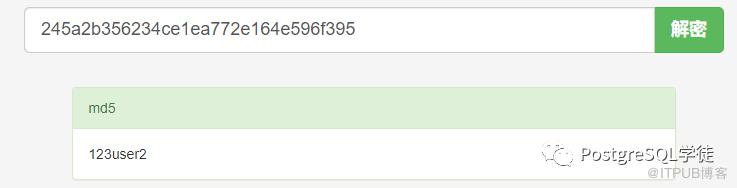
基于此,需要做如下措施:
1)日常使用中,严格把控pg_shadow视图中的内容,非必要不去查,被抓一下包,很容易抓到你的密码,如下,user2的加密后的密码是md5c39xxx,当然可以通过通信加密的方式来进一步保障安全
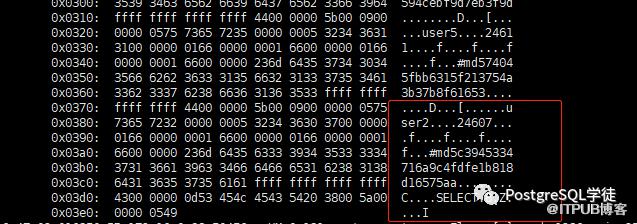
2)严禁使用password的认证方式,因为密码是明文传输的,大多数基于md5的认证方式就够用了
3)设定用户的密码有效期,定期修改密码,create user xxx vaild until xxx
另外,默认PostgreSQL初始化好之后,listen_address是localhost,环回地址是在同一台计算机上的程序之间进行网络通信时所使用的一个默认地址。计算机使用一个特殊的 IP 地址 127.0.0.1 作为环回地址,与该地址具有相同意义的便是叫做 localhost 的主机名。使用这个IP或主机名时,数据包不会流向网络。当然可以把localhost设为其他ip,localhost毕竟是个域名
|
-bash-4.2$ cat postgres_data/postgresql.conf | grep listen_address #listen_addresses = 'localhost' # what IP address(es) to listen on; |
所以,使用ip的方式是无法连接的,
|
-bash-4.2$ psql -h 172.16.0.131 -p 5432 psql: error: could not connect to server: could not connect to server: Connection refused Is the server running on host "172.16.0.131" and accepting TCP/IP connections on port 5432? -bash-4.2$ psql -h localhost -p 5432 psql (12.4) Type "help" for help. postgres=# |
因此,通过listen_address可以进一步限制哪些ip可以访问。
关于listen_address,官网注解很详细:
Specifies the TCP/IP address(es) on which the server is to listen for connections from client applications. The value takes the form of a comma-separated list of host names and/or numeric IP addresses. The special entry * corresponds to all available IP interfaces. The entry 0.0.0.0 allows listening for all IPv4 addresses and :: allows listening for all IPv6 addresses. If the list is empty, the server does not listen on any IP interface at all, in which case only Unix-domain sockets can be used to connect to it. The default value is localhost, which allows only local TCP/IP “loopback” connections to be made. While client authentication (Chapter 20) allows fine-grained control over who can access the server, listen_addresses controls which interfaces accept connection attempts, which can help prevent repeated malicious connection requests on insecure network interfaces. This parameter can only be set at server start. |
表示允许Postmaster监听程序绑定在某种类型IP或者某个具体IP上,因为一台服务器可能有多个网卡,每个网卡也可以绑定多个IP,该参数就是控制Postgres到底绑定在哪个或者哪几个IP上。当配置为'*'时,监听程序注册在本地所有的类型的所有IP地址上,意味着客户端可以通过连接所有本地IP进行数据库连接
此处将监听程序绑定在一个不存在的ip上,不出所料,启动失败:
|
-bash-4.2$ cat 12/data/postgresql.conf | grep listen_address listen_addresses = '172.16.0.33' # what IP address(es) to listen on; -bash-4.2$ ifconfig eth0: flags=4163 inet 172.16.0.131 netmask 255.255.255.0 broadcast 172.16.0.255 inet6 fe80::5054:ff:fe38:acc2 prefixlen 64 scopeid 0x20 ether 52:54:00:38:ac:c2 txqueuelen 1000 (Ethernet) RX packets 5317565458 bytes 401090966314 (373.5 GiB) RX errors 0 dropped 0 overruns 0 frame 0 TX packets 5996981980 bytes 445432122403 (414.8 GiB) TX errors 0 dropped 0 overruns 0 carrier 0 collisions 0 lo: flags=73 inet 127.0.0.1 netmask 255.0.0.0 inet6 ::1 prefixlen 128 scopeid 0x10 loop txqueuelen 1 (Local Loopback) RX packets 129692682 bytes 35954878615 (33.4 GiB) RX errors 0 dropped 0 overruns 0 frame 0 TX packets 129692682 bytes 35954878615 (33.4 GiB) TX errors 0 dropped 0 overruns 0 carrier 0 collisions 0 -bash-4.2$ pg_ctl -D 12/data/ restart waiting for server to shut down.... done server stopped waiting for server to start....2020-09-05 17:20:44.004 CST [6177] LOG: starting PostgreSQL 12.4 on x86_64-pc-linux-gnu, compiled by gcc (GCC) 4.8.5 20150623 (Red Hat 4.8.5-39), 64-bit 2020-09-05 17:20:44.004 CST [6177] LOG: could not bind IPv4 address "172.16.0.33": Cannot assign requested address 2020-09-05 17:20:44.004 CST [6177] HINT: Is another postmaster already running on port 5432? If not, wait a few seconds and retry. 2020-09-05 17:20:44.004 CST [6177] WARNING: could not create listen socket for "172.16.0.33" 2020-09-05 17:20:44.004 CST [6177] FATAL: could not create any TCP/IP sockets 2020-09-05 17:20:44.004 CST [6177] LOG: database system is shut down stopped waiting pg_ctl: could not start server Examine the log output. 改成正常的地址,可以正常启动: -bash-4.2$ cat 12/data/postgresql.conf | grep listen_address listen_addresses = '172.16.0.131' # what IP address(es) to listen on; -bash-4.2$ pg_ctl -D 12/data/ start waiting for server to start....2020-09-05 17:23:25.350 CST [6590] LOG: starting PostgreSQL 12.4 on x86_64-pc-linux-gnu, compiled by gcc (GCC) 4.8.5 20150623 (Red Hat 4.8.5-39), 64-bit 2020-09-05 17:23:25.350 CST [6590] LOG: listening on IPv4 address "172.16.0.131", port 5432 2020-09-05 17:23:25.355 CST [6590] LOG: listening on Unix socket "/var/lib/pgsql/.s.PGSQL.5432" 2020-09-05 17:23:25.363 CST [6590] LOG: redirecting log output to logging collector process 2020-09-05 17:23:25.363 CST [6590] HINT: Future log output will appear in directory "log". done server started |
假如listen_address修改为空的话,则只允许unix socket连接:
|
-bash-4.2$ cat 12/data/postgresql.conf |grep listen_address listen_addresses = '' # what IP address(es) to listen on; -bash-4.2$ pg_ctl -D 12/data/ restart waiting for server to shut down.... done server stopped waiting for server to start....2020-09-05 17:33:18.660 CST [8088] LOG: starting PostgreSQL 12.4 on x86_64-pc-linux-gnu, compiled by gcc (GCC) 4.8.5 20150623 (Red Hat 4.8.5-39), 64-bit 2020-09-05 17:33:18.663 CST [8088] LOG: listening on Unix socket "/var/lib/pgsql/.s.PGSQL.5432" 2020-09-05 17:33:18.673 CST [8088] LOG: redirecting log output to logging collector process 2020-09-05 17:33:18.673 CST [8088] HINT: Future log output will appear in directory "log". done server started -bash-4.2$ netstat -nutlp | grep 5432 (Not all processes could be identified, non-owned process info will not be shown, you would have to be root to see it all.) |
关于unix socket,也是一个十分有趣的IPC机制,在配置文件里可以看到PostgreSQL关于unix socket的相关配置
|
-bash-4.2$ cat 12/data/postgresql.conf | grep unix #unix_socket_directories = '/var/run/postgresql, /tmp' # comma-separated list of directories #unix_socket_group = '' # (change requires restart) #unix_socket_permissions = 0777 # begin with 0 to use octal notation |
看到socket这个词,可能会联想到网络编程中的TCP/UDP socket,socket通信是耳熟能详的一种进程间通信方式(IPC),它是一种全双工的通信方式。本质上unix socket和TCP/UDP socket的作用都一样,都是为了网络通信而生。Unix Domain Socket是在此基础之上发展的IPC机制,用于在同一台主机上两个进程之间直接建立通信方式,不需要经过网络协议栈,不需要打包拆包、计算校验和、维护序号和应答等,所以性能上和效率上比TCP/UDP Socket高得多,基于此点,也可以在TPCC下的PK场景中利用起来,利用unix socket进行通信,减免不必要的网络开销,并且Unix Domain Socket是一种可靠的通信机制,而TCP/UDP Socket是不可靠的通信,可能发生丢包、乱序等现象。Unix domain socket主要是基于文件系统的。与TCP/UDP Socket类似,需要知道是基于哪一个文件来通信的。类似的,MySQL也有socket配置,redis也有unixsocket配置。总结来说就是Unix domain socket 用于同一主机上的进程间通信。与主机间的进程通信不同,它不是通过 "IP地址 + TCP或UDP端口号" 的方式进程通信,而是使用 socket 类型的文件来完成通信,因此在稳定性、可靠性以及效率方面的表现都很不错。
正常启动实例打印的日志便能看到:
|
-bash-4.2$ pg_ctl -D 12/data/ start waiting for server to start....2020-09-05 16:33:20.731 CST [31528] LOG: starting PostgreSQL 12.4 on x86_64-pc-linux-gnu, compiled by gcc (GCC) 4.8.5 20150623 (Red Hat 4.8.5-39), 64-bit -- 在ipv6的环回地址上监听 2020-09-05 16:33:20.731 CST [31528] LOG: listening on IPv6 address "::1", port 5432 -- 在ipv4的环回地址上监听 2020-09-05 16:33:20.731 CST [31528] LOG: listening on IPv4 address "127.0.0.1", port 5432 -- unix domain socket,分别位于/var/run/postgresql/.s.PGSQL.5432和/tmp/.s.PGSQL.5432 2020-09-05 16:33:20.734 CST [31528] LOG: listening on Unix socket "/var/run/postgresql/.s.PGSQL.5432" 2020-09-05 16:33:20.738 CST [31528] LOG: listening on Unix socket "/tmp/.s.PGSQL.5432" 2020-09-05 16:33:20.743 CST [31528] LOG: redirecting log output to logging collector process 2020-09-05 16:33:20.743 CST [31528] HINT: Future log output will appear in directory "log". done server started |
PostgreSQL默认连接方式也是使用unix domain socket,会在/var/run/postgresql/目录下查找.s.PGSQL.5432这个socket,假如没有就会提示连接不上
|
-bash-4.2$ ll /var/run/postgresql/.s.PGSQL.5432 srwxrwxrwx 1 postgres postgres 0 Sep 5 16:33 /var/run/postgresql/.s.PGSQL.5432 -bash-4.2$ mv /var/run/postgresql/.s.PGSQL.5432 /var/run/postgresql/.s.PGSQL.5432.bak -bash-4.2$ psql psql: error: could not connect to server: could not connect to server: No such file or directory Is the server running locally and accepting connections on Unix domain socket "/var/run/postgresql/.s.PGSQL.5432"? -bash-4.2$ mv /var/run/postgresql/.s.PGSQL.5432.bak /var/run/postgresql/.s.PGSQL.5432 -bash-4.2$ psql psql (12.4) Type "help" for help. postgres=# |
当然可以通过指定主机和端口进行连接,但这样就不是本地连接了
|
-bash-4.2$ psql -h localhost psql (12.4) Type "help" for help. postgres=# -bash-4.2$ netstat -anpo | grep psql (Not all processes could be identified, non-owned process info will not be shown, you would have to be root to see it all.) tcp6 0 0 ::1:36628 ::1:5432 ESTABLISHED 1986/psql keepalive (7203.73/0/0) |
可以修改unix socket的目录,此处修改为"/var/lib/pgsql"
|
-bash-4.2$ pg_ctl -D 12/data/ start waiting for server to start....2020-09-05 16:56:07.806 CST [2541] LOG: starting PostgreSQL 12.4 on x86_64-pc-linux-gnu, compiled by gcc (GCC) 4.8.5 20150623 (Red Hat 4.8.5-39), 64-bit 2020-09-05 16:56:07.806 CST [2541] LOG: listening on IPv6 address "::1", port 5432 2020-09-05 16:56:07.806 CST [2541] LOG: listening on IPv4 address "127.0.0.1", port 5432 2020-09-05 16:56:07.812 CST [2541] LOG: listening on Unix socket "/var/lib/pgsql/.s.PGSQL.5432" 2020-09-05 16:56:07.819 CST [2541] LOG: redirecting log output to logging collector process 2020-09-05 16:56:07.819 CST [2541] HINT: Future log output will appear in directory "log". done server started -bash-4.2$ netstat -a | grep PGSQ unix 2 [ ACC ] STREAM LISTENING 1785021871 /var/lib/pgsql/.s.PGSQL.5432 -bash-4.2$ psql psql: error: could not connect to server: could not connect to server: No such file or directory Is the server running locally and accepting connections on Unix domain socket "/var/run/postgresql/.s.PGSQL.5432"? |
默认去找/var/run/postgresql/.s.PGSQL.5432,可以通过PGHOST环境变量(参考官网环境变量的说明https://www.postgresql.org/docs/12/libpq-envars.html)或者-h的方式显式指定
|
-bash-4.2$ psql -h /var/lib/pgsql/ psql (12.4) Type "help" for help. postgres=# show unix_socket_directories; unix_socket_directories ------------------------- /var/lib/pgsql (1 row) |
另外在pg_hba.conf里面可以看到,其中host代表client的访问方式是TCP,而local就代表client的访问方式是Unix Domain Socket。所以可以很明显的看到local行的配置是没有ip配置段的。
|
# TYPE DATABASE USER ADDRESS METHOD # "local" is for Unix domain socket connections only local all all trust # IPv4 local connections: host all all 127.0.0.1/32 trust # IPv6 local connections: host all all ::1/128 trust # Allow replication connections from localhost, by a user with the # replication privilege. local replication all trust host replication all 127.0.0.1/32 trust host replication all ::1/128 trust host all all 172.16.0.0/16 password |
3.小结
1.日常使用中,严格把控pg_shadow视图中的内容,非必要不去查,被抓一下包,很容易抓到你的密码,当然可以通过通信加密的方式来进一步保障安全
2.严禁使用password的认证方式,因为密码是明文传输的,大多数时候基于md5的认证方式就够用了
3.设定用户的密码有效期,定期修改密码,create user xxx vaild until xxx
4.通过listen_address也可以进一步限制,pg_hba.conf是针对client的访问方式,而listen_addresses是控制postgres server 具体使用哪个(IPV4/IPV6/BOTH)网络接口(interface)进行监听连接请求,对于网络接口而言,这可以有效阻止对大量恶意重复的连接