技术团队
作为一种全新的开放式的数据管理架构,湖仓一体(Data Lakehouse)融合了数据仓库的高性能、实时性以及数据湖的低成本、灵活性等优势,帮助用户更加便捷地满足各种数据处理分析的需求,在企业的大数据体系中已经得到越来越多的应用。
在过去多个版本中, 持续加深与数据湖的融合,当前已演进出一套成熟的湖仓一体解决方案。
-
自 0.15 版本起,Apache Doris 引入 Hive 和 Iceberg 外部表,尝试在 Apache Iceberg 之上探索与数据湖的能力结合。
-
自 1.2 版本起,Apache Doris 正式引入 Multi-Catalog 功能,实现了多种数据源的自动元数据映射和数据访问、并对外部数据读取和查询执行等方面做了诸多性能优化,完全具备了构建极速易用 Lakehouse 架构的能力。
-
在 2.1 版本中,Apache Doris 湖仓一体架构得到全面加强,不仅增强了主流数据湖格式(Hudi、Iceberg、Paimon 等)的读取和写入能力,还引入了多 SQL 方言兼容、可从原有系统无缝切换至 Apache Doris。在数据科学及大规模数据读取场景上, Doris 集成了 Arrow Flight 高速读取接口,使得数据传输效率实现 100 倍的提升。
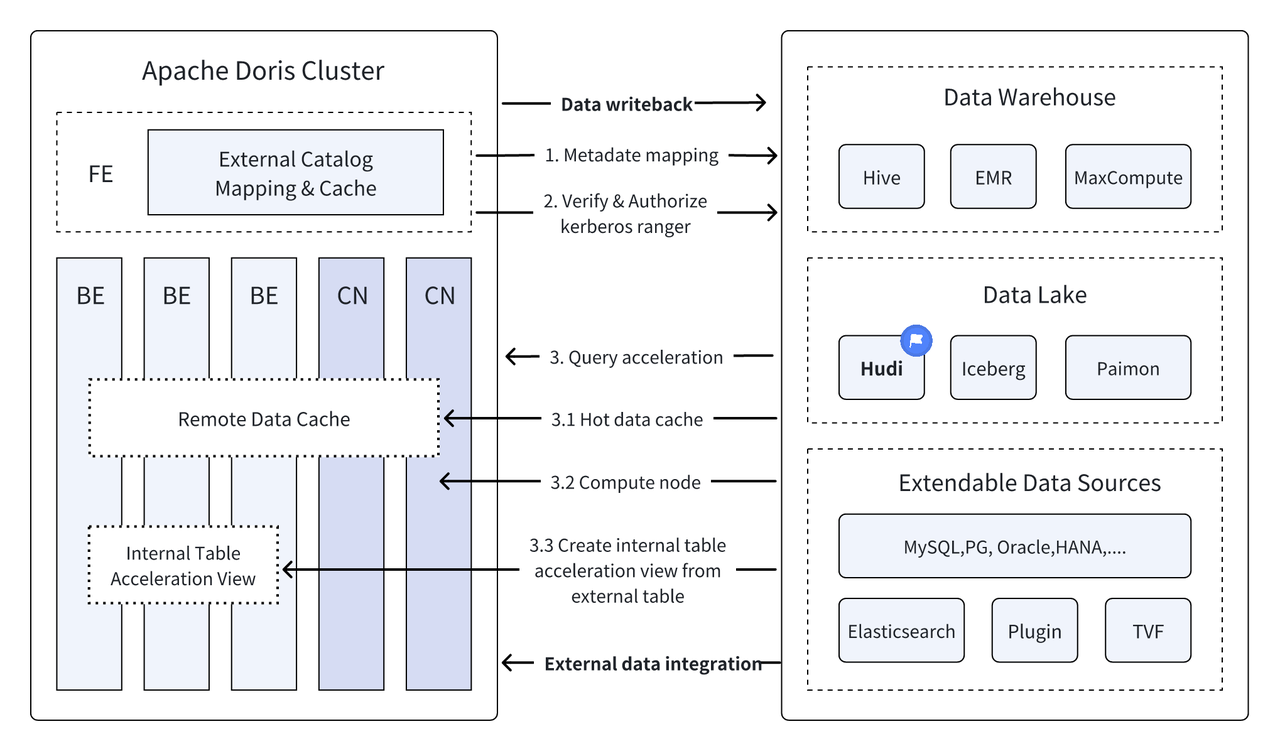
Apache Doris + Apache Hudi
是目前最主流的开放数据湖格式之一,也是事务性的数据湖管理平台,支持包括 Apache Doris 在内的多种主流查询引擎。 同样对 Apache Hudi 数据表的读取能力进行了增强:
Copy on Write Table: Snapshot Query
Merge on Read Table:Snapshot Queries, Read Optimized Queries
支持 Time Travel
支持 Incremental Read
凭借 Apache Doris 的高性能查询执行以及 Apache Hudi 的实时数据管理能力,可以实现高效、灵活、低成本的数据查询和分析,同时也提供了强大的数据回溯、审计和增量处理功能,当前基于 Apache Doris 和 Apache Hudi 的组合已经在多个社区用户的真实业务场景中得到验证和推广:
-
实时数据分析与处理 :比如金融行业交易分析、广告行业实时点击流分析、电商行业用户行为分析等常见场景下,都要求实时的数据更新及查询分析。Hudi 能够实现对数据的实时更新和管理,并保证数据的一致性和可靠性,Doris 则能够实时高效处理大规模数据查询请求,二者结合能够充分满足实时数据分析与处理的需求。
-
数据回溯与审计 :对于金融、医疗等对数据安全和准确性要求极高的行业来说,数据回溯和审计是非常重要的功能。Hudi 提供了时间旅行(Time Travel)功能,允许用户查看历史数据状态,结合 Apache Doris 高效查询能力,可快速查找分析任何时间点的数据,实现精确的回溯和审计。
-
增量数据读取与分析 :在进行大数据分析时往往面临着数据规模庞大、更新频繁的问题,Hudi 支持增量数据读取,这使得用户可以只需处理变化的数据,不必进行全量数据更新;同时 Apache Doris 的 Incremental Read 功能也可使这一过程更加高效,显著提升了数据处理和分析的效率。
-
跨数据源联邦查询 :许多企业数据来源复杂,数据可能存储在不同的数据库中。Doris 的 Multi-Catalog 功能支持多种数据源的自动映射与同步,支持跨数据源的联邦查询。这对于需要从多个数据源中获取和整合数据进行分析的企业来说,极大地缩短了数据流转路径,提升了工作效率。
本文将在 Docker 环境下,为读者介绍如何快速搭建 Apache Doris + Apache Hudi 的测试及演示环境,并对各功能操作进行演示,帮助读者快速入门。
使用指南
本文涉及所有脚本和代码可以从该地址获取:
01 环境准备
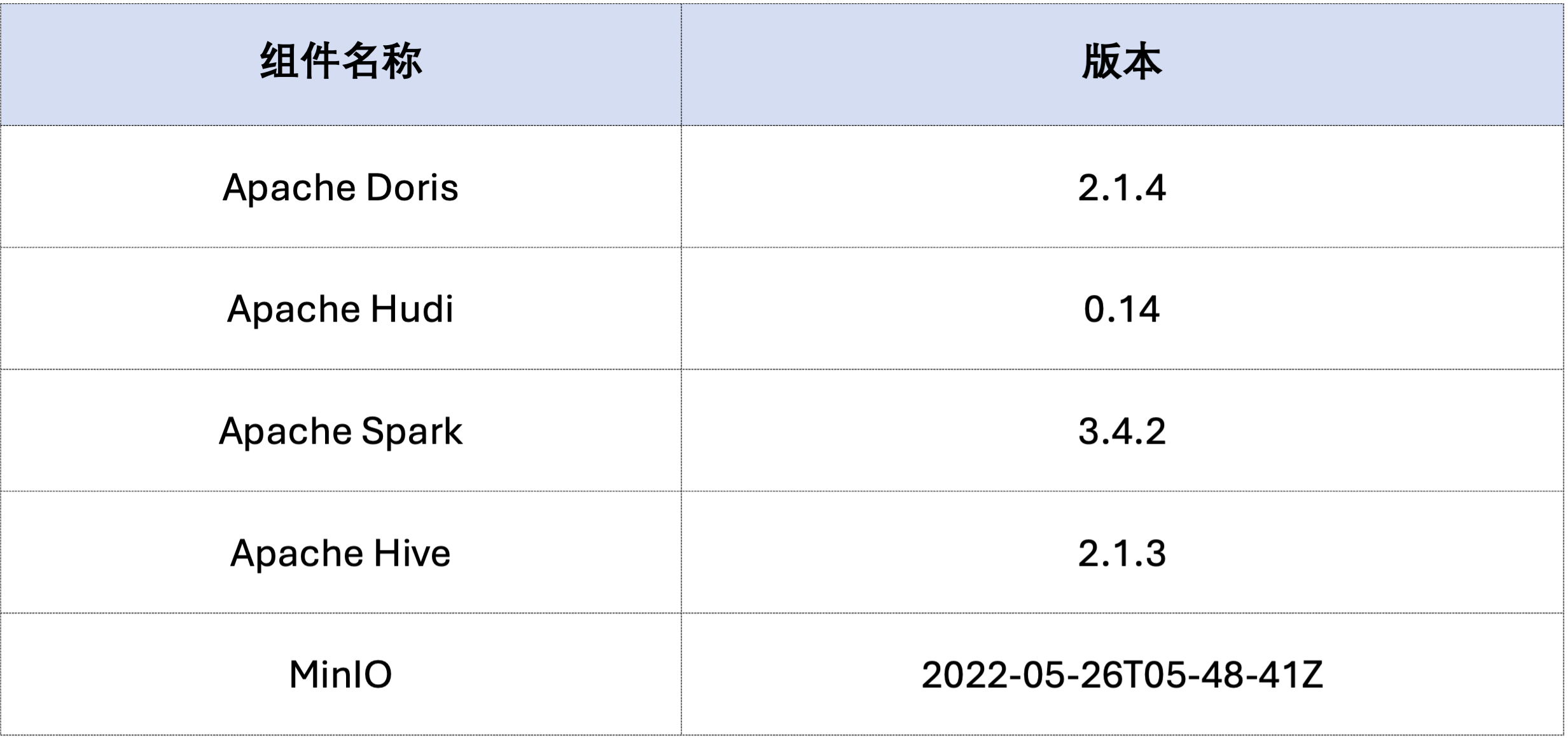
本文示例采用 Docker Compose 部署,组件及版本号如下:
02 环境部署
-
创建 Docker 网络
sudo docker network create -d bridge hudi-net
-
启动所有组件
sudo ./start-hudi-compose.sh
-
启动后,可以使用如下脚本,登陆 Spark 命令行或 Doris 命令行:
sudo ./login-spark.sh


sudo ./login-doris.sh
03 数据准备
接下来先通过 Spark 生成 Hudi 的数据。如下方代码所示,集群中已经包含一张名为
customer
的 Hive 表,可以通过这张 Hive 表,创建一个 Hudi 表:
-- ./login-spark.sh


spark
-
sql
>
use
default
;


-- create a COW table


spark
-
sql
>
CREATE
TABLE customer_cow


USING hudi


TBLPROPERTIES
(


  type
=
'cow'
,


  primaryKey
=
'c_custkey'
,


  preCombineField
=
'c_name'


)


PARTITIONED
BY
(c_nationkey
)


AS
SELECT
*
FROM customer
;


-- create a MOR table


spark
-
sql
>
CREATE
TABLE customer_mor


USING hudi


TBLPROPERTIES
(


  type
=
'mor'
,


  primaryKey
=
'c_custkey'
,


  preCombineField
=
'c_name'


)


PARTITIONED
BY
(c_nationkey
)


AS
SELECT
*
FROM customer
;
04 数据查询
如下所示,Doris 集群中已经创建了名为
hudi
的 Catalog(可通过
HOW CATALOGS
查看)。以下为该 Catalog 的创建语句:
-- 已经创建,无需再次执行


CREATE CATALOG
`hive` PROPERTIES
(


"type"
=
"hms"
,


'hive.metastore.uris'
=
'thrift://hive-metastore:9083'
,


"s3.access_key"
=
"minio"
,


"s3.secret_key"
=
"minio123"
,


"s3.endpoint"
=
"http://minio:9000"
,


"s3.region"
=
"us-east-1"
,


"use_path_style"
=
"true"


)
;
-
手动刷新该 Catalog,对创建的 Hudi 表进行同步:
-- ./login-doris.sh


doris
> REFRESH CATALOG hive
;
-
使用 Spark 操作 Hudi 中的数据,都可以在 Doris 中实时可见,不需要再次刷新 Catalog。我们通过 Spark 分别给 COW 和 MOR 表插入一行数据:
spark
-
sql
>
insert
into customer_cow
values
(
100
,
"Customer#000000100"
,
"jD2xZzi"
,
"25-430-914-2194"
,
3471.59
,
"BUILDING"
,
"cial ideas. final, furious requests"
,
25
)
;


spark
-
sql
>
insert
into customer_mor
values
(
100
,
"Customer#000000100"
,
"jD2xZzi"
,
"25-430-914-2194"
,
3471.59
,
"BUILDING"
,
"cial ideas. final, furious requests"
,
25
)
;
-
通过 Doris 可以直接查询到最新插入的数据:
doris
>
use hive
.default
;


doris
>
select
*
from customer_cow
where c_custkey
=
100
;


doris
>
select
*
from customer_mor
where c_custkey
=
100
;
-
再通过 Spark 插入
c_custkey=32已经存在的数据,即覆盖已有数据:
spark
-
sql
>
insert
into customer_cow
values
(
32
,
"Customer#000000032_update"
,
"jD2xZzi"
,
"25-430-914-2194"
,
3471.59
,
"BUILDING"
,
"cial ideas. final, furious requests"
,
15
)
;


spark
-
sql
>
insert
into customer_mor
values
(
32
,
"Customer#000000032_update"
,
"jD2xZzi"
,
"25-430-914-2194"
,
3471.59
,
"BUILDING"
,
"cial ideas. final, furious requests"
,
15
)
;
-
通过 Doris 可以查询更新后的数据:
doris
>
select
*
from customer_cow
where c_custkey
=
32
;


+-----------+---------------------------+-----------+-----------------+-----------+--------------+-------------------------------------+-------------+


| c_custkey
| c_name
| c_address
| c_phone
| c_acctbal
| c_mktsegment
| c_comment
| c_nationkey
|


+-----------+---------------------------+-----------+-----------------+-----------+--------------+-------------------------------------+-------------+


|
32
| Customer
#000000032_update | jD2xZzi   | 25-430-914-2194 |   3471.59 | BUILDING     | cial ideas. final, furious requests |          15 |


+-----------+---------------------------+-----------+-----------------+-----------+--------------+-------------------------------------+-------------+


doris
>
select
*
from customer_mor
where c_custkey
=
32
;


+-----------+---------------------------+-----------+-----------------+-----------+--------------+-------------------------------------+-------------+


| c_custkey
| c_name
| c_address
| c_phone
| c_acctbal
| c_mktsegment
| c_comment
| c_nationkey
|


+-----------+---------------------------+-----------+-----------------+-----------+--------------+-------------------------------------+-------------+


|
32
| Customer
#000000032_update | jD2xZzi   | 25-430-914-2194 |   3471.59 | BUILDING     | cial ideas. final, furious requests |          15 |


+-----------+---------------------------+-----------+-----------------+-----------+--------------+-------------------------------------+-------------+
05 Incremental Read
Incremental Read 是 Hudi 提供的功能特性之一,通过 Incremental Read,用户可以获取指定时间范围的增量数据,从而实现对数据的增量处理。对此, Doris 可对插入
c_custkey=100
后的变更数据进行查询。如下所示,我们插入了一条
c_custkey=32
的数据:
doris
>
select
*
from customer_cow
@incr
(
'beginTime'
=
'20240603015018572'
)
;


+-----------+---------------------------+-----------+-----------------+-----------+--------------+-------------------------------------+-------------+


| c_custkey
| c_name
| c_address
| c_phone
| c_acctbal
| c_mktsegment
| c_comment
| c_nationkey
|


+-----------+---------------------------+-----------+-----------------+-----------+--------------+-------------------------------------+-------------+


|
32
| Customer
#000000032_update | jD2xZzi   | 25-430-914-2194 |   3471.59 | BUILDING     | cial ideas. final, furious requests |          15 |


+-----------+---------------------------+-----------+-----------------+-----------+--------------+-------------------------------------+-------------+


spark
-
sql
>
select
*
from hudi_table_changes
(
'customer_cow'
,
'latest_state'
,
'20240603015018572'
)
;


doris
>
select
*
from customer_mor
@incr
(
'beginTime'
=
'20240603015058442'
)
;


+-----------+---------------------------+-----------+-----------------+-----------+--------------+-------------------------------------+-------------+


| c_custkey
| c_name
| c_address
| c_phone
| c_acctbal
| c_mktsegment
| c_comment
| c_nationkey
|


+-----------+---------------------------+-----------+-----------------+-----------+--------------+-------------------------------------+-------------+


|
32
| Customer
#000000032_update | jD2xZzi   | 25-430-914-2194 |   3471.59 | BUILDING     | cial ideas. final, furious requests |          15 |


+-----------+---------------------------+-----------+-----------------+-----------+--------------+-------------------------------------+-------------+


spark
-
sql
>
select
*
from hudi_table_changes
(
'customer_mor'
,
'latest_state'
,
'20240603015058442'
)
;
06 TimeTravel
Doris 支持查询指定快照版本的 Hudi 数据,从而实现对数据的 Time Travel 功能。首先,可以通过 Spark 查询两张 Hudi 表的提交历史:
spark
-
sql
>
call show_commits
(
table
=>
'customer_cow'
,
limit
=>
10
)
;


20240603033556094
20240603033558249
commit
448833
0
1
1
183
0
0


20240603015444737
20240603015446588
commit
450238
0
1
1
202
1
0


20240603015018572
20240603015020503
commit
436692
1
0
1
1
0
0


20240603013858098
20240603013907467
commit
44902033
100
0
25
18751
0
0


spark
-
sql
>
call show_commits
(
table
=>
'customer_mor'
,
limit
=>
10
)
;


20240603033745977
20240603033748021        deltacommit
1240
0
1
1
0
0
0


20240603015451860
20240603015453539        deltacommit
1434
0
1
1
1
1
0


20240603015058442
20240603015100120        deltacommit
436691
1
0
1
1
0
0


20240603013918515
20240603013922961        deltacommit
44904040
100
0
25
18751
0
0
接着,可通过 Doris 执行
c_custkey=32
,查询数据插入之前的数据快照。如下可看到
c_custkey=32
的数据还未更新:
注:Time Travel 语法暂时不支持新优化器,需要先执行
set enable_nereids_planner=false;关闭新优化器,该问题将会在后续版本中修复。
doris
>
select
*
from customer_cow
for
time
as of
'20240603015018572'
where c_custkey
=
32
or c_custkey
=
100
;


+-----------+--------------------+---------------------------------------+-----------------+-----------+--------------+--------------------------------------------------+-------------+


| c_custkey
| c_name
| c_address
| c_phone
| c_acctbal
| c_mktsegment
| c_comment
| c_nationkey
|


+-----------+--------------------+---------------------------------------+-----------------+-----------+--------------+--------------------------------------------------+-------------+


|
32
| Customer
#000000032 | jD2xZzi UmId,DCtNBLXKj9q0Tlp2iQ6ZcO3J | 25-430-914-2194 |   3471.53 | BUILDING     | cial ideas. final, furious requests across the e |          15 |


|
100
| Customer
#000000100 | jD2xZzi                               | 25-430-914-2194 |   3471.59 | BUILDING     | cial ideas. final, furious requests              |          25 |


+-----------+--------------------+---------------------------------------+-----------------+-----------+--------------+--------------------------------------------------+-------------+


-- compare with spark-sql


spark
-
sql
>
select
*
from customer_mor
timestamp
as of
'20240603015018572'
where c_custkey
=
32
or c_custkey
=
100
;


doris
>
select
*
from customer_mor
for
time
as of
'20240603015058442'
where c_custkey
=
32
or c_custkey
=
100
;


+-----------+--------------------+---------------------------------------+-----------------+-----------+--------------+--------------------------------------------------+-------------+


| c_custkey
| c_name
| c_address
| c_phone
| c_acctbal
| c_mktsegment
| c_comment
| c_nationkey
|


+-----------+--------------------+---------------------------------------+-----------------+-----------+--------------+--------------------------------------------------+-------------+


|
100
| Customer
#000000100 | jD2xZzi                               | 25-430-914-2194 |   3471.59 | BUILDING     | cial ideas. final, furious requests              |          25 |


|
32
| Customer
#000000032 | jD2xZzi UmId,DCtNBLXKj9q0Tlp2iQ6ZcO3J | 25-430-914-2194 |   3471.53 | BUILDING     | cial ideas. final, furious requests across the e |          15 |


+-----------+--------------------+---------------------------------------+-----------------+-----------+--------------+--------------------------------------------------+-------------+


spark
-
sql
>
select
*
from customer_mor
timestamp
as of
'20240603015058442'
where c_custkey
=
32
or c_custkey
=
100
;
查询优化
Apache Hudi 中的数据大致可以分为两类 —— 基线数据和增量数据。基线数据通常是已经经过合并的 Parquet 文件,而增量数据是指由 INSERT、UPDATE 或 DELETE 产生的数据增量。基线数据可以直接读取,增量数据需要通过 Merge on Read 的方式进行读取。
对于 Hudi COW 表的查询或者 MOR 表的 Read Optimized 查询而言,其数据都属于基线数据,可直接通过 Doris 原生的 Parquet Reader 读取数据文件,且可获得极速的查询响应。而对于增量数据,Doris 需要通过 JNI 调用 Hudi 的 Java SDK 进行访问。 为了达到最优的查询性能,Apache Doris 在查询时,会将一个查询中的数据分为基线和增量数据两部分,并分别使用上述方式进行读取 。
为验证该优化思路,我们通过
EXPLAIN
语句来查看一个下方示例的查询中,分别有多少基线数据和增量数据。对于 COW 表来说,所有 101 个数据分片均为是基线数据(
hudiNativeReadSplits=101/101
),因此 COW 表全部可直接通过 Doris Parquet Reader 进行读取,因此可获得最佳的查询性能。对于 ROW 表,大部分数据分片是基线数据(
hudiNativeReadSplits=100/101
),一个分片数为增量数据,基本也能够获得较好的查询性能。
-- COW table is read natively


doris
>
explain
select
*
from customer_cow
where c_custkey
=
32
;


|
0
:VHUDI_SCAN_NODE
(
68
)
|


|
table
: customer_cow
|


|      predicates
:
(c_custkey
[
#5] = 32)                          |


|      inputSplitNum
=
101
, totalFileSize
=
45338886
, scanRanges
=
101
|


|
partition
=
26/26
|


|      cardinality
=
1
, numNodes
=
1
|


|      pushdown agg
=NONE
|


|      hudiNativeReadSplits
=
101/101
|


-- MOR table: because only the base file contains `c_custkey = 32` that is updated, 100 splits are read natively, while the split with log file is read by JNI.


doris
>
explain
select
*
from customer_mor
where c_custkey
=
32
;


|
0
:VHUDI_SCAN_NODE
(
68
)
|


|
table
: customer_mor
|


|      predicates
:
(c_custkey
[
#5] = 32)                          |


|      inputSplitNum
=
101
, totalFileSize
=
45340731
, scanRanges
=
101
|


|
partition
=
26/26
|


|      cardinality
=
1
, numNodes
=
1
|


|      pushdown agg
=NONE
|


|      hudiNativeReadSplits
=
100/101
|
可以通过 Spark 进行一些删除操作,进一步观察 Hudi 基线数据和增量数据的变化:
-- Use delete statement to see more differences


spark
-
sql
>
delete
from customer_cow
where c_custkey
=
64
;


doris
>
explain
select
*
from customer_cow
where c_custkey
=
64
;


spark
-
sql
>
delete
from customer_mor
where c_custkey
=
64
;


doris
>
explain
select
*
from customer_mor
where c_custkey
=
64
;
此外,还可以通过分区条件进行分区裁剪,从而进一步减少数据量,以提升查询速度。如下示例中,通过分区条件
c_nationkey = 15
进行分区裁减,使得查询请求只需要访问一个分区(
partition=1/26
)的数据即可。
-- customer_xxx is partitioned by c_nationkey, we can use the partition column to prune data


doris
>
explain
select
*
from customer_mor
where c_custkey
=
64
and c_nationkey
=
15
;


|
0
:VHUDI_SCAN_NODE
(
68
)
|


|
table
: customer_mor
|


|      predicates
:
(c_custkey
[
#5] = 64), (c_nationkey[#12] = 15) |


|      inputSplitNum
=
4
, totalFileSize
=
1798186
, scanRanges
=
4
|


|
partition
=
1/26
|


|      cardinality
=
1
, numNodes
=
1
|


|      pushdown agg
=NONE
|


|      hudiNativeReadSplits
=
3/4
|
结束语