配置客户端环境
1 )找到资料包路径下的 Windows 依赖文件夹,拷贝 h adoop-3.1.0 到非中文路径(比如 d :\ )。
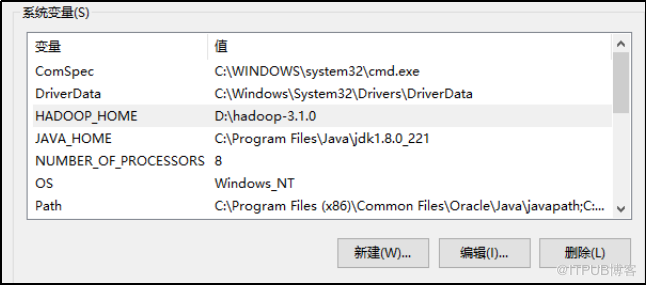
2 ) 配置 HADOOP _HOME 环境 变量
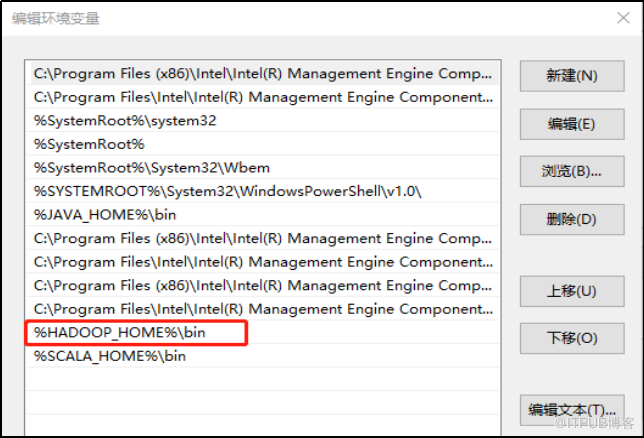
3 ) 配置 Path 环境 变量 。
注意:如果环境变量不起作用,可以重启电脑试试。
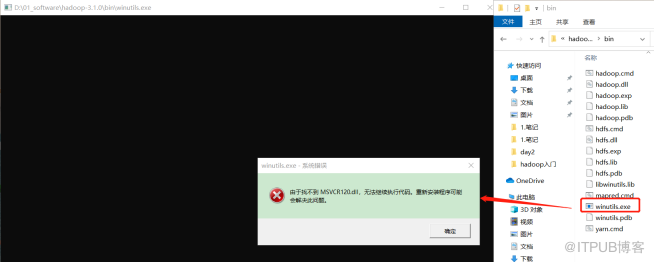
验证 Hadoop 环境变量是否正常。双击 w inutils.exe ,如果报如下错误。说明缺少微软运行库(正版系统往往有这个问题)。再资料包里面有对应的微软运行库安装包双击安装即可。
4 )在 IDEA 中创建一个 Maven 工程 Demo ,并导入相应的依赖坐标 + 日志添加
        org.apache.hadoop
        hadoop-client
        3.1.3


        junit
        junit
        4.12


        org.slf4j
        slf4j-log4j12
        1.7.30
在项目的 src/main/resources 目录下,新建一个文件,命名为“ log4j.properties ”,在文件中填入
log4j.rootLogger=INFO, stdout
log4j.appender.stdout=org.apache.log4j.ConsoleAppender
log4j.appender.stdout.layout=org.apache.log4j.PatternLayout
log4j.appender.stdout.layout.ConversionPattern=%d %p [%c] - %m%n
log4j.appender.logfile=org.apache.log4j.FileAppender
log4j.appender.logfile.File=target/spring.log
log4j.appender.logfile.layout=org.apache.log4j.PatternLayout
log4j.appender.logfile.layout.ConversionPattern=%d %p [%c] - %m%n
Hadoop HDFS API的Java代码示例:
创建HDFS客户端:
Configuration conf = new Configuration();
FileSystem fs = FileSystem.get(new URI("hdfs://hadoop102:8020"), conf, "hadoop");
上传文件到HDFS
fs.copyFromLocalFile(new Path("d:/sunwukong.txt"), new Path("/xiyou/huaguoshan"));
从HDFS下载文件
FSDataInputStream in = fs.open(new Path("/filename.tar.gz"));
FileOutputStream out = new FileOutputStream(new File("c:/filename.tar.gz"));
IOUtils.copyBytes(in, out, 4096);
随机定位读取文件
FSDataInputStream in = fs.open(new Path("/iloveyou.txt"));
in.seek(22);
FileOutputStream out = new FileOutputStream(new File("c:/iloveyou.line.2.txt"));
IOUtils.copyBytes(in,out,19L,true);
显示HDFS上文件内容
FSDataInputStream in = fs.open(new Path("/iloveyou.txt"));
IOUtils.copyBytes(in, System.out, 1024);
上传大文件并显示进度
File file = new File("D:\\kafka.tgz");
final float fileSize = file.length();
InputStream in = new BufferedInputStream(new FileInputStream(file));
FSDataOutputStream out = fileSystem.create(new Path("/hdfs-api/test/kafka5.tgz"), new Progressable() {
    long fileCount = 0;
    public void progress() {
        fileCount++;
        System.out.println("上传进度:" + (fileCount * 64 * 1024 / fileSize) * 100 + " %");
    }
});
IOUtils.copyBytes(in, out, 4096);