来源:京东云开发者
3.1 DispatcherServlet的自动配置原理
org.springframework.boot spring-boot-autoconfigure ${spring-boot.version}
org.springframework.boot.autoconfigure.web.servlet.DispatcherServletAutoConfiguration在这个类中存在有一个静态内部类:
org.springframework.boot.autoconfigure.web.servlet.DispatcherServletAutoConfiguration.DispatcherServletConfiguration
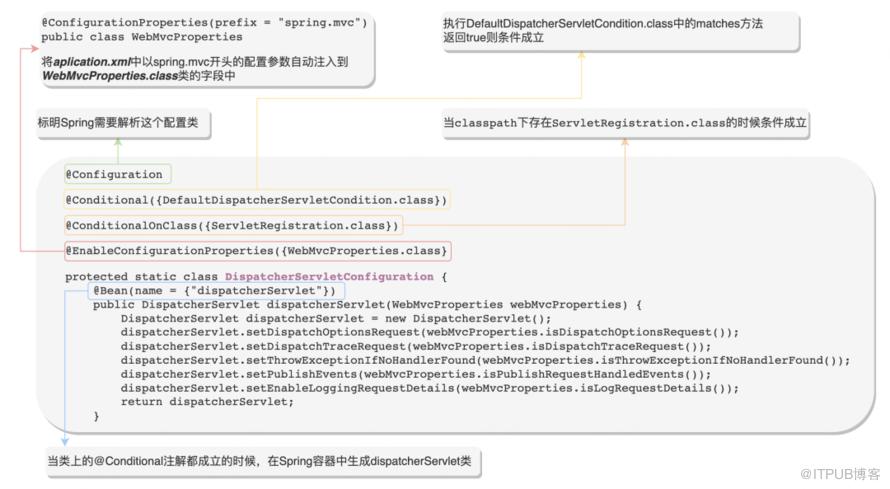
3.1.1:@EnableConfigurationProperties({WebMvcProperties.class})注解解析
3.1.2:@Conditional({DefaultDispatcherServletCondition.class}注解解析
public interface Condition { boolean matches(ConditionContext var1, AnnotatedTypeMetadata var2);}3.1.3:@ConditionOnClass注解解析
protected static Class resolve(String className, ClassLoader classLoader) throws ClassNotFoundException { return classLoader != null ? Class.forName(className, false, classLoader) : Class.forName(className);}3.1.4:总结
@ConfigurationProperties@EnableConfigurationProperties
@Conditional@ConditionalOnClass
/META-INF/spring-factoriesorg.springframework.boot.autoconfigure.EnableAutoConfiguration=自动配置类全路径名称
4.1 首先定义一个标记需要打印出入参日志的注解@PrintLog
@Target(ElementType.METHOD)@Retention(RetentionPolicy.RUNTIME)public @interface PrintLog {}4.2 定义一个存放打印日志配置的实体类
//自动注入application配置文件中已log.switch开头的配置参数@ConfigurationProperties("log.switch")public class LogProperties { //是否启用打印日志功能 private Boolean enabled = false; //是否打印调用者ip private Boolean printIp = false; //是否打印调用者url private Boolean printUrl = false}4.3 定义一个@PrintLog注解的切面类
public class LogAspect {private static final Log LOGGER = LogFactory.getLog(LogAspect.class);private LogProperties logProperties;("@annotation(com.zl.annotation.PrintLog)")public void Log(){}("Log()")public Object doAround(ProceedingJoinPoint joinPoint) throws Throwable {ServletRequestAttributes attributes = (ServletRequestAttributes) RequestContextHolder.getRequestAttributes();HttpServletRequest request = attributes.getRequest();MethodSignature signature = (MethodSignature) joinPoint.getSignature();Method method = signature.getMethod();String methodName = method.getName();//打印调用urlif (Boolean.TRUE.equals(logProperties.getPrintUrl())){LOGGER.info("URL:" + request.getRequestURL().toString());}//打印ipif (Boolean.TRUE.equals(logProperties.getPrintIp())) {LOGGER.info("IP :" + request.getRemoteAddr());}//打印方法LOGGER.info("method :" + methodName);//打印参数LOGGER.info("parameter :" + Arrays.toString(joinPoint.getArgs()));Object result = joinPoint.proceed();//打印返回结果LOGGER.info("return :" + JSON.toJSONString(result));return result;}}
4.4 定义一个打印日志的自动配置类
@Configuration@EnableConfigurationProperties({LogProperties.class})//表示在application配置文件中必须配置log.switch.enabled = true才启动自动配置@ConditionalOnProperty(prefix = "log.switch", value = "enabled", havingValue = "true")public class LogAutoConfigure { @Bean //Advice.class是aop切面中关键的切面方法类(@Before,@After等) //程序中有Advice.class类说明需要使用切面功能,这时才加载自定义的切面类 @ConditionalOnClass(Advice.class) public LogAspect webLogAspect(LogProperties logProperties){ return new LogAspect(logProperties); }}4.5 配置自定义配置类的加载路径
META-INF/spring.factoriesorg.springframework.boot.autoconfigure.EnableAutoConfiguration=\ com.zl.autoConfigure.LogAutoConfigure
4.6 Maven打包部署
maven install
5.1 在项目中引入Starter
com.zl.demo LogStarter 1.0-SNAPSHOT
5.2 在application.yml中配置参数
log: switch: enabled: true //启用打印日志功能 printIp: true //打印请求ip printUrl: true //打印请求url
5.3 定义一个Controller并标上打印日志的注解
@RestController@RequestMapping("/test")public class HelloWorldController { @PrintLog @RequestMapping("/hello") public String helleWorld(String test){ return "hello world!"; }}5.4 启动项目开始测试
com.zl.aspect.LogAspect : URL:http://localhost:8080/test/hellocom.zl.aspect.LogAspect : IP :0:0:0:0:0:0:0:1com.zl.aspect.LogAspect : method :helleWorldcom.zl.aspect.LogAspect : parameter :[test]com.zl.aspect.LogAspect : return :"hello world!"
提高研发效率。我们可以快速构建开发环境,对于开发中使用到的开源组件和中间件,我们直接引入对应的Starter就可以直接开发了,例如Redis和Mybatis等,可以直接引入对应的spring-boot-starter-data-redis就可以直接使用RedisTemplate来操作Redis了,这样可以极大的提高研发的效率,无需再进行复杂的起步配置了和各种版本依赖管理了。 标准模块复用。对于业务开发中的一些标准模块,例如常用的一些三方服务,我们可以利用Starter直接配置好,在需要使用的项目中直接引入这个starter就可以立即使用了,无需再去引入Jar包和编写配置文件等,同样的,对于一些标准非业务强耦合的功能,例如监控,鉴权等,也可以定义一个Starter,需要使用鉴权和监控功能的项目就可以直接复用了,无需再次开发。
-end-