来源:京东技术 Tech 导读
在互联网时代,大文件上传已成为常见的需求,无论是企业还是个人用户,都可能面临大文件传输的挑战。本文将分享一些实践经验,帮助更高效地处理大文件上传问题。我们将探讨选择合适的传输工具、优化网络设置、分块上传等策略,以及一些实用的技巧和注意事项。通过这些实践分享,将能够提高文件上传的成功率,节省时间并减少麻烦。让我们一起探索大文件上传的最佳实践吧!
导读
2.1 大文件上传想要实现的目标
1.能够快速的将1.5G的文件上传到服务端, 由服务端进行存储,之后提供给其他设备下载。
2.能够支持在网络条件不好时实现断点续传。
2.2 实现思路
3.根据服务端返回的状态执行不同的上传策略:
已上传:执行秒传策略,即快速上传(实际上没有对该文件进行上传,因为服务端已经有这份文件了),用户体验下来就是上传得飞快,嗖嗖嗖。。。
未上传、上传部分:执行计算待上传分块的策略
5.当传完最后一个文件分块时,向服务端发送合并的指令,即完成整个大文件的分块合并,实现在服务端的存储。整体流程如下:
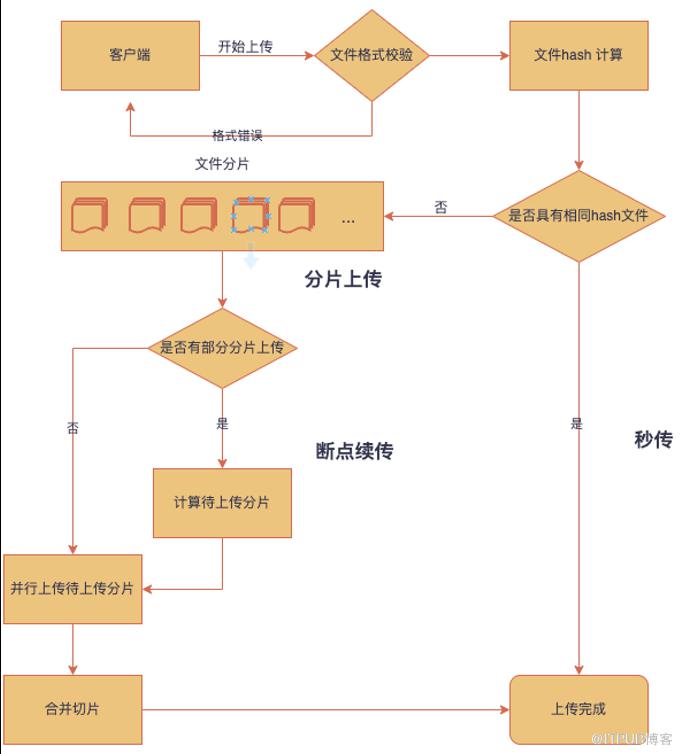
总结一下:将大文件通过切分成N个小文件,通过并发多个HTTP请求,实现快速上传;在每次上传前计算文件hash,带着这个文件hash去服务端查询该文件在服务端的存储状态,通过状态来判断需要上传的分块,实现断点续传、秒传。
3.1 文件hash计算
import SparkMD5 from 'spark-md5'const CHUNK_SIZE = 1024 * 1024 * 5 // 5M// 对大文件进行分片function sliceFile2chunk(file) {const blobSlice = File.prototype.slice || File.prototype.mozSlice || File.prototype.webkitSliceconst fileChunks = []if (file.size <= CHUNK_SIZE) {fileChunks.push({ file })} else {let chunkStartIndex = 0while (chunkStartIndex < file.size) {fileChunks.push({ file: blobSlice(file, chunkStartIndex, chunkStartIndex + CHUNK_SIZE) })chunkStartIndex = chunkStartIndex + CHUNK_SIZE}}return fileChunks}function getFileHash(file) {let hashProcess = 0let fileHash = null// 这里需要使用异步执行,保证获取到hash后执行下一步return new Promise((resolve) => {const fileChunks = sliceFile2Chunk(file)const spark = new SparkMD5.ArrayBuffer()let hadReadChunksNum = 0const readFile = (chunkIndex) => {const fileReader = new FileReader()fileReader.readAsArrayBuffer(fileChunks[chunkIndex]?.file)fileReader.onload = (e) => {hadReadChunksNum++spark.append(e.target.result)if (hadReadChunksNum === fileChunks.length) {hashProcess = 100fileHash = spark.end()fileReader.onload = nullresolve(fileHash)} else {hashProcess = Math.floor((hadReadChunksNum / fileChunks.length) * 100);readFile(hadReadChunksNum)}}}readFile(0)})}// await 用于表示这里是一个异步操作const fileHash = await getFileHash(file)const fileChunks = sliceFile2chunk(file)
// 采用表单形式提交数据,不是必须这样const fileInfo = new FormData()fileInfo.append('fileHash', fileHash)fileInfo.append('fileName', name)// getFileStatusFn是向服务端请求的文件初始状态的 http 方法, await 标识这里是一个异步请求const res = await getFileStatusFn(fileInfo)
3.2 根据服务返回的状态执行不同的上传策略
0 未上传
1 上传部分
2 上传完成
// 这里的 res 是文件在服务端的状态 function createWait2UploadChunks(res) { if (res.data) { const wait2UploadChunks = [] if (res.data.result === 0 ) { // 3.1中得到的文件 chunks fileChunks.forEach((item, index) => { const chunk = formateChunk(item, index) wait2UploadChunks.push(chunk) }, this) } if (res.data.result === 1) { const restFileChunksIndex = [] // tagList 是服务端返回的已上传的文件块标识 类型是Array res.data.tagList.forEach((item) => { restFileChunksIndex.push(item.index) }, this) fileChunks.forEach((item, index) => { if (!restFileChunksIndex.includes(index)) { const chunk = formateChunk(item, index) wait2UploadChunks.push(chunk) } }) } if(res.data.result === 2) { console.log('执行自定义的秒传操作') } return wait2UploadChunks } } // 该函数式对文件块进行标准化,这里可以与后端做协商得出的,看后端需要什么样的数据 function formateChunk(item, index) { const chunkFormData = new FormData() chunkFormData.append("file", item.file); chunkFormData.append("index", index); chunkFormData.append("partSize", item.file.size); chunkFormData.append("fileHash", fileHash); return chunkFormData } // 入参是 3.2 得到的response, 出参事最终需要上传的分片 const wait2UploadChunks = createWait2UploadChunks(res)3.3 并发上传还未上传的文件分块
const currentHttpNum = 0 const maxHttpNum = 5 const hasUploadedChunkNum = 0 const nextChunkIndex = 4 const uploadProcess = 0 uploadFileChunks() function uploadFileChunks() { wait2UploadChunks.slice(0, maxHttpNum).forEach((item) => { uploadFileChunk(item) }, this) } async function uploadFileChunk(chunkFormData) { try { currentHttpNum++ const res = await uploadChunkFn(chunkFormData) // uploadChunkFn是执行文件上传的HTTP请求 currentHttpNum-- if (res.code === 200) { if (hasUploadedChunkNum < wait2UploadChunks.length) { hasUploadedChunkNum++ } if (wait2UploadChunks.length > ++nextChunkIndex) { uploadFileChunk(wait2UploadChunks[nextChunkIndex]) } uploadProcess = Math.floor((hasUploadedChunkNum / wait2UploadChunks.length) * 100) if (currentHttpNum <= 0) { // 定义在 3.5 mergeChunks() // 第五步执行的函数 } } } catch (error) { console.log(error); } }3.4 向服务端发送合并的指令
async mergeChunks() { try { const res = await mergeChunkFn({ //mergeChunkFn 是HTTP请求 fileHash: fileHash, }) } catch (error) { console.log(error); } }4.1 hash计算优化
hash计算可以利用 web worker 协程来计算,这里提供一下worker的实现:
// worker.jsself.addEventListener('message', function (e) {self.postMessage('You said: ' + e.data);}, false);self.close() // self代表子线程自身,即子线程的全局对象// 主线程const worker = new Worker('./worker.js') // 传入的是一个脚本worker.postMessage('Hello World');worker.onmessage = function (e) {console.log(e.data);}
4.2 分块大小合理化
1.网络带宽:10M/s
4.3 多个客户端上传同一个文件包来缩减上传时间