第三十五章 人脸68关键点检测实验
在上一章节中,介绍了利用KPU模块实现人脸属性分析的功能,本章将继续介绍利用KPU模块实现人脸68关键点检测的功能。通过本章的学习,读者将学习到使用SDK编程技术实现人脸68关键点检测应用。
本章分为如下几个小节:
35.1 KPU模块介绍
35.2 硬件设计
35.3 程序设计
35.4 运行验证
35.1 KPU模块介绍
有关KPU模块的介绍,请见第30.1小节《KPU介绍》。
35.2 硬件设计
35.2.1 例程功能
1. 获取摄像头输出的图像,并送入KPU进行人脸检测,接着对检测到的人脸分别进行人脸68关键点检测,最后将所有的检测结果和原始图像一同在LCD上进行显示。
35.2.2 硬件资源
本章实验内容,主要讲解KPU模块的使用,无需关注硬件资源。
35.2.3 原理图
本章实验内容,主要讲解KPU模块的使用,无需关注原理图。
35.3 程序设计
35.3.1 main.c代码
main.c中的代码如下所示:
INCBIN(model_kpu, "face_detect_320x240.kmodel");
INCBIN(model_landm, "landmark68.kmodel");

image_t kpu_image,crop_image,ai_image;
obj_info_t cla_obj_coord;

static float g_anchor[ANCHOR_NUM * 2] = {0.1075, 0.126875, 0.126875, 0.175, 0.1465625, 0.2246875, 0.1953125, 0.25375, 0.2440625, 0.351875, 0.341875, 0.4721875, 0.5078125, 0.6696875, 0.8984375, 1.099687, 2.129062, 2.425937}; /*特征检测*/

static volatile uint8_t ai_done_flag;

/* KPU运算完成回调 */
static void ai_done_callback(void *userdata)
{
    ai_done_flag = 1;
}

static inline float sigmoid(float x)
{
    return 1.f / (1.f + expf(-x));
}

int main(void)
{
    uint8_t *disp;
    uint8_t *ai;
    kpu_model_context_t task_kpu;
    kpu_model_context_t task_landm;
    float *pred_box, *pred_clses;
    size_t pred_box_size, pred_clses_size;
    uint16_t x1 = 0,y1 = 0,x2,y2,cut_width, cut_height;
    uint16_t x_circle = 0;
    uint16_t y_circle = 0;

    region_layer_t detect_kpu;

    sysctl_pll_set_freq(SYSCTL_PLL0, 800000000);
    sysctl_pll_set_freq(SYSCTL_PLL1, 400000000);
    sysctl_pll_set_freq(SYSCTL_PLL2, 45158400);
    sysctl_clock_enable(SYSCTL_CLOCK_AI);
    sysctl_set_power_mode(SYSCTL_POWER_BANK6, SYSCTL_POWER_V18);
    sysctl_set_power_mode(SYSCTL_POWER_BANK7, SYSCTL_POWER_V18);
    sysctl_set_spi0_dvp_data(1);

    lcd_init();
    lcd_set_direction(DIR_YX_LRUD);
    camera_init(24000000);
    camera_set_pixformat(PIXFORMAT_RGB565);
    camera_set_framesize(320, 240);

    kpu_image.pixel = 3;
    kpu_image.width = 320;
    kpu_image.height = 240;
    // image_init(&kpu_image);

    ai_image.pixel = 3;
    ai_image.width = 128;
    ai_image.height = 128;
    image_init(&ai_image);

    if (kpu_load_kmodel(&task_kpu, (const uint8_t *)model_kpu_data) != 0)
    {
        printf("Kmodel load failed!\n");
        while (1);
    }
    if (kpu_load_kmodel(&task_landm, (const uint8_t *)model_landm_data) != 0)
    {
        printf("Kmodel load failed!\n");
        while (1);
    }

    detect_kpu.anchor_number = ANCHOR_NUM;
    detect_kpu.anchor = g_anchor;
    detect_kpu.threshold = 0.5;
    detect_kpu.nms_value = 0.2;
    region_layer_init(&detect_kpu, 10, 8, 30, 320, 240);

    while (1)
    {
        if (camera_snapshot(&disp, &ai) == 0)
        {
            ai_done_flag = 0;
            if (kpu_run_kmodel(&task_kpu, (const uint8_t *)ai, DMAC_CHANNEL5,
 ai_done_callback, NULL) != 0)
            {
                printf("Kmodel run failed!\n");
                while (1);
            }
            while (ai_done_flag == 0);
            if (kpu_get_output(&task_kpu, 0, (uint8_t **)&pred_box,
&pred_box_size) != 0)
            {
                printf("Output get failed!\n");
                while (1);
            }

            detect_kpu.input = pred_box;
            region_layer_run(&detect_kpu, &cla_obj_coord);

            for (size_t j = 0; j < cla_obj_coord.obj_number; j++)
            {
                if (cla_obj_coord.obj[j].x1 >= 2)
                {
                    x1 = cla_obj_coord.obj[j].x1 - 2;   /* 对识别框稍微放大点 */
                }
                if (cla_obj_coord.obj[j].y1 >= 2)
                {
                    y1 = cla_obj_coord.obj[j].y1 - 2;
                }
                x2 = cla_obj_coord.obj[j].x2 + 2;
                y2 = cla_obj_coord.obj[j].y2 + 2;

                cut_width = x2 - x1 ;
                cut_height = y2 - y1 ;

                kpu_image.addr = ai;
                crop_image.pixel = 3;
                crop_image.width = cut_width;
                crop_image.height = cut_height;
                image_init(&crop_image);
                image_crop(&kpu_image, &crop_image, x1, y1);

                image_resize(&crop_image,&ai_image);
                image_deinit(&crop_image);

                ai_done_flag = 0;
                if (kpu_run_kmodel(&task_landm, (const uint8_t *)ai_image.addr,
DMAC_CHANNEL5, ai_done_callback, NULL) != 0)
                {
                    printf("Kmodel run failed!\n");
                    while (1);
                }
                while (ai_done_flag == 0);
                if (kpu_get_output(&task_landm, 0, (uint8_t **)&pred_clses,
&pred_clses_size) != 0)
                {
                    printf("Output get failed!\n");
                    while (1);
                }
                draw_box_rgb565_image((uint16_t *)disp, 320, x1, y1, x2, y2,
 GREEN);  /* 画人脸框 */

                for (size_t i = 0; i < 68; i++)
                {
                    x_circle= sigmoid(pred_clses[2 * i]) * cut_width  + x1;
                    y_circle= sigmoid(pred_clses[2 * i + 1]) * cut_height  + y1;
                    draw_point_rgb565_image((uint16_t *)disp, 320, x_circle,
y_circle, BLUE); /* 画人脸关键点 */
                }
            }
            lcd_draw_picture(0, 0, 320, 240, (uint16_t *)disp);
            camera_snapshot_release();
        }
    }
}
本实验和上个实验相似,需要用到两个AI模型, face_detect_320x240.kmodel是人脸检测模型,用于获取人脸关键信息的坐标,然后以图像两个坐标把人脸的关键区域切割下来给另外个模型使用。landmark68.kmodel是人脸68关键点检测的模型,网络运算的图片大小为128*128。
可以看到一开始是先初始化了LCD和摄像头,初始化完成后创建一个128*128的RGB888图片缓存区,然后加载上述两个需要用到的网络模型,并初始化YOLO2网络,配置region_layer_t结构体参数的数据。
最后在一个循环中不断地获取摄像头输出的图像,图像尺寸为320*240,将摄像头图像送入KPU中进行运算,然后将运算结果作为输入传入region_layer_run函数进行解析,该函数会把解析的坐标放在cla_obj_coord结构体中,进而可以通过两个坐标点提取摄像头图像的人脸区域,我们将人脸区域切割下来,再缩放成128*128的图像大小,最后分别放入人脸68关键点检测模型运算,并将运算结果绘制到LCD显示器上。
35.4 运行验证
将DNK210开发板连接到电脑主机,通过VSCode将固件烧录到开发板中,将摄像头对准人脸,让其采集到人脸图像,随后便能在LCD上看到摄像头输出的图像,同时能看到图像上标注了人脸位置和人脸68关键点位置等信息,如下图所示:
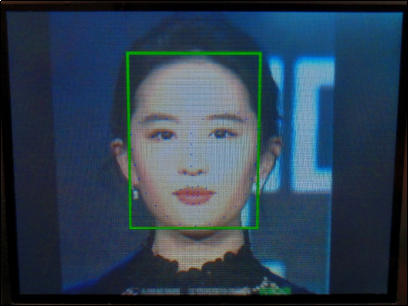
图35.4.1 LCD显示人脸68关键点检测实验结果