Trino 的资源组对资源使用进行了限制,并且可以对查询请求执行排队策略,或者在子资源组之间划分资源。当资源组资源耗尽时,不会导致新的查询失败,而是会排队等待查询,类似于 Hadoop Yarn 中的 queue 的概念。可以有效的做到资源隔离。
资源组的规则由资源管理器配置,并且是可插拔的,目前支持2种资源管理器,分别是文件和 db 管理器。
一、如何配置资源组
要想使用 Trino 的资源组功能,首先需要在 Trino 安装目录下新增一个资源组配置文件:etc/resource-groups.properties,内容如下:
# 资源管理器类型,值为 file 或者 db
resource-groups.configuration-manager=file
1. 配置 file 资源管理器
若果想使用 Trino 的 file 资源管理器,需要将资源管理器的类型设置为 file:
vim etc/resource-groups.properties
resource-groups.configuration-manager=file
# 路径可以是绝对路径,也可以是trino data的相对路径
resource-groups.config-file=etc/resource-groups.json
然后再新建一个 json 格式的资源组配置文件:
vim resource-groups.json
{
  "rootGroups": [
    {
      "name": "admin",
      "softMemoryLimit": "100%",
      "hardConcurrencyLimit": 50,
      "maxQueued": 100,
      "schedulingPolicy": "query_priority",
      "jmxExport": true
    }
  ],
  "selectors": [
    {
      "user": "bob",
      "group": "admin"
    }
}
最后重启 Trino 集群,即可使用。
2. 配置 db 资源管理器
db管理器的配置从关系型数据库读取,支持Mysql,PG和Oracle。同样的,需要将资源管理器的类型设置为 db:
vim etc/resource-groups.properties
resource-groups.configuration-manager=db
resource-groups.config-db-url=jdbc:mysql://localhost:3306/resource_groups
resource-groups.config-db-user=username
resource-groups.config-db-password=password
注意:
① 需要提前建好数据库:resource_groups
② 主要用的是这三个表:resource_groups_global_properties、resource_groups、selectors。Trino Server 启动时会自动创建,无需手动创建。
③ resource_groups 表中 environment 字段需要和 node.environment 配置文件中的 node.environment 保持一致
④ 默认1秒从数据库读取一次配置,并且自动反映到查询的sql中。可以通过
resource-groups.refresh-interval修改读取频率
二、参数解释
1. 全局参数
| 参数名称 | 是否必填 | 参数说明 |
|---|---|---|
| cpuQuotaPeriod | 强制执行Cpu的时间 |
2. resource_group 参数
| 参数名称 | 是否必填 | 默认值 | 参数说明 |
|---|---|---|---|
| name | ✅ | 资源组名称 | |
| maxQueued | ✅ | 排队任务的最大数量,一旦达到这个限制,新的查询将被拒绝 | |
| softMemoryLimit | ✅ | 在新查询进入排队状态之前,该组可以使用的分布式内存的最大量,当达到此阈值后,新任务进入排队。可以指定为绝对值(例如 1GB)或者作为集群内存的百分比(例如 10%)。 | |
| softConcurrencyLimit | 任何时刻处于"RUNNING"状态的查询的最大数量 | ||
| hardConcurrencyLimit | 任何时刻处于"RUNNING"状态的查询的最大数量 | ||
| softCpuLimit | 在一段时间内(参考cpuQuotaPeriod),该组可使用的最大CPU时间,在达到该阈值后,该资源组内占据最大CPU资源的查询的CPU资源会被减少。hardCpuLimit也必须指定。 | ||
| hardCpuLimit | 在一段时间内(参考cpuQuotaPeriod),该组可使用的最大CPU时间,在达到该阈值后,新的查询会进行排队。 | ||
| schedulingPolicy | fair | 调度策略,有3个可选值: - fair:公平,队列中的查询遵循FIFO策略,且子组轮流启动查询。 - weighted_fair:加权公平,子组的选择基于他们的权重和正在并发运行的查询数量。运行查询的预期份额基于所有当前符合条件的子组的权重来计算子组。子组选择相对于其共享的并发性最小的来启动下一个查询。 - weighted:加权,队列中的查询是按照其优先级来随机选择的,通过session属性query_priority来指定,根据其schedulingWeight来选择子组启动新的查询。 - query_priority:队列中的查询严格按照他们的query_priority大小顺序来获取资源。 |
|
| schedulingWeight | 1 | 调度策略使用weighted或者weighted_fair时,子组的权重,数字越大,优先级越高。 | |
| jmxExport | false | 如果设置为true,资源组的统计信息将被暴露给JMX用于监控。 | |
| subGroups | 子组列表 |
2. Selector 参数
除了配置资源组(resource_group)参数外,还有一个重要的配置需要关注,就是:选择器(selector),它提供了一系列的匹配规则,决定了如何去匹配资源组:
| 参数名称 | 是否必填 | 参数说明 |
|---|---|---|
| user | java正则表达匹配的用户名 | |
| userGroup | java正则表达式匹配的每个用户所属的用户 | |
| source | java正则表达式匹配的source | |
| queryType | 查询类型,可选的值有: - SELECT:SELECT语句 - EXPLAIN:EXPLAIN语句 - DESCRIBE:DESCRIBE,DESCRIBE INPUT,DESCRIBE OUTPUT和SHOW语句 - INSERT:INSERT,CREATE TABLE AS和REFRESH MATERIALIZED VIEW语句 - UPDATE:UPDATE语句 - DELETE:DELETE语句 - ANALYZE:ANALYZE语句 - DATA_DEFINITION:alter,create,drop语句 |
|
| clientTags | tag列表 | |
| group | ✅ | 查询使用的组名 |
注意:
选择器按顺序匹配,匹配的第一个将被使用
三、如何使用资源管理器
配置完资源组和选择器,我们便可以通过客户端来进行使用了。
1. 设置 source
① CLI:使用 --source 选项
trino http://127.0.0.1:8080 --source=bob
② JDBC driver:在 connection 的 properties 中加入 source 属性
Properties prop = new Properties();
prop.setProperty("url", "jdbc:trino://127.0.0.1:8080");
prop.setProperty("user", "user");
prop.setProperty("password", "password");
prop.setProperty("source", "bob");
2. 设置 client-tags
① CLI:使用 --client-tags 选项
trino http://127.0.0.1:8080 --client-tags=test
② JDBC driver:在 connection 的 properties 中加入 clientTags 属性
Properties prop = new Properties();
prop.setProperty("url", "jdbc:trino://127.0.0.1:8080");
prop.setProperty("user", "user");
prop.setProperty("password", "password");
prop.setProperty("clientTags", "test");
四、资源组使用案例
以下资源组配置参考了 Trino 官网文档所述。
1. file 配置方式
{
"rootGroups": [
{
"name": "global",
"softMemoryLimit": "80%",
"hardConcurrencyLimit": 100,
"maxQueued": 1000,
"schedulingPolicy": "weighted",
"jmxExport": true,
"subGroups": [
{
"name": "data_definition",
"softMemoryLimit": "10%",
"hardConcurrencyLimit": 5,
"maxQueued": 100,
"schedulingWeight": 1
},
{
"name": "adhoc",
"softMemoryLimit": "10%",
"hardConcurrencyLimit": 50,
"maxQueued": 1,
"schedulingWeight": 10,
"subGroups": [
{
"name": "other",
"softMemoryLimit": "10%",
"hardConcurrencyLimit": 2,
"maxQueued": 1,
"schedulingWeight": 10,
"schedulingPolicy": "weighted_fair",
"subGroups": [
{
"name": "${USER}",
"softMemoryLimit": "10%",
"hardConcurrencyLimit": 1,
"maxQueued": 100
}
]
},
{
"name": "bi-${toolname}",
"softMemoryLimit": "10%",
"hardConcurrencyLimit": 10,
"maxQueued": 100,
"schedulingWeight": 10,
"schedulingPolicy": "weighted_fair",
"subGroups": [
{
"name": "${USER}",
"softMemoryLimit": "10%",
"hardConcurrencyLimit": 3,
"maxQueued": 10
}
]
}
]
},
{
"name": "pipeline",
"softMemoryLimit": "80%",
"hardConcurrencyLimit": 45,
"maxQueued": 100,
"schedulingWeight": 1,
"jmxExport": true,
"subGroups": [
{
"name": "pipeline_${USER}",
"softMemoryLimit": "50%",
"hardConcurrencyLimit": 5,
"maxQueued": 100
}
]
}
]
},
{
"name": "admin",
"softMemoryLimit": "100%",
"hardConcurrencyLimit": 50,
"maxQueued": 100,
"schedulingPolicy": "query_priority",
"jmxExport": true
}
],
"selectors": [
{
"user": "bob",
"group": "admin"
},
{
"userGroup": "admin",
"group": "admin"
},
{
"source": ".*pipeline.*",
"queryType": "DATA_DEFINITION",
"group": "global.data_definition"
},
{
"source": ".*pipeline.*",
"group": "global.pipeline.pipeline_${USER}"
},
{
"source": "jdbc#(?.*)" ,
"clientTags": ["hipri"],
"group": "global.adhoc.bi-${toolname}.${USER}"
},
{
"group": "global.adhoc.other.${USER}"
}
],
"cpuQuotaPeriod": "1h"
}
2. Db 配置方式
上述同样的配置也可以通过数据库配置来实现,记得要先修改资源管理器的类型为 db。
-- global properties
INSERT INTO resource_groups_global_properties (name, value) VALUES ('cpu_quota_period', '1h');
-- Every row in resource_groups table indicates a resource group.
-- The enviroment name is 'test_environment', make sure it matches `node.environment` in your cluster.
-- The parent-child relationship is indicated by the ID in 'parent' column.
-- create a root group 'global' with NULL parent
INSERT INTO resource_groups (name, soft_memory_limit, hard_concurrency_limit, max_queued, scheduling_policy, jmx_export, environment) VALUES ('global', '80%', 100, 1000, 'weighted', true, 'test_environment');
-- get ID of 'global' group
SELECT resource_group_id FROM resource_groups WHERE name = 'global'; -- 1
-- create two new groups with 'global' as parent
INSERT INTO resource_groups (name, soft_memory_limit, hard_concurrency_limit, max_queued, scheduling_weight, environment, parent) VALUES ('data_definition', '10%', 5, 100, 1, 'test_environment', 1);
INSERT INTO resource_groups (name, soft_memory_limit, hard_concurrency_limit, max_queued, scheduling_weight, environment, parent) VALUES ('adhoc', '10%', 50, 1, 10, 'test_environment', 1);
-- get ID of 'adhoc' group
SELECT resource_group_id FROM resource_groups WHERE name = 'adhoc'; -- 3
-- create 'other' group with 'adhoc' as parent
INSERT INTO resource_groups (name, soft_memory_limit, hard_concurrency_limit, max_queued, scheduling_weight, scheduling_policy, environment, parent) VALUES ('other', '10%', 2, 1, 10, 'weighted_fair', 'test_environment', 3);
-- get ID of 'other' group
SELECT resource_group_id FROM resource_groups WHERE name = 'other'; -- 4
-- create '${USER}' group with 'other' as parent.
INSERT INTO resource_groups (name, soft_memory_limit, hard_concurrency_limit, max_queued, environment, parent) VALUES ('${USER}', '10%', 1, 100, 'test_environment', 4);
-- create 'bi-${toolname}' group with 'adhoc' as parent
INSERT INTO resource_groups (name, soft_memory_limit, hard_concurrency_limit, max_queued, scheduling_weight, scheduling_policy, environment, parent) VALUES ('bi-${toolname}', '10%', 10, 100, 10, 'weighted_fair', 'test_environment', 3);
-- get ID of 'bi-${toolname}' group
SELECT resource_group_id FROM resource_groups WHERE name = 'bi-${toolname}'; -- 6
-- create '${USER}' group with 'bi-${toolname}' as parent. This indicates
-- nested group 'global.adhoc.bi-${toolname}.${USER}', and will have a
-- different ID than 'global.adhoc.other.${USER}' created above.
INSERT INTO resource_groups (name, soft_memory_limit, hard_concurrency_limit, max_queued, environment, parent) VALUES ('${USER}', '10%', 3, 10, 'test_environment', 6);
-- create 'pipeline' group with 'global' as parent
INSERT INTO resource_groups (name, soft_memory_limit, hard_concurrency_limit, max_queued, scheduling_weight, jmx_export, environment, parent) VALUES ('pipeline', '80%', 45, 100, 1, true, 'test_environment', 1);
-- get ID of 'pipeline' group
SELECT resource_group_id FROM resource_groups WHERE name = 'pipeline'; -- 8
-- create 'pipeline_${USER}' group with 'pipeline' as parent
INSERT INTO resource_groups (name, soft_memory_limit, hard_concurrency_limit, max_queued, environment, parent) VALUES ('pipeline_${USER}', '50%', 5, 100, 'test_environment', 8);
-- create a root group 'admin' with NULL parent
INSERT INTO resource_groups (name, soft_memory_limit, hard_concurrency_limit, max_queued, scheduling_policy, environment, jmx_export) VALUES ('admin', '100%', 50, 100, 'query_priority', 'test_environment', true);
-- Selectors
-- use ID of 'admin' resource group for selector
INSERT INTO selectors (resource_group_id, user_regex, priority) VALUES ((SELECT resource_group_id FROM resource_groups WHERE name = 'admin'), 'bob', 6);
-- use ID of 'admin' resource group for selector
INSERT INTO selectors (resource_group_id, user_group_regex, priority) VALUES ((SELECT resource_group_id FROM resource_groups WHERE name = 'admin'), 'admin', 5);
-- use ID of 'global.data_definition' resource group for selector
INSERT INTO selectors (resource_group_id, source_regex, query_type, priority) VALUES ((SELECT resource_group_id FROM resource_groups WHERE name = 'data_definition'), '.*pipeline.*', 'DATA_DEFINITION', 4);
-- use ID of 'global.pipeline.pipeline_${USER}' resource group for selector
INSERT INTO selectors (resource_group_id, source_regex, priority) VALUES ((SELECT resource_group_id FROM resource_groups WHERE name = 'pipeline_${USER}'), '.*pipeline.*', 3);
-- get ID of 'global.adhoc.bi-${toolname}.${USER}' resource group by disambiguating group name using parent ID
SELECT A.resource_group_id self_id, B.resource_group_id parent_id, concat(B.name, '.', A.name) name_with_parent
FROM resource_groups A JOIN resource_groups B ON A.parent = B.resource_group_id
WHERE A.name = '${USER}' AND B.name = 'bi-${toolname}';
-- 7 | 6 | bi-${toolname}.${USER}
INSERT INTO selectors (resource_group_id, source_regex, client_tags, priority) VALUES (7, 'jdbc#(?.*)' , '["hipri"]', 2);
-- get ID of 'global.adhoc.other.${USER}' resource group for by disambiguating group name using parent ID
SELECT A.resource_group_id self_id, B.resource_group_id parent_id, concat(B.name, '.', A.name) name_with_parent
FROM resource_groups A JOIN resource_groups B ON A.parent = B.resource_group_id
WHERE A.name = '${USER}' AND B.name = 'other';
-- | 5 | 4 | other.${USER} |
INSERT INTO selectors (resource_group_id, priority) VALUES (5, 1);
注意:
resource_group表中的environment字段必须和
node.properties配置文件中的node.environment的值保持一致,用于唯一确定一个集群。
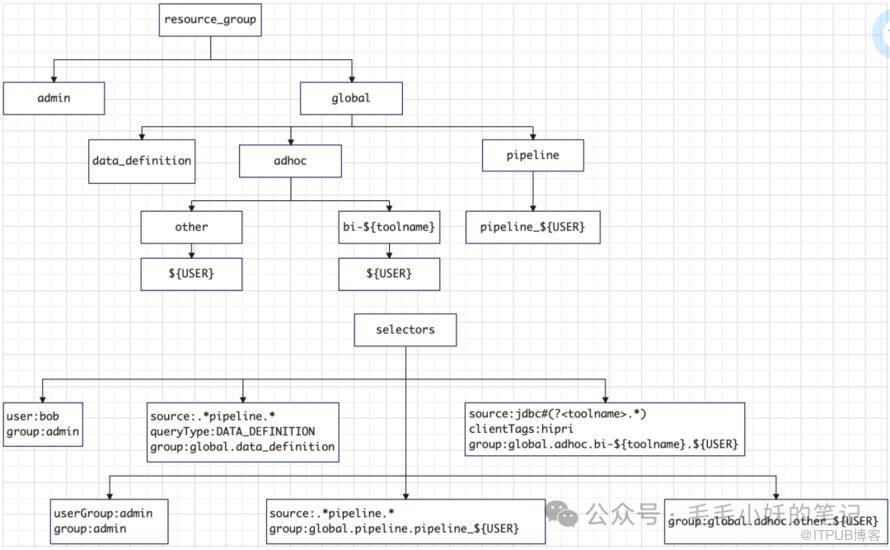
3. 图解
为了更清晰的看出资源组和选择器之间的关系,我画了一个图:
4. 客户端使用
为了方便验证,我这里直接使用 CLI 的方式:
# 命中admin
trino http://127.0.0.1:8080 --user=bob
show catalogs;

# 命中global.pipeline.pipeline_${USER}
trino http://127.0.0.1:8080 --source=a_pipeline.b
show catalogs;

# 查询时使用DDL语句,比如DROP,命中global.data_definition
trino http://127.0.0.1:8080 --source=a_pipeline.b
drop catalog test_hive;

# 命中global.adhoc.bi-${toolname}.${USER}
trino http://127.0.0.1:8080 --source=jdbc#powerfulbi --user=casey --client-tags=hipri
show catalogs;

# 命中global.adhoc.other.${USER}
trino http://127.0.0.1:8080 --user=demo
5. 观察结果
为了更直观的看出是否资源组生效情况,可以登录 Trino 的 web-ui 观察匹配结果:http://127.0.0.1:8080

五、总结
Trino 提供了 file 和 db 两种资源组配置方式。file 方式每次修改完配置需要重启 Trino 集群;
而 db 方式就比较灵活,不需重启 Trino 即可应用资源组规则,但是遗憾的是目前没有提供资源组的 rest 接口,需要我们在使用时自己去实现。
总之,通过使用资源组配置,可以有效的做到资源隔离,一定程度上可以避免资源竞争,但是在具体实施过程中,需要我们及时掌握机器的工作负载情况,及时调整资源组规则,对我们的运维工作也是一个很大的挑战。