MySQL 8.0是MySQL关系数据库管理系统的最新稳定版本。MySQL是使用结构化查询语言(SQL)的免费数据库管理系统(RDBMS)。MySQL旨在稳定,可靠和灵活。使用可用的MySQL APT存储库在Kali Linux上安装MySQL 8.0。
方案一
sudo apt update
sudo apt install -y wget
wget https://dev.mysql.com/get/mysql-apt-config_0.8.15-1_all.deb
sudo dpkg -i mysql-apt-config_0.8.15-1_all.deb
方案二
添加存储库后,更新apt索引并安装mysql-server。
sudo apt update
sudo apt install mysql-community-server
接受许可协议并开始安装。
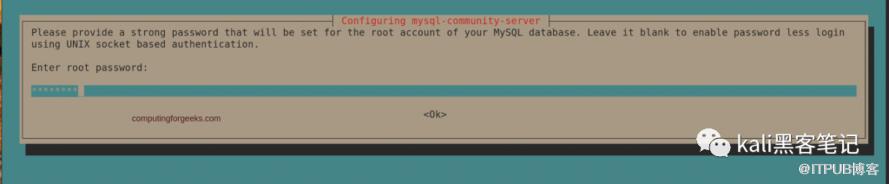
设置MySQL数据库服务器的root密码。
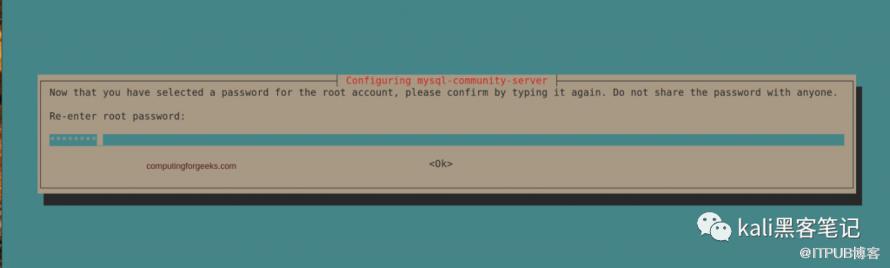
检查root密码。
使用以下方法检查状态:
sudo apt update
sudo apt install mysql-community-server$ systemctl  status  mysql
 ● mysql.service - MySQL Community Server
    Loaded: loaded (/lib/systemd/system/mysql.service; enabled; vendor preset: enabled)
    Active: active (running) since Sat 2020-03-21 11:15:30 UTC; 2min 31s ago
      Docs: man:mysqld(8)
            http://dev.mysql.com/doc/refman/en/using-systemd.html
  Main PID: 2188 (mysqld)
    Status: "Server is operational"
     Tasks: 38 (limit: 2377)
    Memory: 386.5M
    CGroup: /system.slice/mysql.service
            └─2188 /usr/sbin/mysqld
 Mar 21 11:15:29 deb10 systemd[1]: Starting MySQL Community Server…
 Mar 21 11:15:30 deb10 systemd[1]: Started MySQL Community Server.$ systemctl  status  mysql
 ● mysql.service - MySQL Community Server
    Loaded: loaded (/lib/systemd/system/mysql.service; enabled; vendor preset: enabled)
    Active: active (running) since Sat 2020-03-21 11:15:30 UTC; 2min 31s ago
      Docs: man:mysqld(8)
            http://dev.mysql.com/doc/refman/en/using-systemd.html
  Main PID: 2188 (mysqld)
    Status: "Server is operational"
     Tasks: 38 (limit: 2377)
    Memory: 386.5M
    CGroup: /system.slice/mysql.service
            └─2188 /usr/sbin/mysqld
 Mar 21 11:15:29 deb10 systemd[1]: Starting MySQL Community Server…
 Mar 21 11:15:30 deb10 systemd[1]: Started MySQL Community Server.
检查
$ sudo mysql -u root -p
Welcome to the MySQL monitor.  Commands end with ; or g.
Your MySQL connection id is 8
Server version: 8.0.19 MySQL Community Server - GPL
Copyright (c) 2000, 2020, Oracle and/or its affiliates. All rights reserved.
Oracle is a registered trademark of Oracle Corporation and/or its
affiliates. Other names may be trademarks of their respective owners.
Type 'help;' or 'h' for help. Type 'c' to clear the current input statement.
mysql>

mysql> CREATE DATABASE test_db;
Query OK, 1 row affected (0.01 sec)

mysql> SHOW DATABASES;
+--------------------+
| Database           |
+--------------------+
| information_schema |
| mysql              |
| performance_schema |
| sys                |
| test_db            |
+--------------------+
5 rows in set (0.01 sec)
mysql> EXIT
Bye
更多教程 关注我们