三大运营商电信、联通、移动,都想扩大自己的客户群体。
据研究,获取新客户所需的成本远高于保留现有客户的成本。
因此为了满足在激烈竞争中的优势,提前预测出用户是否会流失,采取保留措施成为一大挑战。
之前已经探索了电信流失用户画像,本文和你一起对电信用户进行流失预测。
数据读取与分析
1.1 数据集介绍
1.2 读取数据
1.3 客户流失概率
数据探索与预处理
2.1 定义因变量
2.1 查看各列是否存在异常值
2.3 把类别变量变成哑变量
2.4 特征选择
2.5 区分训练集和测试集
模型训练
3.1 用不同的算法训练模型
3.2 xgb模型挑选最优参数
3.3 用最优参数训练xgb模型
3.4 展示特征重要性

1 数据集介绍
首先介绍一下数据集,它总共包含了7043个用户的信息。
每行存储一个用户的样本,每条样本包含21条属性,由用户基本信息、开通业务信息、签署合约信息、目标变量组成,具体如下:
| 变量名 | 描述 | 数据类型 | 所属特征群或标签 |
| customerID | 客户ID | 字符串 | 基本信息 |
| gender | 性别 | 字符串 | 基本信息 |
| SeniorCitizen | 是否为老年人 | 整型 | 基本信息 |
| Partner | 是否有配偶 | 字符串 | 基本信息 |
| Dependents | 是否有家属 | 字符串 | 基本信息 |
| tenure | 入网月数 | 整型 | 基本信息 |
| PhoneService | 是否开通电话业务 | 字符串 | 开通业务信息 |
| MultipleLines | 是否开通多线业务 | 字符串 | 开通业务信息 |
| InternetService | 是否开通互联网业务 | 字符串 | 开通业务信息 |
| OnlineSecurity | 是否开通在线安全业务 | 字符串 | 开通业务信息 |
| OnlineBackup | 是否开通在线备份业务 | 字符串 | 开通业务信息 |
| DeviceProtection | 是否开通设备保护业务 | 字符串 | 开通业务信息 |
| TechSupport | 是否开通技术支持业务 | 字符串 | 开通业务信息 |
| StreamingTV | 是否开通网络电视业务 | 字符串 | 开通业务信息 |
| StreamingMovies | 是否开通网络电影业务 | 字符串 | 开通业务信息 |
| Contract | 合约期限 | 字符串 | 签署合约信息 |
| PaperlessBilling | 是否采用电子结算 | 字符串 | 签署合约信息 |
| PaymentMethod | 付款方式 | 字符串 | 签署合约信息 |
| MonthlyCharges | 每月费用 | 浮点型 | 签署合约信息 |
| TotalCharges | 总费用 | 字符串 | 签署合约信息 |
| Churn | 客户是否流失 | 字符串 | 目标变量 |
2 读取数据
接着把数据读取到Python中进行预处理,读取数据代码如下:
import osimport numpy as npimport pandas as pdos.chdir(r'F:\公众号\电信客户流失')data = pd.read_csv('Customer_Churn.csv')data.head(2)
参数解释:
import:导入库。
os.chdir:设置数据读取的位置。
pd.read_csv:读取csv格式的数据。
data.head(2):打印data数据的前2行。
得到结果:

3 客户流失概率
然后看下客户流失的概率,代码如下:
data.Churn.value_counts()/len(data.Churn)得到结果:
No 0.73463Yes 0.26537Name: Churn, dtype: float64
可以发现流失客户占比0.265。

1 定义因变量
定义因变量y,流失客户定义为1,非流失客户定义为0,代码如下:
data['y'] = 0data['y'][data['Churn'] =='Yes'] = 1data['y'].value_counts()
得到结果:
0 51741 1869Name: y, dtype: int64
2 查看各列是否存在异常值
接着查看各列空值的数目,代码如下:
#设置查看列不省略pd.set_option('display.max_columns', None)#查看各列空值的数目pd.isnull(data).sum()
得到结果:
customerID 0gender 0SeniorCitizen 0Partner 0Dependents 0tenure 0PhoneService 0MultipleLines 0InternetService 0OnlineSecurity 0OnlineBackup 0DeviceProtection 0TechSupport 0StreamingTV 0StreamingMovies 0Contract 0PaperlessBilling 0PaymentMethod 0MonthlyCharges 0TotalCharges 0Churn 0y 0dtype: int64
可以发现数据列中无空值。
但是在数据分析的过程中发现TotalCharges(总费用)列中有11行的值为' ',需进行填充。
对该列进行数值统计,代码如下:
data['TotalCharges'].value_counts()得到结果:
1120.2 1119.75 920.05 819.9 8..2072.75 1527.9 17875 11294.6 11667.25 1Name: TotalCharges, Length: 6531, dtype: int64
查看这11列的具体值,代码如下:
data[data['TotalCharges']==' ']得到结果:
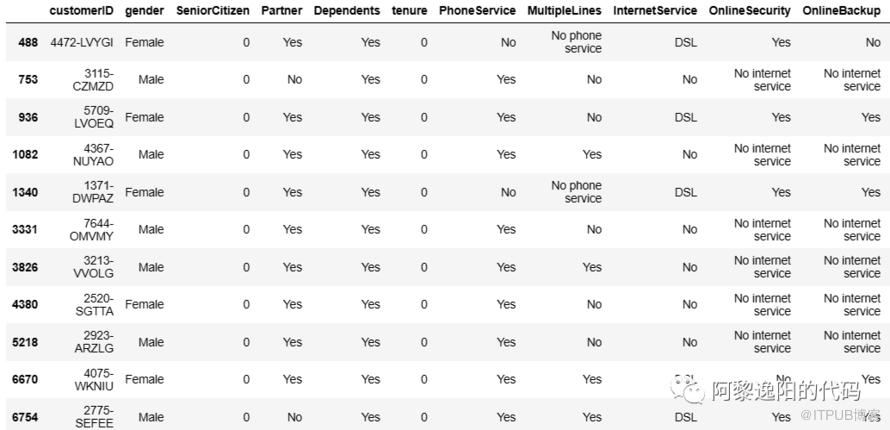
可以发现这11个客户的tenure(入网月数)值都为0,按正常逻辑来说,客户一旦入网至少入网月数值为1。
说明这里的数据在录入时发生了错误,这些客户应该是新入网客户。
需把这11个客户的tenure(入网月数)值从0调整为1,TotalCharges(总费用)用MonthlyCharges(每月费用)填充。
先用每月费用填充总费用,代码如下:
data.loc[:, 'TotalCharges'].replace(to_replace=' ', value=data.loc[:, 'MonthlyCharges'], inplace=True)print(data[data['tenure']==0][['tenure','MonthlyCharges','TotalCharges']])
得到结果:
tenure MonthlyCharges TotalCharges488 0 52.55 52.55753 0 20.25 20.25936 0 80.85 80.851082 0 25.75 25.751340 0 56.05 56.053331 0 19.85 19.853826 0 25.35 25.354380 0 20.00 205218 0 19.70 19.76670 0 73.35 73.356754 0 61.90 61.9
再把tenure中0值变为1,代码如下:
data.loc[:, 'tenure'].replace(to_replace=0, value=1, inplace=True)
最后把总费用的值类型设置为float,并检查是否填充好。
data['TotalCharges'] = data['TotalCharges'].astype(float)print(data[data['tenure']==0][['tenure','MonthlyCharges','TotalCharges']])
得到结果:
Empty DataFrameColumns: [tenure, MonthlyCharges, TotalCharges]Index: []
3 把类别变量变成哑变量
首先查看数据类型,代码如下:
#查看数据类型data.info()
得到结果:
<class 'pandas.core.frame.DataFrame'>RangeIndex: 7043 entries, 0 to 7042Data columns (total 22 columns):# Column Non-Null Count Dtype--- ------ -------------- -----0 customerID 7043 non-null object1 gender 7043 non-null object2 SeniorCitizen 7043 non-null int643 Partner 7043 non-null object4 Dependents 7043 non-null object5 tenure 7043 non-null int646 PhoneService 7043 non-null object7 MultipleLines 7043 non-null object8 InternetService 7043 non-null object9 OnlineSecurity 7043 non-null object10 OnlineBackup 7043 non-null object11 DeviceProtection 7043 non-null object12 TechSupport 7043 non-null object13 StreamingTV 7043 non-null object14 StreamingMovies 7043 non-null object15 Contract 7043 non-null object16 PaperlessBilling 7043 non-null object17 PaymentMethod 7043 non-null object18 MonthlyCharges 7043 non-null float6419 TotalCharges 7043 non-null object20 Churn 7043 non-null object21 y 7043 non-null int64dtypes: float64(1), int64(3), object(18)memory usage: 1.2+ MB
删除customerID列,代码如下:
#删除customerID列data = data.drop(columns='customerID')
然后找出类别特征,代码如下:
#删除customerID列data = data.drop(columns='customerID')
得到结果:
gender SeniorCitizen Partner Dependents PhoneService MultipleLines InternetService OnlineSecurity OnlineBackup DeviceProtection TechSupport StreamingTV StreamingMovies Contract PaperlessBilling PaymentMethod Churn0 Female 0 Yes No No No phone service DSL No Yes No No No No Month-to-month Yes Electronic check No1 Male 0 No No Yes No DSL Yes No Yes No No No One year No Mailed check No2 Male 0 No No Yes No DSL Yes Yes No No No No Month-to-month Yes Mailed check Yes
最后把类别变量变成哑变量,代码如下:
#把类别变量变成哑变量for col in cateCols:if dfCate[col].nunique()==2:dfCate[col] = pd.factorize(dfCate[col])[0]else:dfCate = pd.get_dummies(dfCate, columns=[col])dfCate['tenure'] = data['tenure']dfCate['MonthlyCharges'] = data['MonthlyCharges']dfCate['TotalCharges'] = data['TotalCharges']
4 特征选择
接着删除一些字符变量并进行特征选择,代码如下:
dropFea = ['gender','PhoneService','OnlineSecurity_No internet service', 'OnlineBackup_No internet service','DeviceProtection_No internet service', 'TechSupport_No internet service','StreamingTV_No internet service', 'StreamingMovies_No internet service',]dfCate.drop(dropFea, inplace=True, axis =1)target = dfCate['Churn'].valuescolumns = dfCate.columns.tolist()columns.remove('Churn')features = dfCate[columns].values
5 区分训练集和测试集
最后区分训练集和测试集,代码如下:
from sklearn.model_selection import train_test_splittrain_x, test_x, train_y, test_y = train_test_split(features, target, test_size=0.3, stratify=target, random_state=1)X_train = train_xy_train = train_yy_test = test_yX_test = test_x

1 用不同的算法训练模型
选择不同的算法训练模型,代码如下:
#导入机器学习算法库from sklearn.ensemble import RandomForestClassifier,GradientBoostingClassifier,ExtraTreesClassifier#随机森林from sklearn.linear_model import LogisticRegressionfrom sklearn.neighbors import KNeighborsClassifierfrom sklearn.tree import DecisionTreeClassifierfrom sklearn.svm import SVCfrom sklearn.model_selection import GridSearchCV,cross_val_score,StratifiedKFoldfrom sklearn.ensemble import RandomForestClassifierfrom sklearn.naive_bayes import GaussianNBfrom sklearn.metrics import confusion_matrixfrom xgboost.sklearn import XGBClassifierfrom sklearn import metricsfrom sklearn.metrics import precision_score, recall_score, f1_scoreClassifiers=[["Random Forest",RandomForestClassifier()],["Support Vector Machine",SVC()],["LogisticRegression",LogisticRegression()],["KNN",KNeighborsClassifier(n_neighbors=5)],["Naive Bayes",GaussianNB()],["Decision Tree",DecisionTreeClassifier(criterion = 'entropy', random_state = 0)],["GradientBoostingClassifier", GradientBoostingClassifier()],["XGB", XGBClassifier(eval_metric=['logloss','auc','error'])]]Classify_result=[]names=[]prediction=[]for name,classifier in Classifiers:classifier=classifierclassifier.fit(X_train,y_train)y_pred=classifier.predict(X_test)accuracy_score=metrics.accuracy_score(y_test, y_pred)accuracies=cross_val_score(estimator=classifier,X=X_train,y=y_train,cv=10).mean()recall=recall_score(y_test,y_pred)precision=precision_score(y_test,y_pred)f1score = f1_score(y_test, y_pred)class_eva=pd.DataFrame([accuracy_score,accuracies,recall,precision,f1score])Classify_result.append(class_eva)name=pd.Series(name)names.append(name)y_pred=pd.Series(y_pred)prediction.append(y_pred)names=pd.DataFrame(names)names=names[0].tolist()result=pd.concat(Classify_result,axis=1)result.columns=namesresult.index=["accuracy_score","accuracies","recall","precision","f1score"]result
得到结果:

从上图可知,LogisticRegression、GradientBoostingClassifier、XGB三个模型的预测效果较好,可以都尝试一下。
本文选择XGB模型进行预测,接下来对模型进行参数挑选。
2 XGB模型挑选最优参数
应用GridSearchCV对XGB模型进行最优参数挑选,代码如下:
param_test1 = {'max_depth':np.arange(3,10,2),'min_child_weight':np.arange(1,7,1)}param_test2 = {'gamma': [i/10.0 for i in range(0, 5)]}param_test3 = {'subsample': [i / 10.0 for i in range(6, 10)],'colsample_bytree': [i / 10.0 for i in range(6, 10)]}param_test4 ={'learning_rate':[0.01,0.05,0.1,0.2],'n_estimators':np.arange(50,300,50)}gs = GridSearchCV(estimator=XGBClassifier(learning_rate =0.1, n_estimators=1000, max_depth=5,min_child_weight=1, gamma=0, subsample=0.8, colsample_bytree=0.8, nthread=1, scale_pos_weight=1,eval_metric ='logloss', seed=27),param_grid =param_test1,scoring='roc_auc',n_jobs=1,iid=False, cv=5)gs.fit(X_train, y_train)means = gs.cv_results_['mean_test_score']params = gs.cv_results_['params']print(means, params)print(gs.best_score_ ,gs.best_params_,gs.best_estimator_)
得到结果:
[0.81032988 0.81080381 0.80912527 0.81148552 0.81219432 0.812225490.8073158 0.80585877 0.80604555 0.80804857 0.80597479 0.806310490.80726376 0.80622452 0.80450978 0.80407998 0.8040526 0.80341969] [{'max_depth': 3, 'min_child_weight': 1}, {'max_depth': 3, 'min_child_weight': 2}, {'max_depth': 3, 'min_child_weight': 3}, {'max_depth': 3, 'min_child_weight': 4}, {'max_depth': 3, 'min_child_weight': 5}, {'max_depth': 3, 'min_child_weight': 6}, {'max_depth': 5, 'min_child_weight': 1}, {'max_depth': 5, 'min_child_weight': 2}, {'max_depth': 5, 'min_child_weight': 3}, {'max_depth': 5, 'min_child_weight': 4}, {'max_depth': 5, 'min_child_weight': 5}, {'max_depth': 5, 'min_child_weight': 6}, {'max_depth': 7, 'min_child_weight': 1}, {'max_depth': 7, 'min_child_weight': 2}, {'max_depth': 7, 'min_child_weight': 3}, {'max_depth': 7, 'min_child_weight': 4}, {'max_depth': 7, 'min_child_weight': 5}, {'max_depth': 7, 'min_child_weight': 6}, {'max_depth': 9, 'min_child_weight': 1}, {'max_depth': 9, 'min_child_weight': 2}, {'max_depth': 9, 'min_child_weight': 3}, {'max_depth': 9, 'min_child_weight': 4}, {'max_depth': 9, 'min_child_weight': 5}, {'max_depth': 9, 'min_child_weight': 6}]0.825191254675422 {'max_depth': 3, 'min_child_weight': 6} XGBClassifier(base_score=None, booster=None, callbacks=None,colsample_bylevel=None, colsample_bynode=None,colsample_bytree=0.8, early_stopping_rounds=None,enable_categorical=False, eval_metric='logloss',feature_types=None, gamma=0, gpu_id=None, grow_policy=None,importance_type=None, interaction_constraints=None,learning_rate=0.1, max_bin=None, max_cat_threshold=None,max_cat_to_onehot=None, max_delta_step=None, max_depth=3,max_leaves=None, min_child_weight=6, missing=nan,monotone_constraints=None, n_estimators=1000, n_jobs=None,nthread=1, num_parallel_tree=None, predictor=None, ...)
可以发现不同的参数对应不同的模型效果,我们采用最优参数进行最终模型训练。
3 用最优参数训练XGB模型
用最优参数训练XGB模型,代码如下:
classifier = XGBClassifier(learning_rate=0.1,min_child_weight=6,max_depth=3,n_estimators=1000,gamma=0, subsample=0.9,colsample_bytree=0.8, nthread=1, scale_pos_weight=1,eval_metric ='logloss', seed=27)classifier.fit(X_train,y_train)y_pred=classifier.predict(X_test)recall=recall_score(y_test,y_pred)precision=precision_score(y_test,y_pred)precision
得到结果:
0.6382022471910113从结果知,模型的准确率为0.63,可以把模型预测概率排序靠近1的客户看成可能会流失的客户,对这部分客户进行一定程度的挽留。
4 展示特征重要性
最后,展示特征重要性,代码如下:
import xgboost如果输入是没有表头的array,会自动以f1,f2开始,需要更换表头画树结构图的时候也需要替换表头classifier.get_booster().feature_names = columnsmax_num_features指定排名最靠前的多少特征height=0.2指定柱状图每个柱子的粗细,默认是0.2importance_type='weight'默认是用特征子树中的出现次数(被选择次数),还有"gain"和"cover"xgboost.plot_importance(classifier, max_num_features=15)
得到结果:
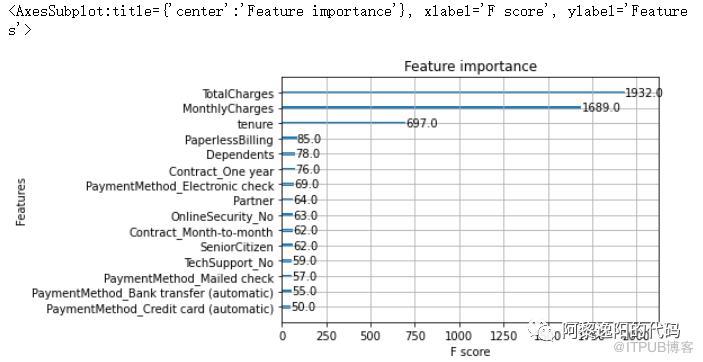
从上图可以发现排名前三的特征是TotalCharges(总费用)、MonthlyCharges(每月费用)和tenure(入网月数)。

根据之前总结的流失客户画像:
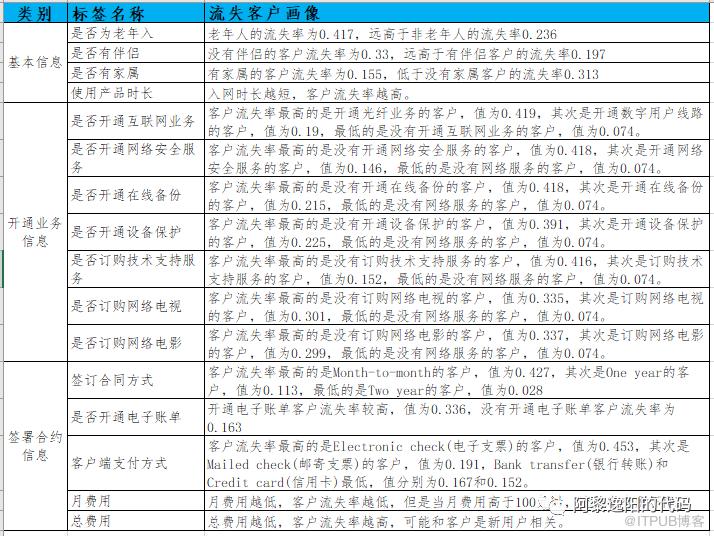
以及模型预测结果,可以得出如下运营建议:
1.用户方面:针对老年用户、无伴侣、无家属的用户推出定制服务,如老年朋友套餐、温情套餐等,满足客户的多样化需求。针对新入网用户,推送半年优惠如赠送消费券,以度过用户流失高峰期。
2.服务方面,针对光纤用户可以推出光纤和通讯组合套餐,对于连续开通半年以上的用户给予优惠减免,也可以附加媒体电视、电影服务,提升网络体验、增值服务体验。针对在线安全、在线备份、设备保护、技术支持等增值服务,应重点对用户进行推广介绍,如首月/半年免费体验。
3.交易倾向方面,针对单月合同用户,推出年合同付费折扣活动,将月合同转化为年合同用户,提高用户留存时长,减少用户流失。针对采用电子支票支付用户,建议定向推送其它支付方式的优惠券,引导用户改变支付方式。对于开通电子账单的客户,可以在电子账单上增加等级积分等显示,等级升高可以免费享受增值服务,积分可以兑换一些日用商品。
4.模型预测高流失概率用户,构建一个高流失率的用户列表,通过用户调研推出一个最小可行化产品功能,并邀请种子用户进行试用,对客户进行针对性挽留。
至此,电信客户流失预测已讲解完毕,感兴趣的同学可以免费到公众号中回复“电信客户流失”获取数据,自己实现一遍。


扫一扫关注我
13162366985
投稿微信号、手机号