 。
。 。
。之前阐述了混淆矩阵和KS曲线,本文阐述F1值的原理和Python实现实例,其它指标会在后续文章中详尽阐述,敬请期待 。
。
详细介绍F1值
1.1 什么是F1值
1.2 理解F1值的一个小例子
用Python如何计算F1值
2.1 写函数计算F1值
2.2 写函数计算F1值具体实例
2.3 调用sklearn计算F1值

F1值又称为F1分数(F1-Score):是分类问题的一个衡量指标,它是精确率P(Precision)和召回率R(Recall)的调和平均数。
F1值=2*P*R/(P+R)
假设1代表涉赌涉诈账户,0代表非涉赌涉诈的低风险账户。
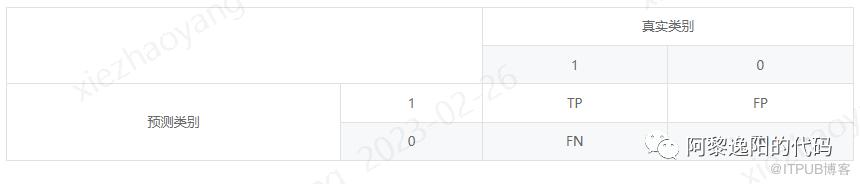
1. TP(True Positive):模型正确预测为1的数量,即真实值是1,模型预测为1的数量。 2. FN(False Negative):模型错误预测为0的数量,即真实值是1,模型预测为0的数量。 3. FP(False Positive):模型错误预测为1的数量,即真实值是0,模型预测为1的数量。
4.TN(True Negative):模型正确预测为0的数量,即真实值是0,模型预测为0的数量。

在Python中计算F1值的代码有多种,本文提供两种。一种是写函数计算,一种是调用sklearn计算。
#Recall = TP/(TP + FN)#Precision = TP/(TP + FP)from sklearn.linear_model import LogisticRegressionfrom sklearn.model_selection import KFold, cross_val_scorefrom sklearn.metrics import confusion_matrix, recall_score, classification_report#绘制混淆矩阵def plot_confusion_matrix(cm, classes,normalize=False,title='Confusion matrix',cmap=plt.cm.Blues):"""This function prints and plots the confusion matrix.Normalization can be applied by setting `normalize=True`."""if normalize:cm = cm.astype('float') / cm.sum(axis=1)[:, np.newaxis]print("Normalized confusion matrix")else:print('Confusion matrix, without normalization')print(cm)plt.imshow(cm, interpolation='nearest', cmap=cmap)plt.title(title)plt.colorbar()tick_marks = np.arange(len(classes))plt.xticks(tick_marks, classes, rotation=45)plt.yticks(tick_marks, classes)fmt = '.2f' if normalize else 'd'thresh = cm.max() / 2.for i, j in itertools.product(range(cm.shape[0]), range(cm.shape[1])):plt.text(j, i, format(cm[i, j], fmt),horizontalalignment="center",color="white" if cm[i, j] > thresh else "black")plt.tight_layout()plt.ylabel('True label')plt.xlabel('Predicted label')def plot_confu_matrix_cal_F1(thresholds, date):'''thresholds:切割predict的阈值,比如:[0.1, 0.2, 0.3, 0.4, 0.5, 0.6]data:数据集,其中包含y标签列,predict预测列(可以是概率值,也可以是标签)'''import itertoolsthresholds = thresholdsplt.figure(figsize = (10, 10))j = 1for i in thresholds:y_test_predictions_high_recall = date['predict'] > iplt.subplot(3, 3, j)j += 1#Compute confusion matcnf_matrix = confusion_matrix(date.y, y_test_predictions_high_recall)np.set_printoptions(precision = 2)recall_score_1 = cnf_matrix[1, 1] / (cnf_matrix[1, 1] + cnf_matrix[1, 0])accary_score_1 = cnf_matrix[1, 1] / (cnf_matrix[1, 1] + cnf_matrix[0, 1])F1_score = 2*recall_score_1*accary_score_1/(recall_score_1+accary_score_1)print("thresholds in the testing dataset:", i)print("Recall metric in the testing dataset:", cnf_matrix[1, 1] / (cnf_matrix[1, 1] + cnf_matrix[1, 0]))print("accary metric in the testing dataset:", cnf_matrix[1, 1] / (cnf_matrix[1, 1] + cnf_matrix[0, 1]))print("F1 score:", F1_score)# Plot non-normalized confusion matrixclass_names = [0, 1]plot_confusion_matrix(cnf_matrix, classes = class_names, title = 'Threshold >= %s' %i)
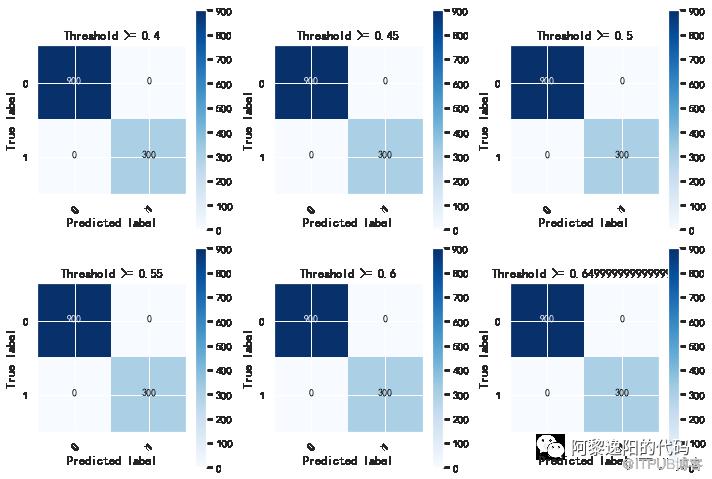
为了便于理解,举一个具体实例(参赛数据):
plot_confu_matrix_cal_F1(list(np.arange(0.4, 0.7, 0.05)), train_date)train_date:数据集,其中包含y标签列,predict预测列(可以是概率值,也可以是标签)。
thresholds in the testing dataset: 0.4Recall metric in the testing dataset: 1.0accary metric in the testing dataset: 1.0F1 score: 1.0Confusion matrix, without normalization[[900 0][ 0 300]]thresholds in the testing dataset: 0.45Recall metric in the testing dataset: 1.0accary metric in the testing dataset: 1.0F1 score: 1.0Confusion matrix, without normalization[[900 0][ 0 300]]thresholds in the testing dataset: 0.5Recall metric in the testing dataset: 1.0accary metric in the testing dataset: 1.0F1 score: 1.0Confusion matrix, without normalization[[900 0][ 0 300]]thresholds in the testing dataset: 0.55Recall metric in the testing dataset: 1.0accary metric in the testing dataset: 1.0F1 score: 1.0Confusion matrix, without normalization[[900 0][ 0 300]]thresholds in the testing dataset: 0.6Recall metric in the testing dataset: 1.0accary metric in the testing dataset: 1.0F1 score: 1.0Confusion matrix, without normalization[[900 0][ 0 300]]thresholds in the testing dataset: 0.6499999999999999Recall metric in the testing dataset: 1.0accary metric in the testing dataset: 1.0F1 score: 1.0Confusion matrix, without normalization[[900 0][ 0 300]]
from sklearn.metrics import f1_scoref1_score(y_true, y_pred, *, labels=None, pos_label=1, average='binary', sample_weight=None, zero_division='warn')
f1_score(train_date.y, train_date.predict)1可以发现计算结果和写函数计算的结果一致,都为1。
至此,F1值的原理和Python实现实例已讲解完毕,感兴趣的同学可以自己尝试实现一下。
往期回顾:


扫一扫关注我
19967879837
投稿微信号、手机