在需要文本转语音(TTS)的应用场景中(如语音助手、语音通知、内容播报等),Java 生态缺少类似 Python 生态的 Edge TTS 客户端库。不过没关系,现在可以通过 UnifiedTTS 提供的 API 来调用免费的 EdgeTTS 能力。同时,UnifiedTTS 还支持 Azure TTS、MiniMax TTS、Elevenlabs TTS 等多种模型,通过对请求接口的抽象封装,用户可以方便在不同模型与音色之间灵活切换。
下面我们以调用免费的 EdgeTTS 为目标,构建一个包含文本转语音功能的 Spring Boot 应用。
实战
1. 构建 Spring Boot 应用
通过
start.spring.io 或其他构建基础的 Spring Boot 工程,根据你构建应用的需要增加一些依赖,比如最后用接口提供服务的话,可以加入 web 模块:
        org.springframework.boot
        spring-boot-starter-web
2. 注册 UnifiedTTS,获取 API Key
- 前往 UnifiedTTS 官网注册账号(直接 GitHub 登录即可)
- 从左侧菜单进入“API 密钥”页面,创建 API Key;
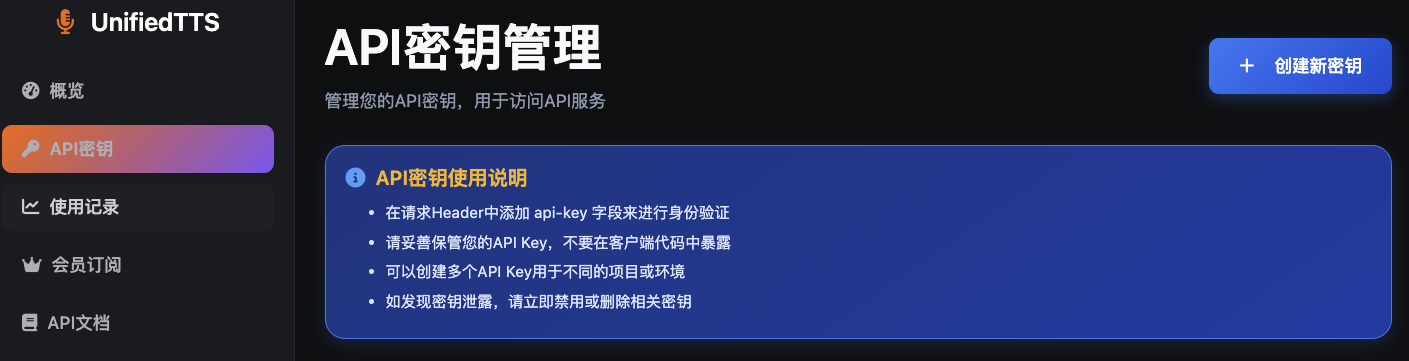
- 存好 API Key,后续需要使用
3. 集成 UnifiedTTS API
下面根据 API 文档: https://unifiedtts.com/zh/api-docs/tts-sync 实现一个可运行的参考实现,包括配置文件、请求模型、服务类与控制器。
3.1 配置文件(
application.properties)
unified-tts.host=https://unifiedtts.com
unified-tts.api-key=your-api-key-here
这里
unifiedtts.api-key 参数记得替换成之前创建的 ApiKey。
3.2 配置加载类
@Data
@ConfigurationProperties(prefix = "unified-tts")
public class UnifiedTtsProperties {
    private String host;
    private String apiKey;
}
3.3 请求封装和响应封装
@Data
@AllArgsConstructor
@NoArgsConstructor
public class UnifiedTtsRequest {

    private String model;
    private String voice;
    private String text;
    private Double speed;
    private Double pitch;
    private Double volume;
    private String format;
}
@Data
@AllArgsConstructor
@NoArgsConstructor
public class UnifiedTtsResponse {
    private boolean success;
    private String message;
    private long timestamp;
    private UnifiedTtsResponseData data;
    @Data
    @AllArgsConstructor
    @NoArgsConstructor
    public static class UnifiedTtsResponseData {
        @JsonProperty("request_id")
        private String requestId;
        @JsonProperty("audio_url")
        private String audioUrl;
        @JsonProperty("file_size")
        private long fileSize;
    }
}
UnifiedTTS 抽象了不同模型的请求,这样用户可以用同一套请求参数标准来实现对不同 TTS 模型的调用,这个非常方便。所以,为了简化 TTS 的客户端调用,非常推荐使用 UnifiedTTS。
3.3 服务实现(调用 UnifiedTTS)
使用 Spring Boot 自带的
RestClient HTTP 客户端来实现
UnifiedTTS 的功能实现类,提供两个实现:
- 接收音频字节并返回。
@Service
public class UnifiedTtsService {
    private final RestClient restClient;
    private final UnifiedTtsProperties properties;
    public UnifiedTtsService(RestClient restClient, UnifiedTtsProperties properties) {
        this.restClient = restClient;
        this.properties = properties;
    }
    /**
     * 调用 UnifiedTTS 同步 TTS 接口,返回音频字节数据。
     *
     * 请求头:
     *
-
*
- Content-Type: application/json *
- X-API-Key: 来自配置的 API Key *
- Accept: 接受二进制流或常见 mp3/mpeg 音频类型 *
若输出路径的父目录不存在,会自动创建;失败时抛出运行时异常。 * * @param request TTS 请求参数 * @param outputPath 目标文件路径(例如 output.mp3) * @return 实际写入的文件路径 */ public Path synthesizeToFile(UnifiedTtsRequest request, Path outputPath) { byte[] data = synthesize(request); try { if (outputPath.getParent() != null) { Files.createDirectories(outputPath.getParent()); } Files.write(outputPath, data); return outputPath; } catch (IOException e) { throw new RuntimeException("Failed to write TTS output to file: " + outputPath, e); } } }
3.4 单元测试
@SpringBootTest
class UnifiedTtsServiceTest {
    @Autowired
    private UnifiedTtsService unifiedTtsService;
    @Test
    void testRealSynthesizeAndDownloadToFile() throws Exception {
        UnifiedTtsRequest req = new UnifiedTtsRequest(
            "edge-tts",
            "en-US-JennyNeural",
            "Hello, this is a test of text to speech synthesis.",
            1.0,
            1.0,
            1.0,
            "mp3"
        );
        // 调用真实接口,断言返回结构
        UnifiedTtsResponse resp = unifiedTtsService.synthesize(req);
        assertNotNull(resp);
        assertTrue(resp.isSuccess(), "Response should be success");
        assertNotNull(resp.getData(), "Response data should not be null");
        assertNotNull(resp.getData().getAudioUrl(), "audio_url should be present");
        // 在当前工程目录下生成测试结果目录并写入文件
        Path projectDir = Paths.get(System.getProperty("user.dir"));
        Path resultDir = projectDir.resolve("test-result");
        Files.createDirectories(resultDir);
        Path out = resultDir.resolve(System.currentTimeMillis() + ".mp3");
        Path written = unifiedTtsService.synthesizeToFile(req, out);
        System.out.println("UnifiedTTS test output: " + written.toAbsolutePath());
        assertTrue(Files.exists(written), "Output file should exist");
        assertTrue(Files.size(written) > 0, "Output file size should be > 0");
    }
}
4. 运行与验证
执行单元测试之后,可以在工程目录
test-result 下找到生成的音频文件:

5. 常用参数与音色选择
目前支持的常用参数如下图所示:
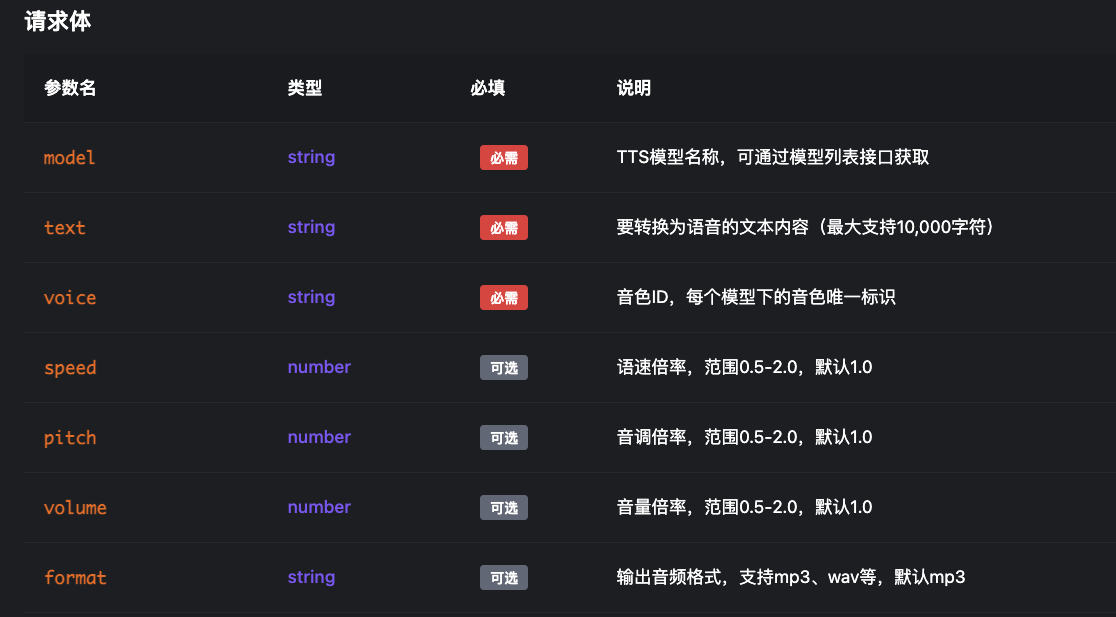
对于 model 和 voice 参数可以因为内容较多,可以前往 API 文档查看。
小结
本文展示了如何在 Spring Boot 中集成 UnifiedTTS 的 EdgeTTS 能力,实现文本转语音并输出为
mp3。UnifiedTTS 通过统一的 API 屏蔽了不同 TTS 模型的差异,使你无需维护多个 SDK,即可在成本与效果之间自由切换。根据业务需求,你可以进一步完善异常处理、缓存与并发控制,实现更可靠的生产级 TTS 服务。