Recently I start to study SD and I found the product hierarchy in transaction code V/76 could not be viewed in tree style and it is not so convenient to check:
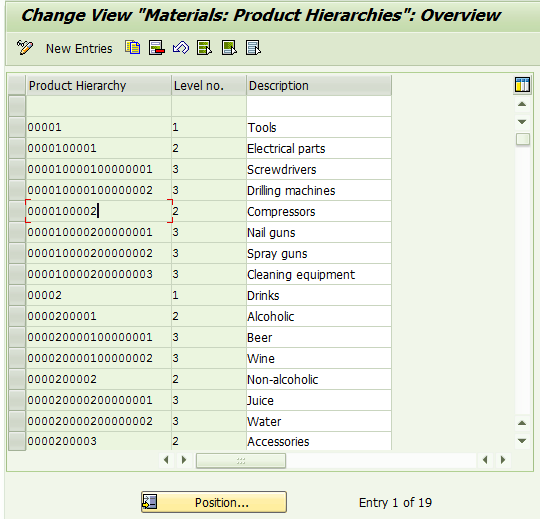
So I wrote a simple report to retrieve hierarchy data from table T179 and display the data in a tree as below:
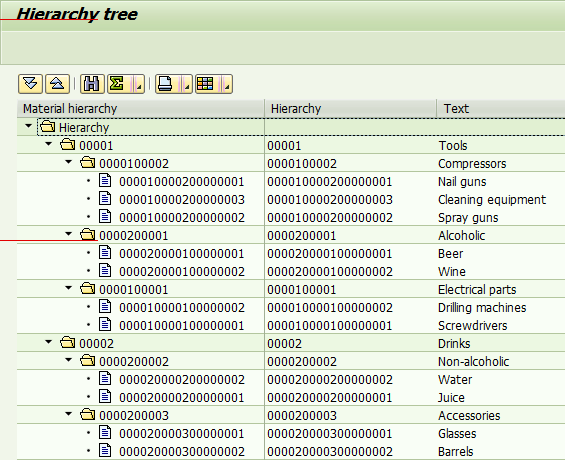
The source code of report is listed below:
REPORT zdisplay_hierarchy.DATA: g_alv_tree TYPE REF TO cl_gui_alv_tree,
  gt_data TYPE STANDARD TABLE OF zcl_alv_tool=>ty_displayed_node,
  ok_code LIKE sy-ucomm,
  save_ok LIKE sy-ucomm,
  ls_data LIKE LINE OF gt_data.END-OF-SELECTION.
  DATA(lo_tool) = NEW zcl_alv_tool( ).
  DATA(lt_fieldcat) = lo_tool->get_fieldcat_by_data( ls_data ).
  PERFORM change_label.
  CALL SCREEN 100.MODULE pbo OUTPUT.
  SET PF-STATUS 'MAIN100'.
  SET TITLEBAR 'MAINTITLE'.
  IF g_alv_tree IS INITIAL.
  PERFORM init_tree.
  CALL METHOD cl_gui_cfw=>flush
  EXCEPTIONS
  cntl_system_error = 1
  cntl_error = 2.
  ASSERT sy-subrc = 0.
  ENDIF.ENDMODULE. " PBO OUTPUTMODULE pai INPUT.
  save_ok = ok_code.
  CLEAR ok_code.
  CASE save_ok.
  WHEN 'EXIT' OR 'BACK' OR 'CANC'.
  PERFORM exit_program.
  WHEN OTHERS.
  CALL METHOD cl_gui_cfw=>dispatch.
  ENDCASE.
  CALL METHOD cl_gui_cfw=>flush.ENDMODULE. " PAI INPUTFORM change_label.
  READ TABLE lt_fieldcat ASSIGNING FIELD-SYMBOL() INDEX 1.
  -seltext = -reptext = -scrtext_m = -scrtext_s = -scrtext_l = 'Hierarchy ID'.
  -outputlen = 20.
  READ TABLE lt_fieldcat ASSIGNING FIELD-SYMBOL() INDEX 2.
  -seltext = -reptext = -scrtext_m = -scrtext_l = 'Description'.
  -scrtext_s = 'Text'.
  -outputlen = 40.ENDFORM.FORM init_tree.
  g_alv_tree = lo_tool->get_tree( ).
  DATA l_hierarchy_header TYPE treev_hhdr.
  PERFORM build_hierarchy_header CHANGING l_hierarchy_header.
  CALL METHOD g_alv_tree->set_table_for_first_display
  EXPORTING
  is_hierarchy_header = l_hierarchy_header
  CHANGING
  it_fieldcatalog = lt_fieldcat
  it_outtab = gt_data.
  PERFORM create_tree.
  g_alv_tree->frontend_update( ).
  lo_tool->expand( ).ENDFORM.FORM create_tree.
  DATA(lt_data) = lo_tool->get_hierarchy_data( ).
  lo_tool->draw_tree( lt_data ).ENDFORM. " init_treeFORM build_hierarchy_header CHANGING p_hierarchy_header TYPE treev_hhdr.
  p_hierarchy_header-heading = 'Material hierarchy'.
  p_hierarchy_header-width = 30.
  p_hierarchy_header-width_pix = ' '.ENDFORM. " build_hierarchy_headerFORM exit_program.
  LEAVE PROGRAM.ENDFORM. " exit_program
In order to use the report, all you need is to just create a new screen :
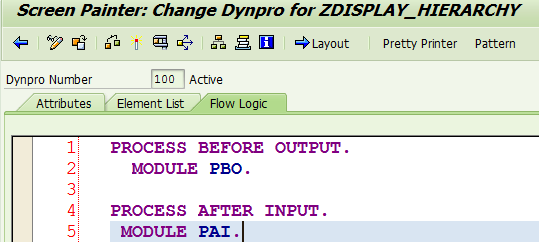
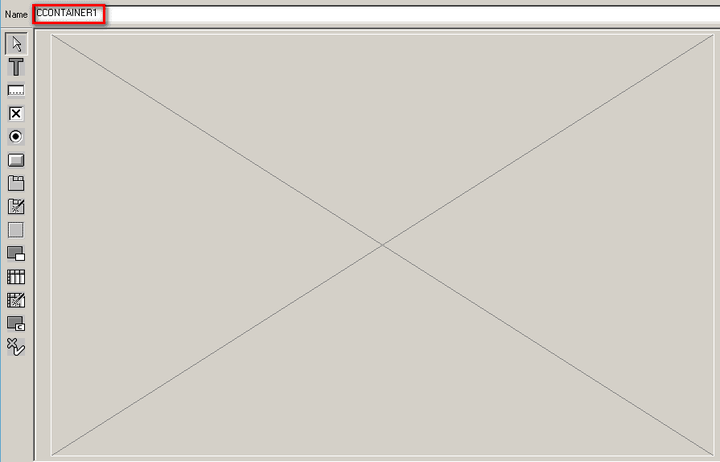
And drag a custom container to screen with name “CCONTAINER1”:
要获取更多Jerry的原创文章,请关注公众号"汪子熙":