1 Nginx服务器
1.1 概述
Nginx 是一款轻量级的 Web 服务器/反向代理服务器及电子邮件(IMAP/POP3)代理服务器,其特点是占用内存少,并发能力强,事实上nginx的并发能力在同类型的网页服务器中表现较好,支持FastCGI、SSL、Virtual Host、URL Rewrite、Gzip等功能,并且支持很多第三方的模块扩展。
Nginx (engine x) 是一个高性能的HTTP和反向代理web服务器 ,同时也提供了IMAP/POP3/SMTP服务。Nginx是由伊戈尔·赛索耶夫为俄罗斯访问量第二的Rambler.ru站点(俄文:Рамблер)开发的,公开版本1.19.6发布于2020年12月15日。
其将源代码以类BSD许可证的形式发布,因它的稳定性、丰富的功能集、简单的配置文件和低系统资源的消耗而闻名。2022年01月25日,nginx 1.21.6发布。
1.2 安装
配置本地yum源,详细信息请参考《openEuler 22.03-LTS 搭建repo服务器》。
清除缓存。
# dnf clean all
例如示例命令如下:
[root@superman-21 ~]# dnf clean all
36 files removed
[root@superman-21 ~]#
创建缓存。
# dnf makecache
例如示例命令如下:
[root@superman-21 ~]# dnf makecache
OS                                                                                           6.8 MB/s | 3.4 MB     00:00
everything                                                                                    19 MB/s |  16 MB     00:00
EPOL                                                                                         3.9 MB/s | 2.6 MB     00:00
debuginfo                                                                                    3.3 MB/s | 3.9 MB     00:01
source                                                                                       1.1 MB/s | 1.7 MB     00:01
update                                                                                        25 MB/s |  28 MB     00:01
Metadata cache created.
[root@superman-21 ~]#
在root权限下安装nginx服务。
# dnf install nginx
例如示例命令如下:
[root@superman-21 ~]# dnf install nginx
Last metadata expiration check: 0:00:34 ago on 2022年12月03日 星期六 10时39分32秒.
Dependencies resolved.
=============================================================================================================================
 Package                                   Architecture         Version                           Repository            Size
=============================================================================================================================
Installing:
 nginx                                     x86_64               1:1.21.5-3.oe2203                 update               498 k
Installing dependencies:
 gd                                        x86_64               2.3.2-2.oe2203                    update               127 k
 libXpm                                    x86_64               3.5.13-1.oe2203                   OS                    41 k
 libwebp                                   x86_64               1.2.1-1.oe2203                    OS                   246 k
 nginx-all-modules                         noarch               1:1.21.5-3.oe2203                 update               7.6 k
 nginx-filesystem                          noarch               1:1.21.5-3.oe2203                 update               8.7 k
 nginx-mod-http-image-filter               x86_64               1:1.21.5-3.oe2203                 update                18 k
 nginx-mod-http-perl                       x86_64               1:1.21.5-3.oe2203                 update                27 k
 nginx-mod-http-xslt-filter                x86_64               1:1.21.5-3.oe2203                 update                17 k
 nginx-mod-mail                            x86_64               1:1.21.5-3.oe2203                 update                49 k
 nginx-mod-stream                          x86_64               1:1.21.5-3.oe2203                 update                71 k

Transaction Summary
=============================================================================================================================
Install  11 Packages

Total download size: 1.1 M
Installed size: 3.0 M
Is this ok [y/N]: y
Downloading Packages:
(1/11): libXpm-3.5.13-1.oe2203.x86_64.rpm                                                    248 kB/s |  41 kB     00:00
(2/11): gd-2.3.2-2.oe2203.x86_64.rpm                                                         562 kB/s | 127 kB     00:00
(3/11): nginx-all-modules-1.21.5-3.oe2203.noarch.rpm                                         168 kB/s | 7.6 kB     00:00
(4/11): nginx-filesystem-1.21.5-3.oe2203.noarch.rpm                                          186 kB/s | 8.7 kB     00:00
(5/11): nginx-mod-http-image-filter-1.21.5-3.oe2203.x86_64.rpm                               385 kB/s |  18 kB     00:00
(6/11): libwebp-1.2.1-1.oe2203.x86_64.rpm                                                    611 kB/s | 246 kB     00:00
(7/11): nginx-mod-http-perl-1.21.5-3.oe2203.x86_64.rpm                                       431 kB/s |  27 kB     00:00
(8/11): nginx-mod-http-xslt-filter-1.21.5-3.oe2203.x86_64.rpm                                395 kB/s |  17 kB     00:00
(9/11): nginx-mod-mail-1.21.5-3.oe2203.x86_64.rpm                                            816 kB/s |  49 kB     00:00
(10/11): nginx-mod-stream-1.21.5-3.oe2203.x86_64.rpm                                         791 kB/s |  71 kB     00:00
(11/11): nginx-1.21.5-3.oe2203.x86_64.rpm                                                    1.1 MB/s | 498 kB     00:00
-----------------------------------------------------------------------------------------------------------------------------
Total                                                                                        1.7 MB/s | 1.1 MB     00:00
Running transaction check
Transaction check succeeded.
Running transaction test
Transaction test succeeded.
Running transaction
  Preparing        :                                                                                                     1/1
  Running scriptlet: nginx-filesystem-1:1.21.5-3.oe2203.noarch                                                          1/11
  Installing       : nginx-filesystem-1:1.21.5-3.oe2203.noarch                                                          1/11
  Installing       : libwebp-1.2.1-1.oe2203.x86_64                                                                      2/11
  Installing       : libXpm-3.5.13-1.oe2203.x86_64                                                                      3/11
  Installing       : gd-2.3.2-2.oe2203.x86_64                                                                           4/11
  Running scriptlet: gd-2.3.2-2.oe2203.x86_64                                                                           4/11
  Installing       : nginx-mod-http-perl-1:1.21.5-3.oe2203.x86_64                                                       5/11
  Running scriptlet: nginx-mod-http-perl-1:1.21.5-3.oe2203.x86_64                                                       5/11
  Installing       : nginx-mod-http-xslt-filter-1:1.21.5-3.oe2203.x86_64                                                6/11
  Running scriptlet: nginx-mod-http-xslt-filter-1:1.21.5-3.oe2203.x86_64                                                6/11
  Installing       : nginx-mod-mail-1:1.21.5-3.oe2203.x86_64                                                            7/11
  Running scriptlet: nginx-mod-mail-1:1.21.5-3.oe2203.x86_64                                                            7/11
  Installing       : nginx-mod-stream-1:1.21.5-3.oe2203.x86_64                                                          8/11
  Running scriptlet: nginx-mod-stream-1:1.21.5-3.oe2203.x86_64                                                          8/11
  Installing       : nginx-1:1.21.5-3.oe2203.x86_64                                                                     9/11
  Running scriptlet: nginx-1:1.21.5-3.oe2203.x86_64                                                                     9/11
  Installing       : nginx-mod-http-image-filter-1:1.21.5-3.oe2203.x86_64                                              10/11
  Running scriptlet: nginx-mod-http-image-filter-1:1.21.5-3.oe2203.x86_64                                              10/11
  Installing       : nginx-all-modules-1:1.21.5-3.oe2203.noarch                                                        11/11
  Running scriptlet: nginx-all-modules-1:1.21.5-3.oe2203.noarch                                                        11/11
  Verifying        : libXpm-3.5.13-1.oe2203.x86_64                                                                      1/11
  Verifying        : libwebp-1.2.1-1.oe2203.x86_64                                                                      2/11
  Verifying        : gd-2.3.2-2.oe2203.x86_64                                                                           3/11
  Verifying        : nginx-1:1.21.5-3.oe2203.x86_64                                                                     4/11
  Verifying        : nginx-all-modules-1:1.21.5-3.oe2203.noarch                                                         5/11
  Verifying        : nginx-filesystem-1:1.21.5-3.oe2203.noarch                                                          6/11
  Verifying        : nginx-mod-http-image-filter-1:1.21.5-3.oe2203.x86_64                                               7/11
  Verifying        : nginx-mod-http-perl-1:1.21.5-3.oe2203.x86_64                                                       8/11
  Verifying        : nginx-mod-http-xslt-filter-1:1.21.5-3.oe2203.x86_64                                                9/11
  Verifying        : nginx-mod-mail-1:1.21.5-3.oe2203.x86_64                                                           10/11
  Verifying        : nginx-mod-stream-1:1.21.5-3.oe2203.x86_64                                                         11/11

Installed:
  gd-2.3.2-2.oe2203.x86_64                                          libXpm-3.5.13-1.oe2203.x86_64
  libwebp-1.2.1-1.oe2203.x86_64                                     nginx-1:1.21.5-3.oe2203.x86_64
  nginx-all-modules-1:1.21.5-3.oe2203.noarch                        nginx-filesystem-1:1.21.5-3.oe2203.noarch
  nginx-mod-http-image-filter-1:1.21.5-3.oe2203.x86_64              nginx-mod-http-perl-1:1.21.5-3.oe2203.x86_64
  nginx-mod-http-xslt-filter-1:1.21.5-3.oe2203.x86_64               nginx-mod-mail-1:1.21.5-3.oe2203.x86_64
  nginx-mod-stream-1:1.21.5-3.oe2203.x86_64

Complete!
[root@superman-21 ~]#
查看安装后的rpm包。
# dnf list all | grep nginx
例如示例命令如下:
[root@superman-21 ~]# dnf list all | grep nginx
nginx.x86_64                                            1:1.21.5-3.oe2203                            @update
nginx-all-modules.noarch                                1:1.21.5-3.oe2203                            @update
nginx-filesystem.noarch                                 1:1.21.5-3.oe2203                            @update
nginx-mod-http-image-filter.x86_64                      1:1.21.5-3.oe2203                            @update
nginx-mod-http-perl.x86_64                              1:1.21.5-3.oe2203                            @update
nginx-mod-http-xslt-filter.x86_64                       1:1.21.5-3.oe2203                            @update
nginx-mod-mail.x86_64                                   1:1.21.5-3.oe2203                            @update
nginx-mod-stream.x86_64                                 1:1.21.5-3.oe2203                            @update
nginx.src                                               1:1.21.5-1.oe2203                            source
nginx-debuginfo.x86_64                                  1:1.21.5-3.oe2203                            update
nginx-debugsource.x86_64                                1:1.21.5-3.oe2203                            update
nginx-help.noarch                                       1:1.21.5-3.oe2203                            update
pcp-pmda-nginx.x86_64                                   5.3.5-6.oe2203                               OS
pcp-pmda-nginx.x86_64                                   5.3.5-6.oe2203                               everything
[root@superman-21 ~]#
1.3 管理nginx
1.3.1 概述
通过systemctl工具,可以对nginx服务进行管理,包括启动、停止、重启服务,以及查看服务状态等。本节介绍nginx服务的管理操作。
1.3.2 前提条件
为了能够使用nginx服务,请确保您的系统中已经安装nginx服务。若未安装,可参考安装进行安装。
启动、停止和重启nginx服务,需要使用root权限。
1.3.3 启动服务
启动并运行nginx服务,命令如下:
# systemctl start nginx
例如示例命令如下:
[root@superman-21 ~]# systemctl start nginx
[root@superman-21 ~]#
假如希望在系统启动时,nginx服务自动启动,则命令和回显如下:
# systemctl enable nginx
Created symlink /etc/systemd/system/multi-user.target.wants/nginx.service → /usr/lib/systemd/system/nginx.service.
例如示例命令如下:
[root@superman-21 ~]# systemctl enable nginx
Created symlink /etc/systemd/system/multi-user.target.wants/nginx.service → /usr/lib/systemd/system/nginx.service.
[root@superman-21 ~]#
说明:假如正在运行的nginx服务器作为一个安全服务器,系统开机启动后需要密码,这个密码使用的是加密的私有SSL密钥。
1.3.4 停止服务
停止运行的nginx服务,命令如下:
# systemctl stop nginx
例如示例命令如下:
[root@superman-21 ~]# systemctl stop nginx
[root@superman-21 ~]#
如果希望防止服务在系统开机阶段自动开启,命令和回显如下:
# systemctl disable nginx
Removed /etc/systemd/system/multi-user.target.wants/nginx.service.
例如示例命令如下:
[root@superman-21 ~]# systemctl disable nginx
Removed /etc/systemd/system/multi-user.target.wants/nginx.service.
[root@superman-21 ~]#
1.3.5 重启服务
重启服务有三种方式:
完全重启服务
# systemctl restart nginx
该命令会停止运行的nginx服务并且立即重新启动它。一般在服务安装以后或者去除一个动态加载的模块(例如PHP)时使用这个命令。
例如示例命令如下:
[root@superman-21 ~]# systemctl restart nginx
[root@superman-21 ~]#
重新加载配置
# systemctl reload nginx
该命令会使运行的nginx服务重新加载它的配置文件。任何当前正在处理的请求将会被中断,从而造成客户端浏览器显示一个错误消息或者重新渲染部分页面。
例如示例命令如下:
[root@superman-21 ~]# systemctl reload nginx
[root@superman-21 ~]#
平滑重启nginx
# ps -ef | grep nginx
# kill -HUP 主进程ID
该命令会使运行的nginx服务重新加载它的配置文件。任何当前正在处理的请求将会继续使用旧的配置文件。
例如示例命令如下:
[root@superman-21 ~]# ps -ef | grep nginx
root        2446       1  0 10:44 ?        00:00:00 nginx: master process /usr/sbin/nginx
nginx       2452    2446  0 10:44 ?        00:00:00 nginx: worker process
nginx       2453    2446  0 10:44 ?        00:00:00 nginx: worker process
root        2463    2069  0 10:45 pts/0    00:00:00 grep --color=auto nginx
[root@superman-21 ~]#
[root@superman-21 ~]# kill -HUP 2446
[root@superman-21 ~]#
[root@superman-21 ~]# ps -ef | grep nginx
root        2446       1  0 10:44 ?        00:00:00 nginx: master process /usr/sbin/nginx
nginx       2464    2446  0 10:45 ?        00:00:00 nginx: worker process
nginx       2465    2446  0 10:45 ?        00:00:00 nginx: worker process
root        2467    2069  0 10:46 pts/0    00:00:00 grep --color=auto nginx
[root@superman-21 ~]#
1.3.6 验证服务状态
验证nginx服务是否正在运行
# systemctl is-active nginx
回显为“active”说明服务处于运行状态。
例如示例命令如下:
[root@superman-21 ~]# systemctl is-active nginx
active
[root@superman-21 ~]#
1.4 配置文件说明
当nginx服启动后,默认情况下它会读取如表2所示的配置文件。
表 2 配置文件说明
虽然默认配置可以适用于多数情况,但是用户至少需要熟悉里面的一些重要配置项。配置文件修改完成后,可以在root权限下使用如下命令检查配置文件可能出现的语法错误。
# nginx -t
如果回显信息中有“syntax is ok”,说明配置文件语法正确。
例如示例命令如下:
[root@superman-21 ~]# nginx -t
nginx: the configuration file /etc/nginx/nginx.conf syntax is ok
nginx: configuration file /etc/nginx/nginx.conf test is successful
[root@superman-21 ~]#
说明:
在修改配置文件之前,请先备份原始文件,以便出现问题时能够快速恢复配置文件。
需要重启web服务,才能使修改后的配置文件生效。
1.5 管理模块
1.5.1 概述
nginx服务是一个模块化的应用,它和许多动态共享对象DSO(Dynamic Shared Objects)一起分发。动态共享对象DSO,在必要情况下,可以在运行时被动态加载或卸载。服务器操作系统中这些模块位于/usr/lib64/nginx/modules/目录下。
本节介绍如何加载和写入模块。
1.5.2 加载模块
为了加载一个特殊的DSO模块,在配置文件中使用加载模块指示。独立软件包提供的模块一般在/usr/share/nginx/modules目录下有他们自己的配置文件。
因openEuler操作系统中使用dnf install nginx安装nginx是会自动加载DSO。
1.6 验证web服务是否搭建成功
Web服务器搭建完成后,可以通过如下方式验证是否搭建成功。
在root权限下查看服务器的IP地址,命令如下:
# ifconfig
回显信息如下,说明服务器IP为 192.168.1.21。
例如示例命令如下:
[root@superman-21 ~]# ifconfig -a
ens33: flags=4163  mtu 1500
        inet 192.168.1.21  netmask 255.255.255.0  broadcast 192.168.1.255
        inet6 fe80::9393:f6ae:ced9:7759  prefixlen 64  scopeid 0x20
        ether 00:0c:29:96:c9:d7  txqueuelen 1000  (Ethernet)
        RX packets 66449  bytes 93282768 (88.9 MiB)
        RX errors 0  dropped 0  overruns 0  frame 0
        TX packets 3734  bytes 377884 (369.0 KiB)
        TX errors 0  dropped 0 overruns 0  carrier 0  collisions 0

lo: flags=73  mtu 65536
        inet 127.0.0.1  netmask 255.0.0.0
        inet6 ::1  prefixlen 128  scopeid 0x10
        loop  txqueuelen 1000  (Local Loopback)
        RX packets 74  bytes 6068 (5.9 KiB)
        RX errors 0  dropped 0  overruns 0  frame 0
        TX packets 74  bytes 6068 (5.9 KiB)
        TX errors 0  dropped 0 overruns 0  carrier 0  collisions 0

virbr0: flags=4099  mtu 1500
        inet 192.168.122.1  netmask 255.255.255.0  broadcast 192.168.122.255
        ether 52:54:00:bc:bb:cd  txqueuelen 1000  (Ethernet)
        RX packets 0  bytes 0 (0.0 B)
        RX errors 0  dropped 0  overruns 0  frame 0
        TX packets 0  bytes 0 (0.0 B)
        TX errors 0  dropped 0 overruns 0  carrier 0  collisions 0

virbr0-nic: flags=4098  mtu 1500
        ether 52:54:00:bc:bb:cd  txqueuelen 1000  (Ethernet)
        RX packets 0  bytes 0 (0.0 B)
        RX errors 0  dropped 0  overruns 0  frame 0
        TX packets 0  bytes 0 (0.0 B)
        TX errors 0  dropped 0 overruns 0  carrier 0  collisions 0

[root@superman-21 ~]#
在root权限下配置防火墙:
# firewall-cmd --add-service=http --permanent
# firewall-cmd --reload
例如示例命令如下:
[root@superman-21 ~]# firewall-cmd --add-service=http --permanent
success
[root@superman-21 ~]#
[root@superman-21 ~]# firewall-cmd --reload
success
[root@superman-21 ~]#
验证web服务器是否搭建成功,用户可选择Linux或Windows系统进行验证。
-
使用Linux系统验证
执行如下命令,查看是否可以访问网页信息,服务搭建成功时,该网页可以正常访问。
# curl http://192.168.1.21
例如示例命令如下:
[root@superman-21 ~]# curl http://192.168.1.21
"-//W3C//DTD XHTML 1.1//EN" "http://www.w3.org/TR/xhtml11/DTD/xhtml11.dtd">
xmlns="http://www.w3.org/1999/xhtml" xml:lang="en">
http-equiv="Content-Type" content="text/html; charset=UTF-8" />
Test Page <span style="box-sizing: border-box;color: rgb(119, 0, 136);">for</span> the Nginx HTTP Server on openEuler
Welcome to nginx on openEuler!
class="content">
This page is used to test the proper operation of the
nginx HTTP server after it has been
installed. If you can read this page, it means that the
web server installed at this site is working
properly.
class="alert">
Website Administrator
class="content">
This is the default index.html page that
is distributed with nginx on
openEuler. It is located in
/usr/share/nginx/html.
You should now put your content in a location of
your choice and edit the root configuration
directive in the nginx
configuration file
/etc/nginx/nginx.conf.
class="logos">
href="http://nginx.net/">
src="nginx-logo.png"
alt="[ Powered by nginx ]"
width="121" height="32" />
[root@superman-21 ~]#
执行如下命令,查看命令返回值是否为0,返回值为0,说明nginx服务器搭建成功。
# echo $?
例如示例命令如下:
[root@superman-21 ~]# echo $?
0
[root@superman-21 ~]#
使用Windows系统验证
打开浏览器,在地址栏输入如下地址,如果能正常访问网页,说明nginx服务器搭建成功。
http://192.168.1.21
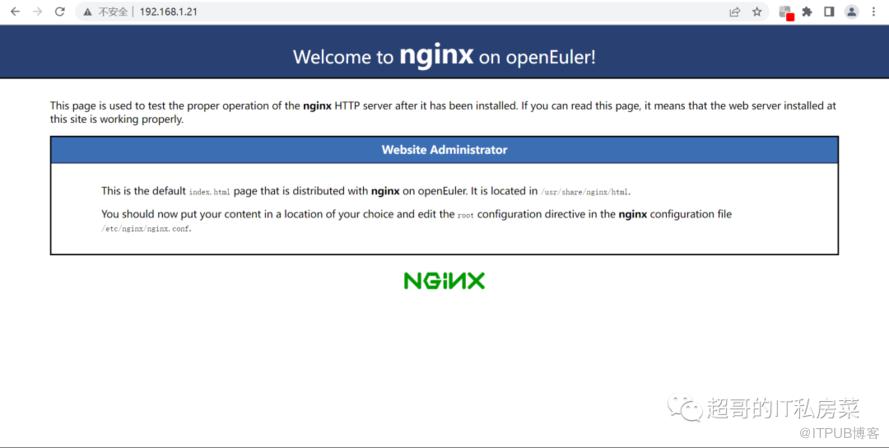
如果修改了端口号,输入地址格式如下:
http://192.168.1.21:端口号

有什么吐槽或反馈意见,直接告诉我!
温馨提示:如出现二维码失效也可直接添加微信号:ysc13803862469。