本篇文章介绍在Java程序中将Excel表格复制然后插入到Word文档中的方法。可插入到Word中的表格包含Excel原表格的所有表格样式,如单元格背景、字符样式、单元格合并拆分、单元格对齐方式等等。
程序运行环境
-
编译工具:IDEA
-
JDK版本:1.8.0
-
工具Jar包:free spire.office.jar 3.9.0
-
测试文档格式:.xlsx/.docx 2013
具体步骤
1.在Java程序中引入jar.
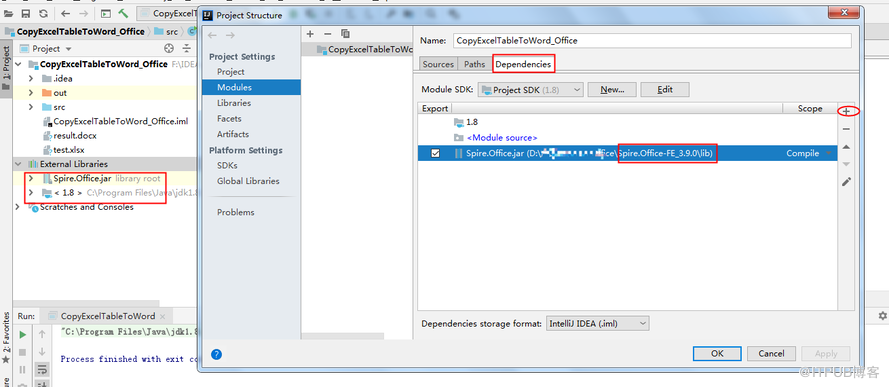
这里是通过手动导入本地的jar(需事先下载jar包到本地,然后解压文件,spire.office.jar文件在文件包的lib文件夹下);另外也可以通过Maven仓库下载导入,需在pom.xml文件中配置如下内容:
            com.e-iceblue
            http://repo.e-iceblue.cn/repository/maven-public/


        e-iceblue
        spire.office.free
        3.9.0
配置完成后导入。
注:这里导入jar为spire.office.jar,这个包是个集合包,在程序中需同时操作excel和word文件,须导入此jar;不能将单个的spire.doc.jar和spire.xls.jar引入Java程序,会报错。
Java代码
 import com.spire.doc.Document;
 import com.spire.doc.Table;
 import com.spire.doc.TableCell;
 import com.spire.doc.documents.HorizontalAlignment;
 import com.spire.doc.documents.VerticalAlignment;
 import com.spire.doc.fields.TextRange;
 import com.spire.xls.CellRange;
 import com.spire.xls.Workbook;
 import com.spire.xls.Worksheet;

 public class CopyExcelTableToWord {
     public static void main(String[] args) {
         //加载Excel 示例文档
         Workbook workbook = new Workbook();
         workbook.loadFromFile("test.xlsx");
         //获取第一个工作表
         Worksheet sheet = workbook.getWorksheets().get(0);

         //复制到Word文档
         copyToWord(sheet.getAllocatedRange(), "result.docx");
     }
     public static void copyToWord(CellRange cell, String fPath) {
         //添加表格
         Document doc = new Document();
         Table table = doc.addSection().addTable(true);
         table.resetCells(cell.getRowCount(), cell.getColumnCount());
         //复制表格内容
         for (int r = 1; r <= cell.getRowCount(); r++) {
             for (int c = 1; c <= cell.getColumnCount(); c++) {
                 CellRange xCell = cell.get(r, c);
                 CellRange mergeArea = xCell.getMergeArea();
                 //合并单元格
                 if (mergeArea != null && mergeArea.getRow() == r && mergeArea.getColumn() == c) {
                     int rowIndex = mergeArea.getRow();
                     int columnIndex = mergeArea.getColumn();
                     int rowCount = mergeArea.getRowCount();
                     int columnCount = mergeArea.getColumnCount();

                     for (int m = 0; m < rowCount; m++) {
                         table.applyHorizontalMerge(rowIndex - 1 + m, columnIndex - 1, columnIndex + columnCount - 2);
                     }
                     table.applyVerticalMerge(columnIndex - 1, rowIndex - 1, rowIndex + rowCount - 2);

                 }
                 //复制内容
                 TableCell wCell = table.getRows().get(r - 1).getCells().get(c - 1);
                 if (!xCell.getDisplayedText().isEmpty()) {
                     TextRange textRange = wCell.addParagraph().appendText(xCell.getDisplayedText());
                     copyStyle(textRange, xCell, wCell);
                 } else {
                     wCell.getCellFormat().setBackColor(xCell.getStyle().getColor());
                 }
             }
         }
         doc.saveToFile(fPath,com.spire.doc.FileFormat.Docx);
 }
     private static void copyStyle(TextRange wTextRange, CellRange xCell, TableCell wCell) {
         //复制字体样式
         wTextRange.getCharacterFormat().setTextColor(xCell.getStyle().getFont().getColor());
         wTextRange.getCharacterFormat().setFontSize((float) xCell.getStyle().getFont().getSize());
         wTextRange.getCharacterFormat().setFontName(xCell.getStyle().getFont().getFontName());
         wTextRange.getCharacterFormat().setBold(xCell.getStyle().getFont().isBold());
         wTextRange.getCharacterFormat().setItalic(xCell.getStyle().getFont().isItalic());
         //复制背景色
         wCell.getCellFormat().setBackColor(xCell.getStyle().getColor());
         //复制排列方式
         switch (xCell.getHorizontalAlignment()) {
             case Left:
                 wTextRange.getOwnerParagraph().getFormat().setHorizontalAlignment(HorizontalAlignment.Left);
                 break;
             case Center:
                 wTextRange.getOwnerParagraph().getFormat().setHorizontalAlignment(HorizontalAlignment.Center);
                 break;
             case Right:
                 wTextRange.getOwnerParagraph().getFormat().setHorizontalAlignment(HorizontalAlignment.Right);
                 break;
             default:
                 break;
         }
         switch (xCell.getVerticalAlignment()) {
             case Bottom:
                 wCell.getCellFormat().setVerticalAlignment(VerticalAlignment.Bottom);
                 break;
             case Center:
                 wCell.getCellFormat().setVerticalAlignment(VerticalAlignment.Middle);
                 break;
             case Top:
                 wCell.getCellFormat().setVerticalAlignment(VerticalAlignment.Top);
                 break;
             default:
                 break;
         }
     }
 }
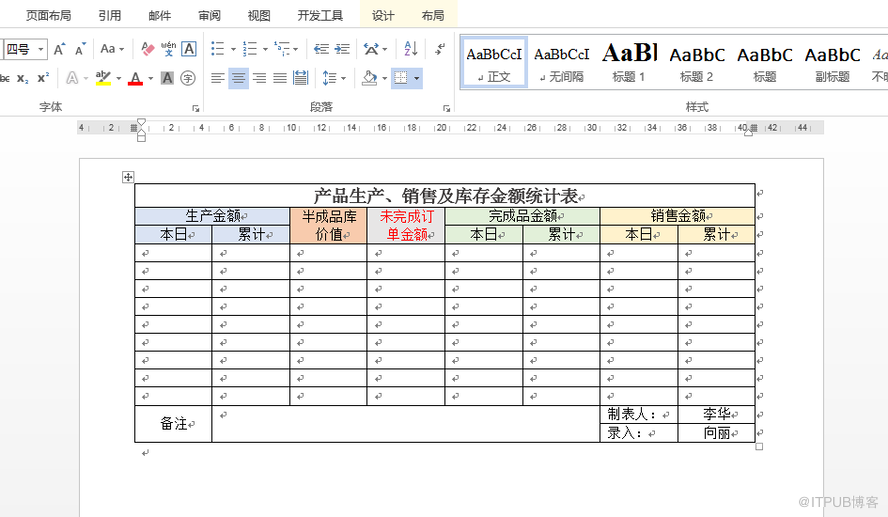
执行程序后,生成Word结果文档。以上代码中的文件路径为IDEA项目程序运行路径,如本次路径F:\IDEAproject\CopyExcelTableToWord_Office\result.docx,文件路径可另行自定义。
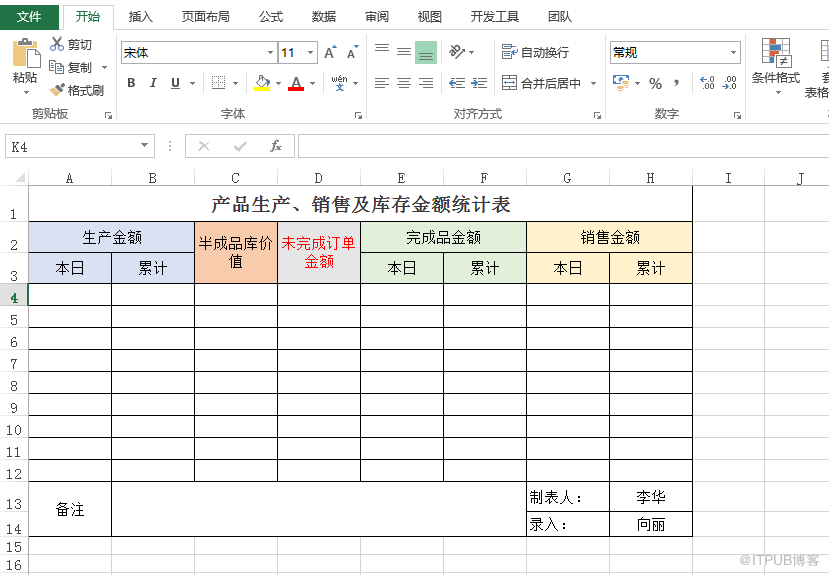
测试的Excel源文档如图:
Word结果文档如图效果:
—End—