1.集成方式对比
1.1使用spring-integration-mqtt
    org.springframework.integration
    spring-integration-mqtt
    5.1.8.RELEASE


            org.eclipse.paho
            org.eclipse.paho.client.mqttv3


    org.eclipse.paho
    org.eclipse.paho.client.mqttv3
    1.2.2
1.2使用org.eclipse.paho.client.mqttv3
     org.eclipse.paho
     org.eclipse.paho.client.mqttv3
    1.2.5
2.环境准备
https://mp.weixin.qq.com/s/f4gFS0F5sEKBSJYZFCDMuw
3.手写Mqtt工具类
3.1yaml配置
mqtt:mps:# 多个brokers用,分割即可:如:xxx1,xxx2,,,下面两个配置的是同一个topic,所以往这个topic上发送消息,这个两个client会收到消息,订阅会打收到两条一样的消息日志,生产一般设置不同的topicbrokers: tcp://192.168.40.47:1883userName: zlf1password: xxxx1 #明文clientId: zlf1_publishtopic: mqtt/testqos: 2type: publishbrokers: tcp://192.168.40.47:1883userName: zlf2password: xxxx2 #明文clientId: zlf2_subscribetopic: mqtt/testqos: 2type: subscribe
3.2代码
package xxxxx.config;import lombok.Data;import java.util.List;/*** 其它属性默认即可,可以抽成配置类的参数*/public class MqttProperties {/*** mqtt服务器地址列表*/private List<String> brokers;/*** 用户名*/private String userName;/*** 密码*/private String password;/*** 客户端clientId*/private String clientId;/*** 主题*/private String topic;/*** 消息等级* QoS 0:最多交付一次,消息可能丢失。* QoS 1:至少交付一次,消息可以保证到达,但是可能重复到达。* QoS 2:只交付一次,消息保证到达,并且不会重复。*/private Integer qos;/*** 类型:只支持下面两种类型,如果要支持发布和订阅可以配置多个,只不过类型不一样而已* publish 发布* subscribe 订阅*/private String type;}
package xxxxx.config;import lombok.Data;import org.springframework.boot.context.properties.ConfigurationProperties;import org.springframework.context.annotation.Configuration;import java.util.List;@Data@Configuration@ConfigurationProperties(prefix = "mqtt")public class MqttConfig {private List<MqttProperties> mps;}
package xxxxx.util;import lombok.extern.slf4j.Slf4j;import org.apache.commons.collections4.CollectionUtils;import org.apache.commons.lang3.StringUtils;import org.eclipse.paho.client.mqttv3.IMqttDeliveryToken;import org.eclipse.paho.client.mqttv3.IMqttMessageListener;import org.eclipse.paho.client.mqttv3.MqttCallback;import org.eclipse.paho.client.mqttv3.MqttClient;import org.eclipse.paho.client.mqttv3.MqttConnectOptions;import org.eclipse.paho.client.mqttv3.MqttMessage;import org.eclipse.paho.client.mqttv3.persist.MemoryPersistence;import java.util.List;import java.util.Objects;import java.util.concurrent.ConcurrentHashMap;/*** 可以搞成一个start启动器,根据配置类来实例化一个MqttClient注入一个bean,让spring来管理这个对象* 方法的参数太长,可以搞成一个配置类或者使用一个类的对象封装承接下的,* 让代码更具有封装性,* 可不可以先订阅后去发布,答案是可以*/public class MqttUtil {/*** 项目启动就要将client建立连接和订阅建立好,* 然后项目中用的时候才不会由于第一次建立连接和第一次发布消息,未建立订阅而导致第一次发布的消息丢失* 这个问题可以先订阅后发布就可以避免这个问题了*/private static final ConcurrentHashMap<String, MqttClient> clientMap = new ConcurrentHashMap<>();public static MqttClient createMqttClient(String broker, String userName, String password, String clientId) {if (StringUtils.isBlank(broker)) {throw new RuntimeException("createMqttClient Broker must not be empty");}if (StringUtils.isBlank(userName)) {throw new RuntimeException("createMqttClient userName must not be empty");}if (StringUtils.isBlank(password)) {throw new RuntimeException("createMqttClient Password must not be empty");}if (StringUtils.isBlank(clientId)) {throw new RuntimeException("createMqttClient ClientId must not be empty");}if (clientMap.containsKey(clientId)) {return clientMap.get(clientId);}MqttClient client = null;try {client = new MqttClient(broker, clientId, new MemoryPersistence());MqttConnectOptions options = new MqttConnectOptions();options.setUserName(userName);options.setPassword(password.toCharArray());//一下三个参数有默认值不用设置//options.setCleanSession();//options.setKeepAliveInterval();//options.setConnectionTimeout();// 设置 socket factory/*TLS/SSL 连接String caFilePath = "/cacert.pem";String clientCrtFilePath = "/client.pem";String clientKeyFilePath = "/client.key";SSLSocketFactory socketFactory = getSocketFactory(caFilePath, clientCrtFilePath, clientKeyFilePath, "");options.setSocketFactory(socketFactory);*/options.setAutomaticReconnect(true);client.connect(options);clientMap.put(clientId, client);} catch (Exception e) {log.error("创建MqttClient异常:{}", e.getMessage());}return client;}public static MqttClient createMqttClient2(List<String> brokers, String userName, String password, String clientId) {if (CollectionUtils.isEmpty(brokers)) {throw new RuntimeException("createMqttClient2 Broker must not be empty");}if (StringUtils.isBlank(userName)) {throw new RuntimeException("createMqttClient2 userName must not be empty");}if (StringUtils.isBlank(password)) {throw new RuntimeException("createMqttClient2 Password must not be empty");}if (StringUtils.isBlank(clientId)) {throw new RuntimeException("createMqttClient2 ClientId must not be empty");}if (clientMap.containsKey(clientId)) {return clientMap.get(clientId);}MqttClient client = null;try {client = new MqttClient(brokers.get(0), clientId, new MemoryPersistence());MqttConnectOptions options = new MqttConnectOptions();options.setUserName(userName);options.setPassword(password.toCharArray());//以下三个参数有默认值不用设置//options.setCleanSession();//options.setKeepAliveInterval();//options.setConnectionTimeout();// 设置 socket factory/*TLS/SSL 连接String caFilePath = "/cacert.pem";String clientCrtFilePath = "/client.pem";String clientKeyFilePath = "/client.key";SSLSocketFactory socketFactory = getSocketFactory(caFilePath, clientCrtFilePath, clientKeyFilePath, "");options.setSocketFactory(socketFactory);*/options.setAutomaticReconnect(true);options.setServerURIs(brokers.toArray(new String[brokers.size()]));client.connect(options);clientMap.put(clientId, client);} catch (Exception e) {log.error("创建MqttClient异常:{}", e.getMessage());}return client;}public static MqttMessage createMessage(String topic, Integer qos, String content) {// 创建消息并设置 QoSMqttMessage message = new MqttMessage(content.getBytes());if (Objects.isNull(qos)) {//默认是1qos = 1;message.setQos(qos);} else {message.setQos(qos);}return message;}public static void publish(MqttClient client, String topic, MqttMessage message) {if (Objects.isNull(client)) {throw new RuntimeException("publish client must not be null");}if (StringUtils.isBlank(topic)) {throw new RuntimeException("publish topic must");}if (Objects.isNull(message)) {throw new RuntimeException("message must not be null");}if (message.getPayload().length == 0) {throw new RuntimeException("public message is empty");}try {client.publish(topic, message);//这里不用关闭这个客户端和连接// 关闭连接//client.disconnect();// 关闭客户端//client.close();} catch (Exception e) {log.error("publish error:{}", e.getMessage());}}public static void subscribe(MqttClient client, String topic, Integer qos) {if (Objects.isNull(client)) {throw new RuntimeException("publish client is null");}if (StringUtils.isBlank(topic)) {throw new RuntimeException("publish topic is empty");}if (Objects.isNull(qos)) {qos = 1;}try {// 设置回调client.setCallback(new MqttCallback() {public void connectionLost(Throwable cause) {log.error("connectionLost:{}", cause.getMessage());}public void messageArrived(String topic, MqttMessage message) {String msg = new String(message.getPayload());int qos1 = message.getQos();log.info("subscribe topic:{}", topic);log.info("subscribe Qos:{}", qos1);log.info("subscribe msg:{}", msg);//新增业务拓展接口对接或者可以发送springEvent事件消息,然后监听该消息即可}public void deliveryComplete(IMqttDeliveryToken token) {log.info("delivery complete:{}", token.isComplete());}});client.subscribe(topic, qos);} catch (Exception e) {log.error("subscribe error:{}", e.getMessage());}}public static void subscribe2(MqttClient client, String topic, Integer qos, MqttCallback mqttCallback) {if (Objects.isNull(client)) {throw new RuntimeException("publish client is null");}if (StringUtils.isBlank(topic)) {throw new RuntimeException("publish topic is empty");}if (Objects.isNull(qos)) {qos = 1;}try {// 设置回调client.setCallback(mqttCallback);client.subscribe(topic, qos);} catch (Exception e) {log.error("subscribe error:{}", e.getMessage());}}public static void publish2(String broker, String username, String password, String clientId, String topic, String content, Integer qos) {MqttClient mqttClient = MqttUtil.createMqttClient(broker, username, password, clientId);MqttMessage message = MqttUtil.createMessage(topic, qos, content);MqttUtil.publish(mqttClient, topic, message);}public static void subscribe3(String broker, String username, String password, String clientId, String topic, Integer qos) {MqttClient mqttClient = MqttUtil.createMqttClient(broker, username, password, clientId);MqttUtil.subscribe(mqttClient, topic, qos);}public static void subscribe4(String broker, String username, String password, String clientId, String topic, Integer qos, MqttCallback mqttCallback) {MqttClient mqttClient = MqttUtil.createMqttClient(broker, username, password, clientId);MqttUtil.subscribe2(mqttClient, topic, qos, mqttCallback);}public static void subscribe5(MqttClient client, String topic, Integer qos, IMqttMessageListener messageListener) {if (Objects.isNull(client)) {throw new RuntimeException("publish5 client is null");}if (StringUtils.isBlank(topic)) {throw new RuntimeException("publish5 topic is empty");}if (Objects.isNull(qos)) {qos = 1;}try {client.subscribe(topic, qos, messageListener);} catch (Exception e) {log.error("subscribe5 error:{}", e.getMessage());}}public static void subscribe6(String broker, String username, String password, String clientId, String topic, Integer qos, IMqttMessageListener messageListener) {MqttClient mqttClient = MqttUtil.createMqttClient(broker, username, password, clientId);MqttUtil.subscribe5(mqttClient, topic, qos, messageListener);}public static void unsubscribe(MqttClient mqttClient, String topic) {if (Objects.isNull(mqttClient)) {throw new RuntimeException("unsubscribe mqttClient is not null");}if (StringUtils.isBlank(topic)) {throw new RuntimeException("unsubscribe topic is not empty");}try {mqttClient.unsubscribe(topic);} catch (Exception e) {log.error("unsubscribe error:{}", e.getMessage());}}}
package xxxxx.util;import org.bouncycastle.jce.provider.BouncyCastleProvider;import org.bouncycastle.openssl.PEMKeyPair;import org.bouncycastle.openssl.PEMParser;import org.bouncycastle.openssl.jcajce.JcaPEMKeyConverter;import javax.net.ssl.KeyManagerFactory;import javax.net.ssl.SSLContext;import javax.net.ssl.SSLSocketFactory;import javax.net.ssl.TrustManagerFactory;import java.io.BufferedInputStream;import java.io.FileInputStream;import java.io.FileReader;import java.security.KeyPair;import java.security.KeyStore;import java.security.Security;import java.security.cert.CertificateFactory;import java.security.cert.X509Certificate;public class SSLUtils {public static SSLSocketFactory getSocketFactory(final String caCrtFile,final String crtFile, final String keyFile, final String password)throws Exception {Security.addProvider(new BouncyCastleProvider());// load CA certificateX509Certificate caCert = null;FileInputStream fis = new FileInputStream(caCrtFile);BufferedInputStream bis = new BufferedInputStream(fis);CertificateFactory cf = CertificateFactory.getInstance("X.509");while (bis.available() > 0) {caCert = (X509Certificate) cf.generateCertificate(bis);}// load client certificatebis = new BufferedInputStream(new FileInputStream(crtFile));X509Certificate cert = null;while (bis.available() > 0) {cert = (X509Certificate) cf.generateCertificate(bis);}// load client private keyPEMParser pemParser = new PEMParser(new FileReader(keyFile));Object object = pemParser.readObject();JcaPEMKeyConverter converter = new JcaPEMKeyConverter().setProvider("BC");KeyPair key = converter.getKeyPair((PEMKeyPair) object);pemParser.close();// CA certificate is used to authenticate serverKeyStore caKs = KeyStore.getInstance(KeyStore.getDefaultType());caKs.load(null, null);caKs.setCertificateEntry("ca-certificate", caCert);TrustManagerFactory tmf = TrustManagerFactory.getInstance("X509");tmf.init(caKs);// client key and certificates are sent to server so it can authenticateKeyStore ks = KeyStore.getInstance(KeyStore.getDefaultType());ks.load(null, null);ks.setCertificateEntry("certificate", cert);ks.setKeyEntry("private-key", key.getPrivate(), password.toCharArray(),new java.security.cert.Certificate[]{cert});KeyManagerFactory kmf = KeyManagerFactory.getInstance(KeyManagerFactory.getDefaultAlgorithm());kmf.init(ks, password.toCharArray());// finally, create SSL socket factorySSLContext context = SSLContext.getInstance("TLSv1.2");context.init(kmf.getKeyManagers(), tmf.getTrustManagers(), null);return context.getSocketFactory();}}
package xxxx.config;import com.alibaba.fastjson.JSON;import xxxxxx.MqttUtil;import lombok.extern.slf4j.Slf4j;import org.apache.commons.collections4.CollectionUtils;import org.eclipse.paho.client.mqttv3.MqttClient;import org.springframework.beans.BeansException;import org.springframework.beans.factory.annotation.Autowired;import org.springframework.context.ApplicationContext;import org.springframework.context.ApplicationContextAware;import org.springframework.stereotype.Component;import java.util.List;@Component@Slf4jpublic class MqttApplicationAware implements ApplicationContextAware {@Autowiredprivate MqttConfig mqttConfig;@Overridepublic void setApplicationContext(ApplicationContext applicationContext) throws BeansException {log.info("==========Mqtt启动初始化开始===========");List<MqttProperties> mps = mqttConfig.getMps();if (CollectionUtils.isNotEmpty(mps)) {for (MqttProperties mp : mps) {log.info("==========Mqtt启动初始化配置:{}==========", JSON.toJSONString(mp));MqttClient mqttClient = MqttUtil.createMqttClient2(mp.getBrokers(), mp.getUserName(), mp.getPassword(), mp.getClientId());if ("subscribe".equals(mp.getType())) {MqttUtil.subscribe(mqttClient, mp.getTopic(), mp.getQos());log.info("==========Mqtt启动初始化订阅配置完成==========");}}}log.info("==========Mqtt启动初始化结束===========");}}
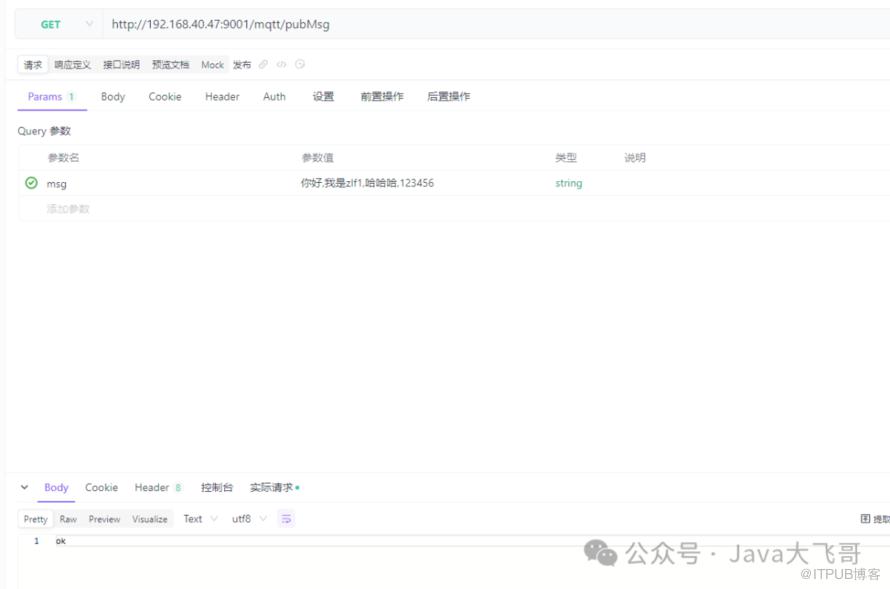
package xxxx.controller;import com.dytz.barrier.gate.web.util.MqttUtil;import lombok.extern.slf4j.Slf4j;import org.springframework.web.bind.annotation.GetMapping;import org.springframework.web.bind.annotation.RequestMapping;import org.springframework.web.bind.annotation.RequestParam;import org.springframework.web.bind.annotation.RestController;public class MqttController {public String pubMsg( String msg) {String broker = "tcp://192.168.40.47:1883";String username = "zlf1";String password = "xxxx1明文";String clientId = "zlf1_publish";String topic = "mqtt/test";MqttUtil.publish2(broker, username, password, clientId, topic, msg, 2);return "ok";}}
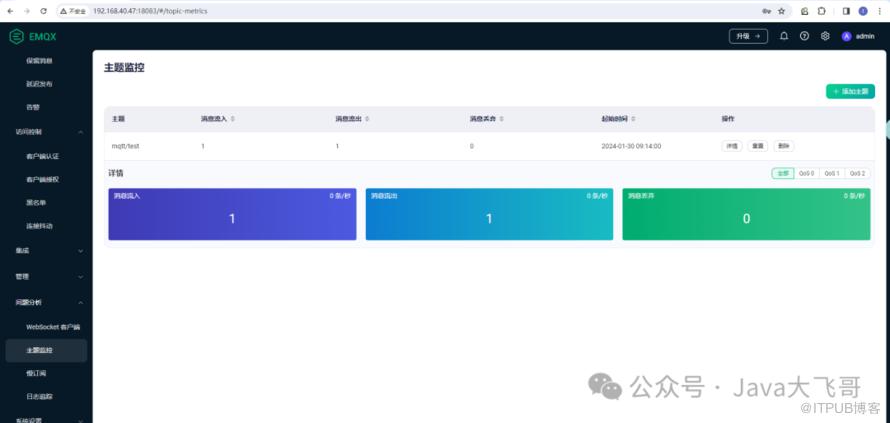
3.3测试验证
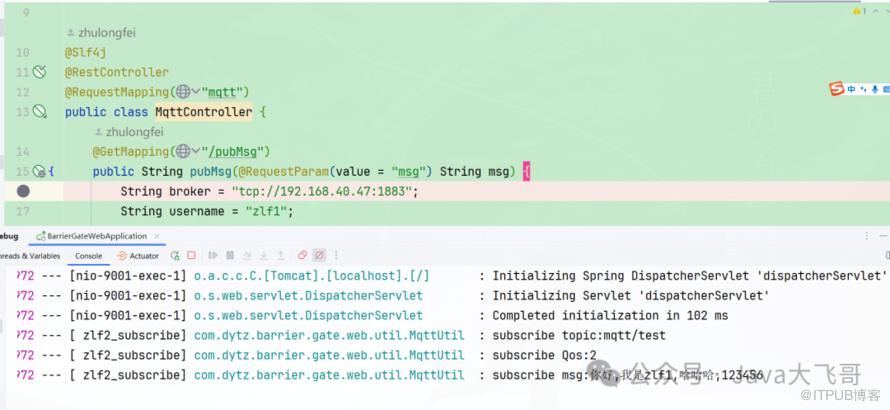
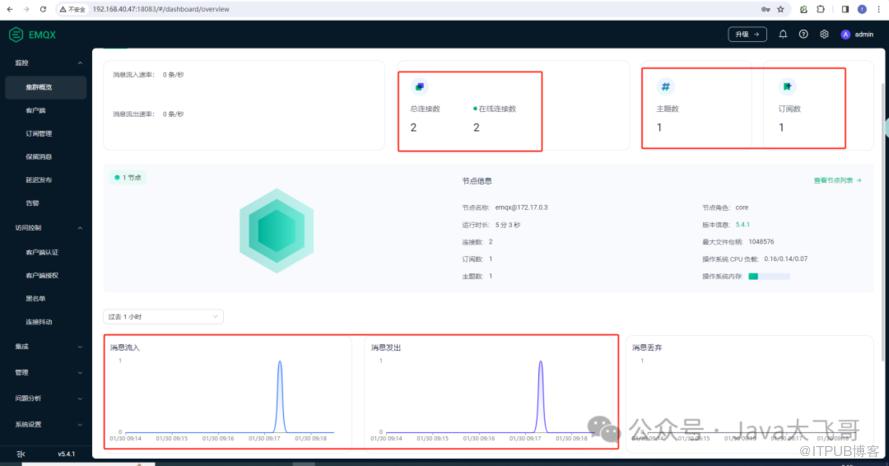
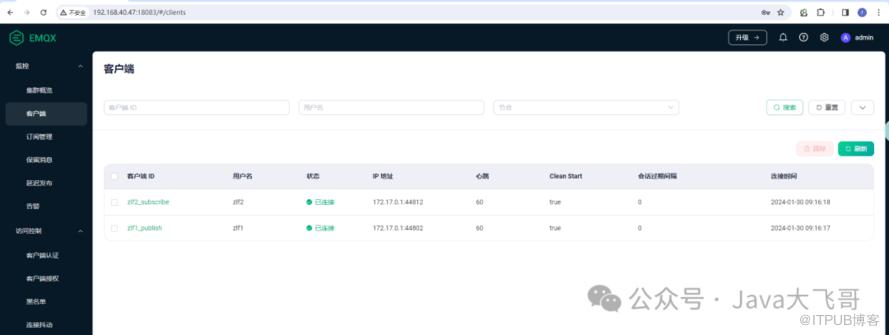
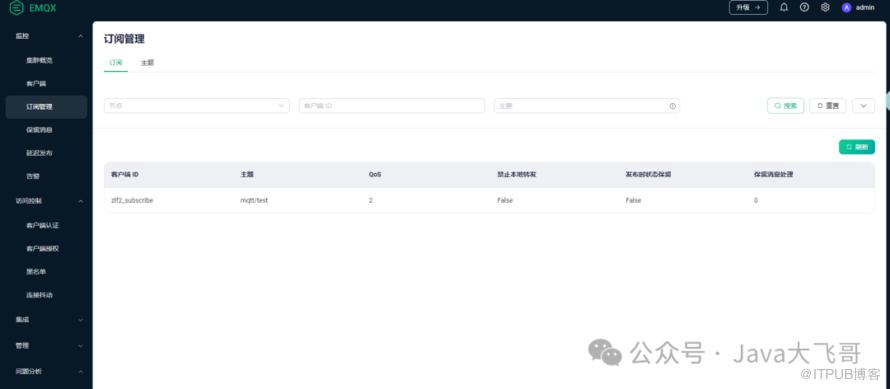
4.手写Mqtt-Start启动器
4.1使用说明
项目中引入依赖如下:
<dependency><groupId>org.zlfgroupId><artifactId>mqtt-spring-boot-startartifactId><version>1.0-SNAPSHOTversion>dependency>
2. nacos配置如下:
mqtt:mps:# 多个brokers用,分割即可:如:xxx1,xxx2,,,下面两个配置的是同一个topic,所以往这个topic上发送消息,这个两个client会收到消息,订阅会打收到两条一样的消息日志,生产一般设置不同的topicbrokers: tcp://192.168.40.47:1883userName: zlf1password: xxx1clientId: zlf1_publishtopic: mqtt/testqos: 2type: publishbrokers: tcp://192.168.40.47:1883userName: zlf2password: xxx2clientId: zlf2_subscribetopic: mqtt/testqos: 2type: subscribe
3. 启动类上加入如下注解:
3.1 @Import(value = {MqttApplicationAware.class, MqttApiService.class, MqttSpringUtils.class}) //导入相关的类3.2 @EnableMqtt //开启Mqtt
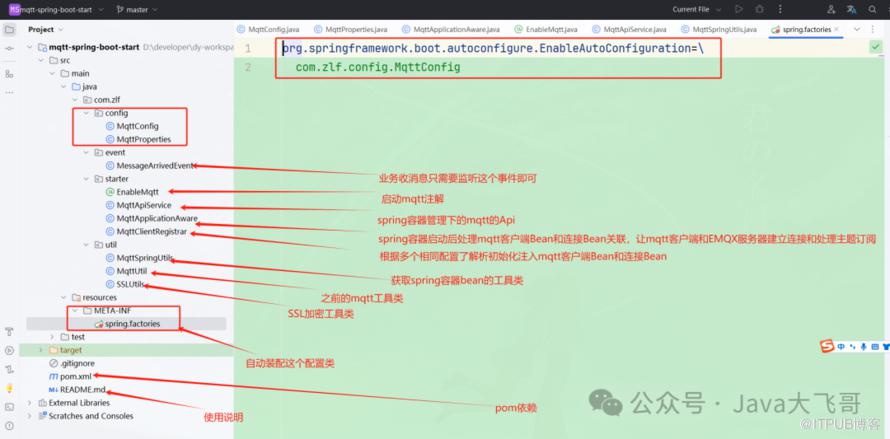
4.2项目工程结构
4.3代码
package com.zlf.starter;import org.springframework.context.annotation.Import;import java.lang.annotation.Documented;import java.lang.annotation.ElementType;import java.lang.annotation.Inherited;import java.lang.annotation.Retention;import java.lang.annotation.RetentionPolicy;import java.lang.annotation.Target;/*** 使用需要在启动类上加入@EnableMqtt注解* 和 @Import(value = {MqttApplicationAware.class, MqttApiService.class,MqttSpringUtils.class})* @author zlf*/@Target(ElementType.TYPE)@Retention(RetentionPolicy.RUNTIME)@Documented@Inherited@Import(MqttClientRegistrar.class)public @interface EnableMqtt {}
package com.zlf.starter;import com.zlf.config.MqttConfig;import com.zlf.config.MqttProperties;import lombok.SneakyThrows;import lombok.extern.slf4j.Slf4j;import org.apache.commons.collections4.CollectionUtils;import org.apache.commons.lang3.StringUtils;import org.eclipse.paho.client.mqttv3.MqttClient;import org.eclipse.paho.client.mqttv3.MqttConnectOptions;import org.eclipse.paho.client.mqttv3.persist.MemoryPersistence;import org.springframework.beans.MutablePropertyValues;import org.springframework.beans.factory.config.ConstructorArgumentValues;import org.springframework.beans.factory.support.BeanDefinitionRegistry;import org.springframework.beans.factory.support.RootBeanDefinition;import org.springframework.boot.autoconfigure.condition.ConditionalOnClass;import org.springframework.boot.context.properties.ConfigurationProperties;import org.springframework.boot.context.properties.EnableConfigurationProperties;import org.springframework.boot.context.properties.bind.Binder;import org.springframework.context.EnvironmentAware;import org.springframework.context.annotation.Configuration;import org.springframework.context.annotation.ImportBeanDefinitionRegistrar;import org.springframework.core.annotation.AnnotationUtils;import org.springframework.core.env.Environment;import org.springframework.core.type.AnnotationMetadata;import java.util.List;import java.util.Objects;/*** @author zlf*/@Slf4j@Configuration@ConditionalOnClass(MqttClient.class)@EnableConfigurationProperties(MqttConfig.class)public class MqttClientRegistrar implements ImportBeanDefinitionRegistrar, EnvironmentAware {private MqttConfig mqttConfig;public static final String MQTT_OPS_PREFIX = "mqtt-ops-";@SneakyThrows@Overridepublic void registerBeanDefinitions(AnnotationMetadata annotationMetadata, BeanDefinitionRegistry beanDefinitionRegistry) {List<MqttProperties> mps = mqttConfig.getMps();if (CollectionUtils.isEmpty(mps)) {throw new RuntimeException("mqtt配置不为空,请检查配置!");}for (MqttProperties m : mps) {ConstructorArgumentValues cas = new ConstructorArgumentValues();if (CollectionUtils.isEmpty(m.getBrokers())) {throw new RuntimeException("MqttClient Broker must not be empty");}if (StringUtils.isBlank(m.getUserName())) {throw new RuntimeException("MqttClient userName must not be empty");}if (StringUtils.isBlank(m.getPassword())) {throw new RuntimeException("MqttClient Password must not be empty");}if (StringUtils.isBlank(m.getClientId())) {throw new RuntimeException("MqttClient ClientId must not be empty");}cas.addIndexedArgumentValue(0, m.getBrokers().get(0));cas.addIndexedArgumentValue(1, m.getClientId());cas.addIndexedArgumentValue(2, new MemoryPersistence());MutablePropertyValues values = new MutablePropertyValues();// 注册beanRootBeanDefinition clientBeanDefinition = new RootBeanDefinition(MqttClient.class, cas, values);beanDefinitionRegistry.registerBeanDefinition(m.getClientId(), clientBeanDefinition);MutablePropertyValues values2 = new MutablePropertyValues();values2.addPropertyValue("userName", m.getUserName());values2.addPropertyValue("password", m.getPassword().toCharArray());values2.addPropertyValue("automaticReconnect", true);RootBeanDefinition optionsBeanDefinition = new RootBeanDefinition(MqttConnectOptions.class, null, values2);beanDefinitionRegistry.registerBeanDefinition(MQTT_OPS_PREFIX + m.getClientId(), optionsBeanDefinition);//一下三个参数有默认值不用设置(按需设置)//options.setCleanSession();//options.setKeepAliveInterval();//options.setConnectionTimeout();// 设置 socket factory/*TLS/SSL 连接 (按需设置)String caFilePath = "/cacert.pem";String clientCrtFilePath = "/client.pem";String clientKeyFilePath = "/client.key";SSLSocketFactory socketFactory = getSocketFactory(caFilePath, clientCrtFilePath, clientKeyFilePath, "");options.setSocketFactory(socketFactory);*/}}@Overridepublic void setEnvironment(Environment environment) {// 通过Binder将environment中的值转成对象mqttConfig = Binder.get(environment).bind(getPropertiesPrefix(MqttConfig.class), MqttConfig.class).get();}private String getPropertiesPrefix(Class tClass) {return Objects.requireNonNull(AnnotationUtils.getAnnotation(tClass, ConfigurationProperties.class)).prefix();}}
package com.zlf.starter;import com.alibaba.fastjson.JSON;import com.zlf.config.MqttConfig;import com.zlf.config.MqttProperties;import com.zlf.event.MessageArrivedEvent;import lombok.extern.slf4j.Slf4j;import org.apache.commons.collections4.CollectionUtils;import org.eclipse.paho.client.mqttv3.IMqttDeliveryToken;import org.eclipse.paho.client.mqttv3.MqttCallback;import org.eclipse.paho.client.mqttv3.MqttClient;import org.eclipse.paho.client.mqttv3.MqttConnectOptions;import org.eclipse.paho.client.mqttv3.MqttException;import org.eclipse.paho.client.mqttv3.MqttMessage;import org.springframework.beans.BeansException;import org.springframework.context.ApplicationContext;import org.springframework.context.ApplicationContextAware;import org.springframework.stereotype.Component;import java.util.List;/*** @author zlf* 下面注释的代码是可以和MqttConfig、MqttProperties、MqttUtil工具类配置使用,其它代码删除即可,* 由于做成一个start启动器可以直接使用,不用MqttUtil工具,* MqttUtil可以单独使用不依赖以nacos相关的依赖,该start也可以不依赖nacos相关依赖,* 不依赖于nacos的配置动态感知刷新可以移除@RefreshScope相关的主机即可。* 配置信息从项目的配置文件中读取即可*/@Component@Slf4jpublic class MqttApplicationAware implements ApplicationContextAware {@Overridepublic void setApplicationContext(ApplicationContext applicationContext) throws BeansException {log.info("==========Mqtt启动初始化开始===========");MqttConfig mqttConfig = applicationContext.getBean(MqttConfig.class);Listmps = mqttConfig.getMps(); if (CollectionUtils.isNotEmpty(mps)) {for (MqttProperties mp : mps) {log.info("==========Mqtt启动初始化配置:{}==========", JSON.toJSONString(mp));//MqttClient mqttClient = MqttUtil.createMqttClient2(mp.getBrokers(), mp.getUserName(), mp.getPassword(), mp.getClientId());MqttClient mqttClient = (MqttClient) applicationContext.getBean(mp.getClientId());MqttConnectOptions mqttConnectOption = (MqttConnectOptions) applicationContext.getBean(MqttClientRegistrar.MQTT_OPS_PREFIX + mp.getClientId());try {mqttClient.connect(mqttConnectOption);} catch (MqttException e) {log.error("Mqtt启动连接异常ex:{}", e.getMessage());}if ("subscribe".equals(mp.getType())) {//MqttUtil.subscribe(mqttClient, mp.getTopic(), mp.getQos());try {mqttClient.subscribe(mp.getTopic(), mp.getQos());} catch (MqttException e) {log.error("Mqtt启动订阅异常ex:{}", e.getMessage());}log.info("==========Mqtt启动初始化订阅配置完成==========");}mqttClient.setCallback(new MqttCallback() {public void connectionLost(Throwable cause) {log.error("connectionLost:{}", cause.getMessage());}public void messageArrived(String topic, MqttMessage message) {String msg = new String(message.getPayload());int qos1 = message.getQos();log.info("subscribe topic:{}", topic);log.info("subscribe Qos:{}", qos1);log.info("subscribe msg:{}", msg);//新增业务拓展接口对接或者是发springEvent,业务监听该消息处理业务即可,这里采用事件监听的方式applicationContext.publishEvent(new MessageArrivedEvent(this, topic, message));}public void deliveryComplete(IMqttDeliveryToken token) {log.info("delivery complete:{}", token.isComplete());}});}}log.info("==========Mqtt启动初始化结束===========");}}
package com.zlf.starter;import com.zlf.config.MqttConfig;import com.zlf.config.MqttProperties;import com.zlf.util.MqttSpringUtils;import lombok.extern.slf4j.Slf4j;import org.apache.commons.collections4.CollectionUtils;import org.apache.commons.lang3.StringUtils;import org.eclipse.paho.client.mqttv3.IMqttMessageListener;import org.eclipse.paho.client.mqttv3.MqttCallback;import org.eclipse.paho.client.mqttv3.MqttClient;import org.eclipse.paho.client.mqttv3.MqttMessage;import org.springframework.beans.factory.annotation.Autowired;import org.springframework.stereotype.Service;import java.util.List;import java.util.Objects;/*** @author zlf*/4jpublic class MqttApiService {private MqttConfig mqttConfig;private MqttSpringUtils mqttSpringUtils;public MqttProperties getMqttProperties(String clientId) {Listmps = mqttConfig.getMps(); if (CollectionUtils.isNotEmpty(mps)) {for (MqttProperties mp : mps) {if (mp.getClientId().equals(clientId)) {return mp;}}}return null;}public MqttClient getMqttClient(String clientId) {MqttClient mqttClient = (MqttClient) mqttSpringUtils.getBean(clientId);return mqttClient;}public MqttMessage createMessage(String topic, Integer qos, String content) {// 创建消息并设置 QoSMqttMessage message = new MqttMessage(content.getBytes());if (Objects.isNull(qos)) {//默认是1qos = 1;message.setQos(qos);} else {message.setQos(qos);}return message;}public void publish0(MqttClient client, String topic, MqttMessage message) {if (Objects.isNull(client)) {throw new RuntimeException("MqttApiService publish client must not be null");}if (StringUtils.isBlank(topic)) {throw new RuntimeException("MqttApiService publish topic must");}if (Objects.isNull(message)) {throw new RuntimeException("MqttApiServicemessage must not be null");}if (message.getPayload().length == 0) {throw new RuntimeException("MqttApiServicepublic message is empty");}try {client.publish(topic, message);//这里不用关闭这个客户端和连接// 关闭连接//client.disconnect();// 关闭客户端//client.close();} catch (Exception e) {log.error("MqttApiService publish error:{}", e.getMessage());}}public void subscribe0(MqttClient client, String topic, Integer qos, MqttCallback mqttCallback) {if (Objects.isNull(client)) {throw new RuntimeException("MqttApiService publish client is null");}if (StringUtils.isBlank(topic)) {throw new RuntimeException("MqttApiService publish topic is empty");}if (Objects.isNull(qos)) {qos = 1;}try {// 设置回调client.setCallback(mqttCallback);client.subscribe(topic, qos);} catch (Exception e) {log.error("MqttApiService subscribe0 error:{}", e.getMessage());}}/*** 发布** @param clientId* @param content*/public void publish(String clientId, String content) {if (StringUtils.isBlank(clientId)) {throw new RuntimeException("MqttApiService publish clientId is empty");}if (StringUtils.isBlank(content)) {throw new RuntimeException("MqttApiService publish content is empty");}MqttClient mqttClient = this.getMqttClient(clientId);MqttProperties mqttProperties = this.getMqttProperties(clientId);MqttMessage message = this.createMessage(mqttProperties.getTopic(), mqttProperties.getQos(), content);this.publish0(mqttClient, mqttProperties.getTopic(), message);}public void subscribe(String clientId, MqttCallback mqttCallback) {if (StringUtils.isBlank(clientId)) {throw new RuntimeException("MqttApiService subscribe clientId is empty");}MqttClient mqttClient = this.getMqttClient(clientId);MqttProperties mqttProperties = this.getMqttProperties(clientId);this.subscribe0(mqttClient, mqttProperties.getTopic(), mqttProperties.getQos(), mqttCallback);}public void subscribe2(String clientId, IMqttMessageListener messageListener) {if (StringUtils.isBlank(clientId)) {throw new RuntimeException("MqttApiService subscribe2 clientId is empty");}MqttClient mqttClient = this.getMqttClient(clientId);MqttProperties mqttProperties = this.getMqttProperties(clientId);try {mqttClient.subscribe(mqttProperties.getTopic(), mqttProperties.getQos(), messageListener);} catch (Exception e) {log.error("MqttApiService ubscribe2 error:{}", e.getMessage());}}public void unsubscribe(String clientId) {if (StringUtils.isBlank(clientId)) {throw new RuntimeException("MqttApiService unsubscribe clientId is empty");}MqttClient mqttClient = this.getMqttClient(clientId);MqttProperties mqttProperties = this.getMqttProperties(clientId);try {mqttClient.unsubscribe(mqttProperties.getTopic());} catch (Exception e) {log.error("MqttApiService unsubscribe error:{}", e.getMessage());}}}
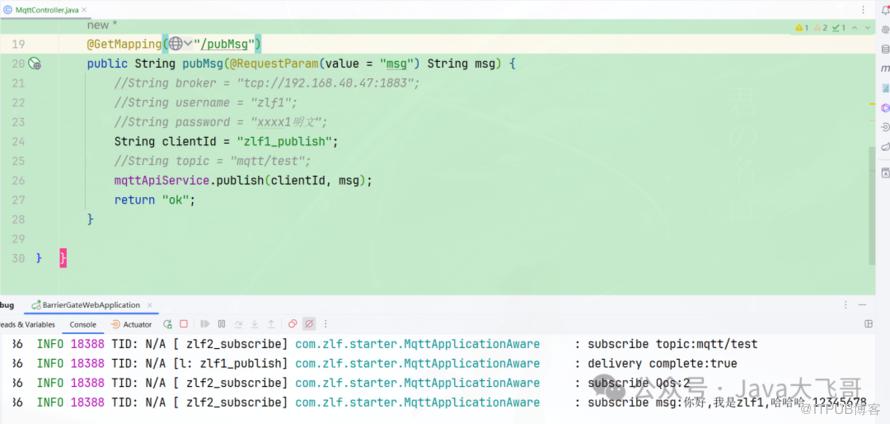
package xxx.controller;import com.zlf.starter.MqttApiService;import lombok.extern.slf4j.Slf4j;import org.springframework.beans.factory.annotation.Autowired;import org.springframework.web.bind.annotation.GetMapping;import org.springframework.web.bind.annotation.RequestMapping;import org.springframework.web.bind.annotation.RequestParam;import org.springframework.web.bind.annotation.RestController;public class MqttController {private MqttApiService mqttApiService;public String pubMsg( String msg) {//String broker = "tcp://192.168.40.47:1883";//String username = "zlf1";//String password = "xxxx1明文";String clientId = "zlf1_publish";//String topic = "mqtt/test";mqttApiService.publish(clientId, msg);return "ok";}}
4.4测试验证