前言
之前曾经分享过一款性能插件——pg_stat_kcache,pg_stat_kcache给我们提供了一个可以分析具体某某SQL到底耗费了多少系统资源的手段,比如IO、CPU等,在此表过不提,后面发现这款插件也有一个比较明显的缺点,pg_stat_kcache * 视图是一组不断累计的视图,比如通过监控告警我发现过去一小时存在CPU尖刺,若我想统计出过去一小时存在哪些高消耗SQL的话,通过pg_stat_kcache插件是不能达到我们的目的的,因为该插件里面不包含任何时间戳的过滤信息。
简易AWR
大多数生产情况,都是通过pg_stat_statements来统计汇总慢SQL,然后再辅以监控如 zabbix 定时采集该视图,再加上一套可视化系统如grafana,不过这就是一套组合拳了,不仅要实现可视化还要自己去实现monitor metrics,显然是有点繁琐的。

少侠莫慌,pg_stat_statements alternative:pg_stat_monitor插件可以帮助我们实现此需求!这款插件是由 Percona 维护的一个独立开源项目,https://github.com/percona/pg_stat_monitor#setup
But sometimes just having the basics is not enough as the queries, and their generated metrics, are presented as one big “clump” of data. It neither provides aggregated statistics nor histogram information. This makes it difficult to identify problem queries during peak loading times versus periods of normal loading versus report generation during off-peak times. In order to trend server performance, one is therefore either forced to manually generate the needed data and calculate the aggregate, which can become quite the chore, or use a 3rd party monitoring solution presenting the results on a dashboard and which brings its own overhead requirements (and headaches?).
pg_stat_statsments 扩展会将所有的统计信息一股脑的全部塞到一张视图里,同时也不能提供聚合信息、直方图,不方便追本溯源。
安装就不再赘述了。pg_stat_monitor提供了两个视图:
                 List of relations
 Schema |           Name           | Type |  Owner
--------+--------------------------+------+----------
 public | pg_stat_monitor          | view | postgres
 public | pg_stat_monitor_settings | view | postgres
(2 rows)
关于pg_stat_monitor的功能介绍:
Time Bucketing: Instead of supplying one set of ever-increasing counts, pg_stat_monitor computes stats for a configured number of time intervals. This allows for much better data accuracy, especially in the case of high resolution or unreliable network.
Multi-Dimensional grouping: While pg_stat_statements groups counters by (userid, dbid, queryid), pg_stat_monitor uses (userid, clientip, dbid, queryid). This allows you to drill down into the performance of queries coming from particular client addresses, which we at Percona have found to be very valuable in a number of cases.
pg_stat_monitor 还增加了clientip的分组,这样就可以定向针对某一来源的SQL进行性能分析
Capture Actual Parameters in the Queries: pg_stat_monitor allows you to choose if you want to see queries with placeholders for parameters or actual query examples. We found having the full query example is very helpful, as you can run EXPLAIN on it or easily play with modifying the query to make it run better, as well as making communication about the query clearer when discussing with other DBAs and application developers.
这个功能要点赞?,通过配置该参数,就可以看到具体的参数了,而不是类似于扩展协议绑定变量这种,看到的都是$1 $2这种云云,在我们后续定位问题中,往往都会随便传入一两个值,这样的话就很有可能因为参数传入不对导致数据倾斜未走索引
Store Information about tables accessed by statement: This allows us to identify all queries which accessed a given table easily. Such an approach is more reliable than parsing queries to extract such information.
pg_stat_monitor有专门一列relation用于统计SQL涉及到的表,这样就可以基于该字段只统计感兴趣的高频表了,不过是个数组,得用包含符
Response time distribution histogram: While min/max/avg query execution statistics are great, especially when computed over a short time bucket, they are hard to understand when trying to look at them for a long period of time. For this reason, we have added a query response time histogram which can offer better insights
统计直方图,分析SQL在一段时间内的调用频率
如下是提供的配置参数
postgres=# select name,description from pg_stat_monitor_settings ;
                   name                   |                                               description
------------------------------------------+----------------------------------------------------------------------------------------------------------
 pg_stat_monitor.pgsm_max                 | Sets the maximum size of shared memory in (MB) used for statement's metadata tracked by pg_stat_monitor.
 pg_stat_monitor.pgsm_query_max_len       | Sets the maximum length of query.
 pg_stat_monitor.pgsm_enable              | Enable/Disable statistics collector.
 pg_stat_monitor.pgsm_track_utility       | Selects whether utility commands are tracked.
 pg_stat_monitor.pgsm_normalized_query    | Selects whether save query in normalized format.
 pg_stat_monitor.pgsm_max_buckets         | Sets the maximum number of buckets.
 pg_stat_monitor.pgsm_bucket_time         | Sets the time in seconds per bucket.
 pg_stat_monitor.pgsm_histogram_min       | Sets the time in millisecond.
 pg_stat_monitor.pgsm_histogram_max       | Sets the time in millisecond.
 pg_stat_monitor.pgsm_histogram_buckets   | Sets the maximum number of histogram buckets
 pg_stat_monitor.pgsm_query_shared_buffer | Sets the maximum size of shared memory in (MB) used for query tracked by pg_stat_monitor.
 pg_stat_monitor.pgsm_overflow_target     | Sets the overflow target for pg_stat_monitor
 pg_stat_monitor.pgsm_enable_query_plan   | Enable/Disable query plan monitoring
 pg_stat_monitor.pgsm_track_planning      | Selects whether planning statistics are tracked.
(14 rows)
pgsm_max 和 pgsm_query_shared_buffer 指定占据的共享内存大小,在v13长新增了一个pg_shmem_allocations的视图,可以看到有哪些PostgreSQL自己使用的共享内存段以及插件使用到的
postgres=# select * from pg_shmem_allocations where name like '%monitor%';
               name                |    off    | size  | allocated_size
-----------------------------------+-----------+-------+----------------
 pg_stat_monitor: bucket hashtable | 168129280 |  2904 |           2944
 pg_stat_monitor                   | 147147008 | 10752 |          10752
 pg_stat_monitor: query hashtable  | 273258368 |  2904 |           2944
(3 rows)
enable_query_plan和track_planning 则是跟踪执行计划的,这样的话,追溯历史执行计划的阵营除了pg_show_plans、auto_explain、pg_store_plans外,再添加一员大将pg_stat_monitor。max_buckets 指定保留多少个快照,bucket_time 指定多久采集获取一次快照,默认300s采集一次,保留10个快照,也就是说最多能追溯到过去50分钟内的状态信息。
刚刚也提到了这个功能:Capture Actual Parameters in the Queries,看下实际效果,如下可以看到是 $1 $2这种占位符
postgres=# select distinct query from pg_stat_monitor limit 100;
                                                     query
---------------------------------------------------------------------------------------------------------------
 begin
 create database tpcb
 create table pgbench_accounts(aid    int not null,bid int,abalance int,filler char(84)) with (fillfactor=100)
 create table pgbench_branches(bid int not null,bbalance int,filler char(88)) with (fillfactor=100)
 create table pgbench_history(tid int,bid int,aid    int,delta int,mtime timestamp,filler char(22))
 create table pgbench_tellers(tid int not null,bid int,tbalance int,filler char(84)) with (fillfactor=100)
 drop table if exists pgbench_accounts, pgbench_branches, pgbench_history, pgbench_tellers
 insert into pgbench_branches(bid,bbalance) values($1,$2)
 insert into pgbench_tellers(tid,bid,tbalance) values ($1,$2,$3)
 select distinct query from pg_stat_monitor limit $1
 select pg_stat_monitor_reset();
 truncate table pgbench_accounts, pgbench_branches, pgbench_history, pgbench_tellers
(12 rows)
调整一下pg_stat_monitor.pgsm_normalized_query参数,再看看效果,这次就是具体的值了
postgres=# select distinct query from pg_stat_monitor limit 100;
                                                     query
---------------------------------------------------------------------------------------------------------------
 begin
 create database tpcb
 create table pgbench_accounts(aid    int not null,bid int,abalance int,filler char(84)) with (fillfactor=100)
 create table pgbench_branches(bid int not null,bbalance int,filler char(88)) with (fillfactor=100)
 create table pgbench_history(tid int,bid int,aid    int,delta int,mtime timestamp,filler char(22))
 create table pgbench_tellers(tid int not null,bid int,tbalance int,filler char(84)) with (fillfactor=100)
 drop table if exists pgbench_accounts, pgbench_branches, pgbench_history, pgbench_tellers
 insert into pgbench_branches(bid,bbalance) values(1,0)
 insert into pgbench_tellers(tid,bid,tbalance) values (1,1,0)
 select distinct query from pg_stat_monitor limit 100;
 truncate table pgbench_accounts, pgbench_branches, pgbench_history, pgbench_tellers
(11 rows)
另外如上所述,也可以看到具体的执行计划:
query      | select distinct query,query_plan from pg_stat_monitor where query like '%select%' limit 100 ;
query_plan| Limit                                                                                        +
           |   ->  Unique                                                                                 +
           |         ->  Sort                                                                             +
           |               Sort Key: pg_stat_monitor.query, pg_stat_monitor.query_plan                    +
           |               ->  Subquery Scan on pg_stat_monitor                                           +
           |                     ->  Sort                                                                 +
           |                           Sort Key: p.bucket_start_time                                      +
           |                           ->  Nested Loop                                                    +
           |                                 Join Filter: (p.dbid = d.oid)                                +
           |                                 ->  Function Scan on pg_stat_monitor_internal p              +
           |                                       Filter: (query ~~ '%select%'::text)                    +
           |                                 ->  Seq Scan on pg_database d                                +
           |                                 SubPlan 1                                                    +
           |                                   ->  Function Scan on pg_stat_monitor_internal s            +
           |                                         Filter: (queryid = p.top_queryid)
实操
统计每个快照
postgres=# select distinct on(bucket_start_time)bucket,bucket_start_time,query,calls from pg_stat_monitor order by bucket_start_time;
-[ RECORD 1 ]-----+----------------------------------------------------------------------------------------------
bucket            | 9
bucket_start_time | 2021-06-15 14:15:00
query             | insert into pgbench_branches(bid,bbalance) values(1,0)
calls             | 100
-[ RECORD 2 ]-----+----------------------------------------------------------------------------------------------
bucket            | 0
bucket_start_time | 2021-06-15 14:20:00
query             | select distinct query,query_plan from pg_stat_monitor where query like '%select%' limit 100 ;
calls             | 1
-[ RECORD 3 ]-----+----------------------------------------------------------------------------------------------
bucket            | 1
bucket_start_time | 2021-06-15 14:25:00
query             | SELECT relations,query FROM pg_stat_monitor;
calls             | 2
-[ RECORD 4 ]-----+----------------------------------------------------------------------------------------------
bucket            | 2
bucket_start_time | 2021-06-15 14:33:00
query             | select distinct bucket_start_time,query,calls,bucket from pg_stat_monitor order by bucket;
calls             | 1
查找高频SQL
postgres=# select userid,datname,substr(query,0, 50) AS query, calls FROM pg_stat_monitor order by calls desc;
  userid  | datname  |                       query                        | calls
----------+----------+----------------------------------------------------+-------
 postgres | tpcb     | insert into pgbench_tellers(tid,bid,tbalance) val  |  1000
 postgres | tpcb     | insert into pgbench_branches(bid,bbalance) values  |   100
 postgres | postgres | select bucket, bucket_start_time, query,calls fro  |     4
 postgres | postgres | SELECT name FROM  (SELECT pg_catalog.lower(name)   |     3
 postgres | postgres | select distinct query,query_plan from pg_stat_mon  |     3
 postgres | postgres | select distinct on(bucket_start_time)bucket,bucke  |     2
 postgres | postgres | SELECT relations,query FROM pg_stat_monitor;      |     2
 postgres | postgres | select distinct query,query_plan from pg_stat_mon  |     2
 postgres | tpcb     | truncate table pgbench_accounts, pgbench_branches  |     1
 postgres | tpcb     | create table pgbench_accounts(aid    int not null  |     1
 postgres | postgres | select distinct query from pg_stat_monitor limit  |     1
 postgres | postgres | SELECT name FROM  (SELECT pg_catalog.lower(name)   |     1
 postgres | postgres | SELECT name FROM  (SELECT pg_catalog.lower(name)   |     1
 postgres | postgres | SELECT name FROM  (SELECT pg_catalog.lower(name)   |     1
 postgres | postgres | show pg_stat_monitor.pgsm_normalized_query ;      |     1
查看application_name和client_ip
postgres=# select application_name,client_ip,query FROM pg_stat_monitor;
 application_name | client_ip |
                                   query

------------------+-----------+------------------------------------------------------------------------------------------------------------------------------------------------------------------------------------------------------
-------------------------------------------------------------------------------------------------------------------------------------------------------------------------------------------------------------------------------------
---------------------------------------------
 pgbench          | 127.0.0.1 | create table pgbench_branches(bid int not null,bbalance int,filler char(88)) with (fillfactor=100)
 pgbench          | 127.0.0.1 | truncate table pgbench_accounts, pgbench_branches, pgbench_history, pgbench_tellers
 pgbench          | 127.0.0.1 | create table pgbench_history(tid int,bid int,aid    int,delta int,mtime timestamp,filler char(22))
 pgbench          | 127.0.0.1 | create table pgbench_accounts(aid    int not null,bid int,abalance int,filler char(84)) with (fillfactor=100)
 pgbench          | 127.0.0.1 | insert into pgbench_tellers(tid,bid,tbalance) values (1,1,0)
 pgbench          | 127.0.0.1 | copy pgbench_accounts from stdin
 psql            | 127.0.0.1 | select distinct query from pg_stat_monitor limit 100;
 pgbench          | 127.0.0.1 | begin
 pgbench          | 127.0.0.1 | drop table if exists pgbench_accounts, pgbench_branches, pgbench_history, pgbench_tellers
 pgbench          | 127.0.0.1 | insert into pgbench_branches(bid,bbalance) values(1,0)
 pgbench          | 127.0.0.1 | create table pgbench_tellers(tid int not null,bid int,tbalance int,filler char(84)) with (fillfactor=100)
 psql            | 127.0.0.1 | select distinct query from pg_stat_monitor limit 100;
 psql            | 127.0.0.1 | create database tpcb
 psql            | 127.0.0.1 | select distinct query,query_plan from pg_stat_monitor limit 100;
 psql            | 127.0.0.1 | select distinct query,query_plan from pg_stat_monitor where query like '%select%' limit 100 ;
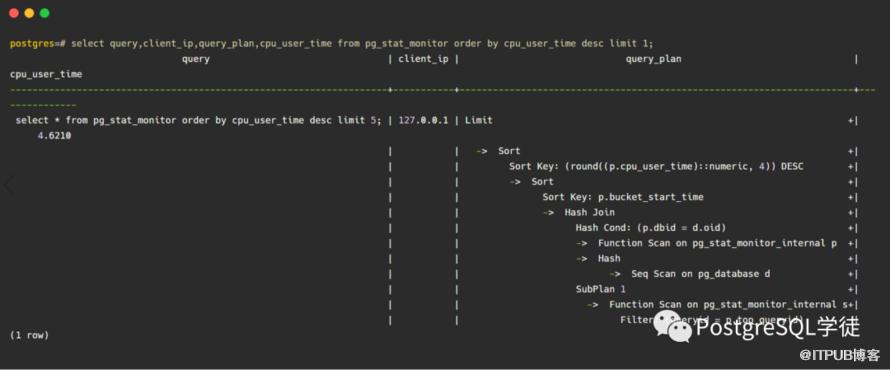
查看最消耗CPU
简易审计
另外还有个有趣的case,可以获取errorcode,获取那些报错的SQL
postgres=# insert into mytest values(1);
2021-06-15 14:57:08.734 CST [6949] ERROR:  duplicate key value violates unique constraint "mytest_pkey"
2021-06-15 14:57:08.734 CST [6949] DETAIL:  Key (id)=(1) already exists.
2021-06-15 14:57:08.734 CST [6949] STATEMENT:  insert into mytest values(1);
ERROR:  duplicate key value violates unique constraint "mytest_pkey"
DETAIL:  Key (id)=(1) already exists.

postgres=# SELECT substr(query,0,50) AS query, decode_error_level(elevel) AS elevel,sqlcode, calls, substr(message,0,50) message from pg_stat_monitor where message is not null;
             query             | elevel | sqlcode | calls |                      message
-------------------------------+--------+---------+-------+---------------------------------------------------
 insert into mytest values(1); | ERROR  | 23505   |     1 | duplicate key value violates unique constraint "m
(1 row)

postgres=# create table mytest(id int primary key);
2021-06-15 14:57:29.363 CST [6949] ERROR:  relation "mytest" already exists
2021-06-15 14:57:29.363 CST [6949] STATEMENT:  create table mytest(id int primary key);
ERROR:  relation "mytest" already exists

postgres=# select 1/0;
2021-06-15 14:59:40.909 CST [6949] ERROR:  division by zero
2021-06-15 14:59:40.909 CST [6949] STATEMENT:  select 1/0;
ERROR:  division by zero
postgres=# SELECT substr(query,0,50) AS query, decode_error_level(elevel) AS elevel,sqlcode, calls, substr(message,0,50) message from pg_stat_monitor where message is not null;
                  query                    | elevel | sqlcode | calls |                      message
------------------------------------------+--------+---------+-------+---------------------------------------------------
 create table mytest(id int primary key); | ERROR  | 42P07   |     1 | relation "mytest" already exists
 select * from test5;                     | ERROR  | 42P01   |     1 | relation "test5" does not exist
 select 1/0;                              | ERROR  | 22012   |     1 | division by zero
 insert into mytest values(1);            | ERROR  | 23505   |     1 | duplicate key value violates unique constraint "m
(4 rows)
获取SQL的统计直方图
涉及到的函数是histogram,可以看一下该函数做了什么,传入一个Bucket和queryid,unnest转化为一列
postgres=# \sf histogram
CREATE OR REPLACE FUNCTION public.histogram(_bucket integer, _quryid text)
 RETURNS SETOF record
 LANGUAGE plpgsql
AS $function$
DECLARE
 rec record;
BEGIN
for rec in
        with stat as (select queryid, bucket, unnest(range()) as range, unnest(resp_calls)::int freq from pg_stat_monitor) select range, freq, repeat('■', (freq::float / max(freq) over() * 30)::int) as bar from stat where queryid = _quryid and bucket = _bucket
loop
return next rec;
end loop;
END
$function$
SELECT resp_calls, query FROM pg_stat_monitor;
                    resp_calls                    |                 query
--------------------------------------------------+----------------------------------------------
{1," 0"," 0"," 0"," 0"," 0"," 0"," 0"," 0"," 0"} | select client_ip, query from pg_stat_monitor
{3," 0"," 0"," 0"," 0"," 0"," 0"," 0"," 0"," 1"} | select * from pg_stat_monitor_reset()
{3," 0"," 0"," 0"," 0"," 0"," 0"," 0"," 0"," 1"} | SELECT * FROM foo

postgres=# SELECT * FROM histogram(0, 'F44CD1B4B33A47AF') AS a(range TEXT, freq INT, bar TEXT);
       range        | freq |              bar
--------------------+------+--------------------------------
  (0 - 3)}          |    2 | ■■■■■■■■■■■■■■■■■■■■■■■■■■■■■■
  (3 - 10)}         |    0 |
  (10 - 31)}        |    1 | ■■■■■■■■■■■■■■■
  (31 - 100)}       |    0 |
  (100 - 316)}      |    0 |
  (316 - 1000)}     |    0 |
  (1000 - 3162)}    |    0 |
  (3162 - 10000)}   |    0 |
  (10000 - 31622)}  |    0 |
  (31622 - 100000)} |    0 |
(10 rows)
SQL Commenter / tags
CREATE EXTENSION hstore;
CREATE FUNCTION text_to_hstore(s text) RETURNS hstore AS $$
BEGIN
    RETURN hstore(s::text[]);
EXCEPTION WHEN OTHERS THEN
    RETURN NULL;
END; $$ LANGUAGE plpgsql STRICT;

postgres=# SELECT 1 AS num /* { "application", java_app, "real_ip", 192.168.1.1} */;
 num
-----
   1
(1 row)

postgres=# SELECT 1 AS num1,2 AS num2 /* { "application", java_app, "real_ip", 192.168.1.2} */;
 num1 | num2
------+------
    1 |    2
(1 row)

postgres=# SELECT 1 AS num1,2 AS num2, 3 AS num3 /* { "application", java_app, "real_ip", 192.168.1.3} */;
 num1 | num2 | num3
------+------+------
    1 |    2 |    3
(1 row)

postgres=# SELECT 1 AS num1,2 AS num2, 3 AS num3, 4 AS num4 /* { "application", psql_app, "real_ip", 192.168.1.3} */;
 num1 | num2 | num3 | num4
------+------+------+------
    1 |    2 |    3 |    4
(1 row)

postgres=# select query, text_to_hstore(comments) as comments_tags from pg_stat_monitor;
                                                     query                                                     |                    comments_tags
---------------------------------------------------------------------------------------------------------------+-----------------------------------------------------
 SELECT $1 AS num /* { "application", psql_app, "real_ip", 192.168.1.3) */                                     | "real_ip"=>"192.168.1.1", "application"=>"java_app"
 SELECT pg_stat_monitor_reset();                                                                               |
 select query, comments, text_to_hstore(comments) from pg_stat_monitor;                                        |
 SELECT $1 AS num1,$2 AS num2, $3 AS num3 /* { "application", java_app, "real_ip", 192.168.1.3} */             | "real_ip"=>"192.168.1.3", "application"=>"java_app"
 select query, text_to_hstore(comments) as comments_tags from pg_stat_monitor;                                 |
 SELECT $1 AS num1,$2 AS num2 /* { "application", java_app, "real_ip", 192.168.1.2} */                         | "real_ip"=>"192.168.1.2", "application"=>"java_app"
 SELECT $1 AS num1,$2 AS num2, $3 AS num3, $4 AS num4 /* { "application", psql_app, "real_ip", 192.168.1.3} */ | "real_ip"=>"192.168.1.3", "application"=>"psql_app"
(7 rows)

postgres=# select query, text_to_hstore(comments)->'application' as application_name from pg_stat_monitor;
                                                     query                                                     | application_name
---------------------------------------------------------------------------------------------------------------+----------
 SELECT $1 AS num /* { "application", psql_app, "real_ip", 192.168.1.3) */                                     | java_app
 SELECT pg_stat_monitor_reset();                                                                               |
 select query, text_to_hstore(comments)->"real_ip" as comments_tags from pg_stat_monitor;                      |
 select query, text_to_hstore(comments)->$1 from pg_stat_monitor                                               |
 select query, text_to_hstore(comments) as comments_tags from pg_stat_monitor;                                 |
 select query, text_to_hstore(comments)->"application" as comments_tags from pg_stat_monitor;                  |
 SELECT $1 AS num1,$2 AS num2 /* { "application", java_app, "real_ip", 192.168.1.2} */                         | java_app
 SELECT $1 AS num1,$2 AS num2, $3 AS num3 /* { "application", java_app, "real_ip", 192.168.1.3} */             | java_app
 select query, comments, text_to_hstore(comments) from pg_stat_monitor;                                        |
 SELECT $1 AS num1,$2 AS num2, $3 AS num3, $4 AS num4 /* { "application", psql_app, "real_ip", 192.168.1.3} */ | psql_app
(10 rows)

postgres=# select query, text_to_hstore(comments)->'real_ip' as real_ip from pg_stat_monitor;
                                                     query                                                     |  real_ip
---------------------------------------------------------------------------------------------------------------+-------------
 SELECT $1 AS num /* { "application", psql_app, "real_ip", 192.168.1.3) */                                     | 192.168.1.1
 SELECT pg_stat_monitor_reset();                                                                               |
 select query, text_to_hstore(comments)->"real_ip" as comments_tags from pg_stat_monitor;                      |
 select query, text_to_hstore(comments)->$1 from pg_stat_monitor                                               |
 select query, text_to_hstore(comments) as comments_tags from pg_stat_monitor;                                 |
 select query, text_to_hstore(comments)->"application" as comments_tags from pg_stat_monitor;                  |
 SELECT $1 AS num1,$2 AS num2 /* { "application", java_app, "real_ip", 192.168.1.2} */                         | 192.168.1.2
 SELECT $1 AS num1,$2 AS num2, $3 AS num3 /* { "application", java_app, "real_ip", 192.168.1.3} */             | 192.168.1.3
 select query, comments, text_to_hstore(comments) from pg_stat_monitor;                                        |
 SELECT $1 AS num1,$2 AS num2, $3 AS num3, $4 AS num4 /* { "application", psql_app, "real_ip", 192.168.1.3} */ | 192.168.1.3
(10 rows)
TODO
目前pg_stat_monitor仍在不断完善中,如下三项是规划中的TODO
Capturing All the Queries: Capture all queries (not only successful queries) so the queries which terminated with errors are not missed (or require another data source to capture). Once we have this, we can measure performance for successful and failed queries separately, so that an elevated failure rate can be seen as a different signal than different query performance.
失败的查询也进行采集,统计一个趋势
Errors and Warnings Histogram: Not all queries succeed and when they fail you really want to know why. We would like to see not only the number of times a given query failed but what the cause of failure was. The same query may fail due to a permission error or foreign key violation which requires an entirely different action to remediate. It is also very helpful to know which query triggers particular warnings.
错误和警告的直方图,统计是什么导致的频频告警
Accurate Wait Event Attribution to Queries: For a given query type it would be great to see where its response time comes from. Wait Events is one way to capture this and currently, query attribution can be done through a high-frequency sampling of the pg_stat_activity table. However, it is not accurate and not scalable with a large number of active backends.
对于等待事件的采集,分析可能的性能瓶颈
小结
pg_stat_monitor提供了类似AWR的定期采集的功能,同时还可以观察执行计划、消耗多少CPU、SQL的直方图、简易审计等等,同时还可以看到具体的参数值,不再是$1 $2这种占位符了。相较pg_stat_kcache和pg_stat_statements的功能要多很多。
comparison matrix:?
参考
https://www.percona.com/blog/2020/10/14/announcing-pg_stat_monitor-tech-preview-get-better-insights-into-query-performance-in-postgresql/
https://www.percona.com/blog/2021/01/19/pg_stat_monitor-a-new-way-of-looking-at-postgresql-metrics/
https://github.com/percona/pg_stat_monitor/blob/master/docs/USER_GUIDE.md