1.什么是sentinel?
随着微服务的流行,服务和服务之间的稳定性变得越来越重要。Sentinel 是面向分布式、多语言异构化服务架构的流量治理组件,主要以流量为切入点,从流量路由、流量控制、流量整形、熔断降级、系统自适应过载保护、热点流量防护等多个维度来帮助开发者保障微服务的稳定性。
Sentinel 基本概念
资源
资源是 Sentinel 的关键概念。它可以是 Java 应用程序中的任何内容,例如,由应用程序提供的服务,或由应用程序调用的其它应用提供的服务,甚至可以是一段代码。在接下来的文档中,我们都会用资源来描述代码块。 只要通过 Sentinel API 定义的代码,就是资源,能够被 Sentinel 保护起来。大部分情况下,可以使用方法签名,URL,甚至服务名称作为资源名来标示资源。
规则
围绕资源的实时状态设定的规则,可以包括流量控制规则、熔断降级规则以及系统保护规则。所有规则可以动态实时调整。
Sentinel 的使用可以分为两个部分:
核心库(Java 客户端):不依赖任何框架/库,能够运行于 Java 8 及以上的版本的运行时环境,同时对 Dubbo / Spring Cloud 等框架也有较好的支持(见 主流框架适配)。
控制台(Dashboard):Dashboard 主要负责管理推送规则、监控、管理机器信息等。
2.sentinel-dashboard搭建
下载地址
https://github.com/alibaba/Sentinel/releases/download/1.8.6/sentinel-dashboard-1.8.6.jar
运行dashboard
java -Dserver.port=8080 -Dcsp.sentinel.dashboard.server=localhost:8080 -Dproject.name=sentinel-dashboard -jar sentinel-dashboard-1.8.6.jar
访问http://127.0.0.1:8080,默认用户名和密码都是 sentinel。
3.代码工程
实验目标
利用Sentinel实现接口流量控制
pom.xml
<project xmlns="http://maven.apache.org/POM/4.0.0"xmlns:xsi="http://www.w3.org/2001/XMLSchema-instance"xsi:schemaLocation="http://maven.apache.org/POM/4.0.0 http://maven.apache.org/xsd/maven-4.0.0.xsd"><parent><artifactId>springboot-demoartifactId><groupId>com.etgroupId><version>1.0-SNAPSHOTversion>parent><modelVersion>4.0.0modelVersion><artifactId>sentinelartifactId><properties><maven.compiler.source>8maven.compiler.source><maven.compiler.target>8maven.compiler.target>properties><dependencies><dependency><groupId>org.springframework.bootgroupId><artifactId>spring-boot-starter-webartifactId>dependency><dependency><groupId>org.springframework.bootgroupId><artifactId>spring-boot-autoconfigureartifactId>dependency><dependency><groupId>org.springframework.bootgroupId><artifactId>spring-boot-starter-testartifactId><scope>testscope>dependency><dependency><groupId>com.alibaba.cspgroupId><artifactId>sentinel-transport-simple-httpartifactId><version>1.8.6version>dependency><dependency><groupId>com.alibaba.cspgroupId><artifactId>sentinel-annotation-aspectjartifactId><version>1.8.6version>dependency>dependencies><build><plugins><plugin><groupId>org.springframework.bootgroupId><artifactId>spring-boot-maven-pluginartifactId>plugin>plugins>build>project>
controller
package com.et.sentinel.controller;import com.alibaba.csp.sentinel.slots.block.BlockException;import com.et.sentinel.service.TestService;import org.springframework.beans.factory.annotation.Autowired;import org.springframework.web.bind.annotation.RequestMapping;import org.springframework.web.bind.annotation.RestController;import java.util.HashMap;import java.util.Map;@RestControllerpublic class HelloWorldController {@AutowiredTestService testService;@RequestMapping("/hello")public Map<String, Object> showHelloWorld() {Map<String, Object> map = new HashMap<>();try {map.put("msg", testService.sayHello("harries"));}catch (Exception e){System.out.println("sayHello blocked!");}return map;}}
service
使用资源(HelloWorld)
package com.et.sentinel.service;import com.alibaba.csp.sentinel.annotation.SentinelResource;import org.springframework.stereotype.Service;@Servicepublic class TestService {@SentinelResource(value = "HelloWorld",blockHandler = "sayHello block")public String sayHello(String name) {return "Hello, " + name;}}
config
配置注解
package com.et.sentinel.config;import org.springframework.context.annotation.Bean;import org.springframework.context.annotation.Configuration;import com.alibaba.csp.sentinel.annotation.aspectj.SentinelResourceAspect;@Configurationpublic class SentinelAspectConfig {@Beanpublic SentinelResourceAspect sentinelResourceAspect(){return new SentinelResourceAspect();}}
DemoApplication.java
定义一个“HelloWorld”资源
package com.et.sentinel;import com.alibaba.csp.sentinel.Entry;import com.alibaba.csp.sentinel.SphU;import com.alibaba.csp.sentinel.slots.block.BlockException;import com.alibaba.csp.sentinel.slots.block.RuleConstant;import com.alibaba.csp.sentinel.slots.block.flow.FlowRule;import com.alibaba.csp.sentinel.slots.block.flow.FlowRuleManager;import org.springframework.boot.SpringApplication;import org.springframework.boot.autoconfigure.SpringBootApplication;import org.springframework.context.annotation.Bean;import java.util.ArrayList;import java.util.List;@SpringBootApplicationpublic class DemoApplication {public static void main(String[] args) {SpringApplication.run(DemoApplication.class, args);// 配置规则.initFlowRules();/*while (true) {// 1.5.0 版本开始可以直接利用 try-with-resources 特性try (Entry entry = SphU.entry("HelloWorld")) {// 被保护的逻辑Thread.sleep(300);System.out.println("hello world");} catch (BlockException | InterruptedException ex) {// 处理被流控的逻辑System.out.println("blocked!");}}*/}private static void initFlowRules(){List<FlowRule> rules = new ArrayList<>();FlowRule rule = new FlowRule();rule.setResource("HelloWorld");rule.setGrade(RuleConstant.FLOW_GRADE_QPS);// Set limit QPS to 20.rule.setCount(2);rules.add(rule);FlowRuleManager.loadRules(rules);}}
以上只是一些关键代码,所有代码请参见下面代码仓库
代码仓库
https://github.com/Harries/springboot-demo
4.测试
打包Spring Boot应用
mvn install运行程序(配置在application.yaml文件里面配追不生效,这块可能有一些bug,只能在启动的时候加上这个参数)
java -Dcsp.sentinel.dashboard.server=127.0.0.1:8080 -jar sentinel-1.0-SNAPSHOT.jar多访问几次http://127.0.0.1:8088/hello,登陆sentinel-dashboad看结果
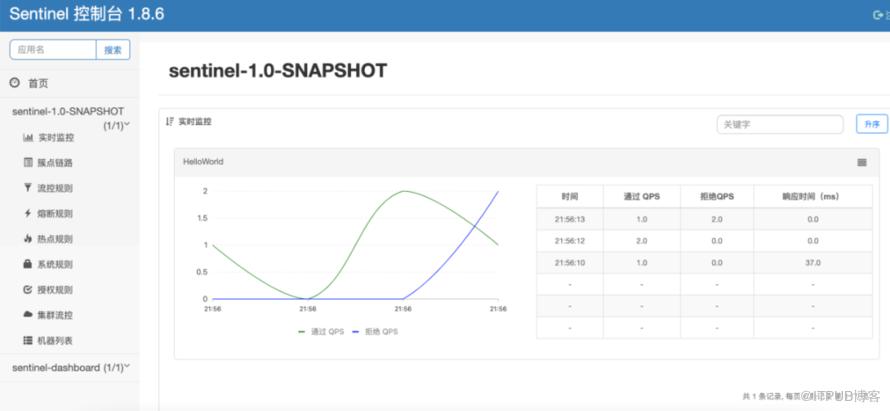
可以看到通过多少流量,拒绝多少流量
5.引用
https://sentinelguard.io/zh-cn/docs/quick-start.html
http://www.liuhaihua.cn/archives/711106.html