效果展示
代码详解
2.1 导入库
2.2 播放音乐
2.3 画手
2.4 定义画心的函数
2.5 定义写名字的函数并实现动态画心

在介绍代码之前,先来看下本文的实现效果。
可以参考Pinstaller(Python打包为exe文件)一文把Python文件转化成exe,发给未安装Python的Ta。

1 导入库
首先导入本文需要加载的库,如果你有些库还没有安装,导致运行代码时报错,可以在Anaconda Prompt中用pip方法安装。
# -*- coding: UTF-8 -*-'''代码用途 :画比心手作者 :阿黎逸阳博客 : https://blog.csdn.net/qq_32532663/article/details/106176609'''import osimport pygameimport turtle as tfrom time import sleep
本文应用到的库较少,只应用了os、pygame、turtle和time四个库。
os库可以设置文件读取的位置。
pygame库是为了绘制过程更有趣,在绘图过程中添加了背景音乐。
turtle库是绘图库,相当于给你一支画笔,你可以在画布上用数学逻辑控制的代码完成绘图。
time库可以设置程序休眠的时间,达到动态画心的效果。
2 播放音乐
接着应用pygame库播放背景音乐,本文的音乐是《赵海洋 - 《瞬间的永恒》夜色钢琴曲》。
#播放音乐print('播放音乐')pygame.mixer.init()pygame.mixer.music.load(r"F:\公众号\520\赵海洋 - 《瞬间的永恒》夜色钢琴曲.mp3")pygame.mixer.music.set_volume(0.5)pygame.mixer.music.play(1, 10)
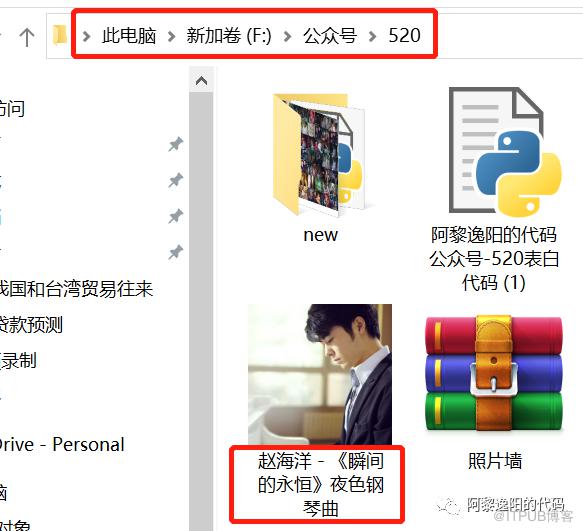
如果选择播放音乐,需要在代码music.load函数中把你想放音乐的电脑本地存放地址填进去。
有部分朋友对这一块有疑问,填充格式可参考如下图片:
3 画手
然后设置画板的大小,并画手。
#画图print('画图')t.title('阿黎逸阳的代码公众号')t.speed(1)#t.screensize(1000, 800)t.setup(startx=0, starty = 0, width=800, height = 600)#第一根手指头print('画第一跟手指头')t.penup()t.goto(0, 60)t.pendown()t.color('black')t.pensize(2)t.setheading(30)t.circle(-200, 30)t.circle(-8, 120)t.setheading(205)t.circle(-300, 12)t.left(10)t.forward(45)#画第二条线print('画第二条线')t.penup()t.goto(18, 13)t.pendown()t.setheading(20)t.forward(50)#画第三条线print('画第三条线')t.penup()t.goto(18, -15)t.pendown()t.setheading(20)t.forward(50)#画第四条线print('画第四条线')t.penup()t.goto(22, -36)t.pendown()t.setheading(10)t.circle(90, 26)#画第二根手指的弧线print('画第二根手指的弧线')t.penup()t.goto(55, 55)t.pendown()t.setheading(-20)t.circle(-25, 85)#画第三根手指的弧线print('画第三根手指的弧线')t.penup()t.goto(62, 30)t.pendown()t.setheading(-10)t.circle(-20, 120)#画第四根手指弧线print('画第四根手指的弧线')t.penup()t.goto(64, 2)t.pendown()t.setheading(-10)t.circle(-20, 120)t.right(5)t.forward(20)t.right(10)t.circle(-10, 80)t.setheading(78)t.circle(-50, 30)t.penup()t.goto(57, -25)t.pendown()t.setheading(-50)t.forward(10)#手的下弧度print('画手的下弧线')t.penup()t.goto(22, -36)t.pendown()t.setheading(270)t.circle(-30, 80)t.forward(10)t.setheading(240)t.forward(40)#手的上弧度print('画第手的上弧线')t.penup()t.goto(0, 60)t.pendown()t.setheading(190)t.circle(150, 20)t.setheading(225)t.forward(10)t.setheading(265)t.forward(80)t.setheading(230)t.forward(60)#画大拇指print('画大拇指')t.penup()t.goto(8, 63)t.pendown()t.setheading(95)t.circle(-80, 30)t.circle(-10, 180)t.left(20)t.forward(20)#画指甲print('画指甲')t.penup()t.goto(84, 85)t.pendown()t.color('black', 'red')t.begin_fill()t.setheading(18)t.circle(-50, 20)t.setheading(270)t.circle(-10, 170)t.end_fill()
关键代码详解:
t.pensize(width):设置画笔的尺寸。
t.color(color):设置画笔的颜色。
t.penup():抬起画笔,一般用于另起一个地方绘图使用。
t.goto(x,y):画笔去到某个位置,参数为(x,y),对应去到的横坐标和纵坐标。
t.pendown():放下画笔,一般和penup组合使用。
t.left(degree):画笔向左转多少度,括号里表示度数。
t.right(degree):画笔向右转多少度,括号里表示度数。
t.circle(radius,extent,steps):radius指半径,若为正,半径在小乌龟左侧radius远的地方,若为负,半径在小乌龟右侧radius远的地方;extent指弧度;steps指阶数。
画手的关键是:通过调节circle函数中的半径和弧度来调节曲线的弧度,从而使得手的轮廓比较流畅。
4 定义画心的函数
接着定义画心的函数。
def heart_bit():#画爱心print('画爱心')t.penup()t.goto(70, 135)t.pendown()t.color('black', 'red')t.begin_fill()t.setheading(90)t.circle(10, 180)t.left(30)t.forward(30)t.setheading(30)t.forward(30)t.left(38)t.circle(12, 188)t.end_fill()
5 定义写名字的函数并实现动态画心
最后定义写名字的函数并实现动态画心。
def write_name(x, y, size, ss):t.hideturtle()t.penup()t.goto(x, y)t.pendown()t.pencolor('black')t.write(ss, font=('Times New Roman', size, 'normal'))while 1:t.speed(10)print('写名字')write_name(5, 125, 12, '杨紫')write_name(5, 125, 12, '杨紫')heart_bit()sleep(1)t.undo()t.undo()t.undo()t.undo()t.undo()t.undo()t.undo()t.undo()t.undo()t.undo()t.undo()t.undo()t.undo()t.undo()t.undo()t.undo()t.undo()t.undo()t.undo()t.undo()t.undo()t.undo()t.undo()
注:如需全量直接可运行的代码和背景音乐,可在公众号中回复”比心“即可免费获取。
至此,在Python中实现比心的绘制逻辑已大致讲解完毕,替换名字送给你喜欢的Ta吧。


扫一扫关注我
13162366985
投稿微信号、手机号