1.什么是protobuf?
Protobuf(Protocol Buffers)是由 Google 开发的一种轻量级、高效的数据交换格式,它被用于结构化数据的序列化、反序列化和传输。相比于 XML 和 JSON 等文本格式,Protobuf 具有更小的数据体积、更快的解析速度和更强的可扩展性。Protobuf 的核心思想是使用协议(Protocol)来定义数据的结构和编码方式。使用 Protobuf,可以先定义数据的结构和各字段的类型、字段等信息,然后使用 Protobuf 提供的编译器生成对应的代码,用于序列化和反序列化数据。由于 Protobuf 是基于二进制编码的,因此可以在数据传输和存储中实现更高效的数据交换,同时也可以跨语言使用。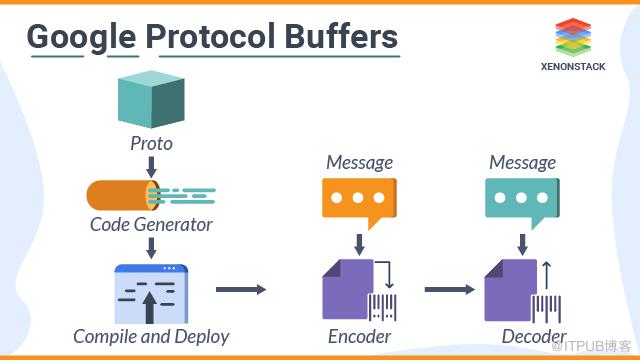
Protobuf 有以下几个优势:
更小的数据量:Protobuf 的二进制编码通常只有 XML 和 JSON 的 1/3 到 1/10 左右,因此在网络传输和存储数据时可以节省带宽和存储空间。
更快的序列化和反序列化速度:由于 Protobuf 使用二进制格式,所以序列化和反序列化速度比 XML 和 JSON 快得多。
跨语言:Protobuf 支持多种编程语言,可以使用不同的编程语言来编写客户端和服务端。这种跨语言的特性使得 Protobuf 受到很多开发者的欢迎(JSON 也是如此)。
易于维护可扩展:Protobuf 使用 .proto 文件定义数据模型和数据格式,这种文件比 XML 和 JSON 更容易阅读和维护,且可以在不破坏原有协议的基础上,轻松添加或删除字段,实现版本升级和兼容性。
2.代码工程
实验目标
rest api实现基于Protobuf 协议通信
pom.xml
xml version="1.0" encoding="UTF-8"?>xmlns:xsi="http://www.w3.org/2001/XMLSchema-instance"xsi:schemaLocation="http://maven.apache.org/POM/4.0.0 http://maven.apache.org/xsd/maven-4.0.0.xsd">org.springframework.boot spring-boot-starter-parent 3.2.1 4.0.0 protobuf 17 17 org.springframework.boot spring-boot-starter-web org.springframework.boot spring-boot-starter-test test org.springframework.boot spring-boot-autoconfigure com.google.protobuf protobuf-java 3.19.2 org.springframework.boot spring-boot-test test kr.motd.maven os-maven-plugin 1.6.1 org.xolstice.maven.plugins protobuf-maven-plugin 0.6.1 ${basedir}/src/main/resources com.google.protobuf:protoc:3.19.1:exe:${os.detected.classifier} io.grpc:protoc-gen-grpc-java:1.43.1:exe:${os.detected.classifier} src/main/java false grpc-java compile compile-custom org.springframework.boot spring-boot-maven-plugin
controller
package com.et.protobuf.controller;import com.et.protobuf.PhoneNumJson;import com.et.protobuf.ProtobufMessage;import com.et.protobuf.StudentJson;import org.springframework.web.bind.annotation.PathVariable;import org.springframework.web.bind.annotation.RequestMapping;import org.springframework.web.bind.annotation.RestController;import java.util.ArrayList;import java.util.HashMap;import java.util.List;import java.util.Map;@RestControllerpublic class HelloWorldController {@RequestMapping("/json/{id}")public StudentJson showHelloWorld(@PathVariable Integer id){StudentJson studentJson = new StudentJson();studentJson.setId(id);studentJson.setFirstName("maxsm");studentJson.setLastName("sdfsdfsdfsdfsdfsdsdfsdfsdfsdfsdfsdfsdfsdf");studentJson.setEmail("1224sdfsfsdf344552@163.com");PhoneNumJson phoneNumJson = new PhoneNumJson();phoneNumJson.setNumber("12345sdfsdfsd6566666");phoneNumJson.setType(1);Listlist = new ArrayList<>(); list.add(phoneNumJson);studentJson.setPhoneNumList(list);return studentJson;}@RequestMapping("/protobuf/{id}")ProtobufMessage.Student protobuf(@PathVariable Integer id) {return ProtobufMessage.Student.newBuilder().setId(id).setFirstName("maxsm").setLastName("sdfsdfsdfsdfsdfsdsdfsdfsdfsdfsdfsdfsdfsdf").setEmail("1224sdfsfsdf344552@163.com").addPhone(ProtobufMessage.Student.PhoneNumber.newBuilder().setNumber("12345sdfsdfsd6566666").setType(ProtobufMessage.Student.PhoneType.MOBILE).build()).build();}}
entity
package com.et.protobuf;import java.util.List;/*** @author liuhaihua* @version 1.0* @ClassName StudentJson* @Description todo* @date 2024/08/05/ 16:32*/public class StudentJson {private int id;private String firstName;private String lastName;private String email;private ListphoneNumList; public int getId() {return id;}public void setId(int id) {this.id = id;}public String getFirstName() {return firstName;}public void setFirstName(String firstName) {this.firstName = firstName;}public String getLastName() {return lastName;}public void setLastName(String lastName) {this.lastName = lastName;}public String getEmail() {return email;}public void setEmail(String email) {this.email = email;}public ListgetPhoneNumList() {return phoneNumList;}public void setPhoneNumList(ListphoneNumList) {this.phoneNumList = phoneNumList;}}
package com.et.protobuf;/*** @author liuhaihua* @version 1.0* @ClassName PhoneNum* @Description todo* @date 2024/08/05/ 16:35*/public class PhoneNumJson {private int type;private String number;public int getType() {return type;}public void setType(int type) {this.type = type;}public String getNumber() {return number;}public void setNumber(String number) {this.number = number;}}
mxsm.proto
使用 Protobuf 的语言定义文件(.proto)可以定义要传输的信息的数据结构,可以包括各个字段的名称、类型等信息。同时也可以相互嵌套组合,构造出更加复杂的消息结构。
syntax = "proto3";package mxsm;option java_package = "com.et.protobuf";option java_outer_classname = "ProtobufMessage";message Course {int32 id = 1;string course_name = 2;repeated Student student = 3;}message Student {int32 id = 1;string first_name = 2;string last_name = 3;string email = 4;repeated PhoneNumber phone = 5;message PhoneNumber {string number = 1;PhoneType type = 2;}enum PhoneType {MOBILE = 0;LANDLINE = 1;}}
头部全局定义
syntax = "proto3";指定 Protobuf 版本为版本 3(最新版本)package com.wdbyte.protobuf;指定 Protobuf 包名,防止有相同类名的message定义,这个包名是生成的类中所用到的一些信息的前缀,并非类所在包。option java_multiple_files = true;是否生成多个文件。若false,则只会生成一个类,其他类以内部类形式提供。option java_package =生成的类所在包。option java_outer_classname生成的类名,若无,自动使用文件名进行驼峰转换来为类命名。
消息结构具体定义
message Person 定一个了一个 Person 类。Person 类中的字段被 optional 修饰,被 optional 修饰说明字段可以不赋值。
修饰符
optional表示可选字段,可以不赋值。修饰符
repeated表示数据重复多个,如数组,如 List。修饰符
required表示必要字段,必须给值,否则会报错RuntimeException,但是在 Protobuf 版本 3 中被移除。即使在版本 2 中也应该慎用,因为一旦定义,很难更改。
字段类型定义
修饰符后面紧跟的是字段类型,如 int32 、string。常用的类型如下:
int32、int64、uint32、uint64:整数类型,包括有符号和无符号类型。float、double:浮点数类型。bool:布尔类型,只有两个值,true 和 false。string:字符串类型。bytes:二进制数据类型。enum:枚举类型,枚举值可以是整数或字符串。message:消息类型,可以嵌套其他消息类型,类似于结构体。
字段后面的 =1,=2 是作为序列化后的二进制编码中的字段的对应标签,因为 Protobuf 消息在序列化后是不包含字段信息的,只有对应的字段序号,所以节省了空间。也因此,1-15 比 16 会少一个字节,所以尽量使用 1-15 来指定常用字段。且一旦定义,不要随意更改,否则可能会对不上序列化信息。
config
package com.et.protobuf.config;import org.springframework.context.annotation.Bean;import org.springframework.context.annotation.Configuration;import org.springframework.http.converter.protobuf.ProtobufHttpMessageConverter;import org.springframework.web.client.RestTemplate;import java.util.Arrays;@Configurationpublic class Config {@BeanRestTemplate restTemplate(ProtobufHttpMessageConverter hmc) {return new RestTemplate(Arrays.asList(hmc));}@BeanProtobufHttpMessageConverter protobufHttpMessageConverter() {return new ProtobufHttpMessageConverter();}}
以上只是一些关键代码,所有代码请参见下面代码仓库
代码仓库
https://github.com/Harries/springboot-demo(Protobuf)
3.测试
启动Spring Boot应用
编写测试类
package com.et.protobuf;import org.junit.jupiter.api.Test;import org.springframework.beans.factory.annotation.Autowired;import org.springframework.boot.test.context.SpringBootTest;import org.springframework.http.ResponseEntity;import org.springframework.http.converter.HttpMessageConverter;import org.springframework.http.converter.protobuf.ProtobufHttpMessageConverter;import org.springframework.web.client.RestTemplate;import java.util.ArrayList;import java.util.List;@SpringBootTest(classes = DemoApplication.class)public class ApplicationTest {// Other declarationsprivate static final String COURSE1_URL = "http://localhost:8088/protobuf/1";@Autowiredprivate RestTemplate restTemplate ;@Testpublic void whenUsingRestTemplate_thenSucceed() {ResponseEntity<ProtobufMessage.Student> student = restTemplate.getForEntity(COURSE1_URL, ProtobufMessage.Student.class);System.out.println(student.toString());}}
结果如下
<200 OK OK,id: 1first_name: "maxsm"last_name: "sdfsdfsdfsdfsdfsdsdfsdfsdfsdfsdfsdfsdfsdf"email: "1224sdfsfsdf344552@163.com"phone {number: "12345sdfsdfsd6566666"},[X-Protobuf-Schema:"mxsm.proto", X-Protobuf-Message:"mxsm.Student", Content-Type:"application/x-protobuf;charset=UTF-8", Transfer-Encoding:"chunked", Date:"Mon, 05 Aug 2024 09:10:55 GMT", Keep-Alive:"timeout=60", Connection:"keep-alive"]>
Json和protobuf性能比较
单个线程,循环1分钟
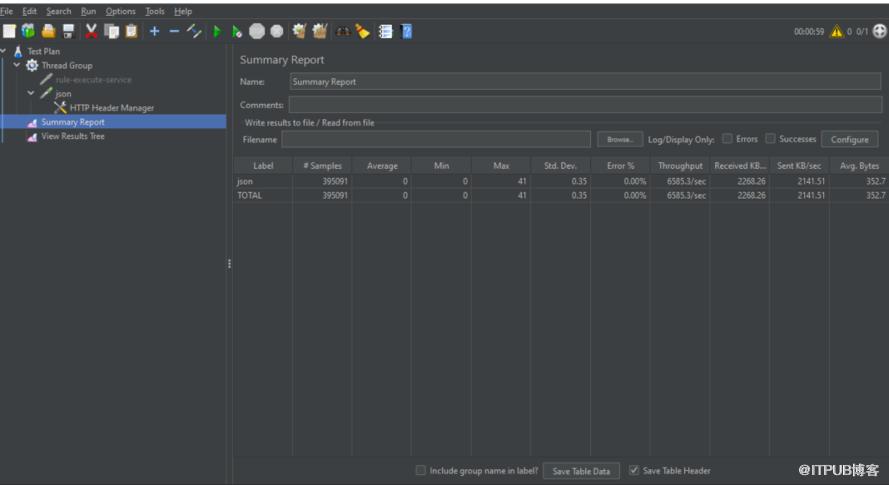
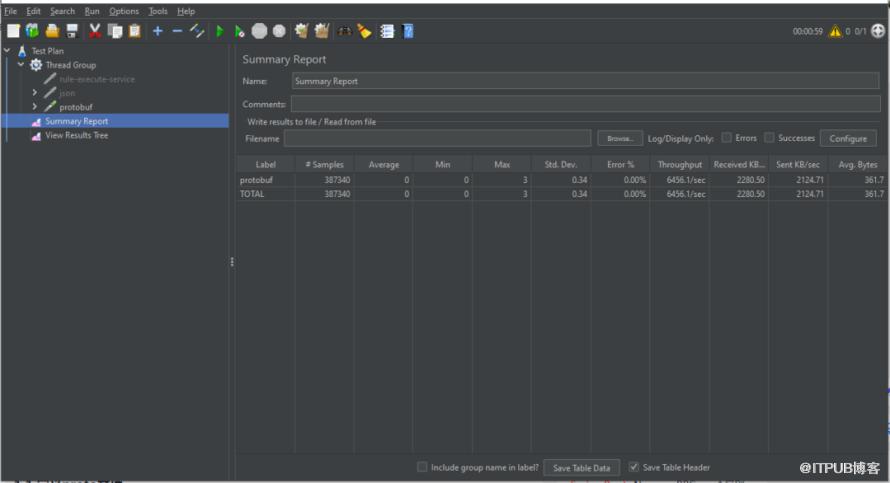
测试结果发现json性能甚至优于protobuf,并不符合预期结果!是我哪一步整错了吗?有大神知道怎么回事吗?
4.引用
https://protobuf.dev/overview/